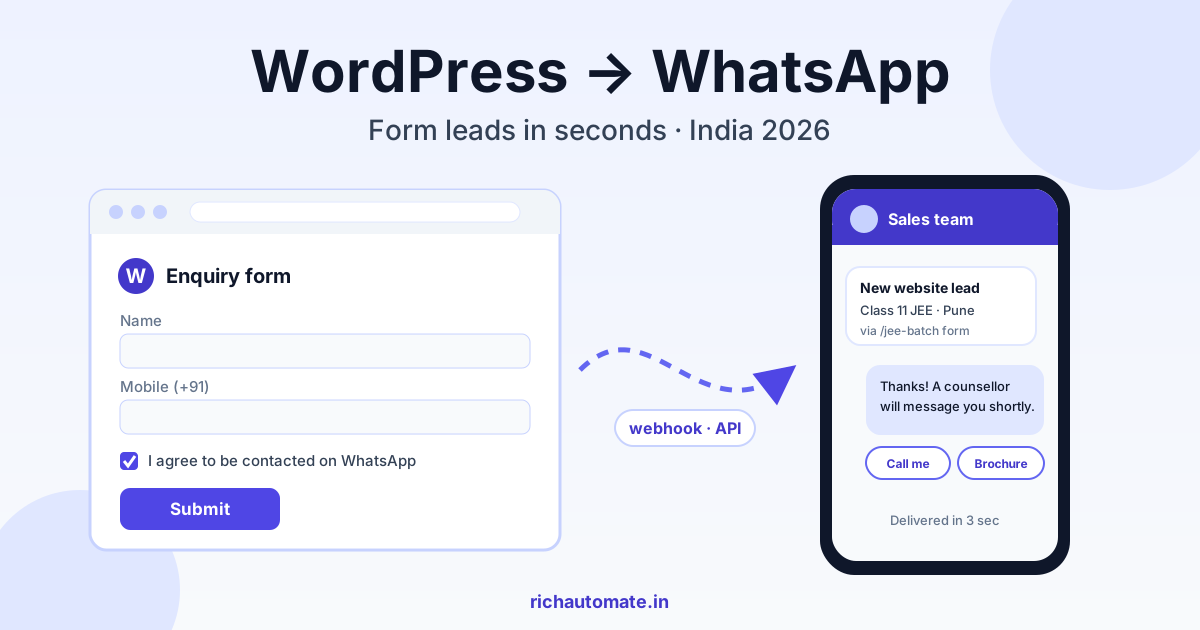
To integrate WordPress with WhatsApp properly, send every contact-form submission through a webhook to the WhatsApp Business API, which then alerts your sales team and sends the enquirer an approved acknowledgement template within seconds. A plain wa.me button only opens a chat; the webhook-plus-API route captures the lead, respects opt-in, and lets you route and follow up without anyone copying numbers out of email.
This guide is for Indian businesses running a WordPress site with enquiry forms: coaching institutes, clinics, interior designers, real-estate brokers and B2B manufacturers. It is not about store checkout. If you sell through a cart, our WooCommerce WhatsApp integration guide covers order confirmations and abandoned carts. Here we focus on Contact Form 7, WPForms, Elementor Forms, Gravity Forms, click-to-chat buttons and enquiry landing pages.
Three ways to connect a WordPress site to WhatsApp
Most Indian SMB sites already have some WhatsApp element, usually a floating button from a free plugin. That is the first of three levels, and each level solves a different problem.
| Approach | What happens | Lead captured? | Best for |
|---|---|---|---|
| wa.me click-to-chat button or plugin | Visitor taps, WhatsApp opens with a pre-filled message to your number | Only if the visitor actually hits send | Very low volume, owner answers personally |
| Form-to-WhatsApp via webhook and API | Form submits, webhook posts data to the API, team gets an alert and enquirer gets a template | Yes, every valid submission | Businesses with 50+ enquiries a month and a sales team |
| Full API plus shared team inbox | Everything above, plus replies land in a multi-agent inbox with assignment, tags and follow-ups | Yes, with full conversation history | Multiple counsellors, branches or salespeople |
The click-to-chat button has one hidden weakness: a large share of visitors tap it, see WhatsApp open, get distracted and never press send. You never learn they existed. A form captures name, phone and requirement first, so even if nobody replies for an hour, the lead is safe in your system. In practice, the strongest setup keeps both: a click-to-chat button for people who want to talk now, and forms wired to the API for everyone else.
If you do not have a website at all, you can still run the API from ads and QR codes; see WhatsApp Business API without a website. But if WordPress is where your enquiries already arrive, wiring it in is the fastest win.
How form-to-WhatsApp works: webhook to API
The flow has four steps. The visitor submits the form. WordPress fires a webhook (an HTTP POST with the form fields as JSON) to your WhatsApp platform endpoint. The platform validates the phone number, checks the consent flag, and sends two messages: an internal alert to the right salesperson and an acknowledgement template to the enquirer. Finally, the conversation opens in the team inbox so whoever replies has the full context.
Every major form plugin can do this, but the route differs:
| Form plugin | Common webhook route | Watch out for |
|---|---|---|
| Contact Form 7 | An add-on that posts submissions to a URL, or a small hook on form submission in a custom plugin | Field names like your-name and your-phone must be mapped exactly |
| WPForms | Webhooks addon on paid tiers, or a hook on entry save | Smart tag mapping and phone field format settings |
| Elementor Forms | Built-in Webhook action under Actions After Submit (Pro) | Set advanced data on so field IDs are sent, not just labels |
| Gravity Forms | Webhooks add-on with field mapping and conditional sending | Conditional logic can silently skip the webhook if misconfigured |
Map at least these fields: name, phone, requirement or course, city, page URL, UTM source, and the consent checkbox value. The page URL and UTM source matter more than people expect: they let you see that the "Class 11 JEE" landing page produces three times the enquiries of the home page form, and they help the salesperson open with the right context.
Keep the webhook call non-blocking where possible. If the API is slow for a moment, you do not want the visitor staring at a spinning submit button. Most webhook add-ons queue the request; if you write your own hook, send it asynchronously and log failures so you can retry.
Routing, alerts and follow-ups that actually close enquiries
An alert that goes to one shared phone is only slightly better than an email. Route instead. A coaching institute can route by course (NEET enquiries to one counsellor, foundation batches to another). A clinic can route by branch or department. A real-estate broker can route by project or budget band. A B2B manufacturer can route by product line or by whether the enquiry mentions quantities that indicate a distributor.
The alert itself should be short and scannable: name, phone, requirement, city, source page, and a one-tap way to open the chat. Add a simple score so the team handles hot enquiries first; our guide to WhatsApp lead qualification and scoring explains how to weight budget, timeline and intent signals.
Speed is the real lever. An enquiry answered in five minutes behaves very differently from one answered the next morning, especially in competitive categories like coaching and property where the visitor filled three forms on three sites. Set an escalation rule: if nobody replies within 15 minutes during working hours, re-alert the team lead. For the enquiries that still slip through, the recovery tactics in how to recover missed WhatsApp messages apply directly.
Follow-ups should be planned, not improvised. A sensible sequence for a form lead is: instant acknowledgement, human reply within 15 minutes, a reminder the next day if the enquirer went quiet, and one final check-in after three to five days. Anything beyond that starts to feel like spam and hurts your number's quality signals.
Consent checkbox wording and template categories
Before you message anyone who filled a form, you need their opt-in to receive WhatsApp messages from you. Meta's current business messaging policy expects it, and India's data protection framework under the DPDP Act generally expects consent to be clear, specific and informed. This is not legal advice; check with your advisor for your sector, particularly healthcare and financial services.
Practical wording that works on most enquiry forms:
- Required checkbox (for the enquiry itself): "I agree to be contacted on WhatsApp at the number above about this enquiry. I can reply STOP at any time."
- Optional, unticked checkbox (for promotions): "Send me offers, new batch dates and updates on WhatsApp."
Keep the two separate. Bundling promotional consent into the enquiry checkbox is exactly the kind of vague consent that invites complaints and blocks. Never pre-tick the promotional box. Store the checkbox value, the timestamp, the page URL and the form ID with the lead, so you can show when and where consent was given.
Template category matters for both approval and cost. The acknowledgement ("Thanks, we received your enquiry about Class 11 JEE. A counsellor will message you shortly.") is typically a utility template because it relates to a specific request the user made. Anything promotional, such as a discount, a new batch launch or a festival offer, is a marketing template. Meta decides the final category during review and can recategorise a template, so do not slip promotional lines into a utility template. Adding quick-reply buttons to the acknowledgement ("Call me", "Send brochure", "Book a visit") raises response rates noticeably; see reply buttons, list messages and flow templates for patterns that pass review.
Get a 1-minute BSP audit on WhatsApp
Drop your WhatsApp number — we line-item your current invoice against Meta India rates in under 60 seconds. India-hosted, DPDP-compliant.
The 24-hour window and cost math for Indian SMBs
Under Meta's current pricing, business-initiated templates are charged per message by category, while replies inside the 24-hour customer service window, which opens when the user messages you, are generally free from Meta. That shapes the economics of form leads. The acknowledgement template is business-initiated and charged. But the moment the enquirer taps a button or replies, a service window opens and your team's replies for the next 24 hours generally carry no Meta template charge.
So a good acknowledgement template does double duty: it reassures the lead and invites a reply that opens the window. Buttons help here because a tap counts as a user message.
RichAutomate has two billing modes. With Client Pay, there is ₹0 setup and ₹0 monthly on pay-as-you-go; you pay a ₹0.10 per message platform fee, and Meta bills its own charges directly to your card at Meta's India rate card. With SaaS Pay, you top up an all-inclusive wallet at ₹1.50 per marketing message and ₹0.50 per utility message, with no separate Meta bill. Full details are on the RichAutomate pricing page.
Illustrative monthly numbers on SaaS Pay, assuming one utility acknowledgement per enquiry, a utility reminder for roughly a third, and a marketing follow-up only to people who ticked the promotional box:
| Business (illustrative) | Enquiries per month | Utility messages | Marketing messages | Approx. SaaS Pay cost |
|---|---|---|---|---|
| Coaching institute, Kota-style batches | 900 | 1,200 | 300 | ₹600 + ₹450 = ₹1,050 |
| Multi-doctor clinic | 400 | 540 | 80 | ₹270 + ₹120 = ₹390 |
| Interior designer | 120 | 160 | 40 | ₹80 + ₹60 = ₹140 |
| Real-estate broker, two projects | 600 | 800 | 200 | ₹400 + ₹300 = ₹700 |
| B2B manufacturer, industrial parts | 150 | 200 | 30 | ₹100 + ₹45 = ₹145 |
Human conversations inside the service window are not counted above because they are generally free from Meta under current pricing. Internal alerts to your own staff numbers are usually handled inside an open window if staff interact with the business number daily; otherwise, they would be sent as utility templates and add to the count. Compare these figures against the cost of one lost admission, one lost patient or one lost flat booking, and the maths is rarely close.
Filtering spam and bot submissions before they hit WhatsApp
WordPress forms attract junk: SEO spam, fake numbers, and bots that submit the same form hundreds of times overnight. If every submission triggers a template, you pay for spam and, worse, you message random numbers that never asked, which raises block rates and can hurt your number's quality rating. Filter before the webhook fires:
- Honeypot field: a hidden field that humans never see; if it is filled, drop the submission. Most form plugins have this built in.
- reCAPTCHA v3 or a similar invisible check: score-based checks stop most scripted submissions without annoying real visitors.
- Phone validation and +91 normalisation: strip spaces, dashes and brackets, remove a leading 0 or +91, confirm exactly 10 digits starting with 6, 7, 8 or 9, then store as 91XXXXXXXXXX. Reject obvious fakes like 9999999999 or 1234567890.
- Duplicate throttle: if the same number submits again within ten minutes, update the lead instead of sending another template.
- Consent gate: if the WhatsApp checkbox is not ticked, create the lead but do not send any template; let the team call or email instead.
Also block submissions containing links in the name field and messages in scripts your business never receives. These simple rules typically remove the bulk of junk before it costs you anything.
Caching, security plugin and hosting gotchas
Most failed WordPress-to-WhatsApp setups are not API problems. They are WordPress environment problems. The usual suspects:
- Page cache and stale nonces: caching plugins or a CDN can serve a cached form with an expired security token, so submissions fail silently for some visitors. Exclude enquiry pages from full-page cache or use a form setting that refreshes the token.
- Security plugins blocking requests: firewalls in popular security plugins, or host-level ModSecurity rules, can block the REST route that receives delivery and reply status, or rate-limit outgoing webhook calls. Whitelist the platform's endpoint and check the plugin's block log first when something breaks.
- REST API disabled: some hardening guides tell you to disable the WordPress REST API entirely. That can break form submissions and any inbound status callback.
- Outbound requests restricted: a WP_HTTP_BLOCK_EXTERNAL setting or a host firewall can stop WordPress from calling external URLs. Test with a request log.
- Shared hosting cron limits: WP-Cron runs only when someone visits the site, and many shared hosts throttle real cron jobs. Never rely on WordPress to send tomorrow's reminder. Let the WhatsApp platform schedule follow-ups, and keep WordPress responsible only for firing the webhook once.
- PHP timeouts: low max execution time on cheap hosting plus a synchronous webhook can time out the form. Queue it or send it asynchronously.
Testing checklist before going live
- Submit each form with a real Indian mobile in every format: with +91, with 0, with spaces, with dashes. All should normalise to the same 91XXXXXXXXXX.
- Submit with the consent box unticked and confirm no template goes out.
- Submit twice within a minute and confirm the duplicate throttle works.
- Fill the honeypot manually (via browser dev tools) and confirm the submission is dropped.
- Test from a logged-out, incognito browser on mobile data, so you see the cached page real visitors see.
- Confirm the alert reaches the correct salesperson for each routing rule, including the fallback when no rule matches.
- Reply to the acknowledgement from the test phone and check the conversation lands in the team inbox with source page and UTM intact.
- Temporarily switch on your security plugin's strictest mode and repeat one submission.
- Check the template is approved in the right category before switching production forms over.
A 30-day rollout plan
Days 1 to 5: foundations. Connect your WhatsApp Business API number, verify the business, and draft two templates: a utility acknowledgement with quick-reply buttons and a utility reminder. Submit them for approval. Add the two consent checkboxes to every enquiry form.
Days 6 to 10: wiring. Configure the webhook on your highest-traffic form first. Map fields, add honeypot and reCAPTCHA, implement +91 normalisation, and run the testing checklist end to end.
Days 11 to 15: routing and alerts. Set routing rules by course, branch, project or product line. Add the 15-minute escalation rule. Train the team on replying inside the service window and tagging outcomes.
Days 16 to 22: expand. Wire the remaining forms and landing pages. Keep the click-to-chat button live alongside the forms. Start tracking first-response time and reply rate per source page.
Days 23 to 30: optimise. Review which pages produce qualified leads, tighten spam filters based on what slipped through, test a second acknowledgement variant, and only then add a marketing template for leads who opted into promotions. Check Meta's latest docs for any change to template categories or pricing before scaling.
Ready to turn your WordPress enquiries into WhatsApp conversations your team answers in minutes? Create your free RichAutomate account with ₹0 setup and ₹0 monthly on pay-as-you-go, connect your number, and wire your first form this week.