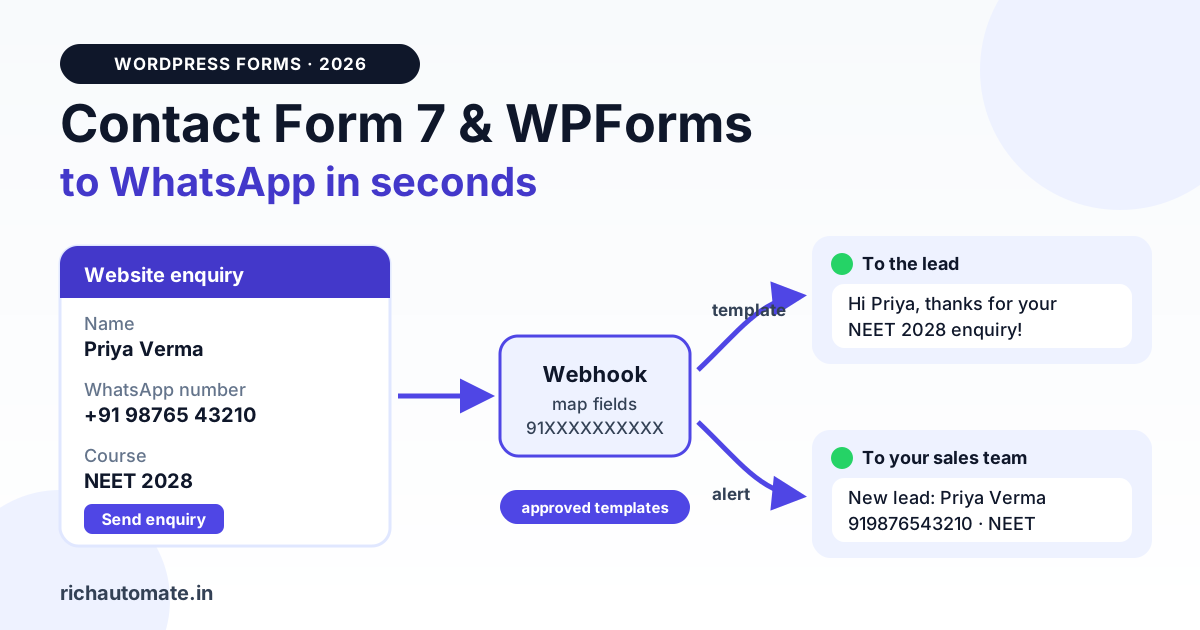
To send Contact Form 7 or WPForms submissions to WhatsApp, push each entry to a webhook, then let that webhook fire an approved WhatsApp template to the lead and a second alert template to your sales team. Contact Form 7 needs a webhook add-on, a Zapier/Make/Pabbly connection or a short wpcf7_mail_sent hook to do this; WPForms uses its Webhooks or Zapier addon on paid licences, or the wpforms_process_complete hook on any edition.
This guide is plugin-specific. Our WordPress contact form to WhatsApp hub guide covers routing, consent, spam and caching. Here we cover which route each plugin supports, CF7 field names vs WPForms field IDs, Indian phone cleaning, and cost per lead in rupees.
Why bother? An enquiry that sits in an inbox for three hours is often a lead a competitor has already called. A WhatsApp reply within a minute, plus an alert on the counsellor's or salesperson's phone, is the cheapest speed advantage a Kota coaching institute or Pune builder can buy.
Contact Form 7 vs WPForms: how each gets data out
Contact Form 7 is free and minimal: a submission becomes an email and nothing more. There is no webhook setting, so you add a free add-on plugin, an automation tool, or a few lines of PHP.
WPForms is a commercial plugin with a free Lite edition. According to WPForms' own documentation, the Zapier addon needs a Pro licence or higher and the Webhooks addon is an Elite feature. Licence tiers and prices change, so confirm on wpforms.com before you buy.
| Point | Contact Form 7 | WPForms |
|---|---|---|
| Plugin cost | Free | Lite is free; Pro and Elite are paid annual licences (check current pricing on wpforms.com) |
| Built-in webhook | None | Webhooks addon on Elite |
| Zapier route | Via a webhook add-on (for example CF7 to Webhook) into a Zapier webhook trigger | Zapier addon on Pro and above |
| Code route | wpcf7_mail_sent action | wpforms_process_complete action (any edition) |
| Field identifiers | Tag names you choose, like your-name, your-phone | Numeric field IDs (1, 2, 3) shown in the builder |
| Phone field | [tel] tag, supports minlength and maxlength | Phone field with format options |
| Ease for non-developers | Medium: form markup is text tags | Easier: drag-and-drop builder |
The two messages: lead reply and team alert
A good form-to-WhatsApp setup sends two messages for every submission, and both have to follow Meta's rules.
- Instant reply to the lead. The lead has never messaged your WhatsApp number, so the first message must be a Meta-approved template. Free-form text will be rejected. Once the lead replies, a 24-hour customer-service window opens and you can send normal messages, buttons and lists there, with no Meta charge for those service replies.
- Alert to your team. The counsellor, doctor's front desk or salesperson also needs a ping with the lead's name, number and requirement. Unless that team member has messaged your business number in the last 24 hours, the alert is also a template.
Keep both templates free of offers: Meta decides the category, and promotional wording can push a template into pricier marketing. Meta explains the categories and the service window in its WhatsApp pricing documentation.
Lead template, website_enquiry_ack:
Hi {{1}}, thanks for your enquiry about {{2}} on our website.
Our team will contact you shortly. Reply here with a convenient
time to call, or ask any question.
Team alert, new_lead_alert:
New website enquiry: {{1}} ({{2}}) asked about {{3}}.
Source: {{4}}. Please follow up.
Only message leads who ticked a clear WhatsApp consent line, and team members who agreed to alerts.
Contact Form 7 to WhatsApp: three routes
RichAutomate has no built-in Contact Form 7 connector. Its built-in integrations are Zoho CRM, Razorpay, Google Sheets, the Meta Cloud API and booking. CF7 entries reach it through one of the routes below, and each one includes a mapping step.
Route 1: CF7 to Webhook add-on
The free CF7 to Webhook plugin in the WordPress.org plugin directory (formerly called CF7 to Zapier) adds a tab to each form where you paste a webhook URL. It sends the submission as JSON, using your field names as keys. A useful detail: you can rename a key inside the form tag with the webhook: option, so CF7's your-phone arrives as phone:
[text* your-name webhook:name]
[tel* your-phone webhook:phone]
[select your-course webhook:course "JEE 2028" "NEET 2028"]
Point this at a Make, Pabbly Connect or Zapier webhook, clean the number there, and call RichAutomate. You could point it straight at an Incoming Webhook flow trigger, but the number arrives exactly as typed, so clean it in a tool step first or use Route 3.
Route 2: Zapier, Make or Pabbly Connect
Use the add-on from Route 1 to post into the automation tool's webhook trigger. In Zapier this is the Webhooks by Zapier trigger, which generally needs a paid Zapier plan; Make and Pabbly have their own webhook modules. Then add a formatter step for the phone number and an HTTP action that calls the send-template API:
curl -X POST https://richautomate.in/api/v1/send-template \
  -H "Authorization: Bearer YOUR_API_KEY" \
  -H "Content-Type: application/json" \
  -d '{
    "phone": "919876543210",
    "template": "website_enquiry_ack",
    "language": "en",
    "variables": ["Priya", "NEET 2028"]
  }'
Add a second action for the team alert. Our Zapier WhatsApp integration setup guide walks through the HTTP action field by field, and the same fields work in Make and Pabbly.
Route 3: a small PHP hook
If your developer can edit server files, a mu-plugin is cheapest, with no monthly tool fee. CF7 fires the wpcf7_mail_sent action after it sends the notification email. Spam-flagged submissions do not reach that point, which is useful. The catch: if your site's email is broken, mail fails and this hook never fires. Fix your SMTP first, or hook wpcf7_before_send_mail instead.
WPForms to WhatsApp: three routes
Route 1: Webhooks addon (Elite)
In the builder, go to Settings » Webhooks, enable webhooks and enter the request URL. You get JSON or form bodies, headers, a secret, conditional logic, and key/value pairs where each value is a form field. Name the keys phone and name and you can post to an automation tool or straight to a RichAutomate Incoming Webhook flow trigger. As with CF7, the number arrives as typed, so a cleaning step is still needed if visitors type spaces or a leading zero.
Conditional logic lets clinics and builders route different services to different flows. Our WhatsApp Business API webhook setup guide explains how webhook URLs, secrets and retries work.
Route 2: Zapier addon (Pro and above)
Install the Zapier addon, copy the API key from WPForms » Settings » Integrations, and create a Zap with WPForms as the trigger and "New Form Entry" as the event. Add a Formatter step for the phone number, then a Webhooks by Zapier action that calls the send-template API twice: once for the lead and once for the team alert.
Route 3: wpforms_process_complete hook (any edition, including Lite)
WPForms' wpforms_process_complete developer reference documents an action that runs only after a successful, error-free submission, with a form-specific version, wpforms_process_complete_{form_id}. It passes the fields keyed by field ID, which the builder shows in each field's options panel. On Lite the entry ID is 0, but field values still arrive.
Field mapping and Indian phone normalisation
This is where most setups break. WhatsApp needs the number in international format without the plus sign, which for India is 91 followed by the 10-digit mobile, for example 919876543210. Visitors type +91 98765 43210, 098765-43210, 9876543210 or even 0091 98765 43210. The rule is: keep digits only, strip leading zeros, add 91 to a 10-digit number that starts with 6, 7, 8 or 9, and reject anything else. Our guide to the Indian WhatsApp number format with the 91 country code explains the edge cases.
Send these messages on WhatsApp, from your own number
We get your templates approved on the official WhatsApp API and set up your first broadcast with you. ₹0 platform fee, you pay only Meta's per-message rate.
Validate at the form too. In CF7, use a required tel tag with length limits (the Contact Form 7 text fields docs list the options). In WPForms, use the Phone field and mark it required. A coaching-institute form might look like this:
<label> Your name
    [text* your-name autocomplete:name] </label>

<label> WhatsApp number
    [tel* your-phone minlength:10 maxlength:15 placeholder "98765 43210"] </label>

<label> Course
    [select your-course "JEE 2028" "NEET 2028" "Foundation Class 9-10"] </label>

[acceptance whatsapp-consent] I agree to receive updates about my enquiry on WhatsApp. [/acceptance]

[submit "Send enquiry"]
Here is a single mu-plugin that handles both plugins. Replace form 123 (CF7), form 456 and field IDs 1, 3 and 5 (WPForms) with your own, and paste your flow trigger token:
<?php
// wp-content/mu-plugins/forms-to-whatsapp.php

const RA_FLOW_URL = 'https://richautomate.in/api/v1/public/flows/YOUR_TOKEN/trigger';

// "+91 98765 43210" / "098765-43210" -> 919876543210, else null
function ra_in_phone( $raw ) {
    $d = ltrim( preg_replace( '/\D/', '', (string) $raw ), '0' );
    if ( strlen( $d ) === 10 && preg_match( '/^[6-9]/', $d ) ) {
        $d = '91' . $d;
    }
    return preg_match( '/^91[6-9]\d{9}$/', $d ) ? $d : null;
}

function ra_push( $phone, $name, array $data ) {
    $phone = ra_in_phone( $phone );
    if ( ! $phone ) {
        return;
    }
    wp_remote_post( RA_FLOW_URL, array(
        'timeout' => 5,
        'headers' => array( 'Content-Type' => 'application/json' ),
        'body'    => wp_json_encode( array(
            'phone' => $phone,
            'name'  => sanitize_text_field( $name ),
            'data'  => $data,
        ) ),
    ) );
}

// Contact Form 7, form 123
add_action( 'wpcf7_mail_sent', function ( $form ) {
    if ( (int) $form->id() !== 123 ) {
        return;
    }
    $submission = WPCF7_Submission::get_instance();
    if ( ! $submission ) {
        return;
    }
    $p = $submission->get_posted_data();
    $course = $p['your-course'] ?? '';
    ra_push( $p['your-phone'] ?? '', $p['your-name'] ?? '', array(
        'source' => 'cf7',
        'course' => is_array( $course ) ? implode( ', ', $course ) : $course,
    ) );
} );

// WPForms, form 456
add_action( 'wpforms_process_complete_456', function ( $fields, $entry, $form_data, $entry_id ) {
    ra_push( $fields[3]['value'] ?? '', $fields[1]['value'] ?? '', array(
        'source'    => 'wpforms',
        'treatment' => $fields[5]['value'] ?? '',
        'entry_id'  => (string) $entry_id,
    ) );
}, 10, 4 );
It posts to an Incoming Webhook flow trigger, POST /api/v1/public/flows/{token}/trigger, which takes phone, an optional name and an optional data object. Values in data are saved on the contact, so flow steps can route by course or treatment. The token is the credential: keep it server-side and rotate it if it leaks. If you only need one instant template, call /api/v1/send-template with your API key from the dashboard instead.
Typical mappings we see:
- Coaching institute, Kota (CF7):
your-course→ template variable 2 and the routing key for the JEE or NEET counsellor. - Dental clinic, Ahmedabad (WPForms): field 5 "Treatment" → variable 2, alert to the front desk.
- Real-estate developer, Pune (WPForms Elite): conditional logic sends 2BHK and 3BHK enquiries to different executives.
- Interior designer, Bengaluru (CF7): budget and city in
data, so the alert reads "3BHK, ₹8-10 lakh, Whitefield".
Setup paths compared: time, cost and skill
Build times assume your number and templates are already approved; Meta's template review is separate.
| Path | Works with | Build time | Extra tool cost | Skill needed |
|---|---|---|---|---|
| CF7 to Webhook add-on + Make/Pabbly/Zapier | CF7 | 30 to 60 minutes | Free plugin; automation tool plan (Zapier webhooks generally need a paid plan) | No code, some mapping |
| WPForms Zapier addon + Zapier | WPForms Pro and above | 30 to 45 minutes | WPForms Pro licence + Zapier plan | No code |
| WPForms Webhooks addon | WPForms Elite | 20 to 40 minutes | WPForms Elite licence | No code, careful key naming |
| mu-plugin with PHP hooks | CF7 and any WPForms edition | 1 to 2 hours with testing | None beyond hosting | Basic PHP and file access |
With a developer on call, the mu-plugin is cheapest over a year; without one, the automation-tool routes keep everything visual. Using another form tool? See our guide to Google Forms WhatsApp notifications.
What it costs per lead in ₹
On RichAutomate pay-as-you-go there is ₹0 setup and ₹0 per month. Meta's per-message rate is billed directly to your own card, and RichAutomate adds a ₹0.10 platform fee per message. Meta's India rates are about ₹0.115 per utility template and roughly ₹0.78 to ₹0.88 per marketing template; check Meta's current rate card, because these change.
| Scenario (utility templates) | Messages per lead | Approx. cost per lead | 300 leads a month |
|---|---|---|---|
| Instant reply to lead only | 1 template | ₹0.115 + ₹0.10 = about ₹0.215 | about ₹65 |
| Lead reply + team alert | 2 templates | about ₹0.43 | about ₹129 |
| Lead reply + alert + 4 chat replies in the 24h window | 2 templates + 4 service replies | ₹0.43 + 4 × ₹0.10 platform fee = about ₹0.83 | about ₹249 |
Service replies inside the 24-hour window carry no Meta charge, only the platform fee. Optional plans: Starter ₹499, Pro ₹899 and White-label ₹1,199 per month; see RichAutomate pricing for what each includes. To go live you need a GST or Udyam registration, and there is a 14-day free trial to test the whole flow first. Compare that with one lost NEET admission.
Testing checklist and common mistakes
- Test three number formats:
+91 98765 43210,098765 43210and plain 10 digits. - Free-form first message. It fails with no open window; lead with a template.
- Guessing field names or IDs. Copy them from the editor and log one real payload first.
- Broken site email with CF7.
wpcf7_mail_sentonly fires when mail succeeds. Check WP Mail SMTP or your host's mail before blaming the webhook. - Promotional words in utility templates. Meta can reclassify them as marketing, which costs several times more.
- Too many follow-ups. Repeated unanswered templates invite blocks and reports, which can lower your quality rating.
- Exposed tokens. Never put your API key or trigger URL in page HTML or JavaScript.
Set it up this week
CF7: use the CF7 to Webhook add-on or the mu-plugin. WPForms: Webhooks addon on Elite, Zapier addon on Pro, the hook on Lite. Then get two utility templates approved, map name and phone, normalise the number, and test.
Start your 14-day free trial of RichAutomate, connect your WhatsApp number, and have your enquiry template and team alert ready before your next form submission comes in.
Frequently asked questions
Does Contact Form 7 have a built-in webhook for WhatsApp?
No. Contact Form 7 only sends email out of the box. To get submissions out as data you add a webhook plugin such as CF7 to Webhook, connect it through Zapier, Make or Pabbly Connect, or add a small wpcf7_mail_sent hook in a mu-plugin that calls a WhatsApp API.
Which WPForms licence do I need to send entries to WhatsApp?
WPForms' own docs list the Zapier addon from the Pro licence upward and the Webhooks addon as an Elite feature. WPForms Lite has neither, but any edition can use the wpforms_process_complete PHP hook. Check wpforms.com for the current tiers before you buy.
Does RichAutomate integrate directly with Contact Form 7 or WPForms?
No. RichAutomate has no built-in connector for either plugin. Its built-in integrations are Zoho CRM, Razorpay, Google Sheets, the Meta Cloud API and booking. Form entries reach it through Zapier, Make or Pabbly, the send-template API, or an Incoming Webhook flow trigger, with a field-mapping step in between.
Why is my form lead not getting the WhatsApp message?
The usual causes are a phone number without the 91 country code, a template that is not yet approved, or sending free-form text as the first message. Normalise numbers to 91XXXXXXXXXX, use an approved template for the first touch, and check the webhook log for errors.
How much does each WhatsApp form notification cost?
On pay-as-you-go, a utility template costs Meta's utility rate (about ₹0.115 in India, check Meta's current rate card) plus RichAutomate's ₹0.10 platform fee, so roughly ₹0.215. A lead reply plus a team alert is about ₹0.43 per lead. Replies inside the 24-hour service window carry no Meta charge.