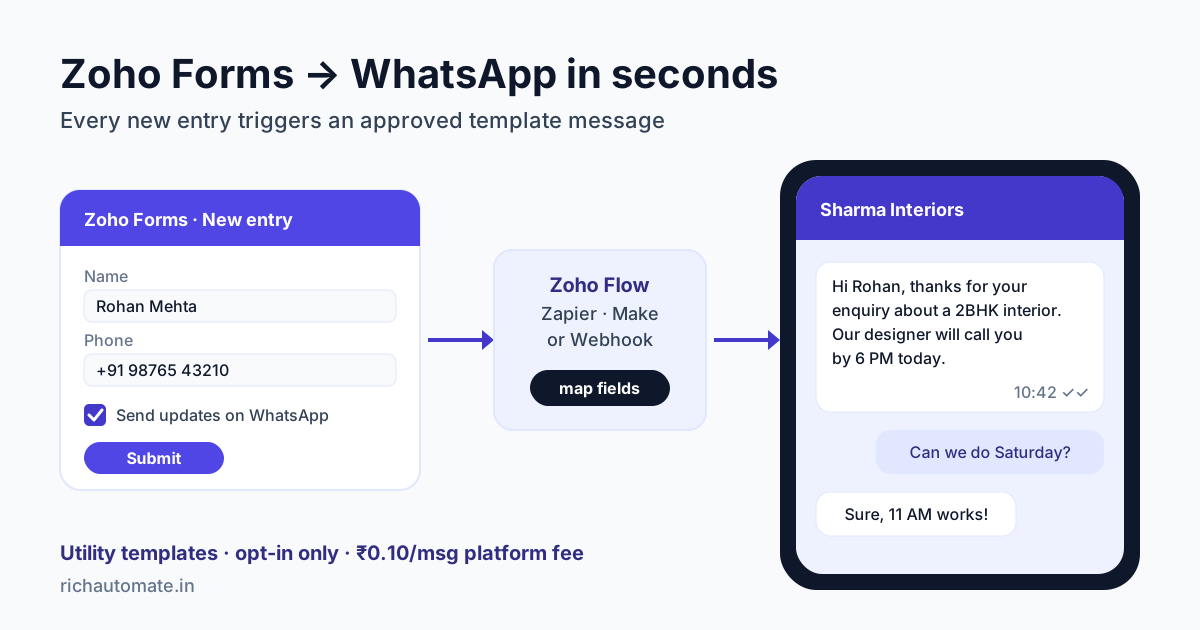
To send a WhatsApp message the moment someone submits a Zoho Form, you either turn on Zoho Forms' own WhatsApp Notifications (with Zoho's paid message credits), or you pass each new entry through Zoho Flow, Zapier, Make, Pabbly or a webhook to a WhatsApp Business API platform that sends an approved template. The second route also lets you alert your sales team, reply to the lead in a shared inbox and keep the chat linked to Zoho CRM.
This guide is for Indian clinics, coaching institutes, real-estate developers, event organisers and B2B sales teams that collect enquiries on Zoho Forms. It covers the built-in option, four ways to connect an API platform, setup steps, rupee costs and common fixes.
Why a WhatsApp reply beats the Zoho Forms confirmation email
Zoho Forms sends a neat confirmation email out of the box. For an Indian lead, that email is often the weakest link. People fill a form on their phone, type an address they rarely check, and the mail lands in Promotions. Meanwhile, three competitors who got the same enquiry from a directory or an ad have already called or messaged.
A WhatsApp message within seconds of submission changes that. It confirms the enquiry, shows your business name, and gives the lead a chat they can reply to. When they reply, you are in a real conversation instead of chasing a cold number. Common uses:
- Lead auto-reply for "Request a quote" or "Contact sales" forms.
- Booking confirmation for site visits, demos, consultations and clinic appointments.
- Registration confirmation for webinars, workshops, admissions and events, with the date, venue or joining link.
- Sales team alert sent to the assigned rep's WhatsApp, so a hot lead is called in minutes, not hours.
If your forms live in Google Forms instead, the same pattern applies; see our guide to Google Forms WhatsApp notifications.
What Zoho Forms offers today
Zoho Forms is more capable here than most form builders. Here is what Zoho's own help and pricing pages show at the time of writing:
- WhatsApp Notifications: sends an approved template to the respondent after submission. It needs Zoho's paid IM credits add-on, and only the Super Admin can set it up.
- Webhooks: an HTTP POST of each entry as JSON, URL-encoded or multipart data, with custom headers and URL parameters.
- Zoho Flow, Zapier, Make and Pabbly Connect: each offers a new-entry trigger you can chain to an HTTP request.
- Phone field: International format adds a country-code dropdown with a default country or IP-based detection.
- Plans: Free, Basic, Standard, Professional and Premium, with Webhooks and Zapier listed on all of them. Rupee prices vary, so check Zoho's pricing page.
Zoho prices its WhatsApp messages per delivered template, by category and the recipient's country. Its WhatsApp Notifications help page says there are currently no free credits and that each credit carries a 3% value-added fee.
When the built-in option is enough, and when it is not
If all you need is one confirmation message to the respondent, and you do not already run WhatsApp on another platform, Zoho's built-in feature is a fair choice. It gets harder when you want more than that. Zoho's help page describes notifications to the respondent, not alerts to your own sales team. It does not give you a shared team inbox for replies, a chatbot that answers follow-up questions, or follow-ups that wait a day. One more catch: Zoho says the phone number must not have been used with another business solution provider. If your number is already connected to a WhatsApp API platform, you cannot attach the same number to Zoho Forms as well, so pick one platform per number.
Four ways to connect Zoho Forms to a WhatsApp API platform
Every route has the same shape: form entry → mapper step → WhatsApp API sends an approved template. RichAutomate has no built-in Zoho Forms connector, so a mapper step is always part of the setup. What changes is who maintains that middle step.
| Route | Best for | Setup time | Extra cost |
|---|---|---|---|
| Zoho Flow → Send Webhook | Businesses already on Zoho One or several Zoho apps | 1-2 hours | Zoho Flow tasks; check your Flow plan |
| Zapier → Webhooks by Zapier | Small teams who want the easiest editor | 1 hour | Free tier at low volume, paid plans above that |
| Make or Pabbly Connect | Several forms, branching logic, cost-conscious teams | 1-3 hours | Make has monthly plans; Pabbly sells one-time plans |
| Zoho Forms webhook → RichAutomate flow trigger | Teams who want a multi-step WhatsApp flow without middleware | 1-2 hours | None beyond WhatsApp costs |
On the RichAutomate side there are two entry points:
- Template send:
POST /api/v1/send-templatewith your API key as a Bearer token. The body carriesphone,template,language(for exampleen) and avariablesarray in the template's order. This is the right choice for a single confirmation or a team alert. - Incoming Webhook flow trigger:
POST /api/v1/public/flows/{token}/trigger. It takesphone, an optionalnameand adataobject, and starts a chatbot flow you built in the visual builder. Use it when one submission should lead to several steps, such as a confirmation, a qualifying question and a reminder before the visit.
The flow trigger URL carries its own token, so a Zoho Forms webhook can call it directly. Map the Phone field to a parameter named phone and the Name field to name. Any other answer you want inside the flow, such as the city or service, has to sit inside the data object, and that is where a mapper step usually comes in. For a deeper look at payloads and testing, read our WhatsApp Business API webhook setup guide.
Step-by-step: Zoho Forms to WhatsApp confirmation
Here is the Zapier route for an enquiry form. Zoho Flow and Make follow the same order with different screen names.
- Fix the phone field. In the form builder, set the Phone field to International format, turn on the country code, set India as the default country and make the field mandatory. Zoho lets you restrict the dropdown to the countries you serve and set a digit range. Note that a phone field with country code counts as two fields towards your form's field limit.
- Add an opt-in checkbox. Add a single checkbox (Zoho's Decision Box field works) with clear wording: "Send me booking updates on WhatsApp from Sharma Interiors." Leave it unticked by default.
- Create the template. In RichAutomate, create a utility template such as: "Hi {{1}}, thanks for your enquiry about {{2}}. Our team will call you within {{3}}. Reply here if you have any questions." Submit it to Meta. Approval often takes minutes, though a review can take up to a day or two.
- Set the trigger. In Zapier, choose Zoho Forms and the New Form Entry trigger, connect your account, pick the form and pull a test entry.
- Clean the number. Add a Formatter step that removes spaces, dashes and brackets, keeps the leading
+, and adds+91only when exactly 10 digits arrive. The goal is E.164, for example+919876543210. - Filter on consent. Continue only if the opt-in checkbox is ticked.
- Send. Add a Webhooks by Zapier Custom Request: POST to the send-template endpoint, header
Authorization: Bearer YOUR_API_KEY, and a JSON body with the cleaned phone, template name, language and the three variables mapped from the entry. Add anIdempotency-Keyheader set to the Zoho Forms entry ID, so a retried Zap does not send twice. - Test with your own number. Submit the live form from your phone and check the name, service and timing in the message.
Zapier's mapper is covered screen by screen in our Zapier WhatsApp integration guide, and the Make version in our Make.com WhatsApp integration guide.
Get the India 2026 WhatsApp BSP price comparison
Wati vs AiSensy vs Interakt vs RichAutomate: Meta rates, platform fees and hidden costs, side by side. We send it to your WhatsApp in a minute.
Doing it in Zoho Flow instead
Zoho's Forms help explains the switch-on step: the Zoho Forms admin opens Control Panel, goes to Developer Space, and enables Zoho Flow Integration (see Zoho's Zoho Flow integration article). In Zoho Flow, start a flow with the Zoho Forms "Entry submitted" trigger, add a decision on the opt-in field, then use the Send Webhook action from the Logic tab to POST to RichAutomate. Zoho announced that outgoing webhooks work without a custom function, but older guides use Deluge's invokeurl; both reach the same endpoint.
Adding a sales team alert
Add a second action after the customer message. Send a separate utility template to the assigned rep, for example: "New enquiry: {{1}}, {{2}}, {{3}}. Call within 15 minutes." The rep's number must also have opted in to messages from your business. Teams that score leads before routing them can add a qualifying question in a flow first; our WhatsApp lead qualification and scoring guide shows how.
Utility or marketing: choose the right template
Meta puts every template into a category, and the category sets the price. Utility templates confirm or update something the person asked for. Marketing templates promote something. Zoho's own help page puts it plainly: business-initiated notifications must be transactional, not promotional.
| Form type | Example message | Likely category |
|---|---|---|
| Quote or contact form | "Thanks Rohan, we got your enquiry for a 2BHK interior. Our designer will call by 6 PM." | Utility |
| Site visit or appointment | "Your site visit is booked for Sat, 2 Nov, 11 AM at Wakad, Pune. Reply 1 to reschedule." | Utility |
| Event or webinar registration | "You're registered for the GST workshop on 8 Nov, 4 PM. Joining link: {{3}}" | Utility |
| Internal sales alert | "New lead: Rohan, +91 98765 43210, Pune, budget ₹8-10 lakh." | Utility |
| Follow-up with an offer | "Book your design consultation this week and get 10% off modular kitchens." | Marketing |
Mixing an offer into a confirmation is the most common reason a utility template is rejected or recategorised as marketing. Keep the confirmation factual and send any offer as a separate marketing template, only to people who agreed to promotional messages.
Consent and the opt-in checkbox
A phone number typed into a form is not, by itself, consent to WhatsApp messages. Meta requires a clear opt-in to messages from your business, and Zoho's help page repeats that notifications may only go to users who opted in. India's DPDP Act also expects consent to be specific and given through a clear affirmative action.
- Name the business and the channel in the checkbox text: "I agree to receive updates about my enquiry on WhatsApp from Sharma Interiors."
- Never pre-tick it, and do not hide it inside the terms and conditions.
- Keep the Zoho Forms entry as your consent record: it holds the timestamp, form name and checkbox value.
- If you want to send offers later, add a second, optional checkbox for promotional messages.
- Honour STOP replies the same day. Repeated messages after an opt-out lead to blocks, and blocks lower your quality rating with Meta.
Following these rules keeps your number healthy, but no provider can promise a number will never be restricted. Meta makes that call based on quality and complaints.
What it costs: a worked example in rupees
Take an interior design studio in Pune with a Zoho Forms enquiry form on its website and Instagram bio. It gets 600 enquiries a month, and books 300 site visits from them.
- Enquiry confirmations to leads: 600 utility messages
- Sales team alerts: 600 utility messages
- Site visit reminders a day before: 300 utility messages
- One festive offer to opted-in leads: 100 marketing messages
That is 1,500 utility and 100 marketing messages, 1,600 in all. On RichAutomate's Client Pay model, the platform fee is ₹0.10 per message and Meta bills its own per-message charges to you directly. In India, Meta's rate is about ₹0.115 for a utility template and about ₹0.86 for a marketing template.
- RichAutomate platform fee: 1,600 × ₹0.10 = ₹160
- Meta utility charges: 1,500 × ₹0.115 ≈ ₹173
- Meta marketing charges: 100 × ₹0.86 = ₹86
- Plan: Starter ₹499/mo or Pro ₹899/mo, GST-inclusive
- Middleware: ₹0 on the direct flow-trigger route, up to a few thousand rupees a month on paid Zapier or Make plans
All in, roughly ₹920 to ₹1,320 a month before middleware. If faster replies turn even one extra enquiry into a ₹5 lakh interior project, that cost is irrelevant. Setup is ₹0, and the 14-day free trial needs no card. Meta charges only for delivered messages, and its pricing page notes that utility templates sent inside an open chat window are charged at the normal rate from 1 October 2026, so do not budget them as free. Rates change from time to time, so check Meta's current rate card and our pricing page before you plan.
Keep the WhatsApp chat linked in Zoho CRM
Many Zoho Forms users also push entries into Zoho CRM as Leads. RichAutomate's built-in Zoho CRM integration works from the WhatsApp side: it pushes WhatsApp contacts into Zoho CRM with a phone-first dedupe upsert into the Leads or Contacts module, and syncs tags and stage. So the flow looks like this: Zoho Forms creates the lead, the mapper triggers the WhatsApp confirmation, the lead replies, and the CRM record that matches the phone number gets the WhatsApp tag and stage instead of a duplicate.
The integration does not send WhatsApp messages from Zoho CRM events, so the send still starts from the form route above. For matching to work, store the number the same way everywhere: E.164 with +91, in both Zoho Forms' CRM mapping and the WhatsApp send. Our WhatsApp Zoho CRM integration guide covers module choice, field mapping and tag sync.
Troubleshooting: phone format, rejections and duplicates
| Symptom | Likely cause | Fix |
|---|---|---|
| Send fails with an invalid number | 10 digits without +91, or spaces and brackets in the value | Use International format in Zoho Forms and normalise to E.164 in the mapper |
| International leads get a wrong number | Mapper adds +91 to every number | Add +91 only when exactly 10 digits arrive and no code is present |
| Template rejected | Offer inside a utility template, variable at the start or end, spelling errors | Keep it factual, put text before and after each variable, resubmit |
| Message says "Hi ," or fails | Empty variable, such as a skipped name field | Make the field mandatory or set a fallback such as "there" |
| Lead gets the confirmation twice | Double-click submit, or a retried Zap or Flow | Send an Idempotency-Key equal to the entry ID; consider a no-duplicates rule on the phone field |
| Nothing arrives, no error | Webhook failed or Zoho Flow integration not enabled | Check the "Webhooks - Failed Entries" filter in All Entries, and the admin setting |
Zoho Forms lets you re-push failed webhook entries only twice, and failure email alerts are a paid-plan feature, per Zoho's webhook configuration article. If you rely on webhooks, set that alert so a broken endpoint does not go unnoticed for days.
Start small: approve one utility template, wire it to your busiest form, and test with your own number. Most teams have the first confirmation live in an afternoon, then add the sales alert and visit reminder over the next week. Start your 14-day free RichAutomate trial, no card needed, and send your first Zoho Forms WhatsApp confirmation today.