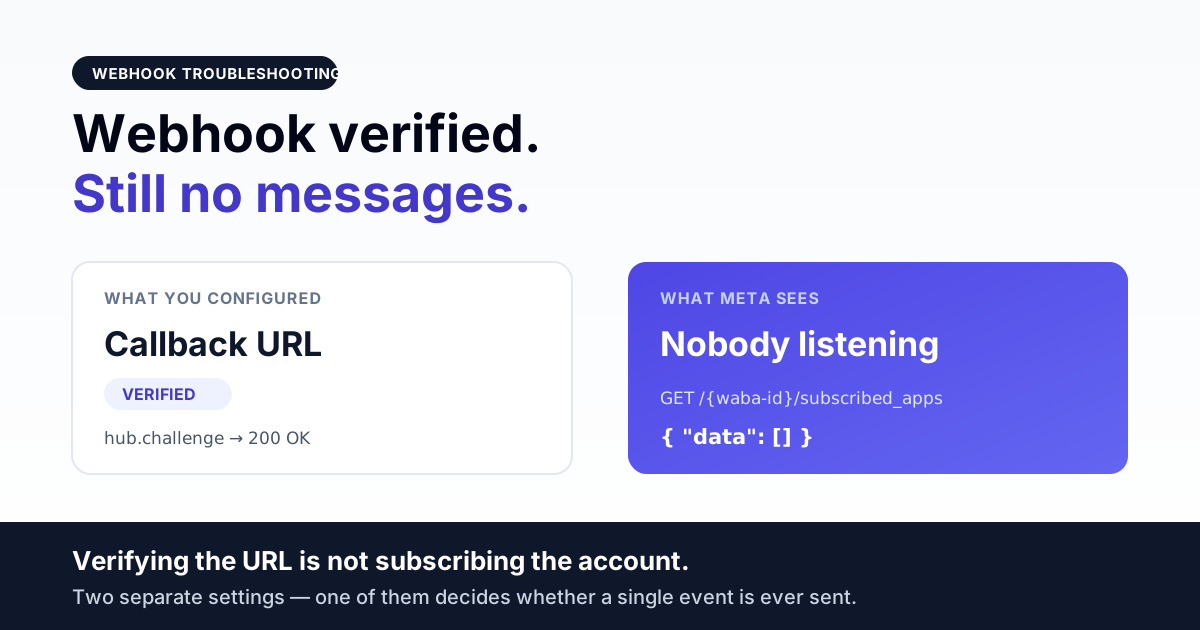
If your WhatsApp webhook is not receiving messages, the cause is almost never the code inside your handler — it is that the events are not being sent to you at all. There are two separate things to configure and teams routinely do only the first: saving a callback URL on your Meta app, and subscribing that app to the WhatsApp Business Account. Skip the second and the URL sits there verified, green, and permanently silent.
This page walks the path an inbound event takes, from Meta to a row in your database, and shows how to tell exactly which link in that chain is broken. If you already receive events and want the architecture that keeps them from being lost under load, read the WhatsApp webhook reliability engineering guide instead — that is a different problem to this one.
Direct answer — the five places inbound events die
An inbound WhatsApp message has to survive five checkpoints before it becomes a row you can see. Each one fails differently, and each one has a distinct tell:
| # | Checkpoint | What breaks | The tell |
|---|---|---|---|
| 1 | Callback URL verification | Meta's GET challenge does not get the answer it wants | Meta refuses to save the URL at all |
| 2 | App subscribed to the WABA | URL saved, but the app was never attached to the business account | URL is green; zero events, ever |
| 3 | Field subscriptions | Subscribed to the WABA but not to the messages field | Some event types arrive, inbound text does not |
| 4 | Signature check | Your handler rejects the request as unsigned or mis-signed | Requests hit your server and get a 4xx in your access log |
| 5 | Async processing | You return 200, queue the job, and nothing consumes the queue | Webhook log fills; UI stays empty |
Checkpoints 1 and 2 look identical from a dashboard and are completely different problems. Checkpoints 4 and 5 are the ones that make people say "the webhook works but messages don't show up" — because it does work, and they don't.
Checkpoint 1 — the verification handshake
Before Meta will store your callback URL it sends a single GET to that URL with three query parameters and expects a very specific answer:
GET https://your-domain.com/api/v1/webhook
    ?hub.mode=subscribe
    &hub.verify_token=<the token you typed into the app>
    &hub.challenge=<a random string>
Your endpoint has to confirm the mode is subscribe, confirm the verify token matches the one you configured on your side, and then return the challenge string itself with a 200. Not JSON. Not a wrapper object. The raw string. Our own handler is four lines of logic:
if ($mode === 'subscribe' && $token === config('services.meta.verify_token')) {
    return response($challenge, 200);
}
return response()->json(['error' => 'Forbidden'], 403);
Three things fail here in practice, in descending order of how often we see them:
- The verify token does not match. It is a string you invent and type into two places — the Meta app config and your own environment. A trailing space in a
.envfile counts as a mismatch. So does having deployed the value to staging but not to production. - The endpoint is not reachable over public HTTPS. Meta calls you from the internet. A URL behind a VPN, on a non-standard port, on plain HTTP, or with a self-signed or incomplete certificate chain never gets to run your code. A browser can be forgiving about a missing intermediate certificate; a server-side HTTPS client is not.
- Your framework returns JSON anyway. A global middleware or an API response wrapper that turns every response into
{"data": "..."}will break the handshake even though your logic is right. Test it with curl and look at the raw body.
The one-command check:
curl -i "https://your-domain.com/api/v1/webhook?hub.mode=subscribe\
&hub.verify_token=YOUR_TOKEN&hub.challenge=test123"
You want HTTP/1.1 200 and a body that is exactly test123 — nothing else, no quotes, no braces. If that works and Meta still will not save the URL, the failure is network reachability, not code.
Checkpoint 2 — the step almost everyone misses
This is the single most common cause of a webhook that is configured correctly and receives nothing. Saving a callback URL tells Meta where to send events for your app. It does not tell Meta which WhatsApp Business Account's events to send there. That is a separate API call, made once per WABA:
POST https://graph.facebook.com/v24.0/{waba-id}/subscribed_apps
Authorization: Bearer <your access token>
No body is required. The app identified by the token gets attached to that WABA, and from that moment its events flow to your saved callback URL. Until then: silence, with a fully green webhook configuration screen.
You can read the current state rather than guessing:
GET https://graph.facebook.com/v24.0/{waba-id}/subscribed_appsAn empty data array is your answer — nothing is subscribed, and no amount of debugging your handler will change that. A populated array means events are being dispatched to you and the problem lives further down the chain.
There is a second-order version of this that is harder to spot. In our own onboarding code the subscribe call is deliberately non-fatal — if it fails, it logs a warning and returns false rather than throwing:
if ($response->failed()) {
    Log::warning('Meta App Subscribe Failed (Non-fatal)', $response->json());
    return false;
}
That is a reasonable choice: a failed subscribe should not abort an otherwise successful onboarding. But it means onboarding can report success while leaving the account only partly wired, and nobody notices until the first customer message never arrives. If you run multi-tenant onboarding, treat the return value of that call as something to assert on later, not something to ignore. Checking subscribed_apps for every account on a schedule costs one API call per WABA and catches this class of failure before a customer does.
Checkpoint 3 — subscribed, but not to the right fields
Webhook subscriptions are per-field. An app can be attached to a WABA and still not be listening for the field that carries inbound text. The symptom is characteristic and confusing: you get some callbacks — a template status change, an account update — but never an actual customer message.
The field that carries both inbound messages and outbound delivery statuses is messages. If you are seeing account-level events but no conversation traffic, open the webhooks section of your app configuration and confirm that field is ticked for the WhatsApp Business Account product. It is a checkbox, not code, and it is easy to save the page without it.
Related to this: delivery statuses and inbound messages ride the same subscription. "Statuses work but inbound doesn't" is therefore not a field problem — that combination points at your own routing, because both payload types came through the same door.
Checkpoint 4 — your handler is rejecting the request
Once events are actually being dispatched, the next place they die is your own security layer. Every POST from Meta carries an X-Hub-Signature-256 header, an HMAC of the raw request body keyed with your app secret. Our handler rejects anything that does not validate:
$signature = $request->header('X-Hub-Signature-256');
if (!$this->isValidSignature($request->getContent(), $signature)) {
    Log::warning('Invalid webhook signature');
    return response()->json(['error' => 'Invalid signature'], 401);
}
That check is correct and you should keep it — without it, anyone who learns your URL can inject fake inbound messages into your system. But when the app secret in your environment is wrong, stale, or belongs to a different app, every genuine event is thrown away with a 401 and the outcome is indistinguishable from "no events arriving".
Two failure modes are worth naming because they are subtle:
- Signing the parsed body instead of the raw body. The HMAC is computed over the exact bytes Meta sent. If your framework has already decoded and re-encoded the JSON — reordering keys, changing whitespace, escaping unicode differently — the hash will never match. You need the raw request content, before any parsing.
- A proxy that rewrites the body. Anything between the internet and your application that decompresses, re-encodes, or normalises the payload breaks the signature for the same reason.
Distinguishing this from checkpoint 2 takes ten seconds: look at your web server access log, not your application log. If you see POST /api/v1/webhook entries with 401 or 403 responses, events are arriving and your app is refusing them. If the log has no POST entries at all, nothing is being sent and your problem is upstream at checkpoint 2 or 3.
Checkpoint 5 — accepted, queued, and never processed
The last failure looks the least like a webhook problem, because the webhook is working perfectly. A correct handler does almost nothing synchronously: it validates the signature, persists the payload, hands the work to a background queue, and returns 200 immediately. Ours dispatches to a high-priority Redis queue:
Get the India 2026 WhatsApp BSP price comparison
Wati vs AiSensy vs Interakt vs RichAutomate: Meta rates, platform fees and hidden costs, side by side. We send it to your WhatsApp in a minute.
\App\Jobs\ProcessWhatsappInbound::dispatch($payload)->onQueue('high');Which means the message becomes visible in your product only when a queue worker picks that job up. If the worker process is dead, stopped, pointed at the wrong queue name, or running an older build than the code that enqueued the job, then every event is accepted with a clean 200 and simply piles up. Meta is satisfied. Your logs show successful deliveries. Your inbox is empty.
Check, in this order: is the worker process actually running; is it consuming the queue name the job was dispatched to; and is the queue backlog growing. A queue depth that only ever increases is the whole diagnosis. This is also why a webhook that "stopped working after a deploy" is usually a supervisor unit that did not come back up, not a webhook change at all.
A decision path that gets you to the answer in five minutes
- Does
GET /{waba-id}/subscribed_appsreturn a non-empty array? No → checkpoint 2. Make the POST. - Does your access log show POST requests from Meta? No → checkpoint 3, or the callback URL on the app is not the URL you think it is. Yes → continue.
- Are those POSTs returning 200? No → checkpoint 4. Compare your app secret against the app the token belongs to.
- Is your queue backlog growing? Yes → checkpoint 5. Start the worker.
- All four clean and still nothing? The events are being processed and dropped inside your own handler logic — add a log line at the top of the job before any branching.
Note what this path does not ask you to do: it never asks you to change the webhook URL, regenerate a token, or resubmit anything to Meta. Those are the three things people try first and none of them address any of the five checkpoints.
The India-specific parts
Nothing about webhook mechanics is country-specific, but three practical issues show up disproportionately on Indian deployments:
- Incomplete TLS chains on budget hosting. A certificate that a browser accepts because it caches intermediates can still fail server-to-server validation. Test with an external SSL checker rather than by opening the URL in Chrome — the browser is the more forgiving client and will tell you everything is fine when it is not.
- Aggressive WAF and bot rules. A managed firewall that challenges unfamiliar user agents or rate-limits POSTs to a single path will silently eat webhook traffic. Meta's requests are unattended machine traffic and will not solve a challenge page. Allow-list the webhook path explicitly.
- Shared hosting without a persistent worker. If your plan cannot run a long-lived background process, checkpoint 5 is guaranteed, not likely. A cron-driven queue drain is a workable stopgap; no worker at all is not.
What to do before you contact support
- Confirm the number is registered on Cloud API at all — an unregistered number receives nothing by definition, and the fix is unrelated to webhooks. See approved but not registered.
- Confirm the account is not under an account-level block, which stops traffic in both directions for a billing or policy reason. See account-level send blocks.
- Capture one raw request from your access log with its response code. That single line answers more questions than any description of the symptom.
- Record the output of
GET /{waba-id}/subscribed_apps. If it is empty, you have your answer and no ticket is needed.
Webhook health checklist
- Callback URL is public HTTPS with a complete certificate chain.
- Verify handshake returns the raw challenge with a 200 — tested with curl, not assumed.
- App is subscribed to every WABA you serve, verified by reading
subscribed_apps, not by remembering that you did it. - The
messagesfield is subscribed. - App secret in your environment matches the app the access token belongs to.
- Signature is computed over the raw body, before parsing.
- Handler returns 200 fast and processes asynchronously.
- A queue worker is running, consuming the right queue, on current code.
- Queue depth is monitored, with an alert on sustained growth.
- A scheduled check re-reads
subscribed_appsper account so a silently failed subscribe is caught by you, not by a customer.
Frequently asked questions
Once events do arrive, media inside them is a second problem: the payload carries a handle, not a file. See downloading inbound WhatsApp media before it expires.
Statuses missing while inbound still works?
Add webhook delivery, retries and duplicate events to your QA plan using our WhatsApp API and webhook test cases.
Why is my WhatsApp webhook verified but not receiving any messages?
Verification and subscription are two different things. Verifying the callback URL only proves your endpoint can answer Meta's GET challenge — it does not attach your app to any WhatsApp Business Account. You also have to POST to /{waba-id}/subscribed_apps once per WABA. Read GET /{waba-id}/subscribed_apps: if the data array is empty, nothing is being dispatched to you, regardless of how green the configuration screen looks.
How do I check whether Meta is actually sending events to my server?
Look at your web server access log rather than your application log. POST requests to your webhook path mean events are arriving and the problem is in your handler — most often a signature rejection returning 401. No POST entries at all means nothing is being sent, and the cause is upstream: app not subscribed to the WABA, messages field not subscribed, or the callback URL saved on the app is not the URL you are watching.
My delivery statuses arrive but inbound customer messages do not. Why?
Inbound messages and delivery statuses ride the same messages subscription, so if statuses reach you the subscription is fine. The split is inside your own code — typically a handler that branches on payload shape and only implements the statuses branch, or an inbound branch that discards messages from unknown contacts. Log at the very top of the processing job, before any branching.
Why did my webhook stop working right after a deployment?
Usually the webhook did not change — the queue worker did not restart. A correct handler returns 200 immediately and hands the payload to a background queue, so a dead worker still produces clean 200s while nothing gets processed. The tell is a queue depth that only grows. Check the worker supervisor unit came back up and is consuming the queue name the job is dispatched to.
Can I disable signature verification to get the webhook working?
No. That check is the only thing preventing anyone who discovers your URL from injecting fabricated inbound messages. If genuine events fail it, your app secret is wrong or belongs to a different app, or you are hashing the parsed body instead of the raw bytes. The HMAC must be computed over the exact content Meta sent, before any JSON decoding.
Does the webhook need to be reconfigured for every phone number?
No. The callback URL is configured once on the app, and the subscription is made once per WhatsApp Business Account — not per phone number. Every number under a subscribed WABA delivers to the same endpoint, and your handler tells them apart by the phone number ID in the payload. In a multi-tenant setup, the per-account step to remember is that each newly onboarded WABA needs its own subscribe call.
Further reading
- WhatsApp webhook reliability engineering guide — once events arrive, the architecture that stops you losing them under load.
- WhatsApp Business API setup, step by step — the full onboarding sequence this sits inside.
- Approved but not registered — the number-level failure that also produces total silence.
- Message delivery troubleshooting — for outbound messages accepted by the API that never land.
- Account-level send blocks — when everything stops at once for a billing or policy reason.
Stop debugging the wrong layer
Most of the time lost to a silent webhook goes on rewriting a handler that was correct all along. RichAutomate verifies subscribed_apps per account rather than trusting that onboarding said it succeeded, keeps the raw payload before anything parses it, and monitors queue depth so an accepted-but-unprocessed event surfaces as an alert instead of a missing conversation. If you have a webhook that verifies clean and delivers nothing, talk to us — we will read the subscription state on Meta before touching a line of your code.