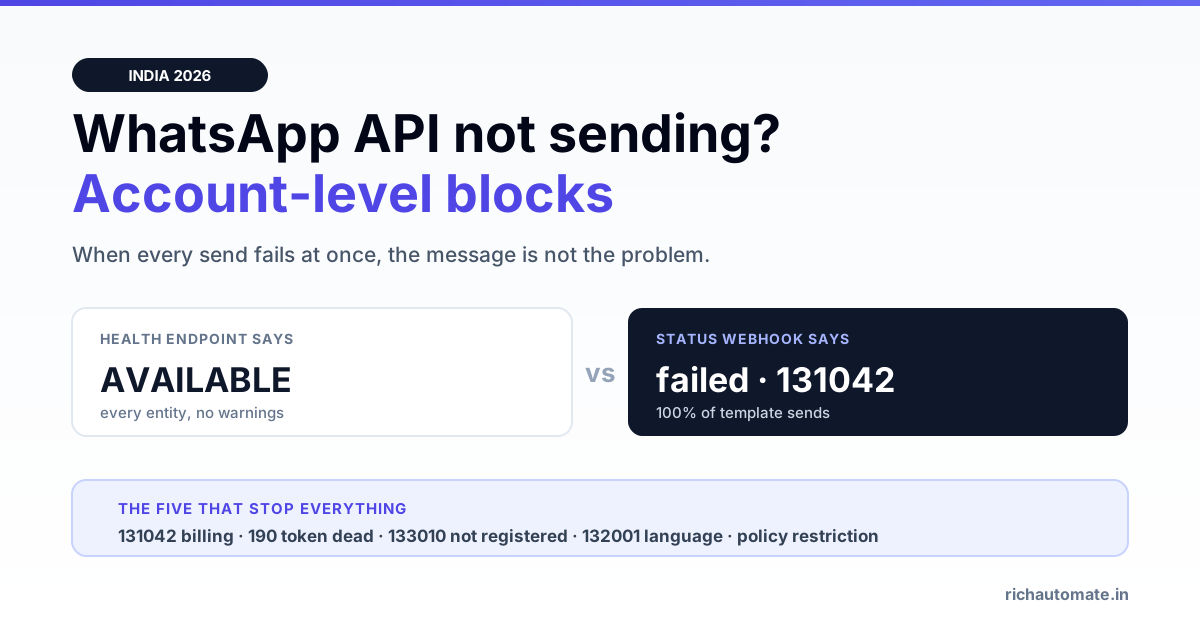
If every WhatsApp message you send is failing at once — not a few, not one recipient, but all of them — the problem is almost never the message. It is an account-level block: something about the WABA, the phone number, the token or the payment method has stopped the whole sending path, and no amount of retrying or rewriting the template will move it.
That is a different failure class from a message that gets accepted and then quietly never lands. If your messages are being accepted by the API and stalling somewhere between sent and delivered, the page you actually want is our WhatsApp message-not-delivered decision tree, which maps per-recipient codes like 131049 and 131047 to fixes. This page is about the blocks that stop everything.
Per-message failure or account-level block? Tell them apart in 60 seconds
The single fastest diagnostic is the blast radius. Run one test send to a number you control, and one to a completely different number on a different network.
| What you observe | Failure class | Where to look |
|---|---|---|
| Some recipients fail, most succeed | Per-message / per-recipient | Delivery forensics — codes in the status webhook |
| One template fails, others send fine | Template-level | Template status, language code, parameter count |
| Every send fails, every recipient, immediately | Account-level block | This page |
| Free-form replies work, templates all fail | Account-level block | Billing and eligibility — see 131042 below |
| Nothing fails, but volume is capped | Tier limit, not a block | Broadcast limits and tiers |
The fourth row is the one that costs teams the most time, because it looks like a template problem and it is not. We will come back to it.
The five account-level blocks
Codes below follow the Meta Cloud API error reference. Meta revises codes and adds new ones, so treat this as a triage map and confirm against the current documentation before you build permanent logic around any single number.
131042 — payment or business eligibility not settled
This is the block that most often reaches us as "our WhatsApp API suddenly stopped working". It means Meta will not bill the conversation, so it will not start the conversation. Common triggers: no payment method attached to the WhatsApp Business Account, a card that failed on renewal, an unpaid balance, a credit line detached by the partner who set you up, or a business whose eligibility check has not completed.
What makes 131042 nasty is that it is enforced at delivery, not at the API call. The send request can return a perfectly normal messages[0].id — a wamid — and only the status webhook that arrives moments later carries status: "failed" with 131042 in the errors[] array. If your logging only records the POST response, your dashboard will show messages sent and Meta will show nothing delivered.
It is not fixable in code. Someone with access to the billing settings on the WhatsApp Business Account has to attach or settle a valid payment method. Retrying, rotating tokens, resubmitting templates and switching provider all fail to clear it, because none of them touch the thing that is actually blocked.
100 and 190 — token dead or permissions revoked
Code 190 is an expired or invalidated access token. Code 100 is the broader "invalid parameter" family and shows up when a token is valid but lacks the permission for the call you made, or when the object ID you are addressing is not visible to that token.
Tokens die for ordinary reasons: a temporary user token hit its expiry, the Meta password of the admin who generated it changed, the user was removed from the Business Manager, or the app's permissions were reduced. A system user token with the right permissions is the durable answer; a token generated from a personal login is a scheduled outage.
The tell for 190 is that every call fails, not just sends — a read call like fetching your phone numbers fails identically. That is a useful one-line test, because it separates a dead token from a healthy token hitting a blocked account.
133010 — phone number not registered on Cloud API
A number can be added to a WhatsApp Business Account and still not be registered for Cloud API sending. Registration is a distinct step that sets a two-step verification PIN against the number. Until it completes, sends fail even though the number appears correctly in the Business Manager UI.
This is a common first-week failure, and also a post-migration one: moving a number between providers or between Business Managers can leave it needing re-registration on the new side.
Policy restriction on the account
A WABA can be restricted for policy reasons — content that breaches the Business or Commerce policy, a pattern of blocks and reports from recipients, or an unresolved appeal. Restrictions vary from a messaging-limit reduction to a full send block, and they surface as policy-violation errors rather than a single fixed code.
Restriction is a reputation outcome, and it is worth being clear about the sequence: a poor quality rating does not by itself block sends, but sustained low quality plus user reports is the road that ends in restriction. If you are on that road, the red quality-rating recovery playbook is the intervention, and it works far better before a restriction than after one.
Template-level failures that masquerade as account blocks
Codes in the 132xxx family are template errors, not account blocks — but when the template involved is the only one your integration sends, the symptom is identical to an outage. The two most common:
- 132001 — the template does not exist for the name and language code you sent. Almost always a language mismatch: a template approved as
en_USwill not resolve if you requesten, and vice versa. Both exist, they are not interchangeable, and the error does not tell you which one is right. - 132000 — parameter count mismatch. The template expects a certain number of variables in the body, header or buttons, and the payload supplied a different number. Adding a button to an approved template changes this contract.
A template can also be paused or disabled for poor performance after approval. Approval is not permanent, and a paused template fails at send time with no change on your side.
The trap: health status says AVAILABLE while every send fails
Meta exposes a health endpoint on the phone number — you request the health_status field and get back entities for the business, the WABA, the phone number and the template, each with a can_send_message value of AVAILABLE, LIMITED or BLOCKED.
It is the obvious thing to check, and on a billing block it will mislead you.
We hit this on our own WhatsApp Business Account in July 2026: health_status returned AVAILABLE across every entity while every single template send failed with 131042. Free-form text replies inside an open 24-hour window went through normally the whole time. We told a customer their account was fine twice on the strength of that endpoint before working out what was happening.
The explanation is that the health entities check structural eligibility — is the number registered, is the WABA in good standing, is the template approved and not paused. Payment settlement is not one of those checks, and the billing decision is made when the conversation is opened. So a WABA with no working payment method is structurally healthy and commercially blocked at the same time, and only one of those two facts is visible to the health endpoint.
Get the India 2026 WhatsApp BSP price comparison
Wati vs AiSensy vs Interakt vs RichAutomate: Meta rates, platform fees and hidden costs, side by side. We send it to your WhatsApp in a minute.
The reliable diagnostic is a real test send, read at the status webhook. Not the POST response, which will look successful; the webhook that follows it. If you are evaluating a provider, this is also a fair question to put to them during procurement due diligence — ask what their dashboard shows when a send fails after acceptance, because a platform that only logs the API response will show you a green tick on a failed message.
Diagnose in this order
- Make a read-only API call — fetch the phone numbers on your WABA. If that fails too, it is the token: 190 or 100. Stop here and fix authentication.
- Send one free-form text to a number that has messaged you in the last 24 hours. If free-form works and templates do not, jump to step 5.
- Send one template and capture the status webhook, not just the POST response. The
errors[]array on the failed status is the only place the real reason appears. - Read the code. 133010 means register the number. 132001 means check the language code before anything else. 132000 means count your parameters.
- Check billing. If the code is 131042, open the payment settings on the WhatsApp Business Account. Confirm a payment method exists, is valid, and has no outstanding failure. This is an account-owner action, not a developer one.
- Check for restriction in the Business Manager account-quality view if none of the above matches — a policy restriction will be stated there.
Steps 1 and 2 take about two minutes together and narrow the problem to one of three causes. Most of the time lost on these incidents is spent skipping them.
Things that look like blocks but are not
Two situations get misdiagnosed as outages often enough to be worth naming.
131049 is a throttle, not an error. It means the recipient sits in a Meta cohort that is receiving fewer marketing messages, so that particular marketing send was dropped. Utility and authentication messages to the same person still land. It is expected background noise on marketing traffic, it affects a slice of recipients rather than all of them, and hammering retries makes it worse. Our delivery-troubleshooting page covers the per-recipient codes including this one in detail.
The 250-customer cap is a tier, not a block. A business that has not completed Meta Business Verification can message a limited number of unique customers in a rolling 24 hours — 250 at the entry tier. Hitting that ceiling is not a fault; it is the tier working as designed, and no provider can lift it for you because it is set at the Meta account level. Completing business verification is what raises it, and tier graduation from there follows send volume and quality rather than any setting.
It is also worth separating both of these from the green tick. The green tick is a display badge tied to brand notability. It does not raise limits, does not affect deliverability, and its absence never causes a send to fail.
Preventing the next one
- Log the status webhook, not the API response. If your system records only the POST result, every account-level block will present as a silent failure with a healthy-looking dashboard.
- Alert on the failed-status rate, not just on HTTP errors. A 100% failed rate over five minutes is an outage regardless of what the send endpoint returned.
- Use a system user token with explicit permissions rather than one generated from an individual's login, so a staff change does not expire your integration.
- Put a second person on the billing account. A single owner on the payment method is the reason 131042 incidents run for days rather than hours.
- Pin language codes explicitly in your template calls and keep the exact approved code in your own config, rather than deriving it.
- Watch quality weekly. A drop from green is a lead indicator for the restriction path, and it is cheap to fix early.
Where RichAutomate sits
We surface the status-webhook error code directly against each message rather than reporting the API acceptance as a send, which is the difference between seeing "delivered 0%" and seeing "131042 — payment not settled" on the row. Billing blocks and token expiry still have to be resolved on your own Meta account — no provider can clear those for you, and any provider claiming otherwise is describing something else.
If you are comparing platforms while dealing with an outage, be careful about attributing an account-level block to the provider: switching will not fix 131042, 190 or 133010, because all three live on your WABA and travel with it. Our alternatives index covers what genuinely does and does not move when you change provider, and the cost breakdown covers what you are actually paying for on either side.
Frequently asked questions
What does WhatsApp error 131042 mean?
It means the WhatsApp Business Account cannot be billed for the conversation, so Meta will not start it — typically no payment method attached, a failed card, an unpaid balance, or an incomplete business eligibility check. It is resolved in the account's payment settings, not in code, and retrying or switching provider will not clear it.
Why do my free-form WhatsApp messages work but templates fail?
That pattern points at billing. Template sends open a new billable conversation, while a free-form reply inside an already-open 24-hour window does not start one. If replies land and every template fails, check the payment method on the WhatsApp Business Account before investigating the templates.
Can health_status show AVAILABLE while sends are failing?
Yes. The health entities check structural eligibility — number registered, WABA in good standing, template approved — and payment settlement is not among those checks. We observed AVAILABLE on every entity while 100% of template sends failed with 131042. Use a real test send and read the status webhook instead.
What is the difference between error 190 and error 131042?
190 is a dead access token and breaks every API call including read-only ones, so fetching your phone numbers fails too. 131042 is an account billing block: the token is fine, read calls succeed, and only message delivery is stopped. Making one read-only call tells you which you have.
Does the green tick fix WhatsApp sending errors?
No. The green tick is a display badge tied to brand notability. It does not raise messaging limits, does not improve deliverability, and its absence never causes a send to fail. Business verification, which is a separate process, is what raises the unverified 250-customer daily cap.
How do I know if my WhatsApp Business Account is restricted?
A restriction is stated in the account-quality view in Business Manager, and errors reference a policy violation rather than billing or registration. Restrictions follow sustained poor quality and user reports, so a rating that has fallen to red is the warning stage — act there rather than waiting for the block.
Total silence in both directions is usually not a block at all — see approved but not registered.
A block stops outbound sends but inbound keeps flowing. Silence in both directions points elsewhere — see webhook not receiving messages.
If only media sends fail while text goes through, this is not an account block — see media upload and fetch failures.
If only some template sends fail while others go through, this is not an account block — see template parameter mismatch at send time.
An account block often surfaces first as a campaign that paused itself — see why a WhatsApp campaign auto-pauses.