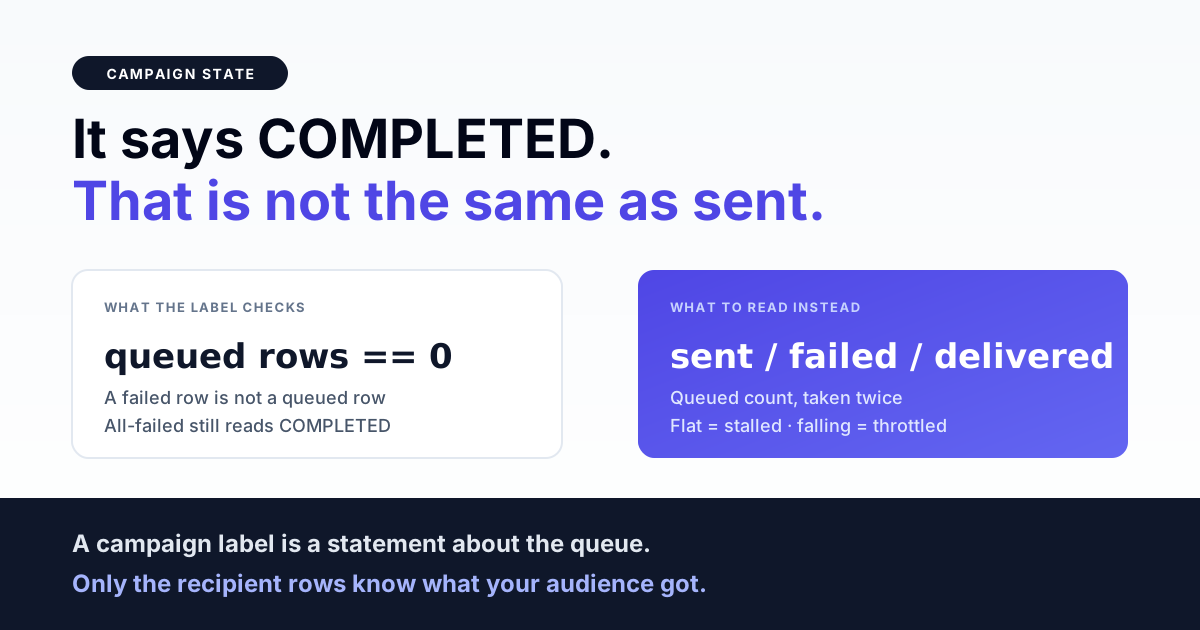
A WhatsApp campaign that reads COMPLETED has not necessarily reached everybody — COMPLETED usually means only that no recipient row is still queued, and a row that failed permanently counts as finished. A campaign that reads PROCESSING for an hour is usually not broken either; it is almost always a queue backing off, a rate-limit release, or a worker draining a different queue than the one the jobs were dispatched to.
Campaign state and message state are two different machines, and almost every "my campaign is stuck" ticket is really a mismatch between them. This page walks the campaign object's own lifecycle — what each state means, which transitions are automatic, which need an operator, and the five numbers that tell you whether a campaign genuinely stalled or simply finished worse than you hoped.
The states a campaign moves through
A broadcast on the WhatsApp Business API is not one object. There is a campaign row, and there is one recipient row per person. The campaign row carries a coarse status; the recipient rows carry the truth. Understanding which state belongs to which object removes most of the confusion.
| Campaign state | What it actually means | Who moves it next |
|---|---|---|
| QUEUED | Recipient rows exist and jobs were dispatched. Nothing has been picked up yet. | The first worker that picks up any job |
| PROCESSING | At least one job started. Says nothing about how many remain. | Automatic, once zero rows are still queued |
| PAUSED | Halted. In-flight jobs return without sending. Can be operator-set or automatic. | An operator, explicitly |
| COMPLETED | No recipient row is still queued. Failures are included in "no longer queued". | Nothing — unless a retry re-queues rows |
The recipient rows run their own smaller lifecycle: queued, then sent when the provider accepts the message and returns a message id, then delivered and read when the status webhook says so, or failed with a reason. The campaign is a rollup of those rows and nothing more.
Why COMPLETED does not mean delivered
The completion check on most campaign engines — ours included — is a single question asked after every job finishes: are there any recipient rows left in the queued state? If the answer is no, the campaign flips to COMPLETED. That check does not ask how many succeeded. A campaign in which every single recipient failed satisfies it perfectly, because a failed row is not a queued row.
This is the correct engineering behaviour — the campaign is genuinely finished, there is no more work to do — but it is a terrible thing to read as a business signal. COMPLETED is a statement about the queue, not about your audience. The only honest completion metric is the split: how many rows ended sent, how many ended failed, and how many of the sent ones ever got a delivery receipt. A campaign that shows COMPLETED with 9,000 sent and 1,000 failed is not the same event as one showing COMPLETED with 3,000 sent and 7,000 failed, and the campaign status cannot tell them apart.
Related: the same trap in reverse appears in WhatsApp message delivery troubleshooting, where a message sits at sent and never advances to delivered.
Why a campaign sits at QUEUED and never moves
If nothing at all has happened — no sends, no failures, the counters flat at zero — the problem is upstream of the messaging API. Three causes cover nearly all of it.
No worker is consuming that queue. Campaign jobs are typically dispatched onto a dedicated named queue so a festival blast cannot starve time-critical traffic. That is the right design, and it has one sharp edge: if the worker process is started without that queue in its list, the jobs pile up perfectly happily and are never picked up. Nothing errors. The campaign simply stays queued forever. Check what queues your workers are actually consuming before you check anything else.
The worker outran the transaction that created the rows. When a campaign is created, the recipient rows and the dispatched jobs are usually written inside one database transaction. A worker on another process can grab the job microseconds later and look up a row that its own connection cannot see yet, because the creating transaction has not committed. A naive handler treats "row not found" as nothing to do and returns — and that recipient is stranded at queued forever, with no error and no retry. We hit exactly this: a single campaign left 295 rows permanently queued before the handler was changed to release the job for a later attempt instead of returning. If a fixed subset of your recipients never moves while the rest send fine, this race is the first thing to suspect.
The queue backend is not running. Obvious, and still the most common cause on a self-managed box after a restart. A worker supervisor that failed to come back up produces exactly the same symptom as the two above.
Why PROCESSING crawls — and why that is usually correct
A campaign that is moving slowly is being throttled somewhere, and most of that throttling is deliberate. Four mechanisms all present as slowness.
- Retry backoff. A transient failure does not fail the recipient immediately; it schedules another attempt after a delay that grows with each try. A handful of recipients in backoff will keep a campaign in PROCESSING long after the bulk of it finished.
- Rate-limit release. When the platform answers with a too-many-requests error, the correct response is to put the job back on the queue with a delay rather than retry it immediately. A campaign that hits the ceiling therefore slows down on purpose. Hammering through it is how a short throttle becomes a long one.
- Deliberate spacing on retries. Bulk retry endpoints commonly stagger re-queued jobs — a second of delay per batch of twenty is a typical shape — so that retrying ten thousand failures does not recreate the burst that caused them.
- Daily conversation limits. Once the number's tier ceiling for new business-initiated conversations is reached, further sends are refused until the window rolls. The campaign is not stuck; it is capped. Capacity planning for this is covered in WhatsApp campaign throughput engineering.
The distinction that matters operationally: a stalled campaign has a queued count that does not change over ten minutes. A throttled campaign has a queued count that falls slowly. Watch the number, not the label.
Why a campaign paused itself
PAUSED is not always something a human did. A sensible send pipeline auto-pauses when the platform signals that the business account itself is restricted or locked, because every further attempt against a locked number both fails and deepens the restriction. Ours pauses every campaign for that account, not just the one that tripped it — which is why an operator can find three untouched campaigns paused after a fourth one misbehaved.
An auto-pause is a protective action, and un-pausing without fixing the underlying account state simply re-runs the damage. Confirm the account is clear first; account-level blocks and how to read them are covered in WhatsApp API account-level send blocks.
Get the India 2026 WhatsApp BSP price comparison
Wati vs AiSensy vs Interakt vs RichAutomate: Meta rates, platform fees and hidden costs, side by side. We send it to your WhatsApp in a minute.
Failed recipients never resend on their own — and that is a feature
Once a recipient row is marked failed, an automatic retry must not pick it up again. The reason is a specific and expensive failure mode: give a campaign a broken header image, and every single recipient rejects at the provider. If failed rows stayed eligible for automatic retry, a default of five attempts turns a ten thousand recipient campaign into fifty thousand rejected API calls, all of them pointless, all of them counting against the number's standing.
So the correct rule is that only a queued row is auto-sendable, and an explicit retry must flip rows back to queued before dispatching them. That is also why a bulk retry clears the stored error code as well as the status: a stale terminal code left on the row can cause a reconciliation pass to flip it straight back to failed before the retry even runs.
The corollary for operators: certain errors are terminal by design and are never retried, no matter how many attempts remain. Template does not exist, template not approved, parameter mismatch, an invalid or expired token, a bad media header, a locked account, no approved display name, a recipient the platform refuses to route to. Retrying any of these just re-fails and makes the campaign look stuck while it grinds through attempts that cannot succeed. Parameter-shaped failures in particular are worth fixing at the template level first — see WhatsApp template parameter mismatch errors.
When the campaign list and the campaign page disagree
Two numbers for the same campaign that do not match is a reporting problem, not a sending problem, and it is worth recognising quickly so you do not chase it as an outage.
Many dashboards keep a cached statistics blob on the campaign row that is only written when status webhooks arrive. If the campaign never received webhooks — or the blob was never initialised — it reads as empty, and a list card rendering from it shows zeros while the detail page, which counts recipient rows live, shows real activity. The fix is to compute the counts from the recipient rows in both places. The diagnostic tell is that the zeros are exactly zero across every column, rather than plausibly wrong.
A second, subtler mismatch: sent is usually counted from a timestamp being present on the row, while delivered and read are only ever written by an inbound status webhook. If your webhook endpoint was down for an hour, delivered will under-count permanently for that window even though the messages arrived. That is a gap in your event stream, not in the send.
Per-recipient failures that do not stop the campaign
Several conditions fail one recipient and let the campaign continue, which produces the confusing pattern of a campaign that completes with a large, uniform block of failures.
| Condition | What you see | Where to look |
|---|---|---|
| Wallet or credit balance exhausted mid-run | The first N recipients send, everyone after fails identically | The failure reason on the first failed row, and its timestamp |
| Account disconnected or token invalidated mid-run | Same shape — a clean cutover point | Account status; a token failure often auto-disconnects the account |
| Broken media header on the template | Every recipient fails from the very first one | Fetch the header asset yourself — see media upload failures |
| Recipient numbers that never normalised | Fewer recipient rows than file rows, before any sending happens | Why CSV rows vanish during import |
The shape of the failure block is the diagnostic. Failures spread evenly through the run point at per-recipient causes. Failures that start at a clean cutover point and never stop point at an account-level or balance-level cause that changed mid-run.
The five numbers that settle any "stuck campaign" argument
Before escalating anything, pull these five counts for the campaign. They take one query each and they resolve the question almost every time.
- Recipient rows created. Compare against the size of the list you uploaded. A gap here happened at import, before sending was ever involved.
- Rows still queued. Take this twice, ten minutes apart. Unchanged means stalled. Falling means throttled. Zero means the campaign is done, whatever the label says.
- Rows with a sent timestamp. This is what the provider accepted. It is the honest denominator for every delivery percentage you quote.
- Rows failed, grouped by reason. One dominant reason is a systemic cause; a long tail of different reasons is a data-quality problem in the list.
- Rows delivered. If this is far below sent and the failures are not explaining the gap, your status webhook is the suspect, not your sending.
The pairing that matters most is the second one taken twice. Everything else is diagnosis; that one is the actual answer to "is it stuck".
Checklist before you launch a large campaign
- Confirm workers are consuming the queue name your campaign jobs are dispatched to — not just a queue.
- Send the template to one internal number first, with the same header media and the same variable count.
- Fetch the header media URL yourself and confirm it returns the asset, not a redirect or a login page.
- Check the balance against recipients multiplied by the per-message cost for that template category, not against yesterday's spend.
- Confirm the account is not already restricted, and that the display name is approved.
- Reconcile recipient rows created against list rows uploaded before you press send.
- Verify your status webhook is receiving events right now, so delivered counts will be trustworthy.
- Know in advance where the failure reasons are visible in your tooling — during an incident is a bad time to find out they are not exposed.
Further reading
- WhatsApp message delivery troubleshooting — the per-message status lifecycle underneath a campaign.
- WhatsApp campaign throughput engineering — queue topology, backoff and capacity planning.
- WhatsApp API account-level send blocks — when the account, not the message, is the problem.
- Why CSV rows vanish during a contact import — the gap that appears before sending starts.
- WhatsApp template parameter mismatch errors — the most common uniform, campaign-wide rejection.
Campaigns that tell you what they did
A campaign engine should never make you infer what happened from a one-word label. Live counts on every campaign, failure reasons visible per recipient, a retry that re-queues cleanly instead of double-sending, and an auto-pause when the account itself is in trouble — that is the baseline, not a premium feature. If you are currently reading tea leaves to work out whether a broadcast finished, talk to us.