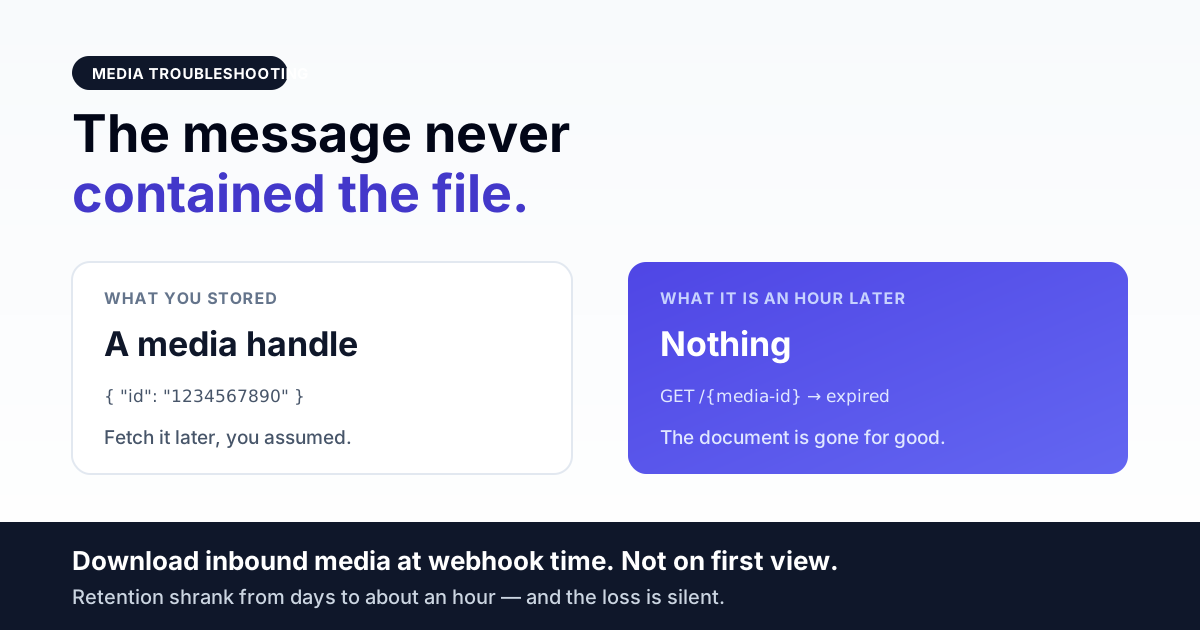
Media on the WhatsApp Cloud API is never a file inside a message. Outbound, it is either an id you uploaded beforehand or a public HTTPS link Meta fetches itself; inbound, it is a handle you must resolve and then download with your access token — and every one of those three paths fails in a way that looks like "the image just didn't send".
This page separates those paths, because the fix for each is different and none of them is "retry the send". If your text messages are also failing, this is the wrong page — start with message delivery troubleshooting, or account-level send blocks if everything stopped at once.
Direct answer — which of the three media paths is broken
| Symptom | Path | Usual cause |
|---|---|---|
| Upload call itself errors | Outbound, upload mode | Missing messaging_product, wrong content type, or the file never reached the request |
| Upload works, send fails | Outbound, upload mode | The id is being used with a different phone number than the one that uploaded it |
| Send accepted, recipient sees nothing | Outbound, link mode | Meta could not fetch your URL — auth, redirect, certificate, or it expired first |
| Inbound media shows as a broken image | Inbound | The handle was stored instead of the bytes, and it has since expired |
| Inbound media 404s in production only | Inbound, storage | The file downloaded fine; your app is serving it from a path that is not publicly reachable |
Outbound path 1 — upload, then send by id
Uploading is a multipart POST against the phone number, not the business account:
POST https://graph.facebook.com/v24.0/{phone-number-id}/media
Authorization: Bearer <token>
Content-Type: multipart/form-data

  messaging_product = whatsapp
  file              = <the bytes, with a correct Content-Type>
It returns a single field — an id — which you then reference in the send:
POST https://graph.facebook.com/v24.0/{phone-number-id}/messages
{
  "messaging_product": "whatsapp",
  "recipient_type": "individual",
  "to": "<recipient>",
  "type": "image",
  "image": { "id": "<the id from the upload>", "caption": "optional" }
}
Three things break here reliably:
- The
messaging_productfield is missing. It is required on the upload, not only on the send. Leaving it off is the single most common first-time upload failure, and the error message does not always point at it clearly. - The per-part content type is wrong or absent. The file part carries its own
Content-Type, separate from the request's multipart boundary. Sending a PDF labelledapplication/octet-streamis a different thing from sending it labelled as a PDF, and the two do not behave the same. - The id is used against a different number. An uploaded id belongs to the phone number that uploaded it. In a multi-number or multi-tenant setup it is very easy to upload once and then fan the same id out across numbers — it will fail on every number except the one that owns it. Upload per number, or use link mode.
There is a portability version of that last point worth stating plainly, because it costs teams a day the first time: a Meta media id is meaningless to any other provider. When we integrated a non-Meta BSP, media had to be re-hosted as a public HTTPS URL — the Meta handle could not be passed through, because it is an object inside Meta's own graph and nothing outside it can resolve it. If your architecture assumes "we store a media id and any channel can send it", that assumption breaks the moment you add a second provider.
Outbound path 2 — send by public link
The alternative skips the upload entirely and hands Meta a URL to fetch:
"image": { "link": "https://your-domain.com/path/file.jpg" }This is simpler and it is where the more confusing failures live, because the API frequently accepts the send — you get a message id back — and the recipient still receives nothing. What happened is that Meta's fetcher, not your code, failed to retrieve the file. The send succeeded; the media did not.
What breaks a fetch:
- The URL is not actually public. Anything behind a session, an API key, a signed header, or a firewall rule works perfectly in your browser — where you are logged in — and returns 403 to an anonymous server-side fetcher.
- A pre-signed URL that expires too early. Generating a 60-second signed link and queueing the send behind a busy worker is a race you will lose intermittently. Intermittent media failure with no pattern is almost always this.
- Redirects. A URL that 302s to a CDN or to a login page is a different resource than the one you named.
- An incomplete TLS chain. Same trap as webhook delivery: browsers cache intermediate certificates and forgive a broken chain, server-side clients do not. Test with an external SSL checker, not with Chrome.
- A
Content-Typethat contradicts the file. A JPEG served astext/htmlby a misconfigured static handler is not a JPEG as far as the fetcher is concerned.
The diagnostic is one command, run from a machine that is not yours and not logged in:
curl -sI "https://your-domain.com/path/file.jpg"You want a 200, a sane Content-Type, a Content-Length that is not zero, and no Location header. If curl needs a flag to succeed, Meta's fetcher will fail.
Inbound — the handle is not the file
This is the part that surprises people. An inbound media message does not contain the image. It contains an id, and getting the bytes is a two-step operation:
# 1. resolve the handle to a temporary download URL
GET https://graph.facebook.com/v24.0/{media-id}
    → { "url": "https://lookaside...", "mime_type": ..., "sha256": ... }

# 2. download that URL — WITH the same Authorization header
GET <the url from step 1>
Authorization: Bearer <token>
Step 2 is where most implementations break. The URL returned in step 1 looks like a normal CDN link, so it gets dropped straight into an <img src> or fetched without headers — and it fails, because it still requires the bearer token. A browser cannot send that header on an image tag. The result is a permanently broken thumbnail in an inbox that otherwise works.
Our own inbound handler does both steps at the moment the webhook arrives, retries each with a short backoff, writes the bytes to our own public disk, and only then hands back a URL:
$downloadUrl = $meta->successful() ? $meta->json('url') : null;
$resp = Http::withToken($accessToken)->timeout(25)
          ->retry(3, 200, throw: false)->get($downloadUrl);
// ... verify bytes actually landed before returning a URL
return secure_url('storage/' . $path);
Two deliberate details in that snippet are worth stealing. First, it only returns a URL if the file genuinely wrote to disk and has non-zero size — a partial download that returns a URL to an empty file is worse than returning nothing, because it looks like it worked. Second, it uses secure_url: if your app URL is HTTP and the browser gets a 301 to HTTPS on an image request, the image silently fails to render in some contexts. Serve the https URL directly.
Retention — the deadline moved and it moved a lot
Storing the media id and fetching the file later "when someone opens the conversation" used to be a defensible design. It is not any more. On the accounts we operate, inbound media handles that were comfortably re-fetchable for days now go dead in roughly an hour. We are describing what we observe on local-region accounts rather than quoting a published figure — but the direction is not ambiguous, and the practical consequence is simple:
Download inbound media at webhook time. Not on first view, not in a nightly job, not lazily. Any architecture that defers the fetch is now a data-loss architecture, and the loss is silent — you find out weeks later when a customer asks about a document nobody can open any more.
Get the India 2026 WhatsApp BSP price comparison
Wati vs AiSensy vs Interakt vs RichAutomate: Meta rates, platform fees and hidden costs, side by side. We send it to your WhatsApp in a minute.
The corollary for anyone with existing lazy-fetch code: your historical media is probably already gone, and a backfill will only recover the recent tail. Worth checking before you promise a customer it can be restored. It is also worth storing the raw handle alongside the downloaded copy — ours goes into the message payload — so a failed localisation can be retried immediately, while the window is still open.
"It works locally, 404s in production"
When the download succeeds and the file still will not display, the problem has moved from the API to your own serving layer. In order of likelihood:
- The storage symlink does not exist on the server. Files land on disk in a directory that is not reachable from the web root. Local development created the link once and nobody added it to the deploy.
- Permissions. The process that wrote the file and the process that serves it are different users, and the second one cannot read what the first one wrote. Extremely common after any manual operation performed as root.
- Ephemeral storage. Containers or platforms with a non-persistent filesystem happily accept the write and lose it on the next restart. Media needs durable storage or an object store, not the container's own disk.
- Mixed protocol. The page is HTTPS and the image URL is HTTP, so the browser blocks it as mixed content and the network tab shows nothing obvious.
A decision path
- Did the upload or send call return an error? Yes → read the message, not the code. Missing
messaging_productand wrong per-part content type cover most first-time failures. - Was the send accepted but nothing delivered, using link mode? →
curl -sIthe URL from an unauthenticated machine. - Is one number working and another not, with the same file? → you are reusing an id across phone numbers.
- Is it inbound and broken? → are you downloading with the auth header at webhook time, or storing the handle for later? If the latter, that is the bug regardless of anything else.
- Downloads succeed but URLs 404? → your serving layer, not WhatsApp. Check the symlink, then permissions, then persistence.
The India-specific parts
- Documents dominate. Invoices, prescriptions, admission forms, insurance papers — the media that matters most in Indian WhatsApp support is PDFs, not photos, and PDFs are exactly what gets misconfigured because a document also needs a filename set on the send for the recipient to see a sensible name instead of a hash.
- Bandwidth-constrained recipients. Large files are not just slow, they change behaviour: on a weak connection a customer may never complete the download, which is indistinguishable from a delivery failure in your own metrics. Compress before you upload; it is the cheapest reliability win available.
- Budget hosting and TLS. The same incomplete certificate chains that break webhooks break link-mode media fetches, for the same reason and with the same test.
Media reliability checklist
messaging_product=whatsappis present on the upload, not just the send.- The file part carries an accurate per-part
Content-Type. - Uploaded ids are never reused across phone numbers.
- Link-mode URLs are anonymous, non-redirecting, correct-content-type HTTPS, verified with
curl -sI. - Signed URLs outlive your worst-case queue latency by a wide margin — or are not used at all.
- Inbound media is resolved and downloaded with the bearer token, at webhook time.
- The download is verified — non-zero bytes on disk — before any URL is handed to the UI.
- The raw media handle is stored alongside the local copy so a failure can be retried immediately.
- Served over HTTPS directly, with no protocol redirect on the image URL.
- Media storage is durable and survives a deploy or container restart.
Frequently asked questions
Media headers are supplied as template parameters too, and the same positional rules apply. See how WhatsApp template parameters are matched.
Why does my WhatsApp media upload fail with a generic error?
Two causes account for most first-time failures: a missing messaging_product=whatsapp on the upload request itself — required on the upload, not only on the send — and a file part sent without an accurate per-part Content-Type. The multipart boundary content type is not the same thing as the content type of the file inside it. Confirm both before investigating anything else.
Can I reuse one WhatsApp media id across multiple phone numbers?
No. An uploaded id belongs to the number that uploaded it, so fanning one id across numbers fails everywhere except the owner. Upload once per number, or use link mode. A Meta media id is also not portable to another provider — it is an object inside Meta's graph, so cross-provider setups must re-host media as a public URL.
The API accepted my media message but the recipient got nothing. Why?
In link mode the API accepts and returns a message id before Meta has fetched the file, so acceptance only means your request was well-formed. The fetch then failed — the URL is not truly public, it redirects, its pre-signed expiry elapsed while the send sat in a queue, its TLS chain is incomplete, or its Content-Type contradicts the file. Test with curl -sI from a machine that is not logged in.
Why is inbound WhatsApp media showing as a broken image?
Because the download URL is being treated as public. Inbound media is two steps: resolve the id to a temporary URL, then download that URL with the same bearer header. The URL looks like an ordinary CDN link but still needs the token, and a browser cannot send that header from an image tag. Download server-side at webhook time and serve your own URL.
How long can I wait before downloading inbound WhatsApp media?
Do not wait. On the accounts we operate, handles that were once re-fetchable for days now expire in roughly an hour on local-region accounts. Deferring the fetch to first view or a nightly job is a silent data-loss design. Download at webhook time, verify the bytes landed, and keep the raw handle so a failure can be retried while the window is open.
Media downloads fine but the URL 404s in production. What is wrong?
That is your serving layer, not the API. In order: the storage symlink exists on the server and is part of the deploy; the serving user can read what the writing process created (this breaks after manual work done as root); the filesystem is durable rather than an ephemeral container disk; and the image URL is HTTPS with no protocol redirect, since a mixed-content block looks like an image that simply never appears.
Further reading
- Webhook not receiving messages — if inbound media is missing because inbound events are missing entirely.
- Webhook reliability engineering guide — the architecture that makes download-at-webhook-time safe under load.
- Message delivery troubleshooting — for messages accepted by the API that never land.
- Account-level send blocks — when every send fails at once, media or not.
- WhatsApp Business API setup, step by step — the onboarding sequence all of this sits inside.
Media that is still there in six months
The expensive failure here is not a broken image today — it is discovering that a year of customer documents was never actually stored, only referenced. RichAutomate downloads inbound media the moment the webhook lands, verifies the bytes reached disk before showing anything in the inbox, keeps the original handle so a failed fetch can be retried while it is still valid, and serves everything over HTTPS from durable storage. If your media works in testing and disappears in production, talk to us before the retention window closes on another month of it.