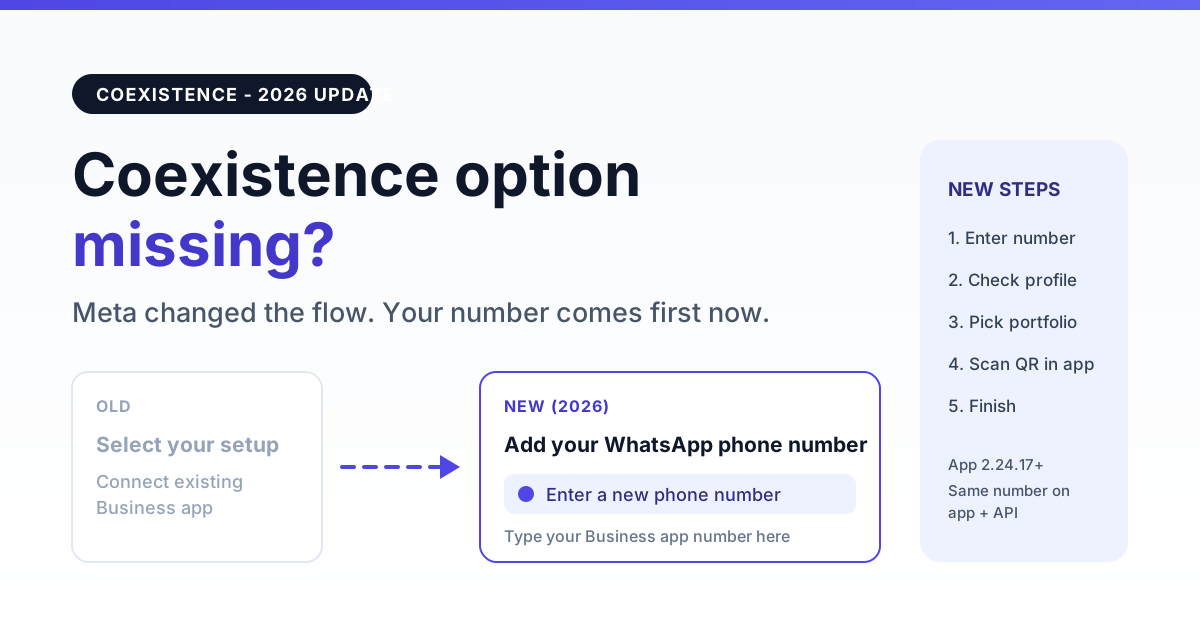
If the "Connect your existing WhatsApp Business app" option has disappeared from your WhatsApp signup popup, nothing is broken: Meta changed the coexistence flow. In 2026 the popup opens on "Add your WhatsApp phone number" for everyone, and you start coexistence by choosing Enter a new phone number and typing the number that already runs on your WhatsApp Business app.
Meta then recognises that the number is live on the app, shows its business profile and asks you to scan a QR code inside the WhatsApp Business app. The label "new phone number" is what makes most people stop. This guide shows the old flow next to the new one, the exact screens to expect, the checks to run before you start, the common errors and how to confirm that coexistence is really active.
What changed in the coexistence signup flow
Coexistence lets one number work in the WhatsApp Business app on your phone and on the WhatsApp Cloud API at the same time. You keep chatting from the app, and your provider runs broadcasts, chatbots and automations on the same number. If you are new to the idea, our guide to WhatsApp coexistence with the Business app and API on one number explains the basics.
What changed is how you get into it. Earlier, providers sent a coexistence flag and Meta showed a separate choice screen. Today that screen is gone and the decision happens after you enter the number. HighLevel's coexistence help article, last updated on 2 September 2026, lists the same order: phone number entry first, then the business profile tied to that number, then a QR scan in the app.
| Step | Old flow | New flow (2026) |
|---|---|---|
| First screen after login | "Select your setup" with "Connect your existing WhatsApp Business app" and "Start with a new WhatsApp phone number" | "Add your WhatsApp phone number" with Enter a new phone number, a virtual number option and your registered numbers |
| How coexistence starts | You pick the existing-app option | You type the number that is live on the Business app; Meta detects it |
| Verification | QR scan in the Business app | QR scan in the Business app |
| Result | Same number on app and API | Same number on app and API |
The new coexistence flow, screen by screen
- Log in with Facebook and allow the permissions your WhatsApp provider asks for.
- Add your WhatsApp phone number: choose Enter a new phone number.
- Type the number that already runs on the WhatsApp Business app, with the country code.
- Check the business profile Meta shows for that number. If it is your business, continue.
- Select or create the Meta business portfolio the number should belong to.
- Scan the QR code from the WhatsApp Business app on your phone when Meta asks.
- Confirm the account name and timezone, accept the terms and finish.
Your chats keep working in the app throughout. Meta shares a limited slice of recent chat history and your contacts with the API side so the provider dashboard is not empty on day one.
Which option to pick on the phone number screen
| Option on the screen | Use it for coexistence? | What it does |
|---|---|---|
| Enter a new phone number | Yes | Type your existing WhatsApp Business app number here. Meta checks it and moves to the coexistence path. |
| Use a display name with a virtual number instead | No | Creates a separate number on the API. Your app number is not connected. |
| A number marked Registered | No | That number is already on the Cloud API with some provider. It cannot be added again through coexistence. |
Checklist before you start
- App version: Meta requires the WhatsApp Business app 2.24.17 or newer. Update it first.
- The number is live on the app and in daily use, not a fresh install from today.
- The number is not on the Cloud API already with another provider or another WABA.
- Phone in hand: the flow ends with a QR scan inside the app, so keep the phone unlocked and online.
- Right business portfolio: use the Meta business portfolio that should own the number.
Common errors and what they mean
| What you see | Likely cause | What to do |
|---|---|---|
| Meta sends an OTP and treats it as a brand-new registration | The number is not live on the WhatsApp Business app, or the app is too old | Open the app, update it to 2.24.17 or newer, make sure the number is active there, then start again |
| Number shows "ineligible" | The number fails one of Meta's coexistence pre-checks | Follow our fix order for a number that shows ineligible in coexistence |
| "Selected business CoEx gate evaluation is missing" | Meta did not clear the selected business portfolio for coexistence | Use the portfolio that owns the number, complete its business details, or try another portfolio |
| Your number appears with a Registered badge | It is already connected to the Cloud API | Disconnect it from the old provider first, or keep it there |
| Popup closes and nothing connects | Popup blocker, an old tab or the session expired | Allow popups, open the connect page in a fresh tab and retry |
For developers: what your Embedded Signup code must handle
If you build on the WhatsApp Cloud API yourself, the coexistence change affects what you should expect from the popup, not the parameter you send. Keep these points in mind:
Get a 1-minute BSP audit on WhatsApp
Drop your WhatsApp number — we line-item your current invoice against Meta India rates in under 60 seconds. India-hosted, DPDP-compliant.
- Launch flag: coexistence still uses
featureType: "whatsapp_business_app_onboarding"in the FB.loginextras. With it, the popup still opens on the phone number screen, so do not treat that screen as a bug. - Finish event: a coexistence session ends with
FINISH_WHATSAPP_BUSINESS_APP_ONBOARDING, notFINISH. If your message listener only handlesFINISH, you lose the WABA and phone number IDs from the session. - Webhooks: subscribe your app to
history,smb_app_state_syncandsmb_message_echoes, so you receive the synced chat history, contacts and the messages the business sends from the app. - Verification: read
is_on_biz_appon the phone number in the Graph API. It returnstruefor a coexistence number. - Deadline: Meta lists Embedded Signup v2 for deprecation on 15 October 2026, so move to the current version if you have not already.
How to confirm coexistence is active
- The number still sends and receives messages in the WhatsApp Business app on your phone.
- The same number shows as connected in your provider dashboard and can send a template.
- Recent chats and contacts appear on the API side.
- Messages you send from the app show up in your provider's inbox as well.
Coexistence numbers have lower sending throughput than a full API number, so plan large broadcasts accordingly. Our guide on WhatsApp Business app and API coexistence in India covers the limits and when a full migration makes more sense.
Connect your number with RichAutomate
On RichAutomate, open WhatsApp Connect and click I already use the WhatsApp Business app. When Meta's popup asks for a phone number, choose Enter a new phone number, type your WhatsApp Business app number and scan the QR code in the app. Your number keeps working on the phone, and broadcasts, chatbots and the shared team inbox run on the same number.
RichAutomate has ₹0 setup and ₹0 monthly on pay-as-you-go, plans from Starter ₹499/mo, and a 14-day free trial with 100 free credits. See RichAutomate pricing for the full plans, or compare what each message costs in our WhatsApp API pricing by country guide.
Frequently asked questions
Why don't I see 'Connect your existing WhatsApp Business app' anymore?
Meta's Embedded Signup now opens on the 'Add your WhatsApp phone number' screen for coexistence too. There is no separate choice screen. You enter the number that already runs on the WhatsApp Business app, and Meta switches to the coexistence path on its own, followed by a QR code scan inside the app.
Should I choose 'Enter a new phone number' for coexistence?
Yes. Despite the label, 'Enter a new phone number' is where you type the number you already use on the WhatsApp Business app. Do not pick 'Use a display name with a virtual number instead', which creates a different number, and do not pick a number marked Registered, which is already on the API.
Which WhatsApp Business app version do I need for coexistence?
Meta requires the WhatsApp Business app version 2.24.17 or newer on the phone. Update the app from the Play Store or App Store before you start, keep the phone online and nearby, because the flow ends with a QR scan inside the app.
How do I know coexistence actually worked?
After you finish, the number keeps working in the WhatsApp Business app and also appears as connected in your provider dashboard. Developers can check the phone number on the Graph API: is_on_biz_app returns true for a coexistence number. The Embedded Signup session also ends with the FINISH_WHATSAPP_BUSINESS_APP_ONBOARDING event instead of FINISH.
What does 'CoEx gate evaluation is missing' mean?
It means Meta did not clear the selected business portfolio for coexistence. It is a business-side eligibility check, not a code error on your provider's side. Try again with the business portfolio that owns the number, check that the business details are complete, or try a different portfolio.