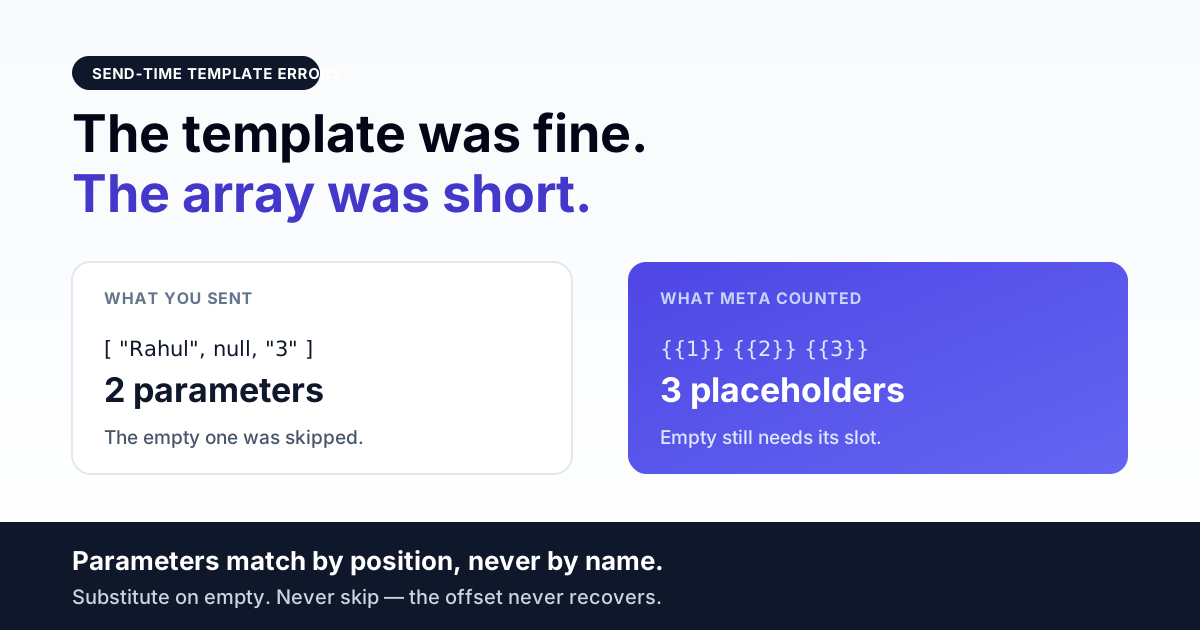
A WhatsApp template parameter mismatch almost never means your values are wrong. It means the count or the position of what you sent does not line up with the template Meta approved — because the send payload is a positional array, not a set of named fields, and {{1}} is a slot number rather than a key you fill in.
That distinction is the whole failure class. This page is about templates that are already approved and still 400 at send time. If Meta is rejecting your template during review, that is a different problem with a different fix — see template rejection reasons and fixes instead.
Direct answer — approval-time and send-time are two different failures
Both get described as "the template has a parameter problem", and the two have almost nothing in common.
| Approval-time | Send-time | |
|---|---|---|
| When it happens | You submit the template for review | Template is live and a specific send fails |
| What you see | Rejected, with a reason on the template | An HTTP 400 on one message; other sends of the same template may succeed |
| Typical cause | Sample values missing or a variable count that disagrees with your example | The array you built at runtime has the wrong length, order, or content |
| Who fixes it | Whoever owns the template copy | Whoever owns the send code |
| Blast radius | One template, until resubmitted | Every contact whose data happens to trip it — often a minority of a campaign |
The send-time version is the nastier one, because a campaign can be 94% delivered and quietly fail on the 6% of contacts with an empty middle field. Nothing looks broken from the dashboard until someone reads the error rows.
The payload is positional, and the offset is continuous
The single most useful thing to understand: when you send an approved template, you do not send a map of {"1": "Rahul", "2": "INV-4471"}. You send an ordered list of components, each with an ordered list of parameters:
{
  "messaging_product": "whatsapp",
  "to": "9198XXXXXXXX",
  "type": "template",
  "template": {
    "name": "order_update",
    "language": { "code": "en" },
    "components": [
      { "type": "header", "parameters": [ { "type": "text", "text": "INV-4471" } ] },
      { "type": "body",   "parameters": [
          { "type": "text", "text": "Rahul" },
          { "type": "text", "text": "3" }
      ] }
    ]
  }
}
Meta matches these by position. The first parameter in the body array becomes the body's first placeholder, the second becomes the second, and so on. Nothing in the payload names a placeholder. If your body has three placeholders and you send two parameters, the message is rejected — not filled in with a blank.
What trips up most implementations is that the offset is continuous across components. A template with a text header, a body, and a dynamic URL button consumes your variable list in that order: header first, then body, then button. Getting the header wrong does not just break the header — it shifts everything downstream by one.
The NULL that eats the rest of your message
This is the bug we have actually shipped and fixed, so it is worth spelling out in full. Our send job walks the approved template's components, counts the placeholders in each, and pulls that many values off the caller's variable list:
// array_key_exists, not isset: a NULL variable must still
// consume its slot or $varOffset stalls and every later
// placeholder is silently dropped (Meta #132000).
if (array_key_exists($varOffset, $variableValues)) {
    $headerParams[] = ['type' => 'text', 'text' => (string)$variableValues[$varOffset++]];
}
The comment is the lesson. An earlier version used isset(), which returns false for a value that exists but is null. A contact with a missing middle name did not just lose that one placeholder — the offset failed to advance, so every subsequent placeholder read the wrong slot, and the last one had no slot at all. The array came out one short and the send failed on parameter count.
The general form of this bug, in any language: a null-ish check that skips instead of substituting. Empty string, None, undefined, a database NULL, a CRM field that was never filled. If your parameter builder treats "no value" as "no slot", every template with more than one variable will fail for exactly the customers whose records are incomplete — which is the segment you are most likely to be messaging.
The fix is not to filter those contacts out. It is to emit a placeholder value — a space, a dash, a sensible default — so the array length always equals the placeholder count.
The name and the language are part of the match
Two more things must line up before the parameters are even looked at, and both produce errors that read like a template problem rather than a payload problem.
The name is case-sensitive and lowercase. Meta stores template names as lowercase with underscores. If your UI lets someone type Order_Update and you pass that string through verbatim, the send fails to match any approved template. Our code normalises it at the send chokepoint for exactly this reason:
// Meta stores template names lowercase (^[a-z0-9_]+$);
// a UI-cased name throws 132001.
'name' => strtolower((string) $templateName),
The language code must be the approved one, not the user's locale. A template approved under en_US does not answer to en, and one approved under en does not answer to en_US. This causes a lot of confusion in India specifically, where the same template is often approved in English and in a regional language as two separate objects. The reliable pattern is to read the language off your stored copy of the approved template rather than off the contact or the request — if you have the template row, it already knows its own language.
A related trap we hit ourselves: a template row is not a text message. If you clone a stored template send and try to reuse it as a free-form text send, the message still carries template metadata and Meta rejects it. Clone the last text row explicitly, or build the payload from scratch.
Characters that are legal in your CRM and illegal in a parameter
Template text parameters are not free text. A newline, a tab, or a run of four or more consecutive spaces inside a parameter value will be rejected, even though the same characters are perfectly fine in a normal text message and perfectly fine in the template body you had approved.
This matters because parameters are almost always populated from data you do not control: a CRM address field with an embedded line break, a product name pasted out of a spreadsheet with trailing tabs, an address block from a web form. The value looks fine in your database and fails at Meta.
The correct place to fix this is the single point every send passes through, not each caller:
foreach ($component['parameters'] as &$param) {
    if (isset($param['text']) && is_string($param['text'])) {
        $clean = preg_replace('/[\r\n\t]+/', ' ', $param['text']);
        $clean = preg_replace('/ {2,}/', ' ', $clean);
        $param['text'] = trim($clean);
    }
}
Structural parameters — currency objects, date-time objects, already-validated button URLs — are left alone. Only text is collapsed. Doing this per-caller instead of centrally guarantees that the one caller you forget is the one that runs your biggest campaign.
Send these messages on WhatsApp, from your own number
We get your templates approved on the official WhatsApp API and set up your first broadcast with you. ₹0 platform fee, you pay only Meta's per-message rate.
Authentication templates want the same value twice
One-time-password templates are the most common source of "but I sent the parameter" confusion. An authentication template typically shows the code in the body and attaches a copy-code or URL button that also carries the code. Those are two separate components, and Meta wants the value supplied in both — even though it is literally the same {{1}} in your template copy.
Send it in the body only and the request fails for a missing button parameter. Our builder handles this by reusing the value the placeholder points at when no unused variable remains:
// authentication / OTP COPY_CODE templates reuse the SAME {{1}}
// in body AND button url, and Meta requires it in BOTH components
preg_match('/\{\{(\d+)\}\}/', $button['url'], $bm);
if (isset($variableValues[$varOffset])) {
    $btnVal = (string)$variableValues[$varOffset++];
} elseif (!empty($bm[1]) && isset($variableValues[(int)$bm[1] - 1])) {
    $btnVal = (string)$variableValues[(int)$bm[1] - 1];
}
If you are building OTP sends and they fail intermittently, check the button component before you check anything else. And if OTP delivery is failing without any API error at all, that is a different problem — see message delivery troubleshooting.
When the header quietly steals a body variable
A subtler one, and worth auditing if your numbers occasionally land in the wrong sentence. Media-header templates need a media reference rather than text, and a common convenience is to scan the caller's variable list for anything that looks like a URL and promote it to the header.
That convenience has a sharp edge: if a body placeholder is legitimately a URL — a tracking link, an invoice PDF link, a store locator — the promotion logic can take it for the header and re-index the remaining values, shifting every body placeholder by one. The message sends successfully with completely wrong content, which is worse than an error.
If your templates carry media headers, pass the header media explicitly as its own field rather than relying on detection, and keep body variables strictly positional.
A decision path
- Every send of this template fails, no exceptions → name, language code, or a structural count mismatch. Fetch your approved template from the API and count its placeholders per component.
- Most sends work, some fail → data-dependent. Look for null, empty, or whitespace-only values in the failing contacts' variables.
- Fails only for one component type → button or header parameters. Authentication templates need the code twice; media headers need a media object, not text.
- Message sends but the values are in the wrong places → offset drift, not a count error. Something is consuming a slot it should not, or skipping one it should.
- Every template send fails but plain text works → not a parameter problem at all. Check account-level send blocks — a billing or policy block hits templates first.
- Only media templates fail → see media upload and fetch failures.
The India-specific parts
Three things make this class of bug more frequent for Indian senders than the generic documentation suggests.
Multilingual template sets. Running the same campaign in English, Hindi and a regional language means three approved template objects with three language codes and, often, three different placeholder counts — because a sentence that needs two variables in English may need three in Hindi to read naturally. Selecting the template by name and assuming the parameter list transfers is a reliable way to break the non-English variants only.
Name and address data. Indian contact records carry more optional-field variance than most: single-word names, missing surnames, address lines pasted with embedded newlines, honorifics in a separate column that is empty two-thirds of the time. Every one of those is a null-slot or illegal-character trigger, and they cluster in bulk-imported legacy lists.
Amounts and dates. Rupee amounts formatted with the Indian digit grouping, and dates written day-first, are usually passed as plain text parameters. That works — but if you switch a placeholder to a currency or date-time parameter type later, the shape of that array entry changes completely and every caller still sending a text object will fail.
Parameter reliability checklist
- Build the parameter array from the approved template's own component list, not from a hand-maintained count in your code.
- Never let a null or empty value skip a slot — substitute a placeholder string so array length always matches placeholder count.
- Lowercase the template name at the single point of send.
- Read the language code off the stored approved template, never off the contact's locale.
- Sanitise newlines, tabs and repeated spaces out of every text parameter centrally.
- Supply the code in both the body and the button component for authentication templates.
- Pass header media explicitly; do not infer it from a URL-shaped body variable.
- Re-sync your local copy of approved templates whenever a template is edited — a stale local copy is how a correct send builds a wrong array.
- Log the full outbound payload on failure, not just the error string. The array length is the answer and it is only visible in the payload.
- Test with your worst contact record, not your cleanest one.
Frequently asked questions
If the complaint is about the recipient rather than the payload, the failure class is different — see WhatsApp API invalid phone number errors.
Further reading
- Template rejection reasons and fixes — the approval-time half of this problem.
- Template governance at scale — naming, ownership and version control once you have hundreds.
- Message delivery troubleshooting — when the send is accepted and nothing arrives.
- Account-level send blocks — when every template fails at once.
- Media upload and fetch failures — the media-header half.
Campaigns that do not fail on your worst record
Parameter bugs are cheap to fix and expensive to find, because the failure is invisible until someone reads the error rows on a campaign that reported mostly delivered. RichAutomate builds the parameter array from the approved template's own component list rather than a hand-maintained count, substitutes rather than skips on empty values, normalises text parameters at the single send chokepoint, and surfaces per-contact failures instead of burying them in a success percentage. If your template sends work for clean records and break on real ones, talk to us.