An "invalid phone number" error on the WhatsApp Business API is almost never about the recipient being a bad person to message. It means the digits you sent could not be resolved to a WhatsApp identity — and that resolution has four possible outcomes, only one of which is a real send.
The number in your CRM, the number Meta will accept, and the number that actually exists on WhatsApp are three different things. This page is about the gap between them, which is where most Indian contact lists quietly lose 5–15% of their reach.
Direct answer — four recipient states, not one
Teams treat "the number failed" as a single condition. It is four, and each one is fixed somewhere different. Reading the wrong one wastes a week cleaning a list that was never the problem.
| State | What happened | Where you see it | Fix lives in |
|---|---|---|---|
| Malformed | The digits are not a plausible international number at all. Rejected before Meta ever looks for a user. | Immediate API error on the send call | Your normalisation code |
| Well-formed, no WhatsApp account | A real, valid number — nobody has registered it on WhatsApp. | Accepted, then fails as undeliverable | List sourcing |
| Resolved to a different identity | Meta accepts it and answers about a slightly different number than the one you sent. | The wa_id in the response | Your matching logic |
| Valid and reachable, never arrives | Nothing wrong with the number. Something else stopped the message. | Status webhook, later | Not here — see delivery troubleshooting |
Only the first three belong to this page. If the number resolved cleanly and the message still never landed, the number is exonerated and you should be reading why WhatsApp messages are sent but not delivered instead.
The number you send is not the number you get back
This is the single most under-appreciated fact in WhatsApp integrations, and it breaks reconciliation rather than sending.
When a message arrives, the webhook payload carries a wa_id — WhatsApp's own identifier for that user. It is usually identical to the digits you would have sent. It is not guaranteed to be. Our inbound handler matches the profile name by comparing the contact entry's wa_id against the wa_id on the message itself, rather than against whatever number the CRM holds:
// Match profile name from contacts array if available
$profileName = null;
foreach ($contacts as $contactEntry) {
    if (($contactEntry['wa_id'] ?? null) === $waId) {
        $profileName = $contactEntry['profile']['name'] ?? null;
        break;
    }
}
The practical consequence: if you key conversations on the number your CRM stored rather than on the wa_id WhatsApp returned, you will eventually create two conversation rows for one human. They will look like two different contacts, the 24-hour window will be tracked against the wrong one, and a reply will arrive on a thread nobody is watching.
Rule: store the number you sent, but key on the wa_id you received. One is your data, the other is WhatsApp's truth.
What "normalising to E.164" actually has to handle in India
Every integration guide says "normalise to E.164". Almost none of them say what the input looks like in an Indian CRM, which is where the work is. The real inputs, in rough order of frequency:
- Bare 10 digits —
9876543210. The default in most Indian web forms and every imported Excel sheet. - Trunk-prefixed 11 digits —
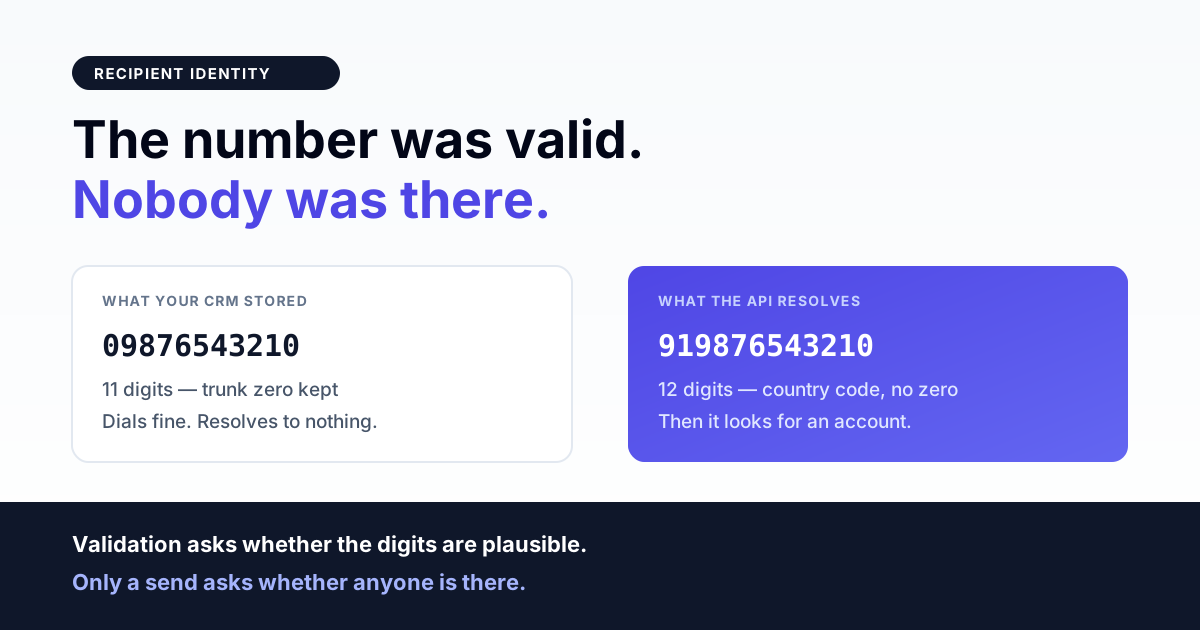
09876543210. The domestic dialling habit, preserved by field staff and call-centre exports. - Correct 12 digits —
919876543210. What you actually want. - Doubled country code, 14 digits —
9191followed by ten digits. A UI field that already displays+91concatenated with a number the user typed with 91 in it. - Formatted with separators —
+91 98765 43210,+91-98765-43210. Harmless once stripped, fatal if not. - Landline and toll-free numbers sitting in a column labelled "mobile".
The doubled-prefix case is worth dwelling on because it is the one people assume cannot happen. It is unambiguous and therefore safely correctable — India is a 2-digit country code plus a 10-digit subscriber number, so a 14-digit string beginning 9191 can only be the prefix applied twice. Our helper says exactly that in a comment, because the reasoning is not obvious to whoever reads the branch next:
// Double country code: a UI field that already shows +91 concatenated with a
// number the user typed WITH 91 gives 9191XXXXXXXXXX. India is 91 + 10 digits,
// so 14 digits starting 9191 can only be the prefix applied twice.
if (strlen($phone) === 14 && str_starts_with($phone, '9191')) {
    return substr($phone, 2);
}
The mobile-series check most normalisers skip
Stripping separators and adding 91 is the easy half. The half that determines whether your list is clean is deciding what to do with digits that look like a number but cannot be an Indian mobile.
Indian mobile numbers begin with 6, 7, 8 or 9. A 10-digit string starting with 2 or 4 is a landline, and it will normalise into a perfectly well-formed +91 number that no WhatsApp account will ever answer to. A normaliser that only counts digits will pass it through happily; one that checks the series will not:
// 10-digit Indian mobile (starts 6-9).
if (strlen($digits) === 10 && preg_match('/^[6-9]/', $digits)) {
    return '+91'.$digits;
}

// 11 digits with a national trunk 0 prefix (0XXXXXXXXXX).
if (strlen($digits) === 11 && str_starts_with($digits, '0')) {
    $local = substr($digits, 1);
    if (preg_match('/^[6-9]/', $local)) {
        return '+91'.$local;
    }
}
Note the second branch: the trunk zero is stripped and then the series is re-checked. Stripping the zero first and validating never is how 0224xxxxxxx becomes a "valid" mobile.
Two normalisers in one codebase is the normal state
Here is an honest finding from our own repository, because it is the thing that will bite you and no vendor documentation will warn you about it.
We have two phone-normalisation paths. One is length-driven: strip non-digits, drop a leading zero, add 91 to anything exactly ten digits long, and return unchanged for any other length. The other is series-aware and returns null when it cannot produce something plausible. Both are correct for what they were written for. They do not agree on the same input.
Get the India 2026 WhatsApp BSP price comparison
Wati vs AiSensy vs Interakt vs RichAutomate: Meta rates, platform fees and hidden costs, side by side. We send it to your WhatsApp in a minute.
| Input | Length-driven path | Series-aware path |
|---|---|---|
9876543210 | 919876543210 | +919876543210 |
02240001234 | 2240001234 — passed through | null — rejected |
12345 | 12345 — passed through | null — rejected |
The lesson is not "we have a bug". The lesson is that a permissive normaliser and a strict one produce different lists from the same CSV, and if your import path uses one while your send path uses the other, your delivery rate will disagree with your contact count in ways nobody can explain. Pick one function. Route every entry point through it. Whether it is permissive or strict matters far less than whether it is singular.
Validation is not verification
A number can be perfectly valid and still have no WhatsApp account behind it. These are separate questions and only one of them can be answered offline:
- Validation — is this a plausible number? Answerable from the digits alone, instantly, for free, at import time.
- Verification — does a WhatsApp account exist here? Answerable only by attempting something and reading the result.
Do all the validation you can at import. Treat verification as a byproduct of sending, not a prerequisite: mark a contact unreachable when a send to it fails as undeliverable, and stop retrying that number. A list that never records its own failures re-attempts the same dead numbers on every campaign forever, which is both wasted spend and a slowly worsening quality signal.
The India-specific traps
Ported and recycled numbers
Mobile number portability means a number can move between operators without changing. That does not affect WhatsApp. What does affect it is recycling — a disconnected number reissued to a new subscriber. Your two-year-old list contains some of these. The number is valid, WhatsApp may well be active on it, and the person is a stranger who never opted in. This is a compliance problem wearing a data-quality costume; see opt-in list hygiene and re-permissioning.
The DND myth
India's Do Not Disturb registry governs telecom SMS and voice. It is not a WhatsApp mechanism and there is no DND flag in the messaging API. Filtering your list against a DND list will not change what WhatsApp delivers, and not filtering it will not make WhatsApp block you. What governs WhatsApp reach is opt-in quality and how recipients respond — a number nobody blocks is worth more than a number that merely passes a registry check.
Multi-number households and shared business numbers
Common in retail and B2B: one WhatsApp account on a number that several people use, or an office number where the person who reads WhatsApp is not the person in your CRM record. Nothing technical fails. Your personalisation does — {{1}} greeting the wrong person is a worse outcome than no name at all. Prefer a neutral greeting when name confidence is low rather than a confidently wrong one.
Test numbers that quietly stay in production lists
Every team seeds a list with a colleague's number during setup. Those rows survive migrations. They inflate counts, they skew read rates, and occasionally they receive a campaign meant for customers.
A decision path
- Did the API reject the send outright, before any status webhook? The number never resolved. Check normalisation — length, trunk zero, doubled prefix, separators.
- Did it reject only for some recipients while others in the same batch went through? Not an account problem. Your list has mixed formats; find the ones that differ in length from the majority.
- Did every recipient in the batch fail identically? Stop looking at the numbers. Look at account-level send blocks.
- Did the API accept it and a status webhook later report it undeliverable? The format was fine; there is no WhatsApp account. Mark unreachable, stop retrying.
- Was it accepted, and nothing at all came back? Neither format nor account — that is a webhook or delivery issue.
- Did it fail with a parameter or template complaint rather than a recipient one? The recipient is irrelevant; see template parameter mismatch at send time.
- Is it your own sending number failing rather than the recipient? Different class entirely — see when your WhatsApp API number is not registered.
Recipient-hygiene checklist
- One normalisation function. Every import, form, API and campaign path calls it.
- Normalise at write time, not read time — store the canonical form, never re-derive it per send.
- Strip the trunk zero, then re-validate the series. Not the other way round.
- Reject 10-digit strings that do not start 6–9 rather than prefixing them.
- Detect the 14-digit doubled
9191case explicitly; it is unambiguous and cheap to fix. - Key conversations on the
wa_idWhatsApp returns, not the number your CRM stored. - Record undeliverable outcomes against the contact and stop retrying automatically.
- Never bulk-import a column labelled "mobile" without checking what fraction of it is landlines.
- Keep opt-in source and timestamp on every row — it is the only defence for an old list.
- Flag and exclude internal test numbers before the first real campaign, not after.
Further reading
- Message delivery troubleshooting — when the number was fine and nothing arrived.
- Your API number is not registered — the sender-side version of this failure.
- Template parameter mismatch — when the payload, not the recipient, is wrong.
- Opt-in list hygiene — keeping an old list defensible.
- Account-level send blocks — when every recipient fails at once.
Lists that fail loudly instead of quietly
Bad numbers are not expensive because they fail. They are expensive because they fail silently, get retried forever, and drag a quality score down while the dashboard reports a healthy send count. RichAutomate normalises on write through a single path, keys conversations on the identity WhatsApp returns rather than the one you typed, and records per-recipient outcomes so a dead number stops costing you on the next campaign instead of the tenth. If your delivered count has never matched your contact count and nobody can say why, talk to us.
Before a number can be rejected it has to survive the upload — see why CSV rows vanish during a WhatsApp contact import.
Most invalid-number errors start with formatting: see our WhatsApp number format guide for India (+91 and 91XXXXXXXXXX).