Direct answer — the row count is not the contact count
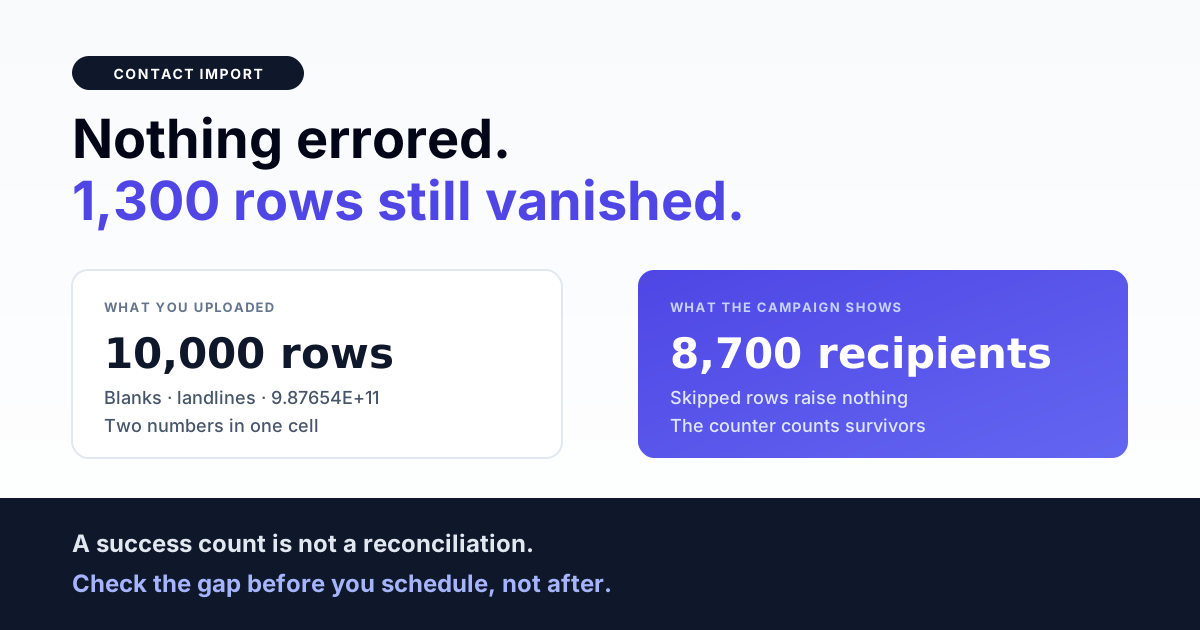
If you uploaded a CSV of 10,000 numbers and the campaign screen says 8,700 recipients, nothing errored. Rows that cannot be turned into a usable number are skipped silently — no warning, no rejected-rows file, no line number — and the importer's own progress counter counts only the survivors, so the number it reports back to you already excludes everything it threw away.
That is the whole problem in one sentence: an importer's success count is not a reconciliation. It tells you how many rows made it, never how many did not. If you want the difference, you have to compute it yourself, before the campaign goes out rather than after finance asks why the send volume missed forecast.
This page walks the path a single CSV row takes on its way to becoming a messageable contact, and names the five places it can quietly disappear.
The header row decides everything
Contact importers are almost always header-driven. The first row of the file is read once, each column name is lowercased and trimmed, and the importer looks for the specific names it knows. Everything else in that header row is ignored — not rejected, ignored. A column the importer does not recognise contributes nothing and raises nothing.
In practice the recognised set is small. A phone column, and a set of positionally-numbered variable columns for template placeholders. That is frequently the entire contract. Columns called email, city, order_id, gst or last_purchase sail past untouched unless the platform explicitly documents them as custom attributes.
The failure this produces is not dramatic, which is exactly why it survives to production: your file looks rich, the upload succeeds, and the send goes out with none of the personalisation you thought you had attached.
The header names that actually matter
| What you write in the header | What a header-driven importer does |
|---|---|
phone | Recognised. This column becomes the recipient. |
Phone, PHONE, phone | Recognised — matching is done on the lowercased, trimmed name. |
mobile, whatsapp, Phone Number, contact_no | Not recognised. These are the four most common Indian CRM exports, and none of them match. |
var_1, var_2, var_3 | Recognised as template variables, bound to placeholder position 1, 2, 3. |
name, city, amount | Ignored for templating. Put the value in var_1 if the template's first placeholder is the customer's name. |
The practical rule: rename your columns to match the importer, do not expect the importer to guess. Renaming a header in a spreadsheet takes ten seconds. Diagnosing a campaign that sent 8,700 messages with blank placeholders takes an afternoon.
When there is no phone column
Here is the behaviour that surprises people most. When a header-driven importer cannot find its phone column, the sane thing to do would be to stop and tell you. What many actually do instead is fall back to the first column of the file and treat it as the number.
The fallback is well-intentioned — plenty of real uploads are a bare list of numbers with a throwaway header — and when the first column genuinely is the phone number, it rescues the import. When it is not, the outcome is silent and total:
- First column is
name→ every row normalises to nothing → every row is skipped → the campaign has zero recipients and no error explaining why. - First column is
customer_id→ numeric, so it looks superficially plausible → some IDs may pass a length check and be sent as phone numbers to whoever owns those digits. This is the dangerous variant. - First column is
email→ zero recipients, same silent nothing as the name case.
Two defences, both cheap. Always include a literal phone header. And always verify the recipient count before scheduling — a zero or a wildly wrong count is the fallback telling you it guessed wrong, in the only language it has.
The silent skip: rows that leave no trace
Every row's number goes through a normaliser on its way in — the step that turns whatever the spreadsheet holds into the E.164 form the WhatsApp Business API expects. If normalisation returns nothing usable, the row is dropped and the loop moves on. No exception, no log line, no rejected-rows report.
What actually triggers it, in the order we see it in real Indian contact files:
- Blank cells. Exported CRMs leave gaps. A blank phone is a skipped row.
- Excel's number formatting. A column stored as a number turns
09876543210into9876543210by eating the leading zero, and long numbers into9.87654E+11in scientific notation. The second one never recovers. - Landlines and toll-free numbers.
02226541234and1800…rows are in almost every legacy database and none of them are WhatsApp identities. - Two numbers in one cell.
9876543210 / 9123456789is extremely common in Indian records. It is one cell, so it is one row, and it normalises to nothing. - Stray characters. Non-breaking spaces from a web copy-paste, trailing tabs, a smart-quote apostrophe some tools prepend to force text formatting.
Only the first two are obvious in a spreadsheet. The rest look completely fine to a human reading the file.
The number itself can also be perfectly well-formed and still not reach anybody — normalising cleanly is a different question from resolving to a real WhatsApp account. That distinction is its own subject; we cover the four possible outcomes in why the WhatsApp API rejects a phone number as invalid.
Deduplication happens after normalisation, not before
Importers typically create contacts with a find-or-create against a key of tenant plus normalised phone number. This ordering matters more than it sounds, and it is good news:
| Rows in your file | Contacts created | Why |
|---|---|---|
09876543210+91 98765 43210919876543210 | 1 | All three normalise to the same E.164 value, so the key collides and the row matches the contact that already exists. |
98765432109876543211 | 2 | Different numbers, different keys. |
9.87654E+119876543210 | 1 (+1 skipped) | The scientific-notation row fails normalisation and is dropped before it can dedupe against anything. |
So a file with the same customer written three ways does not produce three contacts and does not send three messages. Dedupe by normalised number is doing real work for you.
The catch is that it also makes your reconciliation arithmetic non-obvious. File rows ≠ contacts created ≠ messages sent. Rows collapse through dedupe, rows vanish through skips, and both happen before a single message is queued. If you are budgeting a send, budget on the recipient count the platform shows you after the import, never on the row count of the file you uploaded.
Get the India 2026 WhatsApp BSP price comparison
Wati vs AiSensy vs Interakt vs RichAutomate: Meta rates, platform fees and hidden costs, side by side. We send it to your WhatsApp in a minute.
The name column trap
Find-or-create has a second consequence that catches people on their second import rather than their first: the attributes you supply are applied only when the contact is created. On a match, they are not applied at all.
Concretely: import a list, get contacts named Unknown because your file had no usable name column. Fix the file, add proper names, re-import the same numbers. The contacts already exist, so the key matches, so nothing updates. They are still called Unknown.
This is correct behaviour — an importer that overwrote existing contact data on every upload would be far more destructive — but it means the first import of a number sets its record, and a re-import will not repair it. Get the name column right before the first upload, or plan to fix names through the contact editor or an update endpoint rather than by re-uploading.
opt_in is not a column you should let an importer invent
Many importers set an opt-in flag to true on every contact they create, because the implicit assumption is that you would not be uploading a list you had no permission to message. That assumption is doing an enormous amount of unearned work.
Under the DPDP Act 2023, consent has to be demonstrable — you need to be able to say when it was given, through which channel, and for what purpose. A flag flipped to true by a CSV parser records none of those things. It records only that a row existed in a file.
Treat the flag as a convenience default, never as evidence. The consent record that matters lives outside the import:
- Source — the specific form, checkout, kiosk, WhatsApp opt-in message or paper consent the permission came from.
- Timestamp — when. Consent from 2019 for a purpose you have since changed is not consent for today's campaign.
- Purpose — transactional-only permission does not authorise a promotional broadcast.
Carry those three as their own columns in the file even when the importer ignores them, and keep the file. When a grievance arrives, the file is your audit trail. Lists also decay — numbers get recycled, people churn — which is a separate discipline covered in WhatsApp opt-in list hygiene and re-permissioning.
And a list you bought or scraped does not become permissioned because a column says true. What is and is not lawful at volume is set out in how to send bulk WhatsApp messages legally in India.
Template variables ride on the same row
Positional variable columns — var_1, var_2 and so on — are read from the same row as the phone number and bound to the template's placeholders in order. Three things follow:
- Position is the contract, not the column name.
var_1fills{{1}}. If your template's first placeholder is the customer's name, the name goes invar_1, whatever else you call it elsewhere. - A missing variable column does not skip the row. The row still sends. It sends with a hole where the personalisation should have been, which is worse than not sending, because it is visible to the customer.
- Variable count must match the approved template. A template approved with three placeholders needs three values every time. Supplying two is a send-time rejection, not an import-time one — the file uploads happily and the failure surfaces later, per-message.
Because that class of failure happens after the import and after the schedule, it is easy to misattribute to the import. It is not; it is a payload problem, and we unpack it in WhatsApp template parameter mismatch errors.
Reconciling the file: a five-number check
Run this every time, before you schedule. It takes two minutes and it is the only thing that catches a silent skip.
- Rows in the file. Count them in the spreadsheet, minus the header. Write the number down.
- Unique normalised numbers. Your own estimate of how many distinct people are in the file. The gap between this and (1) is your expected dedupe.
- Recipients the platform reports after the import completes.
- (1) − (3) = total shrinkage. Now the important part: is that number close to your expected dedupe from (2)? If it is much larger, the excess is skipped rows.
- Spot-check five known numbers from different parts of the file — including one you know is formatted awkwardly — and confirm each is present in the contact list.
If step 4 shows unexplained shrinkage, do not schedule. Open the file, sort by the phone column, and look at the top and bottom — blanks sort together, and scientific notation is instantly visible once the column is sorted.
Preparing the file: checklist
- Header row present, and the phone column is literally named
phone. - Phone column formatted as text in the spreadsheet before you type or paste anything into it.
- No scientific notation anywhere in the column — sort it and check both ends.
- One number per cell. Split
a / bcells into separate rows. - Landlines, toll-free and internal extension numbers removed.
- Country code strategy decided and consistent — pick one form and let the normaliser do the rest.
- Variable columns named
var_1…var_N, in the order the approved template expects. - Every variable column populated for every row, or the row removed.
- Consent source, timestamp and purpose carried as columns even if the importer ignores them.
- Names correct on the first upload — a re-import will not fix them.
- File saved as UTF-8 CSV, under the platform's size limit (commonly 10 MB; split larger lists).
- Recipient count reconciled against row count before scheduling.
Further reading
- WhatsApp API invalid phone number: the four recipient states — what happens after a number survives the import.
- Opt-in list hygiene and re-permissioning — keeping a clean list clean.
- DPDP Act opt-in compliance — what demonstrable consent requires.
- Migrating between WhatsApp BSPs — exporting a list you can actually re-import.
- Sending bulk WhatsApp messages legally in India — the rules the list has to satisfy.
Imports that tell you what they dropped
An import is a data-integrity operation wearing a file-upload costume. The count you get back should be reconcilable against the file you handed over, and when rows do not make it, you should be told which ones and why — before the campaign, not after.
If you are moving a legacy contact database onto the WhatsApp Business API and want the shrinkage explained rather than absorbed, talk to us.
Rows lost at import shrink the campaign before it ever sends; rows lost after it starts are a different problem — see reading campaign state.