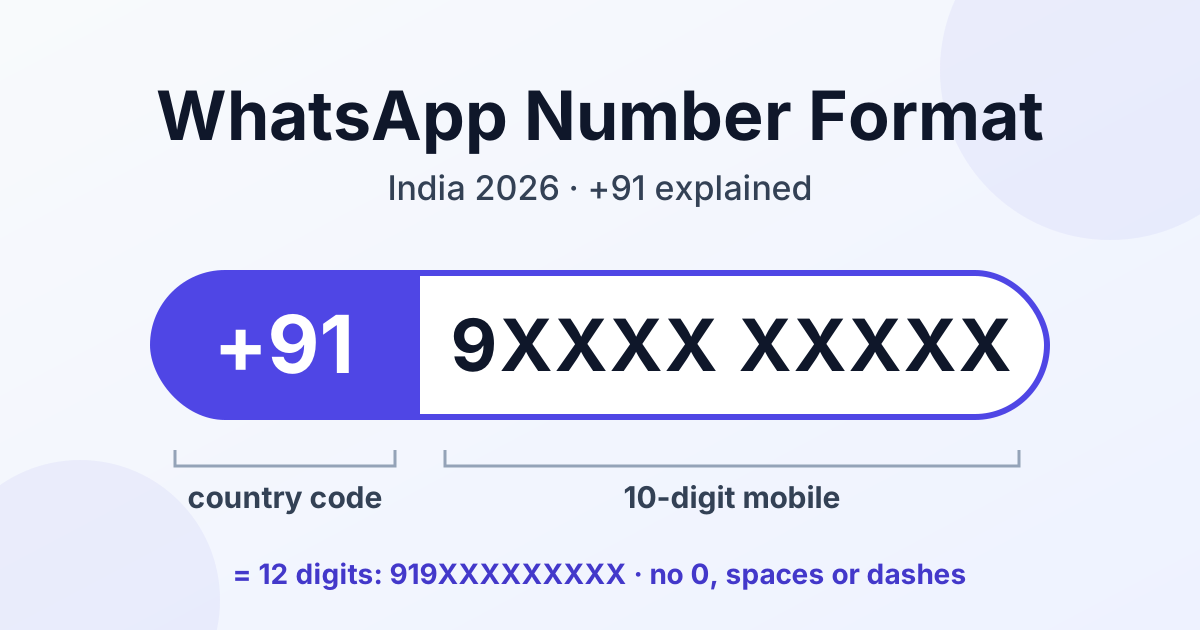
An Indian WhatsApp number is written as the country code 91 followed by the 10-digit mobile number, for example 91 + 9XXXXXXXXX = 919XXXXXXXXX, which is 12 digits with no leading 0, no spaces and no dashes. "+91 9XXXX XXXXX" is the same number in human-readable form, and a search like "917xxxxxxxxx" is simply 91 plus a mobile number that starts with 7.
The exact form shifts with the destination: your phone's address book, a wa.me link, the WhatsApp Cloud API or a CSV upload. This guide covers each one, decodes common prefixes, lists the mistakes that break sends, and shows how to clean a messy contact list.
The quick answer: Indian WhatsApp number formats at a glance
A valid Indian WhatsApp number in international format has exactly 12 digits: 91 plus a 10-digit mobile number.
- Machine format (wa.me links, API requests, CSV uploads):
919XXXXXXXXX— digits only, country code first. - Human format (business cards, websites, email signatures): +91 9XXXX XXXXX — the plus sign and spaces help people read and dial it.
- Never: a leading 0 (09XXXXXXXXX), a double country code (91919XXXXXXXXX), the 0091 dialling prefix, or brackets and dashes inside links and uploads.
People read +91; systems want 91 followed by nothing but digits.
Anatomy of an Indian mobile number
Part 1: the country code, 91
91 is India's country calling code. It tells WhatsApp and every network that the digits after it belong to the Indian numbering plan. The plus in +91 stands for "your local international dialling prefix", which helps people but is unnecessary for most software.
Part 2: the 10-digit mobile number
Under India's current numbering plan, mobile numbers are 10 digits long and begin with 6, 7, 8 or 9. That is why people search for "917xxxxxxxxx", "918xxxxxxxxx" or "919xxxxxxxxx": the same structure, 91 plus a mobile number, with a different first digit. The 0 you may dial before a number inside India is a domestic trunk prefix, not part of the number, so it never belongs in the international format.
Prefix decoder
| What you see | What it means | What to do |
|---|---|---|
| 917XXXXXXXXX | 91 + a mobile number starting with 7 | Valid if the total is 12 digits |
| 918XXXXXXXXX | 91 + a mobile number starting with 8 | Valid if the total is 12 digits |
| 919XXXXXXXXX | 91 + a mobile number starting with 9 | Valid if the total is 12 digits |
| 916XXXXXXXXX | 91 + a mobile number starting with 6 | Valid if the total is 12 digits |
| 00919XXXXXXXXX | The 00 international dialling prefix + 91 | Remove the 00 |
| 0919XXXXXXXXX (091…) | A stray trunk 0 in front of the country code | Wrong; remove the 0 |
One caveat: a few landline area (STD) codes also begin with 7 or 8, Bengaluru's 80 for example, so a number starting 918 is usually, but not always, a mobile. Both are written the same way: 91 plus the 10-digit national number.
E.164 explained in one sentence
E.164 is the ITU's international standard for telephone numbers: a plus sign, a country code and a national number, with no more than 15 digits in total and no spaces or punctuation.
For India, the E.164 form of a mobile number is +919XXXXXXXXX. CRMs and messaging platforms store numbers this way because the same string means the same phone anywhere. The only difference from what most WhatsApp tools want is the plus sign: wa.me links leave it out, and for API requests digits only is safest. Remove the leading "+" from an E.164 number and it is WhatsApp-ready.
WhatsApp number format by context
| Context | Correct format | Example |
|---|---|---|
| Saving a contact in your phone | +91, then the number; spaces optional | +91 9XXXX XXXXX |
| wa.me click-to-chat link | Full international format, digits only, no "+" | https://wa.me/919XXXXXXXXX |
WhatsApp Cloud API to field | Country code + number; digits only is safest | "to": "919XXXXXXXXX" |
wa_id returned by the API | Digits only, as WhatsApp records it | 919XXXXXXXXX |
| CSV / Excel contact upload | 12 digits in a column stored as text | 919XXXXXXXXX |
| Business card or website display | +91 with readable spacing | +91 9XXXX XXXXX |
Saving a contact in your phone
Your address book is forgiving: with an Indian SIM it usually accepts +91 9XXXX XXXXX, 09XXXXXXXXX or a plain 10-digit number. Saving with +91 in front is still the most reliable habit, especially if you travel or share contacts abroad.
wa.me click-to-chat links
WhatsApp's own help guidance says to use the full number in international format and omit any zeros, brackets or dashes. For India that means https://wa.me/919XXXXXXXXX, with no "+", no spaces and no leading 0. To pre-fill a message, append ?text= and URL-encoded text, for example https://wa.me/919XXXXXXXXX?text=Hi%20I%20want%20a%20quote.
A broken wa.me link usually still opens WhatsApp, which makes the mistake easy to miss: the visitor typically sees an invalid-number message instead of a chat. Test links on a phone before printing them; our guide to WhatsApp QR codes and click-to-chat links covers the setup. The same format sits behind the button when you add a WhatsApp chat widget to your website.
WhatsApp Cloud API: the to field
Meta's documentation describes the to field as the customer's phone number or WhatsApp ID, including the country code. The safest habit is digits only, country code first: "to": "919XXXXXXXXX". Never rely on the API to guess the country. The WhatsApp Business API, including via RichAutomate, needs numbers in international format with the country code.
The wa_id the API sends back
A successful send response typically includes a contacts array with the input you sent and a wa_id, the user's WhatsApp ID as digits only. For Indian mobiles it usually matches the 12-digit number you sent, but in some cases it can differ, so key stored conversations on the wa_id WhatsApp returns.
CSV and Excel contact uploads
Bulk uploads are where most problems start. Exports often mix +91 9XXXX XXXXX, 09XXXXXXXXX, 9XXXXXXXXX and 0091 9XXXXXXXXX in one column. Convert every row to the same 12-digit form and store the column as text; the steps are below.
Business cards, websites and signatures
For anything a person reads, +91 9XXXX XXXXX is clearest. The display text and the link behind it are different things: your page can show +91 9XXXX XXXXX while the button points to https://wa.me/919XXXXXXXXX.
The 7 most common WhatsApp number formatting mistakes in India
| Mistake | Wrong | Right | Why |
|---|---|---|---|
| 1. Leading 0 (trunk prefix) | 09XXXXXXXXX | 919XXXXXXXXX | The 0 is for domestic dialling only and is not part of the number. |
| 2. Double country code | 91919XXXXXXXXX | 919XXXXXXXXX | 91 was added to a number that already had it, often by a spreadsheet formula. |
| 3. 0091 prefix | 00919XXXXXXXXX | 919XXXXXXXXX | 00 is an international dialling prefix used from many countries, not part of the number. |
| 4. Spaces, dashes, brackets | +91 (9XXXX) XXXXX or 9XXXX-XXXXX | 919XXXXXXXXX | wa.me links and API fields expect digits only. |
| 5. Excel scientific notation | 9.19E+11 | 919XXXXXXXXX, stored as text | Excel treats the number as a value; saved to CSV in that state, the real digits can be lost. |
| 6. Landline without STD code | 91XXXXXXXX (local number only) | 91 + STD code without 0 + number, e.g. 9122XXXXXXXX | A local landline number is not unique across India without its area code. |
| 7. No country code | 9XXXXXXXXX | 919XXXXXXXXX | Your phone may assume India, but wa.me links and the API need the country code. |
Mistakes 1, 3, 4 and 7 are fixed by the same normalisation logic. Mistake 2 needs care, because a blind "remove 91" rule can damage valid numbers, so flag 14-digit strings for review. Mistake 5 must be fixed inside the spreadsheet. If sends are already failing, see our guide to fixing WhatsApp API invalid phone number errors.
Get a 1-minute BSP audit on WhatsApp
Drop your WhatsApp number — we line-item your current invoice against Meta India rates in under 60 seconds. India-hosted, DPDP-compliant.
How to clean an Indian contact list for WhatsApp
Normalising means turning every variation of a number into one form: for Indian mobiles, 12 digits starting with 91.
- Strip everything that is not a digit. Remove plus signs, spaces, dashes, dots, brackets and stray text such as "Mob:".
- Strip a leading 00. 00919XXXXXXXXX becomes 919XXXXXXXXX.
- Strip a single leading 0. 09XXXXXXXXX becomes 9XXXXXXXXX. Remove one zero only.
- Add 91 to bare mobile numbers. If exactly 10 digits remain and the first is 6, 7, 8 or 9, put 91 in front.
- Keep only numbers that match the pattern. A valid Indian mobile in WhatsApp format matches
^91[6-9]\d{9}$: 91, then a digit from 6 to 9, then nine more digits. Everything else goes to a review list.
Length, not leading digits, tells you whether 91 is already present: a 10-digit number starting with 91 is a bare mobile that still needs the code. Numbers with 11, 13 or 14 digits are usually typos, double codes or landlines; check them by hand rather than guessing.
A small JavaScript example
// Normalise one Indian number to WhatsApp format (91 + 10 digits).
// Returns null when the value needs a person to check it.
function toWhatsAppIndia(raw) {
  let d = String(raw).replace(/\D/g, '');     // 1. digits only
  if (d.startsWith('00')) d = d.slice(2);      // 2. drop the 00 prefix
  if (d.startsWith('0')) d = d.slice(1);       // 3. drop one trunk 0
  if (/^[6-9]\d{9}$/.test(d)) d = '91' + d;    // 4. add 91 to bare mobiles
  return /^91[6-9]\d{9}$/.test(d) ? d : null;  // 5. keep valid 12-digit only
}

// With real digits in place of X:
// '+91 9XXXX XXXXX'  => '919XXXXXXXXX'
// '09XXXXXXXXX'      => '919XXXXXXXXX'
// '0091 9XXXXXXXXX'  => '919XXXXXXXXX'
// '91919XXXXXXXXX'   => null (double 91, review by hand)
The same steps translate to a spreadsheet formula, Python or SQL. Remove duplicates after normalising, not before: 09XXXXXXXXX and +91 9XXXX XXXXX are the same person.
Fixing Excel before it breaks your numbers
Excel sees 919XXXXXXXXX as a large number. It may display it as 9.19E+11, and if the file is saved as CSV in that state, the digits after 9.19 can be lost for good.
- Prevent it: set the column format to Text before you paste or type any numbers.
- Importing a CSV: use Excel's text or CSV import and set the phone column to Text, instead of double-clicking the file.
- Repair a column that still holds the full values: in a helper column use
=TEXT(A2,"0"), fill it down, then paste the results back as values. - Check before saving: search the column for "E+". If any cell contains it, the CSV is not safe to upload.
Google Sheets can also reformat long numbers, so format the column as plain text there too.
What happens when the number format is wrong
A bad format rarely fails loudly. It fails silently, and nobody notices until a campaign underperforms.
- wa.me links: WhatsApp opens but typically says the number is invalid or not on WhatsApp.
- Saved contacts: a contact with a wrong or missing country code may not appear in your WhatsApp contacts.
- Cloud API sends: Meta's API typically returns an invalid-parameter or undeliverable error, either in the response or a later status webhook. Check the exact error returned rather than assuming the cause.
- Broadcasts: rejected rows drop out, so the campaign reaches fewer people than the list suggests.
A perfectly formatted number can still fail if the person does not use WhatsApp on it. That is a different problem; see what to do when a WhatsApp API number is not registered.
Landline and toll-free numbers on WhatsApp Business
A business can generally register a landline on the WhatsApp Business API, provided the line can receive the verification code, usually by voice call. Format it as 91 + STD code without its 0 + subscriber number: 022 XXXX XXXX (Mumbai) becomes 9122XXXXXXXX, and 011 XXXX XXXX (Delhi) becomes 9111XXXXXXXX. These are usually 12 digits too but will not match the mobile pattern, so keep them in a separate list.
Toll-free 1800 numbers are a grey area; confirm with your telecom provider and Meta's current requirements first. Our guide to using a landline or toll-free number on the WhatsApp Business API covers registration.
Checklist before you send a WhatsApp broadcast
- Every mobile number is 12 digits and matches
^91[6-9]\d{9}$. - No leading 0, no 00 or 0091 prefix, no doubled 9191, and no spaces, plus signs, dashes or brackets.
- The phone column is stored as text and contains no "E+" values.
- Duplicates were removed after normalising, and rejected rows were reviewed by hand.
- Every contact has opted in to receive WhatsApp messages from your business.
- Your message template is approved and its variables map to the right columns.
- A test send to a few internal numbers went through and rendered correctly.
Ready to put a clean contact list to work? RichAutomate connects your business to the official WhatsApp Business API, and you can begin with a 14-day free trial and 100 free credits to test your formatting on real sends. Start your WhatsApp Business API free trial.
Frequently asked questions
What does 917xxxxxxxxx mean?
It is an Indian mobile number in international format. 91 is India's country code and 7xxxxxxxxx is a 10-digit mobile number that starts with 7, giving 12 digits in total. Written for people it looks like +91 7XXXX XXXXX; for wa.me links and the WhatsApp API it is 917XXXXXXXXX, with no plus sign, spaces or leading 0.
How many digits does an Indian WhatsApp number have with the country code?
Twelve. A valid Indian WhatsApp number in international format is 91 plus a 10-digit mobile number. A plus sign in front does not change the count, because the plus is a symbol, not a digit. If your number has 11, 13 or 14 digits, it probably contains a leading 0, a 00 prefix or a repeated 91.
Should I write +91 or 91 for a WhatsApp number?
Both refer to the same country code. Use +91 with spaces, such as +91 9XXXX XXXXX, wherever people read the number: business cards, websites and email signatures. Use 91 and digits only, such as 919XXXXXXXXX, in wa.me links, API requests and CSV uploads.
What is the correct wa.me link format for an Indian number?
Use https://wa.me/ followed by 91 and the 10-digit mobile number, digits only: https://wa.me/919XXXXXXXXX. Do not include a plus sign, spaces, brackets, dashes or a leading 0. To pre-fill a message, add ?text= and URL-encoded text at the end of the link.
Why does Excel turn my WhatsApp numbers into 9.19E+11?
Excel treats a 12-digit number as a numeric value and may display it in scientific notation. If you save the file as CSV in that state, the real digits can be lost. Format the column as Text before pasting, or convert existing values with =TEXT(A2,"0") and paste the results back as values.