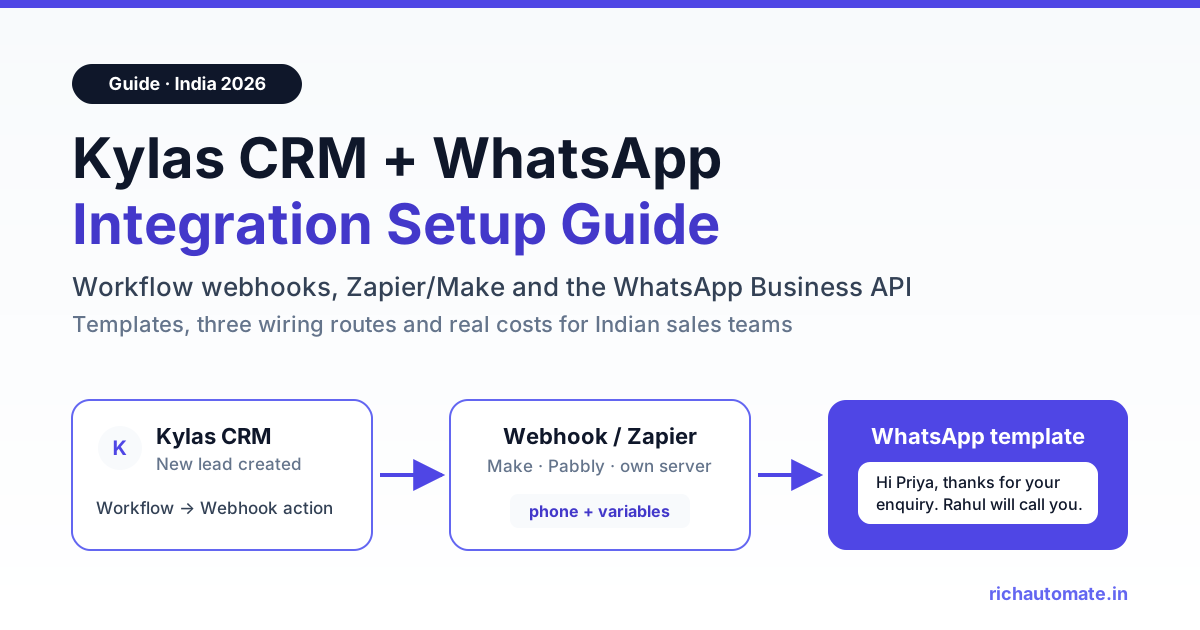
To integrate Kylas CRM with WhatsApp, create a Kylas workflow (for example "When Lead is created") whose action is a webhook, and point that webhook at something that can send an approved WhatsApp template: Zapier, Make or Pabbly Connect, a small server of your own, or a WhatsApp Business API platform's incoming-webhook URL. That platform then sends the template to the lead's number within seconds, and replies come back into a shared inbox where your team can continue the conversation.
This guide is for Indian sales teams already running their pipeline on Kylas: which events deserve a message, the templates to submit, three ways to wire Kylas to RichAutomate, and the cost for 1,500 leads a month. RichAutomate has no direct Kylas connector, so every route uses Kylas workflow webhooks or an automation tool in between, which also gives you full control over what fires and when.
What Kylas gives you to work with
Based on Kylas's help centre and pricing page at the time of writing, these are the pieces that matter:
- Workflow webhooks. Under Setup, then Automation, then Workflow, you can create a workflow with a trigger such as "When Lead is created" and choose Webhook as the action. The webhook supports GET, POST and PUT, a target URL, an authorisation method, and named parameters whose values come from the record (lead information, lead owner's information and so on). Kylas's help article lists this under the Elevate plan, and the pricing page marks webhooks as restricted on the free Embark tier.
- API key. Kylas users can copy an API key from the Integrations tab in CRM settings. You need it to write WhatsApp activity back into Kylas.
- Zapier app. Kylas CRM has a published Zapier app with triggers for New Lead, Lead Updated, New Contact, Contact Updated, New Deal and Deal Updated, plus actions to create leads, contacts, deals and companies.
- Marketplace WhatsApp apps. Kylas's marketplace lists several WhatsApp providers, and its site also mentions an inbuilt WhatsApp Business feature.
Kylas sells Embark (free, with record limits), Elevate (a flat monthly fee with unlimited users) and Exceed (custom). Check the current pricing page and your own plan before you build: if your account cannot create workflow webhooks, the Zapier route is the one that still works.
Which Kylas events deserve a WhatsApp template
Use WhatsApp where speed or a reminder clearly helps the buyer; everything else belongs in email or a call. Five events cover most Indian sales teams:
- New-lead instant reply. A lead from IndiaMART, a website form or a Facebook lead ad lands in Kylas. A WhatsApp acknowledgement within a minute, naming the rep who will call, usually lands better than a call three hours later.
- Demo or meeting reminder. When a meeting is logged against a lead or deal, send a reminder a few hours before with a reply option to confirm or reschedule.
- Deal-stage update. When a deal moves to stages such as "Proposal sent", "Payment received" or "Dispatched", tell the customer. It saves reps repetitive status calls.
- Quote follow-up. Two or three days after a quotation, a short message that references the quote number and validity date often restarts a stalled conversation.
- Owner alert. When a high-value lead is assigned, alert the lead owner on their own WhatsApp. Field reps see WhatsApp faster than CRM notifications.
If you already score leads, fire the richer messages only above a threshold. Our guide on WhatsApp lead qualification and scoring shows how to capture budget and timeline in the first exchange.
Template examples with variables and categories
Business-initiated messages need a Meta-approved template, and its category sets the price. Utility templates relate to a transaction or request the customer started; marketing templates promote something. Keep utility wording factual, because Meta re-categorises promotional-sounding templates.
| Kylas event | Template name | Body (variables in double braces) | Category |
|---|---|---|---|
| Lead created | new_lead_ack | Hi {{1}}, thanks for your enquiry about {{2}}. {{3}} from our team will call you shortly. You can also reply here with your requirement. | Utility |
| Meeting scheduled | demo_reminder | Hi {{1}}, a reminder that your demo with {{2}} is on {{3}} at {{4}}. Reply 1 to confirm or 2 to reschedule. | Utility |
| Deal stage changed | deal_stage_update | Hi {{1}}, your order {{2}} has moved to {{3}}. Next step: {{4}}. | Utility |
| Quote sent (follow-up after 2 days) | quote_followup | Hi {{1}}, we shared quotation {{2}} for Rs {{3}} on {{4}}. It is valid until {{5}}. Reply here if you have any questions. | Utility |
| Lead assigned (to the rep) | rep_lead_alert | New lead assigned to you: {{1}}, {{2}}, source {{3}}. Please call within 15 minutes. | Utility |
| Lost or cold lead (manual campaign) | reengage_offer | Hi {{1}}, we have a limited-period offer on {{2}} this month. Reply YES and we will send details. Reply STOP to opt out. | Marketing |
A quote follow-up stays utility only while it references the existing quotation; add a discount and it becomes marketing. Rep alerts also need your reps' opt-in.
Route 1: Zapier, Make or Pabbly Connect
The fastest route, and the only one that does not need Kylas workflow webhooks, because Zapier's Kylas app has its own triggers.
Zapier setup
- In Zapier, create a Zap with the Kylas CRM app as the trigger and pick New Lead (or Lead Updated, Deal Updated). Connect your Kylas account.
- Add a Filter step if needed, for example only leads whose source is "Website" or whose phone field is not empty.
- Add a Formatter step to clean the phone number into 91XXXXXXXXXX format (country code, no plus sign, no spaces).
- Add a Webhooks by Zapier action, choose POST, and send JSON to
https://richautomate.in/api/v1/send-templatewith the headerAuthorization: Bearer YOUR_API_KEY. - Map the body fields:
phone,template(for example new_lead_ack),language(for example en) andvariablesas a list in the same order as {{1}}, {{2}}, {{3}}. - Test with your own number as a dummy lead, then turn the Zap on.
Webhooks by Zapier needs a paid Zapier plan, and every run counts as a task, so check your task volume. Our Zapier WhatsApp integration guide covers the request body and error handling in more detail.
Make and Pabbly Connect
If your Make or Pabbly account offers a Kylas module, use it the same way. If not, create a custom webhook in Make (or a webhook trigger in Pabbly), paste that URL into a Kylas workflow webhook action, then add an HTTP module that posts to the RichAutomate send-template endpoint. Make is usually cheaper than Zapier at volume because it bills by operation; the Make.com WhatsApp integration walkthrough has the module-by-module setup.
Route 2: your own small server
With a developer, a 40-line service gives you deduplication, phone cleaning and logging with no per-task fees.
- In Kylas, open Setup, then Automation, then Workflow, and create a workflow on the lead entity with the trigger you want.
- Choose Webhook as the action, select POST, and enter your server's URL.
- Add parameters: a shared secret (a fixed value only you know), the lead ID, phone, first name, the product or requirement field, and the lead owner's name. Use whatever field names Kylas shows in your account.
- Save and activate the workflow, then create a test lead.
A minimal receiver in Node 18 or later, with no dependencies, looks like this:
// kylas-to-whatsapp.mjs
import http from 'node:http';

const RA_KEY = process.env.RICHAUTOMATE_API_KEY;
const SECRET = process.env.KYLAS_HOOK_SECRET;
const seen = new Set(); // swap for Redis or a DB table in production

http.createServer(async (req, res) => {
  if (req.method !== 'POST') return res.writeHead(405).end();
  let raw = '';
  for await (const chunk of req) raw += chunk;
  const p = JSON.parse(raw || '{}');

  if (p.secret !== SECRET) return res.writeHead(401).end();
  if (seen.has(p.lead_id)) return res.writeHead(200).end('duplicate');
  seen.add(p.lead_id);

  const digits = String(p.phone || '').replace(/\D/g, '');
  const phone = digits.length === 10 ? '91' + digits : digits;
  if (phone.length < 11) return res.writeHead(422).end('bad phone');

  const r = await fetch('https://richautomate.in/api/v1/send-template', {
    method: 'POST',
    headers: {
      'Authorization': `Bearer ${RA_KEY}`,
      'Content-Type': 'application/json',
      'Idempotency-Key': `kylas-lead-${p.lead_id}`
    },
    body: JSON.stringify({
      phone,
      template: 'new_lead_ack',
      language: 'en',
      variables: [p.first_name || 'there', p.product || 'your enquiry', p.owner || 'Our team']
    })
  });
  res.writeHead(r.ok ? 200 : 502).end();
}).listen(8080);
The Idempotency-Key header means that if Kylas retries the same webhook, the second request does not send a second message. Check the exact payload format Kylas sends from your account by pointing the webhook at a request inspector first. If you are new to receiving webhooks, our WhatsApp Business API webhook setup guide explains HTTPS, retries and signature checks.
Get the India 2026 WhatsApp BSP price comparison
Wati vs AiSensy vs Interakt vs RichAutomate: Meta rates, platform fees and hidden costs, side by side. We send it to your WhatsApp in a minute.
Route 3: RichAutomate incoming-webhook flow trigger
If you do not want to run a server or pay for Zapier tasks, point the Kylas webhook straight at a RichAutomate flow. Each flow can have its own trigger URL of the form POST https://richautomate.in/api/v1/public/flows/{token}/trigger.
- In RichAutomate, build a flow whose Start node uses the Incoming Webhook trigger. Add a template message node (new_lead_ack), then a question or button node, then branches for each answer.
- Publish the flow and copy its trigger URL. The token inside the URL is the credential, so treat it like a password and rotate it if it leaks.
- In Kylas, create the workflow, choose Webhook, select POST, and paste the trigger URL.
- Add a parameter named
phonemapped to the lead's phone, andnamemapped to the lead's first name. These two are what the trigger expects. - Extra fields go inside a
dataobject and become contact attributes you can use in the flow as variables. If your Kylas webhook can only send flat parameters, keep the flow to phone and name, or put Zapier or Make in between to build the nested body.
The whole conversation, not just the first message, runs in one place: the flow can ask for budget, offer demo slots and hand over to an agent.
Getting replies back into Kylas
All three routes push data from Kylas to WhatsApp. For the reverse direction, use Zapier or Make to create or update a lead in Kylas when a WhatsApp reply or a completed flow comes in, or have your own server call the Kylas API with your Kylas API key to add the details. Zapier's Kylas actions focus on creating records, so anything more specific, such as appending a note to an existing lead, usually means calling the Kylas API directly.
What it costs for 1,500 leads a month
On RichAutomate's Client Pay pay-as-you-go option you pay ₹0 per month, ₹0 setup and a ₹0.10 platform fee per message, while Meta bills its own charges directly to your WhatsApp Business account. In India, Meta's rate is about ₹0.115 for a utility template and about ₹0.86 for a marketing template. Replies inside the 24-hour customer service window carry no Meta charge. So a utility template costs you about ₹0.215 all-in, and a marketing template about ₹0.96.
Here is a worked month for a team receiving 1,500 leads, where 40 percent book a demo and a fifth reach the quote and deal-update stages:
| Message type | Volume | Meta charge (approx.) | Platform fee | Total |
|---|---|---|---|---|
| New-lead reply (utility) | 1,500 | ₹172.50 | ₹150 | ₹322.50 |
| Demo reminder (utility) | 600 | ₹69 | ₹60 | ₹129 |
| Deal-stage update (utility) | 300 | ₹34.50 | ₹30 | ₹64.50 |
| Quote follow-up (utility) | 300 | ₹34.50 | ₹30 | ₹64.50 |
| Rep alerts for hot leads (utility) | 500 | ₹57.50 | ₹50 | ₹107.50 |
| Re-engagement campaign (marketing) | 400 | ₹344 | ₹40 | ₹384 |
| Agent replies inside the 24-hour window | 3,000 | ₹0 | ₹300 | ₹300 |
| Monthly total | 6,600 | ₹712 | ₹660 | ₹1,372 |
That is under ₹1 per lead. The table treats every utility template as chargeable; Meta also waives utility charges inside an already-open customer window, so your bill may be lower. If you want extra features, the optional plans are Starter at ₹499 a month, Pro at ₹899 a month and White-label at ₹1,199 a month, and every account starts with a 14-day free trial. Full details are on the pricing page. Rates above are indicative; confirm Meta's current India rate card before budgeting.
CRM-side WhatsApp add-on vs your own WhatsApp Business API account
Kylas's marketplace lists several WhatsApp providers (Gallabox, Gupshup, Interakt, Wati and others), and Kylas also promotes inbuilt WhatsApp features. For some teams that is the simplest answer. The trade-offs:
| Factor | WhatsApp app from the CRM marketplace | Your own WABA platform via webhook |
|---|---|---|
| Setup effort | Install the app and connect; usually fastest | One workflow webhook or Zap, plus template approval |
| Where chats live | Mostly inside the CRM record | A shared team inbox, with key events pushed back to Kylas |
| Chatbots and multi-step flows | Depends on the provider and plan | Visual flow builder with branches, questions and handover |
| Pricing model | Provider's plan, often a monthly subscription plus Meta charges | ₹0 monthly on pay-as-you-go plus ₹0.10 per message and Meta charges |
| Works if you change CRM later | Usually tied to that CRM | Yes; only the webhook source changes |
| Plan requirement on the CRM side | Check which Kylas plan the app needs | Elevate-level workflow webhooks, or Zapier's Kylas app |
For one-off sends from a lead record, a marketplace app may be enough. When WhatsApp becomes a channel in its own right, with bots, broadcasts and several agents, a dedicated WABA platform fed by Kylas scales better. Teams evaluating other CRMs can compare the same pattern in our WhatsApp CRM comparison for India.
Opt-in, the 24-hour window and DPDP compliance
Meta requires that a person has opted in to receive WhatsApp messages from your business before you send them templates. Opt-in can come from a checkbox on your website form, a line in your IndiaMART or lead-ad form, or the customer messaging you first. Record it: add a custom field in Kylas such as "WhatsApp consent" with the date and source, and make your workflow condition check it before the webhook fires.
India's Digital Personal Data Protection Act, 2023 points the same way: consent must be specific and informed, and withdrawing it must be as easy as giving it. Put a clear opt-in line on every form, "Reply STOP to opt out" on marketing templates, and mark the Kylas lead opted out when someone replies STOP.
The 24-hour customer service window opens each time the customer messages you. Inside it agents can send free-form messages; outside it you need an approved template. Following these rules lowers the risk of restrictions, but no provider can guarantee a number will never be restricted.
Common mistakes to avoid
- Triggering on "Lead updated" without a condition. Every edit by a rep fires the webhook again, and the lead gets three identical messages. Add a condition on the specific field that changed, or use an idempotency key.
- Phone numbers without a country code. Indian forms often store 10 digits. Normalise to 91 plus the number before calling the API.
- Promotional wording in utility templates. "Thanks for your enquiry, enjoy 10 percent off" is marketing. Meta will re-categorise it, and your cost per message goes up roughly sevenfold.
- Leaving the receiving URL unauthenticated. If your webhook has no authentication, anyone who finds the URL can send messages on your account. Use a shared secret parameter, an authorisation key, or a long unguessable flow token.
- Testing on real leads. Use a test lead with your own number first.
- No path back to the CRM. Reps end up calling people who already answered on WhatsApp.
Start sending from Kylas this week
The quickest working setup is a single "When Lead is created" workflow in Kylas, a new_lead_ack utility template, and either a Zap or a RichAutomate flow trigger URL. Once that runs cleanly for a week, add the demo reminder and the deal-stage update. Keep each new event behind its own workflow so you can switch one off without touching the others.
Create your free RichAutomate account to connect your WhatsApp Business number, submit your templates and get your API key and flow trigger URL. The 14-day trial lets you test the full Kylas-to-WhatsApp chain with your own test leads before you commit to anything.