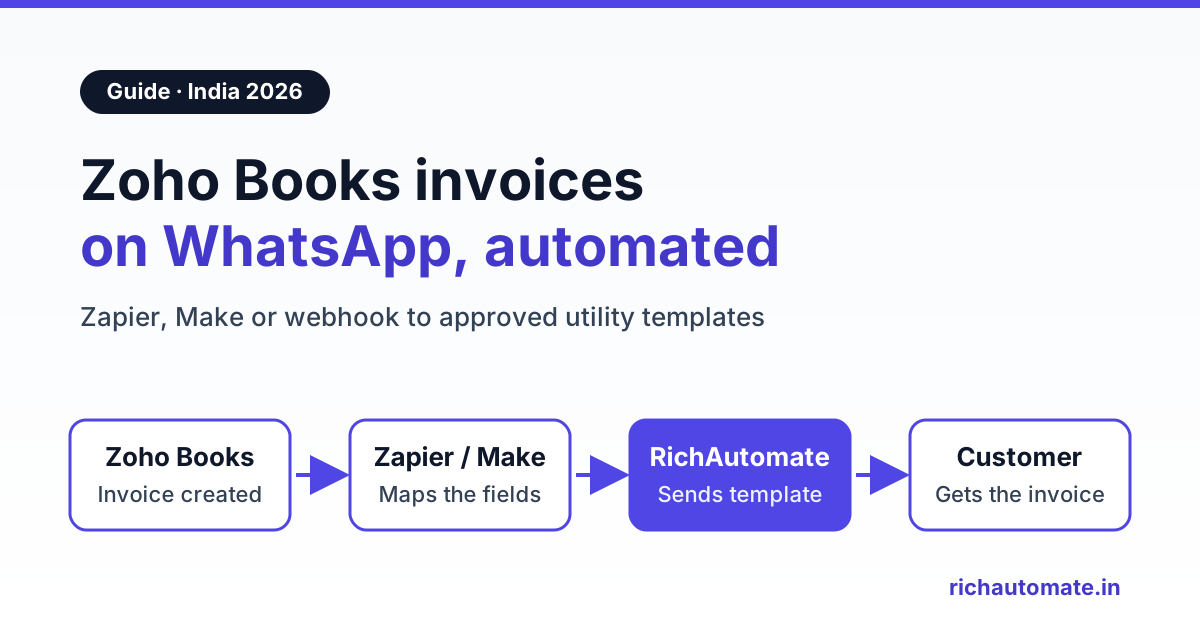
Zoho Books can already send invoices and payment reminders on WhatsApp through its own built-in integration, where Zoho becomes your WhatsApp Business Solution Provider and you pay with prepaid IM credits. If your WhatsApp number already runs on a separate API platform such as RichAutomate, or you want chatbot flows, a shared team inbox and Razorpay payment follow-ups on that same number, connect Zoho Books to the platform through Zapier, Make, Pabbly Connect or a Zoho Books workflow webhook instead.
A Surat textile wholesaler, a Nagpur pharma distributor and a Coimbatore spare-parts dealer all raise invoices in Zoho Books. All three then spend the first hour of every morning forwarding PDFs to customers on WhatsApp by hand and phoning the ones who have not paid. This guide covers both ways to automate that work, the honest trade-offs between them, and what it costs in rupees.
To be clear up front: RichAutomate does not connect to Zoho Books directly. Every RichAutomate setup below uses an automation tool or a small relay that calls RichAutomate's public API. RichAutomate's native integrations are Zoho CRM, Razorpay, Google Sheets and Meta Cloud API, plus its built-in booking.
What Zoho Books can already do on WhatsApp
Many tutorials skip this, so start here. According to Zoho's WhatsApp integration help page, Zoho Books connects to the official WhatsApp Business Platform. It is not a click-to-chat shortcut. You connect it under Settings, Integrations & Marketplace, WhatsApp, and log in with your Facebook Business Manager. Zoho then acts as your Business Solution Provider (BSP).
Once connected, Zoho Books can send WhatsApp notifications for:
- Sales documents: invoices, quotes, sales orders, retainer invoices, sales receipts and credit notes, one at a time or in bulk from the list page.
- Payments: payment receipts when you record a payment.
- Payment reminders: sent manually, in bulk for overdue invoices, or automatically from the reminder settings, based on due dates.
- Statements for customers and vendors, plus vendor notifications.
Templates are created inside Zoho Books as Utility or Marketing, and Meta approves them (Zoho says this can take up to 24 hours). A dynamic attachment can carry the transaction PDF. You can also chat with a customer from inside Zoho Books once they reply, and a WhatsApp Alert can be added as a workflow action.
The limits are worth knowing before you choose:
- One BSP per number. Zoho's help page says the WhatsApp Business account should not be associated with other BSPs. If your number already runs your sales chatbot or campaigns on another platform, you cannot also put it on Zoho Books without moving it.
- Prepaid IM credits. You buy credits in Zoho Books (Settings, WhatsApp, Buy IM Credits), and messages draw them down. Zoho shows the credit price at the point of purchase; check it in your account, because it is not published on the help page.
- Per-contact opt-in switch. WhatsApp must be enabled as the communication channel on each customer or contact person. Bulk sends skip contacts where it is off.
- Plan availability is not stated on the Zoho Books India pricing page, so confirm it for your plan with Zoho.
If all you need is "invoice saved, customer gets it on WhatsApp" and your number is not already on another platform, the built-in option is worth trying first.
Built-in Zoho Books WhatsApp vs a WhatsApp API platform
The API platform route makes sense when WhatsApp is more than a delivery pipe for documents. That means the same number handles sales enquiries, support, campaigns and collections, with a team working the replies.
| Need | Zoho Books built-in WhatsApp | Zoho Books + RichAutomate (via Zapier, Make, Pabbly or webhook) |
|---|---|---|
| Send invoice and receipt notifications | Yes, from the invoice screen or in bulk | Yes, triggered automatically when the invoice is created |
| Payment reminders | Yes: manual, bulk or automatic by due date | Yes, from a workflow rule or a scheduled automation |
| Setup effort | Low, all inside Zoho Books | Medium: an automation or relay plus approved templates |
| Number already on another BSP | Must not be associated with other BSPs | Uses the number you already run on RichAutomate |
| Chatbot flows, lead capture, campaigns | Not the focus; built for transaction notifications and chat | Visual flow builder, broadcasts and lead flows on the same number |
| Shared inbox for sales and support | Chat inside Zoho Books, one user per contact at a time | Team inbox with assignment across all WhatsApp conversations |
| Billing | Prepaid Zoho IM credits | Client Pay: ₹0.10 platform fee per message, Meta bills its charges directly |
| Payment links on WhatsApp | Through whatever payment gateway your Zoho Books invoices use | Razorpay is a native RichAutomate integration |
Many businesses already use RichAutomate's native Zoho CRM WhatsApp integration for leads. Adding Zoho Books on the same number keeps every customer conversation in one inbox, from the first enquiry to the last payment.
Before you start: a five-point checklist
- A WhatsApp Business API number connected in RichAutomate. The WhatsApp Business app on a phone cannot be driven by an API.
- Approved utility templates for the invoice notice and the reminder. Both are business-initiated messages, so they must be Meta-approved templates.
- Clean customer mobile numbers in Zoho Books. Store them on the contact's Mobile field. Customers type
+91 98765 43210,098765-43210or just ten digits. - Recorded consent. Meta requires opt-in before you message customers on WhatsApp. A line on your order form or a custom contact field such as "WhatsApp opt-in: Yes" is enough to filter on.
- A RichAutomate API key from your developer settings, kept in your automation tool's secure fields, never pasted into a shared sheet.
The RichAutomate API expects numbers in international format without a plus sign or spaces, which for India means 91XXXXXXXXXX, for example 919876543210. Every route below includes a formatting step: keep digits only, take the last 10 digits and put 91 in front. That handles spaces, hyphens, a leading 0 and a duplicated +91. For overseas customers, use their country code instead of hard-coding 91.
Route 1: Zoho Books to WhatsApp with Zapier, Make or Pabbly Connect
This is the no-code route and the right default for most teams. The chain is the same in every tool: trigger, filter, formatter, HTTP POST to RichAutomate.
Step 1: Zoho Books trigger
Zoho's help docs list "New Sales Invoice" among the Zoho Books triggers available in Zapier, alongside New Customer, New Estimate, New Expense and New Item. Make and Pabbly Connect have their own Zoho Books apps, so check the live trigger list in your tool. Create one real test invoice so the tool captures sample fields.
Step 2: Get the customer's mobile number
Check whether the invoice sample contains the customer's mobile. If it does not, add a step that looks up the contact by customer ID, or keep the WhatsApp number in a custom field on the invoice so it travels with the trigger.
Step 3: Filter on consent and status
Continue only when the opt-in field is Yes and the invoice is not a draft.
Step 4: Map the fields and POST to RichAutomate
Use Webhooks by Zapier (check your plan includes it), Make's HTTP module or API by Pabbly. Set method POST, payload type JSON, and add the header Authorization: Bearer YOUR_API_KEY. A typical mapping looks like this:
Zoho Books field (sample)      → RichAutomate send-template field
------------------------------------------------------------------
Contact mobile (formatted)     → phone          "919876543210"
(fixed)                        → template       "invoice_ready_v1"
(fixed)                        → language       "en"
Customer Name                  → variables[0]   {{1}} "Rakesh Traders"
Invoice Number                 → variables[1]   {{2}} "INV-02417"
Total                          → variables[2]   {{3}} "48,260.00"
Due Date                       → variables[3]   {{4}} "20 Nov 2026"

POST https://richautomate.in/api/v1/send-template
Authorization: Bearer YOUR_API_KEY
Content-Type: application/json

{
  "phone": "919876543210",
  "template": "invoice_ready_v1",
  "language": "en",
  "variables": ["Rakesh Traders", "INV-02417", "48,260.00", "20 Nov 2026"]
}
Field names in your sample data may differ slightly from the labels above, so map from what your tool actually shows. Our Zapier WhatsApp integration guide walks through the mapping screen by screen. If you prefer a lifetime-deal tool, the Pabbly Connect WhatsApp setup guide follows the same logic. All three tools have free tiers with task or operation limits, and each invoice uses several tasks.
Optional: start a flow instead of a single template
If you want the customer's reply to trigger follow-up steps, such as "Tap to get the PDF again" or "Talk to accounts", POST to a published flow's Incoming Webhook trigger instead:
Get the India 2026 WhatsApp BSP price comparison
Wati vs AiSensy vs Interakt vs RichAutomate: Meta rates, platform fees and hidden costs, side by side. We send it to your WhatsApp in a minute.
POST https://richautomate.in/api/v1/public/flows/{token}/trigger
Content-Type: application/json

{
  "phone": "919876543210",
  "name": "Rakesh Traders",
  "data": {
    "invoice_no": "INV-02417",
    "amount": "48,260.00",
    "due_date": "20 Nov 2026"
  }
}
The flow trigger expects phone, name and a data object at the top level. The token in the URL is the credential, so keep it out of screenshots and shared documents.
Route 2: Zoho Books workflow rule + webhook relay
Zapier's Zoho Books triggers cover new invoices well, but reminders depend on dates: three days before the due date, or seven days after it. Zoho Books workflow rules handle that natively. Zoho's help articles describe:
- Event-based rules that fire when a record is created, edited, created or edited, deleted, submitted, approved or rejected.
- Date-based rules that fire a set number of days before or after a date field, for example 3 days before the invoice due date. They apply only to records created or edited after the rule is set up.
- Webhook actions with placeholders such as
${INVOICE.CONTACT_NAME},${INVOICE.INVOICE_DATE}and${INVOICE.INVOICE_TOTAL}, plus contact fields like Mobile Phone added as parameters.
Zoho's workflow limits article lists workflow rules on the Professional, Elite and Ultimate plans, with up to 200 rules, 10 per module, one webhook per rule and 1,000 webhook triggers per day. The India pricing page lists customizable workflows from Professional upward, so confirm what your plan includes before you build.
Zoho's webhook sends its own parameter shape, and the phone number arrives exactly as typed in the contact. RichAutomate needs a clean phone and a variables array, so put a small relay in between. A Cloudflare Worker is enough:
export default {
  async fetch(request, env) {
    const url = new URL(request.url);
    if (url.searchParams.get("key") !== env.RELAY_KEY) return new Response("forbidden", { status: 403 });

    const ct = request.headers.get("content-type") || "";
    const f = ct.includes("json")
      ? await request.json()
      : Object.fromEntries(new URLSearchParams(await request.text()));
    for (const [k, v] of url.searchParams) if (!(k in f)) f[k] = v;

    const digits = String(f.mobile || "").replace(/\D/g, "");
    if (digits.length < 10) return new Response("bad phone", { status: 400 });
    const phone = "91" + digits.slice(-10);

    const res = await fetch("https://richautomate.in/api/v1/send-template", {
      method: "POST",
      headers: { "Content-Type": "application/json", "Authorization": `Bearer ${env.RA_API_KEY}` },
      body: JSON.stringify({
        phone,
        template: f.template || "payment_reminder_v1",
        language: "en",
        variables: [f.customer || "", f.invoice_no || "", f.amount || "", f.due_date || ""]
      })
    });
    return new Response(null, { status: res.status });
  }
};
In Zoho Books, create the webhook with method POST and the Worker URL including ?key= and your relay secret. Then add parameters named mobile, customer, invoice_no, amount, due_date and template mapped to the matching placeholders. Store RA_API_KEY and RELAY_KEY as Worker secrets, never in code. Send one test with your own number on the contact before switching the rule on for all customers. If you are on a plan with Zoho Books custom functions, the same reshaping can be written there instead of in a Worker.
The WhatsApp templates: wording that stays utility
Invoice notices and payment reminders with no promotional content belong in Meta's utility category. Keep each template about one specific transaction. A sample invoice template:
Hi {{1}}, your invoice {{2}} for Rs. {{3}} from Sharma Distributors has been generated.
Payment is due by {{4}}.
Reply to this message if any line item needs a correction.

[View invoice]  [Talk to accounts]
And a payment reminder:
Hi {{1}}, this is a reminder that invoice {{2}} for Rs. {{3}} was due on {{4}}.
If you have already paid, please ignore this message.
Reply here if you need a copy of the invoice or the bank details.
Rules that save rejections: give sample values for every variable when you submit, do not start or end the body with a variable, and keep offers out. Add "Order this week for 5% off" to a reminder and it reads as marketing, and Meta may reclassify a promotional-sounding utility template. For reminder sequences that work without annoying good customers, our guide to WhatsApp payment reminders for overdue invoices covers timing, tone and escalation.
Which Zoho Books event sends which message
Map each Zoho Books event to one template and know what it costs before you switch it on:
| Zoho Books trigger | How it fires | WhatsApp template | Meta category | Meta charge (India, approx.) |
|---|---|---|---|---|
| New sales invoice | Zapier, Make or Pabbly trigger, or an event-based workflow rule on create | Invoice generated, with amount and due date | Utility | about ₹0.115 |
| 3 days before due date | Date-based workflow rule + webhook | Friendly due-date reminder | Utility | about ₹0.115 |
| 7 days after due date, still unpaid | Date-based workflow rule with an unpaid criterion + webhook | Overdue reminder | Utility | about ₹0.115 |
| Payment recorded | Workflow rule on the payments module, if available on your plan | Payment received, thank you | Utility | about ₹0.115 |
| Festive offer to all customers | Campaign, not an invoice trigger | Promotional broadcast | Marketing | about ₹0.8631 |
| Customer replies "send PDF again" | Inside the 24-hour customer service window | Free-form reply from the inbox or flow | Service | Free |
Meta revises its rates, so check Meta's WhatsApp pricing page before you budget.
Collecting the money: the Razorpay angle
A reminder only works if paying is easy. Razorpay is one of RichAutomate's native integrations, so a reminder flow can hand the customer a Razorpay payment link inside the chat and confirm the payment in the same conversation. Customers do not need to log in to a portal or hunt for bank details.
A practical pattern for distributors is a utility reminder with a "Pay now" button. When the customer taps it, a 24-hour service window opens, and the flow sends the payment link and an "I have paid" option as free-form messages with no Meta charge. Keep Zoho Books as the accounting record and reconcile the payment there as you do today. The Razorpay WhatsApp integration guide covers payment links and confirmations step by step.
What it costs in India: a worked monthly example
On RichAutomate's Client Pay model, you pay a ₹0.10 platform fee per message to RichAutomate, and Meta bills its own charges directly to your business. Meta's India rates are about ₹0.115 per utility template and about ₹0.8631 per marketing template, and replies inside the 24-hour customer service window are free.
Take the Nagpur pharma distributor sending 600 invoice notifications and 300 payment reminders a month, all as utility templates. Assume the worst case, with no service window already open for any of them, and the Starter plan:
| Cost line | Calculation | Monthly amount |
|---|---|---|
| Meta utility templates, invoice notices (billed by Meta) | 600 × about ₹0.115 | about ₹69 |
| Meta utility templates, payment reminders (billed by Meta) | 300 × about ₹0.115 | about ₹34.50 |
| RichAutomate platform fee | 900 messages × ₹0.10 | ₹90 |
| RichAutomate Starter plan | Fixed | ₹499 |
| Total on the WhatsApp side | ₹69 + ₹34.50 + ₹90 + ₹499 | about ₹692.50 |
| Automation tool or relay (if used) | Zapier, Make or Pabbly bill per task or operation; a Worker has a free tier | Depends on your plan |
That works out to under ₹0.80 per message, including the plan fee. On the ₹0 pay-as-you-go plan, the same 900 messages cost about ₹193.50 a month (₹103.50 to Meta plus ₹90 platform fee). Wording matters too. If those 300 reminders read as promotional and were charged as marketing, Meta's share for them would rise from about ₹34.50 to about ₹259 (300 × ₹0.8631).
There is no setup fee and every account gets a 14-day free trial; full details are on the RichAutomate pricing page.
Where RichAutomate fits, and your next step
If Zoho Books is your only WhatsApp use and your number is free, its built-in integration is a fair place to start. If WhatsApp also runs your leads, support and campaigns, keep it on one platform. Zoho Books remains the source of truth for invoices, while RichAutomate sends the templates, runs the reminder and payment flows, and gives your accounts team a shared inbox for the replies. Zapier, Make, Pabbly or a small relay is the bridge, and you can be live in an afternoon.
Start the 14-day free trial with no setup fee, get your invoice and reminder templates approved, and send your first Zoho Books invoice on WhatsApp from your own verified business number.