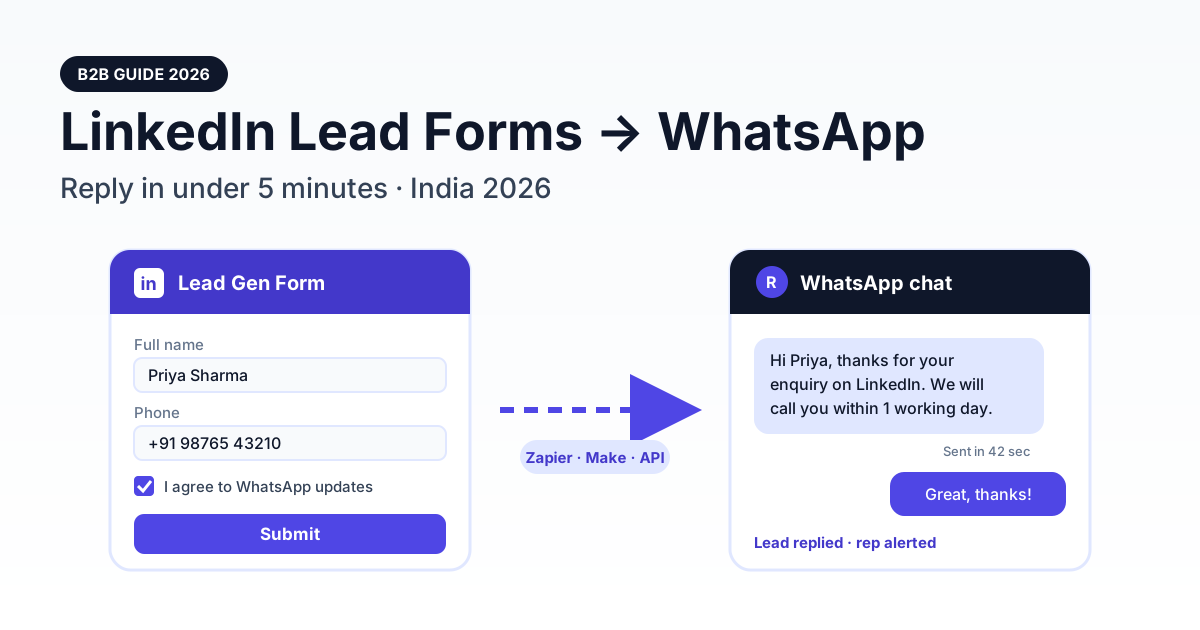
You can connect LinkedIn Lead Gen Forms to WhatsApp by sending each new lead through Zapier, Make or Pabbly Connect into a WhatsApp Business API platform, which then sends an approved template message to the lead within a minute or two. LinkedIn has no native WhatsApp integration, so the real work is a short mapping step (phone number to +91 format, first and last name joined) plus a consent checkbox on the form.
This guide is written for Indian B2B teams running LinkedIn campaigns: SaaS companies, IT services firms, executive-education programmes, exporters and commercial real-estate brokers. It covers what a LinkedIn form actually gives you, three ways to wire it up, a working API request, template examples, a DPDP-aware consent checklist and the KPIs worth tracking.
Why speed-to-lead matters more in B2B than you think
LinkedIn leads are expensive. You pay for senior, filtered audiences, and the person who fills your form is usually comparing two or three vendors in the same sitting. If your SDR emails them the next morning, someone else has already had the first conversation.
A widely cited 2011 Harvard Business Review study of more than 2,000 US companies found that firms trying to contact a lead within an hour were nearly seven times as likely to qualify it as firms that waited just one hour longer, and more than 60 times as likely as firms that waited a day or more. The average response time in that study was 42 hours. Indian B2B teams rarely do much better, especially for leads that arrive at 9 pm or on a Sunday.
Email is the default follow-up for LinkedIn leads, but work inboxes are crowded and promotional filters are aggressive. WhatsApp is where Indian decision-makers actually answer, from founders to plant heads. An instant WhatsApp acknowledgement, followed by a human within business hours, closes the gap between "form submitted" and "first conversation" without hiring a night shift. The same logic drives our guide to Facebook Lead Ads WhatsApp auto-reply; LinkedIn simply has a smaller, more valuable audience.
What a LinkedIn Lead Gen Form gives you
LinkedIn Lead Gen Forms are prefilled from the member's profile, which is why they convert well on mobile. According to LinkedIn's Help Centre on lead form fields, a form can carry up to 12 informational fields, including up to three custom questions, plus up to five custom checkboxes for disclosures and consent that sit outside the 12-field limit. The default fields are first name, last name and email; everything else, including phone, is optional and you must add it.
| Field group | Examples | WhatsApp relevance |
|---|---|---|
| Default contact | First name, last name, email | Name personalises the template; email is your fallback channel |
| Phone (optional) | Phone number, work phone number | Essential: no phone field means no WhatsApp follow-up. Members can edit it |
| Work profile | Job title, seniority, job function, company name, company size, industry | Use for routing and lead scoring before a rep replies |
| Location | City, state, country, PIN/ZIP code | Route to the right regional team; confirm the country code |
| Custom questions | Up to 3, free text or multiple choice | Ask budget or timeline once instead of over chat |
| Hidden fields | Campaign, UTM-style tags | Pass campaign name into the template and your CRM |
| Custom checkboxes | Up to 5 consent or disclosure boxes | Where your explicit WhatsApp opt-in lives |
Two practical points. First, don't treat Campaign Manager as your CRM. You can download leads as a CSV, but retention is limited: LinkedIn's lead download help page currently says collected member data can be stored for one year, while older guidance said 90 days. Sync leads out as they arrive. Second, lead forms on LinkedIn Pages and Showcase Pages can no longer be created, so plan around Sponsored Content and Message Ads forms.
Three ways to connect LinkedIn leads to WhatsApp
Every route has the same shape: LinkedIn produces a lead, something picks it up, and that something calls a WhatsApp Business API platform. What changes is who owns the middle step.
| Route | Effort | Running cost | Typical latency | Best for |
|---|---|---|---|---|
| No-code connector: Zapier, Make or Pabbly Connect | Low: about an hour, no developer | Connector plan plus WhatsApp messages | Seconds for instant/webhook triggers; minutes for polling triggers (Pabbly polls roughly every 10 minutes) | Most teams starting out |
| CRM-first: HubSpot, LeadSquared or Zoho CRM syncs LinkedIn, then triggers WhatsApp | Medium: CRM workflow plus WhatsApp step | CRM licence you already pay for, plus messages | Depends on the CRM's LinkedIn sync interval, often minutes | Teams whose sales process already lives in a CRM |
| Custom: LinkedIn Lead Sync API with webhooks | High: needs developer time and separate API approval from LinkedIn | Hosting plus messages; no connector fees | Near real time via lead notifications | High-volume advertisers and agencies |
On the connector route, Zapier's LinkedIn Ads app offers "New Lead Gen Form Response" triggers for Sponsored and organic content, and needs at least Viewer access on the ad account. Make's LinkedIn Lead Forms app has a "Watch Form Responses" module in both instant and polling versions. If you already use one of these tools, our Zapier WhatsApp integration guide and Make.com WhatsApp setup guide cover the WhatsApp half in more depth.
On the CRM route, the CRM becomes the source of truth and fires the WhatsApp message from its own workflow. That suits teams using LeadSquared, HubSpot or Zoho CRM (which RichAutomate integrates with natively).
The custom route uses LinkedIn's Lead Sync API. Note that it is a separate programme: access to the Advertising API does not grant it, and you must apply. Webhooks must be HTTPS and validated, and the same notification can arrive more than once, so de-duplicate on the form response ID before sending any WhatsApp message.
Step-by-step: Zapier to a WhatsApp template in about an hour
Be clear about one thing first: RichAutomate has no built-in LinkedIn connector. The connection runs through your connector and RichAutomate's developer API. Here is the setup.
1. Prepare the WhatsApp side
- Connect your WhatsApp Business API number in RichAutomate and create an API key under developer settings.
- Create and submit a template such as
linkedin_enquiry_ackwith two variables: the lead's first name and the offer they asked about. Wait for Meta's approval; only approved templates can be sent.
2. Prepare the LinkedIn form
- Add the phone number field (it is not a default field).
- Add a custom consent checkbox, unticked, that names your business and mentions WhatsApp (wording in the checklist below).
- Add a hidden field with the campaign name so it flows through to your CRM.
3. Build the Zap
- Trigger: LinkedIn Ads, "New Lead Gen Form Response". Select the ad account and form.
- Filter: continue only if the consent checkbox is accepted and a phone number exists.
- Formatter (the mapper step): strip spaces, dashes and a leading zero from the phone, then prefix +91 when the lead is in India, giving E.164 format. Join first and last name into one field for your CRM.
- Action: Webhooks by Zapier, POST to RichAutomate's send-template endpoint with your API key as a Bearer token.
- Optional: a second action that adds the lead to your CRM or a Google Sheet.
The request looks like this. Copy the API base URL from your RichAutomate dashboard; the path is /api/v1/send-template.
Get the India 2026 WhatsApp BSP price comparison
Wati vs AiSensy vs Interakt vs RichAutomate: Meta rates, platform fees and hidden costs, side by side. We send it to your WhatsApp in a minute.
POST {API_BASE}/api/v1/send-template
Authorization: Bearer YOUR_API_KEY
Content-Type: application/json

{
  "phone": "+919876543210",
  "template": "linkedin_enquiry_ack",
  "language": "en",
  "variables": ["Priya", "WhatsApp API demo"]
}
Prefer a multi-step conversation instead of a single message? Build a chatbot flow with an Incoming Webhook trigger and POST {"phone": "+91…", "name": "Priya Sharma", "data": {"company": "…", "job_title": "…", "campaign": "…"}} to /api/v1/public/flows/{token}/trigger. The flow can then ask qualifying questions and hand hot leads to a rep. Either way you still need the mapper step, because LinkedIn's payload does not arrive in that shape.
Test with your own phone number first, then submit a test lead from Campaign Manager's form preview and check the delivery status in RichAutomate. If your wallet balance is too low, the API returns an "Insufficient balance" error rather than silently dropping the message.
Template examples for LinkedIn leads
Outside the 24-hour customer service window, Meta only lets businesses start conversations with approved template messages, and the template category (utility, marketing or authentication) affects what Meta charges. Two templates cover most LinkedIn funnels.
Acknowledgement (submitted as utility)
"Hi {{1}}, thanks for your enquiry about {{2}} on LinkedIn. Our team has received your details and will contact you on this number within one working day. Reply STOP to opt out."
This responds directly to the user's own request, which is why it fits the utility category. Meta decides the final category during review, and a template that drifts into promotion will be recategorised as marketing. Keep it factual: no offers, no discounts.
Follow-up (marketing)
"Hi {{1}}, teams like {{2}} use our platform to cut lead response time to minutes. Want a 20-minute walkthrough this week? Reply YES and we'll share slots."
This is promotional, so submit it as marketing. Send it only to leads who ticked the WhatsApp consent box, and space it out: one acknowledgement plus one follow-up is plenty before a human takes over.
Consent and DPDP checklist
Meta's WhatsApp opt-in rules require that the person clearly opts in to messages, that your business name is stated, and that you comply with applicable law. In India that law increasingly means the Digital Personal Data Protection Act, 2023, whose consent provisions expect consent to be free, specific, informed and given by a clear affirmative action. The Act's obligations are being phased in, so check current commencement dates with your counsel, but build for them now.
- Unticked checkbox: pre-ticked boxes and silence are not consent. Use one of LinkedIn's custom checkboxes and leave it unticked by default.
- Specific wording: "I agree to receive messages about my enquiry from [Business Name] on WhatsApp at the number above." Name WhatsApp and your business.
- Purpose link: link your privacy policy and state what you will use the number for.
- Gate in code: your connector filter must skip any lead whose consent response is not accepted.
- Easy opt-out: every template should say how to stop messages, and STOP replies must suppress future sends.
- Record keeping: store the consent value, form ID and timestamp alongside the lead in your CRM.
- Retention: delete or anonymise leads you no longer need; don't keep a shadow list in spreadsheets.
- No over-promising: WhatsApp quality ratings depend on how recipients react. Consent and relevance keep your number healthy; nothing guarantees it.
India B2B use cases
- B2B SaaS: a Bengaluru HR-tech company runs a "free payroll audit" form. The acknowledgement goes out in seconds with a booking link, and the rep sees job title and company size before calling.
- IT services: a Pune firm targeting US and Indian CTOs uses the custom question "project start date" to route urgent leads to a senior architect on WhatsApp the same day.
- Executive education: a business school's weekend MBA programme sends a brochure PDF as the template header and lets a flow answer fee and eligibility questions overnight.
- Manufacturing and exports: a Gujarat valve manufacturer asks for product category and order volume, then forwards qualified enquiries to the right regional dealer.
- Commercial real estate: a Mumbai office-leasing broker asks for seat count and micro-market, and the WhatsApp flow shares matching floor plates before the site-visit call.
For routing logic, pair this setup with WhatsApp lead qualification and scoring so the bot only escalates leads that clear your threshold.
KPIs to track
| KPI | How to measure | Healthy target |
|---|---|---|
| Time to first WhatsApp touch | Template sent time minus form submit time | Under 5 minutes |
| Consent rate | Leads with WhatsApp consent ÷ total leads | Track trend; low rates mean unclear wording |
| Delivery rate | Delivered ÷ sent templates | Above 90%; investigate invalid numbers |
| Reply rate | Leads replying within 24 hours ÷ delivered | Benchmark against your email reply rate |
| Meeting-booked rate | Meetings ÷ WhatsApp-engaged leads | Compare monthly against email-only leads |
| Cost per qualified lead | LinkedIn spend plus messaging cost ÷ qualified leads | Should fall as response time drops |
| Opt-out rate | STOP replies ÷ delivered | Keep low; rising rates mean too many follow-ups |
Pass the LinkedIn campaign name through as a hidden field so revenue can be tied back to campaigns; our guide to WhatsApp ads attribution explains the tagging approach.
Common mistakes to avoid
- Forgetting the phone field. It is not on the form by default.
- Skipping the mapper. Sending "98765 43210" or "09876543210" to the API fails. Normalise to +91 E.164 first.
- Treating a phone number as consent. Without an explicit WhatsApp checkbox you risk blocks, complaints and DPDP exposure.
- Using a marketing template as the first touch. Lead with a factual acknowledgement; earn the pitch.
- Ignoring duplicates. Webhooks and polling can deliver the same lead twice. De-duplicate on the response ID.
- Leaving leads in Campaign Manager. Retention is limited; sync to your CRM immediately.
- No human handover. Automation buys you minutes, not the deal. Alert a rep when a lead replies.
What it costs on RichAutomate
Setup is ₹0. On Client Pay, RichAutomate's platform fee is ₹0.10 per message, and Meta bills its own per-message rate for each template category to you directly (see RichAutomate pricing for current details). Plans are optional: Starter ₹499/month, Pro ₹899/month and White-label ₹1,199/month, all GST-inclusive, or stay on pay-as-you-go with no monthly floor. Add your connector's plan (Zapier, Make or Pabbly) to the total.
Ready to reply to LinkedIn leads in minutes instead of days? Start your 14-day RichAutomate free trial, no card needed, connect your number, approve your first template and wire up the Zap the same afternoon.