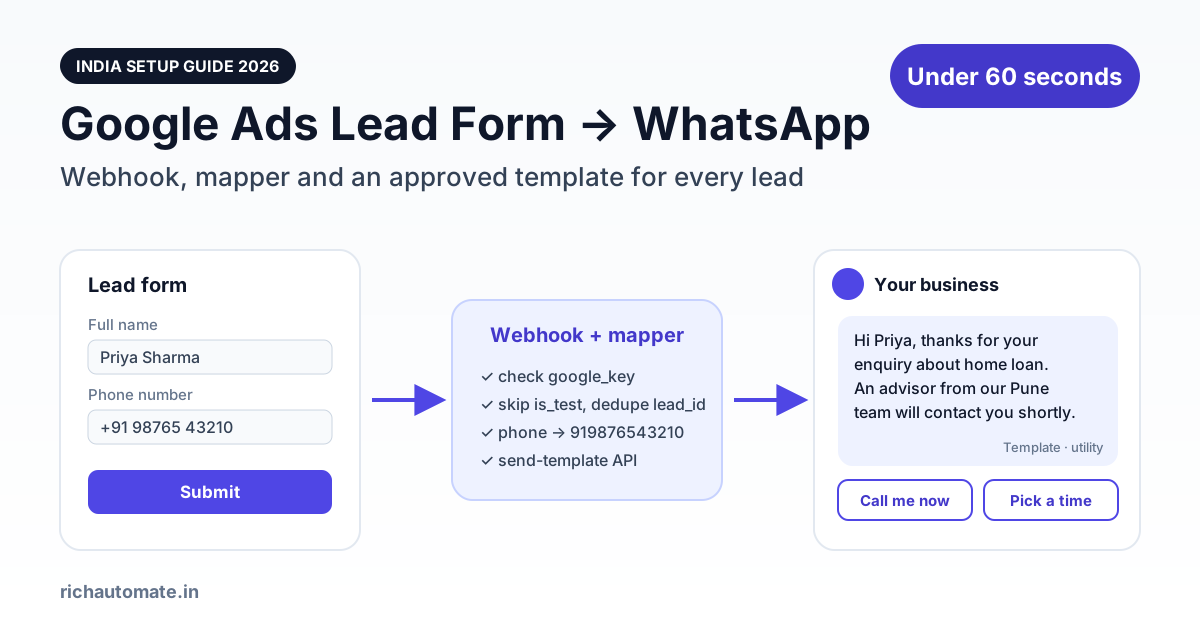
Yes, you can send every Google Ads lead form submission a WhatsApp message within a minute. You point the form's webhook at a small mapper step (Pabbly Connect, Make, Zapier, n8n or your own function). The mapper reformats Google's lead into an approved WhatsApp template send on your WhatsApp Business API account. Google does not message anyone on WhatsApp by itself, and a fresh lead has not chatted with you yet, so that first message has to be a Meta-approved template, not free text.
This guide is for Indian advertisers who already run lead form assets on Search or Performance Max campaigns and are tired of leads going cold in a CSV. It covers the exact payload Google sends, how to map it to template variables, the consent line your form needs, a worked monthly cost in rupees, and the errors that quietly break most setups. If your leads come from Meta instead, the sister guide on Facebook Lead Ads to WhatsApp auto-reply covers that pipeline.
How the Google Ads lead form to WhatsApp pipeline works
A lead form asset lets someone submit their details inside Google's own interface without visiting your website. Per Google Ads Help (as of October 2026), lead forms run on Search and Performance Max campaigns, plus some Display formats, and every form must link to your privacy policy. Leads land in your Google Ads account, and you can also push each one to an outside system through a webhook as soon as it is submitted.
The full chain has four steps:
- Lead submits the form. Google stores the lead and immediately POSTs a JSON payload to the webhook URL you configured on that form.
- Mapper receives the payload. It checks the
google_key, skips test leads, removes duplicates, pulls the name and phone out ofuser_column_data, and normalises the number to91XXXXXXXXXX. - Mapper calls RichAutomate. It sends one request to the public developer API's
send-templateendpoint, or fires an Incoming Webhook flow trigger if you want a multi-step chatbot instead of a single message. - Lead receives the template on WhatsApp. When they reply, the 24-hour customer service window opens and your team (or a flow) continues the conversation for free on Meta's side.
Google Ads is not a built-in integration in RichAutomate. The platform connects directly to Zoho CRM, Razorpay, Google Sheets, the Meta Cloud API and its own booking module, but Google's lead payload needs that mapper step every time.
What Google actually sends: the lead form webhook payload
Google's developer documentation for the lead form webhook (developers.google.com/google-ads/webhook) defines a WebhookLead object. The fields that matter for WhatsApp are lead_id, user_column_data, form_id, campaign_id, gcl_id, google_key and is_test. Video and Discovery leads also carry adgroup_id and creative_id. Newer payloads add lead_submit_time (ISO-8601) and lead_source. Each item in user_column_data holds a column_id such as FULL_NAME, PHONE_NUMBER, EMAIL or CITY, plus a string_value. Google documents phone numbers in E.164 format, for example +919876543210.
Here is an illustrative payload modelled on Google's documented schema. Values are made up:
{
  "lead_id": "TeSter-123-ABCDEFGHIJKLMNOPQRSTUVWXYZ",
  "api_version": "1.0",
  "form_id": 40000000001,
  "campaign_id": 20000000002,
  "gcl_id": "EAIaIQobChMI-example",
  "google_key": "your-secret-form-key",
  "is_test": false,
  "lead_submit_time": "2026-10-29T06:12:44Z",
  "user_column_data": [
    { "column_id": "FULL_NAME",    "string_value": "Priya Sharma" },
    { "column_id": "PHONE_NUMBER", "string_value": "+919876543210" },
    { "column_id": "EMAIL",        "string_value": "priya@example.com" },
    { "column_id": "CITY",         "string_value": "Pune" }
  ]
}
Three behaviours from Google's docs shape how your mapper should work. First, a single lead is not guaranteed to arrive exactly once, so your handler must dedupe on lead_id, which Google says is unique across all forms. Second, Google expects an HTTP 200 with an empty JSON body. A 4XX response is treated as permanent and is not retried, while a 5XX may be retried. Third, the request only contains the questions you actually added to the form. If you never asked for a phone number, there is nothing to send on WhatsApp.
Map Google's fields to WhatsApp template variables
The mapper's job is to turn that nested array into a flat set of values that line up with your template's {{1}}, {{2}} placeholders. This is the map we recommend:
| Google webhook field | Where it goes | Notes |
|---|---|---|
user_column_data → FULL_NAME | Template {{1}} | Use the first word only; fall back to "there" if blank |
user_column_data → PHONE_NUMBER | phone field of the API call | Strip +, spaces and dashes; prefix 91 to bare 10-digit numbers |
form_id | Template {{2}} via a lookup | Map each form to a product name, e.g. "home loan" or "MBA admission" |
user_column_data → CITY | Template {{3}} or routing | Optional; useful to assign the right branch |
user_column_data → EMAIL | CRM / Google Sheets row | Not needed for WhatsApp; keep for enhanced conversions |
lead_id | Dedupe store + Idempotency-Key header | Never send twice for the same lead |
gcl_id, campaign_id | CRM row | Needed later for offline conversion import |
google_key | Checked, then dropped | Reject the request if it does not match your form's key |
is_test | Gate | If true, log it and return 200 without sending |
After mapping, the mapper calls RichAutomate's public developer API with your API key as a Bearer token. The send-template endpoint takes the phone, template name, language and an ordered list of variables:
POST https://<your-api-host>/api/v1/send-template
Authorization: Bearer <your-richautomate-api-key>
Idempotency-Key: TeSter-123-ABCDEFGHIJKLMNOPQRSTUVWXYZ
Content-Type: application/json

{
  "phone": "919876543210",
  "template": "google_lead_ack",
  "language": "en",
  "variables": ["Priya", "home loan", "Pune"]
}
Passing the Google lead_id as the Idempotency-Key gives you a second safety net: the API stores the first response for that key and replays it for 24 hours instead of sending again. If you would rather start a chatbot, for example to ask budget and timeline before a human calls, post {"phone":"919876543210","name":"Priya","data":{"form":"home loan","city":"Pune"}} to the flow's Incoming Webhook trigger at /api/v1/public/flows/{token}/trigger. Google's payload never matches either shape on its own, which is why the mapper is not optional.
Choosing the mapper: Pabbly, Make, Zapier, n8n or your own function
Any tool that can receive a webhook, run a little logic and make an HTTP request will work. The trade-off is effort versus control:
| Route | Setup effort | Running cost | Reliability notes |
|---|---|---|---|
| Pabbly Connect | Low: Google Ads lead trigger, webhook URL, field mapping in a UI | Subscription plan; popular with Indian SMBs | Add a filter step for is_test and a formatter for the phone number |
| Make | Low to medium: custom webhook module + HTTP module | Operations-based plans | Good visual error handling and replay |
| Zapier | Low: Webhooks by Zapier + Code or Formatter steps | Task-based plans, usually the priciest per lead | Mature retries and logs |
| n8n (self-hosted) | Medium: you run the server | Your hosting bill only | Full control, but you own uptime; a 5XX may be retried by Google, a dead server just loses leads |
| Own serverless function | Medium to high: about 60 lines of code | Near zero at SMB volume | Fastest path and easiest dedupe; needs someone who can read logs |
One caution on ready-made recipes. Pabbly's published Google Ads to WhatsApp walkthrough maps the lead into a WhatsApp Cloud API "Send Text Message" action. That works in a demo when the test number has messaged you recently. For a real new lead there is no open customer service window, so a free-form text is rejected (Meta usually reports this as a re-engagement error, code 131047). Whatever tool you pick, make the action a template send.
Get the India 2026 WhatsApp BSP price comparison
Wati vs AiSensy vs Interakt vs RichAutomate: Meta rates, platform fees and hidden costs, side by side. We send it to your WhatsApp in a minute.
The approved template and the consent line on your form
Meta's rule is simple: a business-initiated message to someone who has not messaged you in the last 24 hours must use a pre-approved template in the marketing, utility or authentication category. A lead acknowledgement that confirms the enquiry the person just made can often be approved as utility. If you add offers, discounts or "limited seats" wording, expect Meta's review to classify it as marketing. A template that has worked well for service businesses looks like this:
google_lead_ack (Utility, English)
Hi {{1}}, thanks for your enquiry about {{2}}. We have received your details and an advisor from our {{3}} team will contact you shortly. You can reply here with any question in the meantime.
Buttons: Call me now · Pick a callback time
Keep it short and free of promotional language. Quick-reply buttons matter: a tap opens the 24-hour window for free-form replies.
Consent is the part most advertisers skip. The person opted in on Google's form, not on WhatsApp, and Meta's WhatsApp Business Messaging Policy expects an opt-in that tells people they will be contacted by your business on WhatsApp. Put a plain line in the form description, for example: "By submitting, you agree that [Brand] may contact you about this enquiry by phone and WhatsApp." Mirror the same wording in the privacy policy that Google already requires you to link. Ask for the phone number as a form question too. Google offers an OTP-verified phone option on some forms (the payload then carries PHONE_NUMBER_VERIFIED), which cuts fake numbers sharply. Consent and verified numbers are what keep block rates low, and low block rates are what keep your number's quality rating healthy.
Speed-to-lead: why the first 60 seconds decide the lead
Google lead form users are high intent but low commitment. They did not visit your site and they probably filled two or three forms from competing advertisers in the same session. The well-known Harvard Business Review study "The Short Life of Online Sales Leads" (2011) found that firms contacting a lead within an hour were nearly seven times as likely to qualify it as firms that waited even one hour longer. A WhatsApp template that lands while the person is still holding their phone is the cheapest way to be first.
A properly built webhook pipeline usually completes in a few seconds. The slow parts are human, so let the template buy time and a short flow ask two qualifying questions. Our guide to WhatsApp lead qualification and scoring shows how to score those answers so hot leads reach a caller first.
Google Ads lead forms vs Meta Lead Ads vs Click-to-WhatsApp
Lead forms are one of three ways Indian advertisers commonly push paid traffic into WhatsApp. They behave differently on speed, cost and consent:
| Factor | Google Ads lead form | Meta Lead Ads | Click-to-WhatsApp ads |
|---|---|---|---|
| Who starts the WhatsApp chat | You, with a template | You, with a template | The user, by tapping the ad |
| Delivery to your system | Webhook POST per lead | Leadgen webhook via the Graph API | Lands directly in your WhatsApp inbox |
| First-message Meta charge | Utility ₹0.1150 or marketing ₹0.8631 per template | Same as Google | No template needed; Meta's free entry point pricing applies if you reply in time |
| WhatsApp consent | Must be added to form copy | Must be added to form copy | Implied by the user messaging you |
| Intent signal | Search query intent, strongest for "near me" and service keywords | Interest-based, more casual | Interest-based, but conversation already open |
| Main risk | Missing phone field, wrong format | Fake or mistyped numbers | Chats without a phone-verified identity |
If you are deciding where to put the next rupee, the Click-to-WhatsApp ads ROI playbook compares cost per qualified conversation across the three routes.
Close the loop: GCLID and offline conversion import
The gcl_id in every webhook payload is the most under-used field. Store it with the lead. When that lead later books, pays or becomes a customer in your CRM, you can upload the conversion back to Google Ads so Smart Bidding learns which searches produce sales, not just form fills. Per Google Ads Help (as of October 2026), a GCLID is only usable for offline conversion import for 90 days after the click, and enhanced conversions for leads, which matches on hashed email or phone, accepts uploads for a shorter window. Google currently recommends enhanced conversions for leads as the starting point for new setups. Either way, uploading the WhatsApp-qualified outcome rather than the raw form fill is how you stop paying for junk leads. Our Google and Meta ads attribution guide for WhatsApp covers the reporting side.
Also download or sync your leads regularly. Google Ads Help says CSV downloads cover only the last 30 days and Google stores leads for 60 days, so a webhook that writes every lead to your CRM or Google Sheets is your real system of record.
Worked monthly cost in rupees
Take an education counsellor or a home-services brand getting 600 Google lead form leads a month, each receiving one template, followed by an average of four agent or bot replies inside the 24-hour window:
- Meta charge, utility template: 600 × ₹0.1150 = ₹69. Billed by Meta directly to your WhatsApp Business account.
- Meta charge, if the template is classified marketing: 600 × ₹0.8631 = ₹517.86.
- Meta charge for replies inside the customer service window: ₹0. Non-template replies within 24 hours of the lead's last message carry no Meta fee.
- RichAutomate on Client Pay: 3,000 messages sent (600 templates + 2,400 replies) × ₹0.10 = ₹300, with ₹0 setup and ₹0 monthly platform fee.
- Mapper: whatever your Pabbly, Make or Zapier plan costs, or close to nothing for a serverless function.
That is roughly ₹369 a month with a utility template, or about ₹818 with a marketing one, before GST and the mapper. That is well under ₹2 per lead. The number that moves the business is how many of those 600 leads you actually reach. Full rate details are on the RichAutomate pricing page.
Common errors and how to fix them
- Wrong phone format. The most common failure. Send
919876543210: no plus sign, no spaces, no leading zero. Handle users who type their number with a 0 prefix or with +91 twice. - Template not approved or wrong language code. The template name and language in your API call must match an approved template exactly. A template still in review, or
enwhen you createden_US, will fail. - Variable count mismatch. Sending two variables to a template with three placeholders is rejected. Always fill every placeholder, even with a fallback like "there".
- Free-form text instead of a template. Fails for new leads with a re-engagement error (usually 131047), as explained above.
- 131026 (undeliverable). Providers generally describe this as the number not being reachable on WhatsApp, for example not registered or on an outdated app. Fall back to SMS or a call; do not retry in a loop.
- 131049 (ecosystem engagement). Meta held back a marketing template, which providers link to per-user marketing message limits and engagement signals. Another reason to keep the lead acknowledgement in the utility category and not to stack several marketing templates on a cold lead.
- Test leads reaching real sends. The "Send test data" button in the form's webhook section posts a sample with
"is_test": true. Return 200 and stop there. Google's own testing doc warns that a green status only proves you returned 200, not that you parsed the lead correctly. - Returning errors to Google. If your WhatsApp send fails, still answer Google with 200 once the lead is safely stored, and retry the send yourself. A 4XX tells Google to give up on the delivery entirely.
Running IndiaMART or JustDial as well? The same mapper pattern applies, and our IndiaMART lead WhatsApp auto-reply guide shows the differences.
Go-live checklist: approve the template, add the consent line and phone question, build the mapper, paste its URL and key into the form, press "Send test data", then submit one real lead from your own phone and time the WhatsApp message.