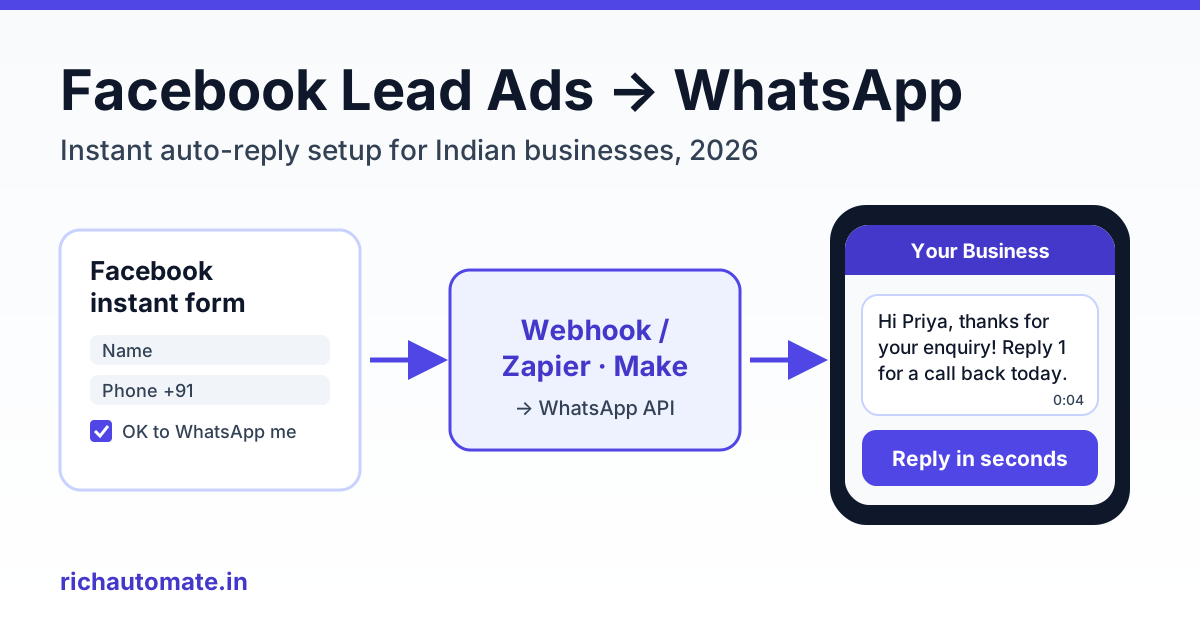
To send an instant WhatsApp reply to a Facebook Lead Ads lead, let the instant form capture the phone number, then have a webhook or connector pass that lead to your WhatsApp Business API provider, which sends an approved template within seconds. On RichAutomate there is no direct Lead Ads trigger yet (it is on the roadmap, marked coming soon), so today you connect the two through Zapier, Make or Pabbly, or through Meta's leadgen webhook into our developer API.
This guide walks through the whole setup for an Indian business: how to word consent inside the form, which template to send first, the three ways to wire it up, what the first 1,000 leads will cost you in rupees, and the mistakes that quietly kill reply rates.
Why speed-to-lead matters more than the ad itself
A Facebook lead is warm for a very short time. The person tapped your ad, filled a form in 20 seconds and went back to scrolling. If your sales caller rings them four hours later, they often do not remember which form they filled, or they have already spoken to two competitors.
This is not just intuition. Harvard Business Review's 2011 study The Short Life of Online Sales Leads (Oldroyd, McElheran and Elkington) concluded that most companies are not responding nearly fast enough, and its widely quoted finding is that firms contacting a lead within an hour were nearly seven times as likely to qualify it as firms that waited longer. That research was about phone and email in the US, but the pattern holds for Indian SMBs running Meta ads: the first business to reply usually gets the conversation.
WhatsApp makes the first reply cheap and automatic. A template lands on the phone the lead is already holding, it shows your verified business name, and the person can reply in one tap. Your callers then work only the leads who answered, instead of dialling every number cold.
Lead Ads vs Click-to-WhatsApp ads: which one fits
Before you build anything, check that Lead Ads is the right format. Click-to-WhatsApp ads open a chat directly, so there is no form and no connector to maintain. Lead Ads keep the form, which is useful when you need structured details before a conversation.
| Factor | Lead Ads (instant form) + WhatsApp reply | Click-to-WhatsApp ads |
|---|---|---|
| What the user does | Fills a short form inside Facebook or Instagram | Taps the ad and lands in a WhatsApp chat |
| Data you get | Name, phone, email plus custom questions (city, budget, course) | Phone number and whatever they type |
| Opt-in for WhatsApp | You must collect it in the form | The user starts the chat themselves |
| Setup effort | Form + connector + approved template | Ad + chatbot or agent ready to answer |
| Best for | Education, real estate, loans, B2B, CRM-driven sales teams | D2C, local services, quick enquiries, high chat capacity |
| Risk | Fake or mistyped numbers, delay if the connector fails | Chat volume spikes your team cannot handle |
If you are weighing the two on cost per sale, our click-to-WhatsApp ads ROI playbook breaks down the numbers. Many teams end up running both: Lead Ads for high-ticket, form-heavy offers and Click-to-WhatsApp for everything quick.
Getting WhatsApp opt-in inside the instant form
WhatsApp requires opt-in before a business starts a conversation. Meta's WhatsApp opt-in policy says the business must clearly state that the person is opting in to receive messages, must clearly name the business, and must comply with applicable law. A phone number field on its own is not consent to WhatsApp messages.
Wording that works
Instant forms let you add a custom disclaimer with optional consent checkboxes in the privacy section of the form. Keep the wording plain and specific, for example:
- "I agree to receive messages from Sharma Coaching Classes on WhatsApp about my enquiry and course updates."
- "Yes, Sharma Coaching Classes can contact me on WhatsApp at the number above."
Name the business exactly as it appears on your WhatsApp profile, mention WhatsApp by name, and do not hide the line inside a long privacy paragraph.
Store the evidence
Meta's Lead Ads retrieval documentation notes that the standard field_data on a lead does not contain the responses to optional custom disclaimer checkboxes; those come back through a separate custom_disclaimer_responses field. If your connector only maps field_data, you lose the consent record. Map that field too and save it with the lead. Our guide to WhatsApp opt-in evidence for a Meta audit covers what to keep and for how long.
The DPDP Act angle
India's Digital Personal Data Protection Act, 2023 expects consent to be free, specific, informed and given through a clear affirmative action, with obligations phasing in under the rules notified since. A checkbox that names WhatsApp and your business, plus a stored record of the tick, lines up with both Meta's policy and the direction of Indian law. This is general guidance, not legal advice; check with your own adviser for sensitive sectors such as lending or health.
Choosing the first-message template
Because the lead has not messaged you yet, your first WhatsApp message must be an approved template. Free-form text only works inside the 24-hour customer service window that opens when the person replies.
Utility or marketing?
You pick a category when you submit the template, but Meta decides the final category during review and can recategorise it. A message that confirms the enquiry the person just made and asks a non-promotional follow-up question has a fair chance of being accepted as utility. Anything with offers, discounts or "limited seats" language will be treated as marketing. Our explainer on WhatsApp template categories has more examples.
An example first template:
- Body: "Hi {{1}}, thanks for your enquiry about {{2}} on our Facebook form. Your reference number is {{3}}. Reply 1 to get a call back today, or 2 to receive the details here on WhatsApp."
- Variables: {{1}} = first name, {{2}} = course or product from the form, {{3}} = your lead ID.
- Buttons: two quick replies, "Call me back" and "Send details".
What the first message costs
Per first reply, a utility template costs Meta's ₹0.1150 plus the RichAutomate Client Pay platform fee of ₹0.10, about ₹0.215 in total. A marketing template costs ₹0.8631 plus ₹0.10, about ₹0.963. Once the lead replies, messages inside the 24-hour service window carry no Meta charge; only the ₹0.10 platform fee per message applies.
These are Meta's published India rates at the time of writing; check RichAutomate pricing for current numbers. On Client Pay, Meta bills you directly and you see every charge on your own Meta invoice.
Three ways to connect Lead Ads to WhatsApp
There are three practical routes. All of them end at the same place: an approved template going out through your WhatsApp Business API account.
Get a 1-minute BSP audit on WhatsApp
Drop your WhatsApp number — we line-item your current invoice against Meta India rates in under 60 seconds. India-hosted, DPDP-compliant.
| Route | How it works | Effort | Running cost | Typical latency |
|---|---|---|---|---|
| 1. Zapier / Make / Pabbly | Connector receives the new lead, then a webhook or HTTP step calls the RichAutomate API or a flow trigger URL | Low, about an hour, no code | Connector plan (free tiers exist; paid tiers vary) + message cost | Seconds to a few minutes |
| 2. Meta leadgen webhook + your server | Meta pings your server with a lead ID, your server fetches the lead and calls the API | High, needs a developer and a Meta app with lead permissions | Hosting only + message cost | Meta says pings can be delayed by up to a few minutes |
| 3. CRM in the middle | Your CRM (for example LeadSquared or Privyr) receives Facebook leads, then triggers the WhatsApp send through its own automation or a webhook | Medium, depends on the CRM | CRM subscription + message cost | Depends on the CRM's sync interval |
Route 1: connector (recommended for most SMBs)
Zapier, Make and Pabbly all have a Facebook Lead Ads trigger. You do not need a RichAutomate app inside them; their generic webhook or HTTP action is enough. Our Zapier WhatsApp integration guide and Make.com WhatsApp integration guide show the screens step by step.
Route 2: Meta's leadgen webhook
Meta's documentation describes real-time delivery through the leadgen webhook field. The payload carries IDs such as leadgen_id, page_id, form_id and ad_id, not the answers themselves, so your server then calls the Graph API for that lead to read field_data. Reading leads needs the leads_retrieval permission, webhooks need pages_manage_metadata, and Meta recommends a long-lived Page token so the integration does not expire. This route suits teams that already run a backend and want zero connector fees.
Route 3: CRM first
If your sales team already lives in a CRM, push Facebook leads there first and let the CRM trigger WhatsApp. That keeps one source of truth for lead status. Check how often your CRM syncs Facebook leads, because a 15-minute sync defeats the purpose of an instant reply.
Step-by-step setup: connector route
Here is the full sequence for route 1. Budget about an hour, plus template approval time.
- Connect your WhatsApp number. Sign up on RichAutomate, connect your WhatsApp Business API number and confirm the display name matches the business named in your form disclaimer.
- Submit the first template. Create the template above with its variables and wait for approval. Do not build the automation around a template that is still pending.
- Get your credentials. Generate an API key in the developer section, or open the chatbot flow you want leads to enter and copy its unique trigger URL. The RichAutomate API documentation lists the request format for both.
- Add the consent line to your instant form. Add the custom disclaimer with the WhatsApp checkbox, and make the phone number field required.
- Create the trigger. In Zapier, Make or Pabbly, choose Facebook Lead Ads, "new lead", then pick your Page and form.
- Clean the phone number. Add a formatter step: strip spaces, dashes and a leading zero, and make sure the number starts with country code 91 followed by the 10-digit mobile number.
- Add the webhook or HTTP action. POST to the RichAutomate API (template name plus variables) or to the flow trigger URL (phone plus the fields you want the flow to use). Map name, product and lead ID into the template variables.
- Test with a real lead. Meta offers a Lead Ads testing tool for developers that submits test leads to your form. Submit one with your own number and time how long the WhatsApp message takes to arrive.
- Turn on the ad. Watch the first 20 leads in the shared team inbox and fix any mapping errors before you scale spend.
You can see every connection option on the RichAutomate integrations page, including Zoho CRM and Google Sheets.
What to do after the first reply
The template only opens the door. What happens in the next ten minutes decides whether the lead becomes a sale.
Qualify with a short chatbot flow
When the lead taps "Send details", route them into a visual chatbot flow that asks two or three qualifying questions: budget range, timeline, city. Keep it short; every extra question loses people. Score the answers so hot leads go to a human first. Our guide to WhatsApp lead qualification and scoring has question sets for common Indian verticals.
Hand off to sales fast
When a lead taps "Call me back" or scores high, assign the chat to a salesperson in the shared team inbox. The salesperson sees the form answers and the chat history together, so the call starts from context rather than "Sir, you filled some form?".
Follow-up timing
- Inside the 24-hour window after they reply, send free-form messages; there is no Meta charge for these.
- If they never reply, one follow-up template the next day is reasonable. That will usually count as marketing.
- Stop after two unanswered templates. Repeated unwanted messages lead to blocks and reports, which hurt your number's quality rating.
Common mistakes that kill reply rates
- No opt-in line in the form. Without it you are messaging people who never agreed to WhatsApp contact. Expect blocks, a falling quality rating and, eventually, messaging limits.
- Wrong number format. Numbers typed as "098xxxxxxxx" or with spaces fail silently. Always normalise to 91 plus 10 digits before calling the API.
- Marketing copy submitted as utility. Meta will recategorise it or reject it. Write the first message as a genuine confirmation of the enquiry and keep offers for later.
- No fallback when the number is not on WhatsApp. Some leads use a landline or a number without WhatsApp. When the send fails, push the lead to your call list or an email sequence instead of losing it.
- Dropping the consent field. Mapping only
field_dataloses the disclaimer response. Map the consent field and store it. - Nobody watching the inbox. An instant template followed by a three-hour silence wastes the speed you paid for. Staff the inbox during ad hours or let a chatbot carry the first few steps.
Cost worked example: 1,000 leads a month
Say a coaching institute in Pune gets 1,000 Lead Ads leads a month and uses RichAutomate on Client Pay. Assume the first template is accepted as utility, 60% of leads reply, each replying lead exchanges about eight messages inside the service window, and non-responders get one marketing follow-up.
| Line item | Volume | Rate | Monthly cost |
|---|---|---|---|
| First utility template | 1,000 | ₹0.215 | ₹215 |
| Service-window messages (no Meta charge) | 600 × 8 = 4,800 | ₹0.10 platform fee | ₹480 |
| Marketing follow-up to non-responders | 400 | ₹0.963 | ₹385 |
| Total messaging | about ₹1,080 | ||
| Optional plan | Starter ₹499 or Pro ₹899 per month | ₹0 to ₹899 |
So the whole WhatsApp layer runs at roughly ₹1 to ₹2 per lead, with ₹0 setup and GST invoices in INR. If Meta classes your first template as marketing instead, the first line rises to about ₹963 and the total to roughly ₹1,830. Set that against what you already pay Meta per lead, and the reply layer is a small cost protecting a much bigger one. Connector subscription fees, if any, are extra.
Start with a free trial
You can build and test the whole setup before spending on ads. RichAutomate includes a 14-day free trial with 100 credits, enough to approve a template, wire a Zapier or Make scenario to the API and send test leads to your own phone. Start your free RichAutomate trial and have your Facebook Lead Ads replying on WhatsApp within the hour.