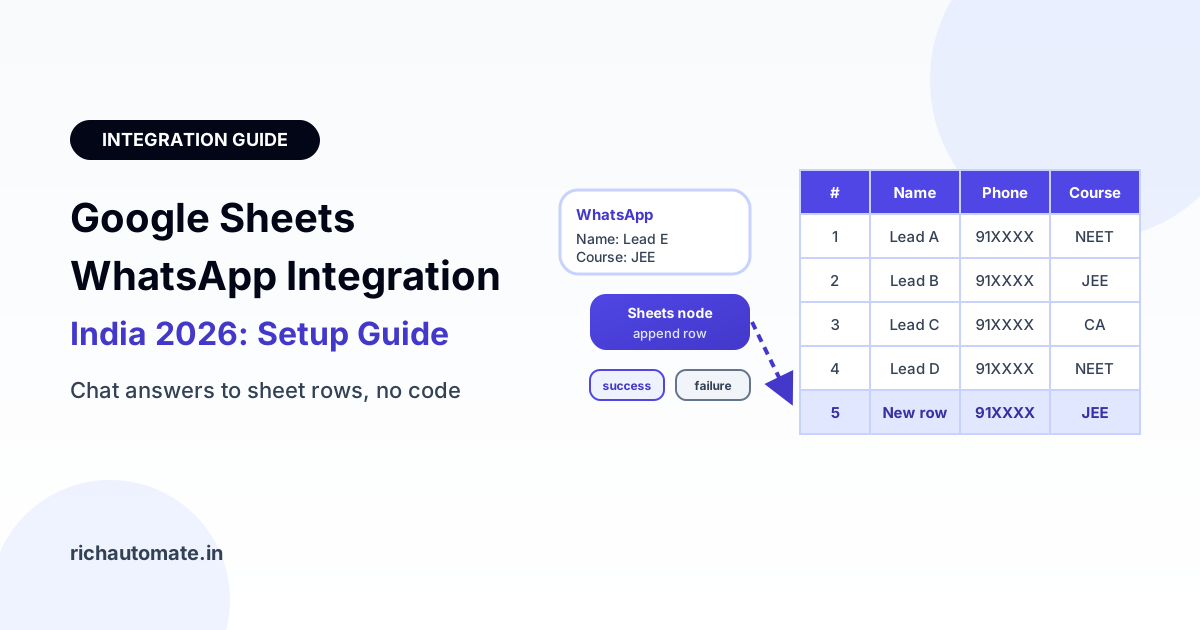
WhatsApp Google Sheets integration means every lead, order or booking your WhatsApp chatbot collects is written straight into a spreadsheet as a new row, with no copy-paste. On RichAutomate you do it without code: connect your Google account, drop the native Google Sheets node into a flow, map chat answers to columns, and each conversation that reaches that step appends a row your team can filter, share and follow up from.
For most Indian small businesses, Google Sheets is the first CRM. The coaching centre counsellor, the clinic receptionist and the D2C founder packing COD orders all already live in a sheet. The problem is getting WhatsApp data into it. Screenshots, forwarded chats and end-of-day manual entry lose leads and create typos in phone numbers. This guide covers the four ways to connect WhatsApp to Google Sheets in 2026, how to set up the native node step by step, which columns to log for five real use cases, how to read data back out of a sheet, what breaks and how to fix it, and when you have outgrown Sheets altogether.
Four ways to connect WhatsApp to Google Sheets
There is no single right route. The choice depends on whether you only need to write rows (capture leads, orders, bookings) or also need to read from the sheet (look up an order status, check slot availability), and how comfortable your team is with automation tools.
| Route | Extra cost | Setup time | Skill needed | Reliability | Best for |
|---|---|---|---|---|---|
| RichAutomate native Sheets node | No extra tool fee | 10 to 20 minutes | None; drag and map | High; success and failure branches in the flow | Appending leads, orders and bookings from a chatbot |
| Make.com | Its own per-operation plans; check current pricing | 30 to 60 minutes | Low to medium | High, but one more system to monitor | Multi-app scenarios, lookups, routing to several tools |
| n8n | Free if self-hosted (you pay for the server), or its own cloud plans | 1 to 3 hours | Medium to high | Depends on your hosting | Tech teams that want full control and custom logic |
| Zapier | Its own per-task plans; check current pricing | 20 to 40 minutes | Low | High, costs rise with task volume | Simple triggers across many SaaS apps |
| Google Apps Script + webhook | Free within Google quotas | 2 to 4 hours | JavaScript | Good if someone maintains the script | Custom lookups and reading data back into chat |
| Manual CSV export | None | Minutes, every time | None | Low; always stale | One-off reports, not live operations |
If you already run automations elsewhere, our guides to the WhatsApp Make.com integration and the n8n WhatsApp integration walk through those routes in detail. For plain capture, the native node is the shortest path because nothing sits between the chat and the sheet.
How the native Google Sheets node works
The RichAutomate flow builder is a visual, no-code canvas where each step of a chatbot conversation is a node: ask a question, show buttons, send a document, branch on an answer. The Google Sheets node is one of these steps. When a customer's conversation reaches it, the node takes the values collected so far and appends one row to the spreadsheet and tab you chose.
- Connection: you connect a Google account once under integrations using Google sign-in (OAuth). You never paste a password into the platform, and you can revoke access from your Google account at any time.
- Target: you pick the spreadsheet and the tab (sheet) inside it. Most teams keep one tab per flow, such as "Enquiries" or "COD Orders".
- Mapping: you map flow variables to columns. Typical variables are the contact's name, their WhatsApp phone number, and every answer they gave in the chat, such as course, city, preferred slot or order quantity.
- Branches: the node has a success branch and a failure branch. On success, send the customer a confirmation. On failure, send a polite fallback message and alert a staff member so the lead is not lost.
Because the data is captured in the chat itself, the answers are structured from the start. Pair the node with a WhatsApp Flows in-chat lead capture form when you want dropdowns, date pickers and validated fields instead of free-typed replies.
Step-by-step setup in RichAutomate
Here is the full setup for a lead capture flow. The same pattern works for orders and bookings.
- Prepare the sheet. Create a new Google Sheet and add a header row in row 1, for example: Timestamp, Name, Phone, Course, City, Source, Consent. Format the Phone column as Plain text (Format, Number, Plain text) so Sheets does not drop the plus sign or treat numbers as maths.
- Set the sheet time zone. Under File, Settings, set the time zone to India Standard Time so timestamps match your working hours.
- Connect Google. In RichAutomate, open integrations and connect the Google account that owns or can edit the sheet. Approve the permission screen.
- Build the questions. In the flow builder, add the steps that collect what you need: name, course of interest, city, preferred call time. Save each answer into a variable.
- Add the Google Sheets node. Place it after the last question. Select the spreadsheet and the tab.
- Map variables to columns. Match each header to a variable: phone to Phone, the course answer to Course, and so on. Add a fixed value for Source, such as "Instagram ad Oct" or "Website widget", so every row carries its origin.
- Wire both branches. On success, send "Thanks, a counsellor will call you within 2 hours." On failure, send "Got it, our team will reach you shortly" and notify a staff member with the details.
- Test with your own number. Run the flow end to end from a personal WhatsApp, check the row appears, and check the phone and date formats.
- Publish and watch the first day. Attach the flow to its trigger, such as a keyword, a click-to-WhatsApp ad or a website button, and check the sheet a few times on day one.
If you are still choosing a builder, check whether it includes native integrations like this before you commit; a Sheets step that needs a separate automation tool adds one more bill and one more point of failure.
Real Indian use cases and the columns to log
The value of a sheet is only as good as its columns. Log what the next person needs to act, plus the source and consent record. Below are five common setups with realistic volumes.
| Use case | Typical volume | Columns to log | Next action from the sheet |
|---|---|---|---|
| Coaching institute enquiries | 40 enquiries a day, about 1,200 rows a month | Timestamp, Name, Phone, Class or exam, Batch preference, City, Source, Consent | Counsellor filters by exam and calls within 2 hours |
| Clinic appointment bookings | 25 bookings a day across 2 doctors, about 750 a month | Timestamp, Patient name, Phone, Doctor, Date, Slot, New or repeat, Consent | Reception checks the day's tab each morning |
| D2C COD orders | 60 orders a day, about 1,800 a month | Timestamp, Name, Phone, Product, Qty, Pincode, Address, COD confirmed (Y/N), Source | Warehouse ships only COD-confirmed rows |
| Real-estate site-visit leads | 15 leads a day from ads, about 450 a month | Timestamp, Name, Phone, Budget band, BHK, Preferred date, Project, Source | Sales books site visits for budget-fit rows |
| Event registrations | 800 registrations over 10 days | Timestamp, Name, Phone, Ticket type, Company, City, Consent | Entry desk checks names on the day |
A few details make these setups work in practice. For D2C COD orders, a WhatsApp confirmation step before shipping cuts return-to-origin losses, and the "COD confirmed" column lets the warehouse ship only confirmed rows. For clinics, keeping one tab per doctor avoids receptionists scrolling through every booking. For real estate, a budget band column lets the sales team skip leads that do not match the project. For events, a single tab with a ticket type column is enough, because the sheet is used on one day and then archived.
Get a 1-minute BSP audit on WhatsApp
Drop your WhatsApp number — we line-item your current invoice against Meta India rates in under 60 seconds. India-hosted, DPDP-compliant.
What does this cost? Take the clinic: 750 bookings a month. Patients start the chat themselves, so the chatbot replies inside the 24-hour service window are free from Meta. If you also send a reminder template the day before each appointment as a utility message, that is 750 × ₹0.30 = ₹225 a month on SaaS Pay. The coaching institute running 1,200 enquiries a month, with one marketing follow-up template to leads who went quiet, would spend 1,200 × ₹1.20 = ₹1,440 at most, and less if only some leads need the nudge. On Client Pay, the platform fee is ₹0.10 per message and Meta bills its own charges to you. See RichAutomate pricing for the current rates.
Reading from a sheet: lookups and order status
The native node is built to write. Reading data back into a chat, such as "What is my order status?" or "Is the 5 pm slot free?", is not offered as a no-code step, and you should plan it as a small integration instead. There are three practical options:
- Webhook or API plus Apps Script. Publish a Google Apps Script as a web app that takes a phone number or order ID, searches the sheet and returns the matching row as JSON. Your flow calls it through a webhook or API step and shows the result to the customer. Our WhatsApp Business API webhook setup guide explains the request and response basics.
- Make.com, n8n or Zapier. These tools have ready Google Sheets search actions. The scenario receives the customer's query, looks up the row and sends the answer back through the WhatsApp API.
- Move the lookup data elsewhere. If customers check order status hundreds of times a day, the sheet becomes a bottleneck. Store orders in your store platform, CRM or database and query that instead.
Keep lookup sheets tidy: one row per order, a unique ID column, no merged cells and no blank rows in the middle. Scripts and automation tools break far more often on messy sheets than on the API itself.
Sheets vs CRM vs database: when to move on
Google Sheets is a great starting point and a poor long-term system of record at high volume. A single Google Sheet is capped at 10 million cells, and the Sheets API has per-minute request quotas, so at high volume you need to batch or queue writes. Long before you hit those limits, a sheet with tens of thousands of rows gets slow to open, easy to overwrite and hard to control access to.
| Monthly volume | Google Sheets | CRM | Database |
|---|---|---|---|
| Under 2,000 rows a month | Ideal; fast to set up and share | Optional | Overkill |
| 2,000 to 10,000 rows a month | Works; archive old rows monthly, one tab per flow | Worth it once several people follow up | Only for custom products |
| 10,000 to 50,000 rows a month | Strained; slow filters, quota risk | Recommended for sales and support pipelines | Recommended for orders and transactions |
| Above 50,000 rows a month | Use only for summaries and reports | Yes, for customer-facing teams | Yes, as the system of record |
A practical rule: once you pass tens of thousands of rows a month, or more than three people edit the same sheet, move the operational data into a CRM or database and keep Sheets for reporting. Our guide to WhatsApp CRM integration with HubSpot, Zoho and Salesforce covers that next step.
Troubleshooting common problems
Most WhatsApp to Google Sheets issues are formatting and permission problems, not bugs. Check these first.
- Duplicate rows. A customer who restarts the flow or taps a button twice can create two rows. Put the Sheets node after the final confirmation step, not in the middle of the flow, and add a helper column that joins phone and date so duplicates stand out with conditional formatting. For reporting, use the UNIQUE function on a separate tab rather than deleting raw rows.
- Phone numbers losing +91 or leading zeros. Sheets treats a value starting with + as a formula and strips leading zeros from numbers. Format the Phone column as Plain text before the first row arrives, and store numbers in one consistent format, such as 91 followed by the 10-digit number. Pincodes need the same Plain text treatment.
- Wrong dates or times. If timestamps look five and a half hours off, the spreadsheet time zone is not set to India. Fix it under File, Settings. Use one date format across the sheet, such as YYYY-MM-DD, so sorting and filters work.
- Token expiry and reconnect. Google access can stop working if the account password changes, access is revoked, or the account is removed from your Workspace. Rows then start going down the failure branch. Reconnect the Google account under integrations, then test the flow again. The failure branch alert is why you should never leave it empty.
- Permission errors. The connected Google account must have edit access to the spreadsheet. If someone moves the file to a shared drive, changes sharing, renames or deletes the tab, writes fail. Keep the tab name stable and give the integration account its own edit access.
- Quota errors at high volume. The Sheets API has per-minute quotas. A sudden burst, such as an ad going viral or an event opening registrations, can hit them. Spread load across tabs or spreadsheets, batch or queue writes, and move to a database if bursts are routine.
DPDP Act 2023: treat the sheet as personal data
A spreadsheet of names, phone numbers and addresses collected on WhatsApp is personal data under the Digital Personal Data Protection Act, 2023. The convenience of Sheets makes it easy to overshare, so set simple rules from day one:
- Restrict sharing. Share the sheet only with named staff accounts. Never use "anyone with the link" for a lead or order sheet, and remove ex-staff promptly.
- Log consent. Add Consent and Source columns recording how the person opted in, such as "Clicked WhatsApp ad, started chat" or "Ticked opt-in in Flow", with the timestamp.
- Set a retention period. Decide how long you keep rows, for example 12 months for enquiries, and archive or delete older rows on a schedule.
- Collect only what you need. Do not ask for date of birth or ID numbers in a chat flow unless the service truly requires them.
- Honour deletion requests. When someone asks to be removed, delete their rows from the sheet and any copies, and add them to your suppression list.
Consent in the sheet also protects your WhatsApp number. Messaging people who never opted in leads to blocks and reports, which lower your quality rating. No provider can guarantee your number will never be restricted; clean opt-in data is what keeps the risk low.
Start logging WhatsApp leads to Google Sheets
You do not need a paid automation tool to get WhatsApp leads, orders and bookings into a spreadsheet. Build the flow, add the Google Sheets node, map your columns, wire the failure branch, and your team gets a live sheet instead of forwarded screenshots. When volume grows, the same flow can feed a CRM instead. RichAutomate is usage-only, with ₹0 setup and ₹0 monthly, and you can pick Client Pay or SaaS Pay on the RichAutomate pricing page.
Create your free RichAutomate account and connect your first Google Sheet to a WhatsApp chatbot today.