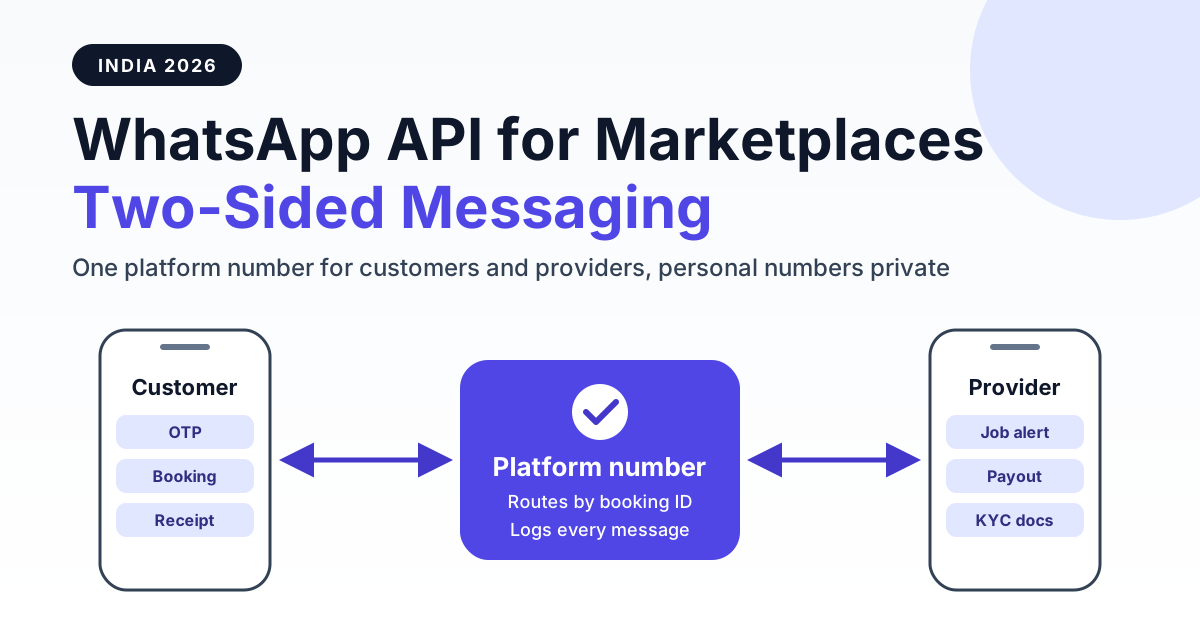
A marketplace uses the WhatsApp Business API by sending every message to both sides, customers and providers, from one verified platform number: OTP logins, booking and job notifications, reminders, payouts and two-way support all run through that number. Neither side ever sees the other's personal number, because the platform receives each message on a webhook, matches it to a booking or case ID, and relays or answers it while logging the whole thread.
That single idea works for every two-sided model in India: home-services apps connecting households with electricians and AC technicians, legal-tech platforms connecting clients with lawyers, tutor and doctor-consult marketplaces, freelancer networks and B2B supplier platforms. This guide covers the message map for each side, how template categories and the 24-hour window affect your bill, how to keep numbers private under the DPDP Act, the backend architecture, and a worked cost example with realistic Indian volumes.
How two-sided WhatsApp messaging works on one platform number
A single-sided business (a D2C brand, a clinic) talks to one audience. A marketplace talks to two audiences with opposite needs: customers want speed and reassurance, providers want job flow and timely payouts. The WhatsApp Business API handles both because the platform, not an individual, owns the conversation.
The basic flow looks like this:
- A customer books a plumber, a consultation or a tutor inside your app or website, and ticks a WhatsApp opt-in at signup.
- Your backend sends a booking confirmed template to the customer and a new job alert template to one or more providers, both from the platform number.
- The provider taps an Accept button. The reply arrives on your webhook, your system assigns the job, and the customer gets a provider assigned update with name, rating and ETA.
- If the customer types "Can he come at 5 instead?", the message lands on the platform number. Your system routes it to support or relays it to the assigned provider, tagged with the booking ID.
- After the job, the customer receives a payment receipt and a rating request; the provider receives a payout confirmation.
You can run both sides on one number, or split them across two numbers under the same WhatsApp Business Account, for example "YourApp" for customers and "YourApp Partner" for providers. Two numbers keep display names and quality ratings separate, so a spike in provider complaints does not drag down the customer-facing number. Most platforms under 50,000 monthly bookings start with one number and split later.
The message map: what each side receives
Before you write a single template, list every event in the booking lifecycle and decide who gets told. The table below is a practical starting map for a service marketplace.
| Side | Message | Trigger | Likely category |
|---|---|---|---|
| Customer | OTP for login or booking verification | Signup, login, checkout | Authentication |
| Customer | Booking confirmed | Payment or booking success | Utility |
| Customer | Provider assigned (name, rating, ETA) | Provider accepts job | Utility |
| Customer | Reminder 2 hours before slot | Scheduler | Utility |
| Customer | Payment receipt or invoice PDF | Job closed | Utility |
| Customer | Rating ask | Job closed plus a few hours | Utility if strictly about that job |
| Customer | Seasonal offer, win-back coupon | Campaign | Marketing |
| Provider | New job alert with Accept or Decline buttons | New booking nearby | Utility |
| Provider | Daily schedule digest | Every morning | Utility |
| Provider | Payout processed | Settlement run | Utility |
| Provider | KYC or onboarding document request | Signup, document expiry | Utility |
| Provider | Compliance nudge (licence renewal, policy update) | Expiry dates, policy change | Utility |
OTP is usually the first template a marketplace gets approved, because it replaces costly SMS OTPs that often fail on DLT routing. Our guide to WhatsApp OTP authentication in India covers the copy-code and one-tap formats, expiry settings and SMS fallback.
Provider-side messages matter just as much. A lawyer who misses a new case alert or a technician who does not see a job request in time is lost supply. On a two-sided platform, supply-side messaging is retention, not just notification.
Template categories and the 24-hour window for marketplaces
Meta classifies every business-initiated template into three categories, and each has its own price on Meta's published India rate card. Getting the category right is the single biggest lever on your WhatsApp bill.
| Category | What it is for | Marketplace examples | Cost notes |
|---|---|---|---|
| Authentication | One-time passcodes only | Login OTP, booking verification, payout-account change OTP | Lowest template tier on Meta's rate card; strict format rules |
| Utility | Updates about a transaction the user started | Booking confirmed, provider assigned, job alert, payout processed, KYC request | Mid tier; Meta has stated utility templates sent inside an open service window are not charged, so check the current rate card |
| Marketing | Promotions, offers, re-engagement | Monsoon AC-service offer, "Book your next tuition batch", referral bonus for providers | Highest tier; subject to frequency caps and user-level limits |
| Service (free-form) | Replies inside 24 hours of the user's last message | Answering "where is the technician?", resolving a refund query | Free-form replies inside the window are not billed as templates by Meta |
The 24-hour customer-service window opens every time a user messages you. Inside it, your support team or bot can reply with free-form text, images and documents. Outside it, you can only start a conversation with an approved template. For marketplaces this has a practical consequence: a customer who asked a question at 9 am and a provider who replies at 11 am the next day cannot be connected with free text; the platform has to send a utility template to reopen the thread.
The most common and expensive mistake is dressing a transactional update as marketing, or stuffing a promo line into a utility template. Meta reviews templates and can reclassify a utility template as marketing if it contains promotional content. Our explainer on WhatsApp message categories, marketing vs utility shows the wording patterns that stay in the utility bucket.
Number masking, privacy and the DPDP Act
Marketplaces face a problem single brands do not: disintermediation. If a client gets the lawyer's personal number, or a household gets the electrician's number, the next booking may happen off-platform. Privacy and business protection point in the same direction here.
Platform-relayed conversations vs sharing direct numbers
In a relayed model, both the customer and the provider chat only with the platform number. Your backend decides where each message goes: to a support agent, to a bot, or forwarded to the other party with a booking reference. Neither side sees the other's number, and every message is stored against the booking or case ID.
In a direct-number model, you simply hand over phone numbers after assignment. It is cheaper to build, but you lose the audit trail, you cannot enforce conduct, and you expose personal data you then have to justify under Indian data-protection law.
- Filter relayed text for 10-digit numbers, UPI IDs and email addresses, and mask them before forwarding.
- Show providers the customer's first name and locality only, and release a full address once the job is accepted.
- For calls, pair WhatsApp with a masked calling service rather than revealing numbers.
- Close the relay when the booking closes, so old threads cannot be used for off-platform deals.
Consent and purpose under the DPDP Act 2023
The Digital Personal Data Protection Act, 2023 is built around consent that is informed and specific, purpose limitation, and the user's right to withdraw consent. The implementing rules were notified with phased timelines, so confirm the exact obligations that apply to your platform with legal counsel. In practice, for WhatsApp messaging this means:
Get a 1-minute BSP audit on WhatsApp
Drop your WhatsApp number — we line-item your current invoice against Meta India rates in under 60 seconds. India-hosted, DPDP-compliant.
- Capture a clear WhatsApp opt-in at signup, separately for transactional updates and for promotional messages.
- Use provider data (KYC documents, bank details) only for onboarding, payouts and compliance, not for unrelated campaigns.
- Honour STOP or opt-out replies immediately across both transactional and marketing lists.
- Keep logs of consent time, source and wording, alongside the conversation history.
An audit trail for disputes
When a client says the lawyer never joined the call, or a customer claims the technician quoted a different price, the relayed conversation log is your evidence. Store message ID, timestamp, delivery and read status, sender side and booking ID for every message. Legal-tech platforms in particular should read our guide on WhatsApp for law firms and advocate practices, which covers confidentiality expectations and Bar Council advertising sensitivities that apply to lawyer-facing messaging.
Architecture: webhooks, routing and messaging tiers
A two-sided setup is mostly a routing problem. The WhatsApp side is simple; the intelligence lives in your backend.
Core components
- Opt-in capture: store phone number, side (customer or provider), consent flags and preferred language at signup.
- Event bus: booking created, provider assigned, job completed, payout settled. Each event maps to a template and a recipient side.
- Template variables: keep templates generic, for example "Your booking {{1}} with {{2}} is confirmed for {{3}}", and fill booking ID, provider name and slot at send time. One approved template then serves thousands of bookings.
- Inbound webhook: every reply, button tap and delivery status comes back as a webhook event. Look up the sender's phone number, find their active booking or case, and route accordingly.
- Routing rules: button replies (Accept, Reschedule, Cancel) update the booking directly; free text goes to the support inbox or to the relay; unknown senders get a menu.
If you are building this in-house, our WhatsApp Business API webhook setup guide walks through verification, signature checks and retry handling. Product teams comparing build vs buy can also look at the best WhatsApp Business API options for SaaS companies, since a marketplace backend has the same multi-user and API needs.
Messaging tiers and rate limits
New numbers start with a low daily limit on how many unique users you can open business-initiated conversations with. Meta's published ladder moves from 250 to 1,000, 10,000, 100,000 and then unlimited unique users in a rolling 24-hour period, and upgrades depend on sending volume and quality rating. Plan your launch around it:
- Launch provider-side messaging first (a smaller, engaged audience) to build quality and volume.
- Move OTP and booking updates next, because they have high read rates and low block rates.
- Add marketing campaigns last, in small batches, once your quality rating is steady.
Also plan for throughput spikes: festival-season demand for home services or results season for tutor platforms can multiply daily volume. Queue sends, respect per-second limits and retry failed messages with backoff.
Cost worked example: legal-tech and home-services platforms
RichAutomate is usage-only: ₹0 setup and a ₹0 monthly plan. You choose between two billing models:
- Client Pay: a ₹0.10 per message platform fee, with Meta's charges billed directly to your own card on your Meta account at Meta's published India rate card.
- SaaS Pay: an all-inclusive wallet at ₹1.50 per marketing message and ₹0.50 per utility message. Authentication is billed at Meta's rate plus the platform fee; see RichAutomate pricing for current details.
Platform A, legal-tech: 2,000 lawyers and 15,000 client bookings a month. Assume 12,000 client OTPs; four utility messages per booking to clients (confirmed, lawyer assigned, reminder, receipt) for 60,000; one case alert per booking to lawyers for 15,000; a daily schedule digest to 2,000 lawyers on 22 working days for 44,000; weekly payout notices for 8,000; and one win-back campaign to 10,000 past clients.
Platform B, home services: 40,000 bookings and 6,000 technicians a month. Assume 30,000 customer OTPs; four utility messages per booking to customers for 160,000; each job offered to two technicians on average for 80,000 job alerts; weekly payouts for 24,000; 3,000 KYC and compliance nudges; and 40,000 seasonal marketing messages.
| Line item | Legal-tech (A) | Home services (B) |
|---|---|---|
| Authentication (OTP) | 12,000 | 30,000 |
| Utility, customer side | 60,000 | 1,60,000 |
| Utility, provider side | 67,000 | 1,07,000 |
| Marketing | 10,000 | 40,000 |
| Total messages per month | 1,49,000 | 3,37,000 |
| Client Pay: platform fee at ₹0.10 | ₹14,900 plus Meta charges on your own account | ₹33,700 plus Meta charges on your own account |
| SaaS Pay: utility at ₹0.50 | ₹63,500 (1,27,000 messages) | ₹1,33,500 (2,67,000 messages) |
| SaaS Pay: marketing at ₹1.50 | ₹15,000 | ₹60,000 |
| SaaS Pay: authentication | Meta's rate plus platform fee | Meta's rate plus platform fee |
| SaaS Pay subtotal (excl. OTP) | ₹78,500 | ₹1,93,500 |
Three takeaways from these numbers. First, utility messages dominate a marketplace bill, so wording templates correctly matters more than negotiating marketing rates. Second, customer replies inside the 24-hour window are handled with free-form messages, so a good bot that resolves "where is my technician?" on the spot keeps template counts down. Third, the daily digest is the biggest single provider line in Platform A; batching alerts into one morning message instead of several scattered ones cuts volume without hurting response rates.
Client Pay usually suits platforms that already have a Meta business account with a card attached and want the lowest platform fee. SaaS Pay suits teams that want one predictable wallet, GST invoice and no separate Meta billing setup.
Common mistakes marketplaces make
- Marketing templates for transactional updates. Sending "Your booking is confirmed, get 20% off your next one" pushes an essential update into the marketing category, raises cost and can hit frequency caps, so the confirmation may not reach the user.
- No opt-in, or opt-in hidden in terms. Messaging people who never agreed leads to blocks and reports, which lower your quality rating and can restrict the number. No provider can promise you will never be restricted; clean consent is your best protection.
- Leaking provider numbers. Putting the technician's or lawyer's personal number inside a template invites off-platform deals and privacy complaints. Relay through the platform number instead.
- No fallback when a user blocks or is not on WhatsApp. Delivery is never guaranteed. Watch failed and undelivered statuses and fall back to SMS, email or in-app push for critical events like OTPs and payout notices.
- One number for everything with no routing. If support agents see a flood of provider "Accept" taps mixed with customer complaints, response times collapse. Route by side and booking status from day one.
- Ignoring provider language. Many technicians and tutors prefer Hindi or a regional language. Approve templates in the languages your supply side actually reads.
Rollout checklist
- Map every booking-lifecycle event to a recipient side and a template category.
- Decide one number or two (customer and provider) under one WhatsApp Business Account.
- Add separate transactional and marketing opt-ins at signup for both sides, and log consent.
- Draft generic, variable-based templates for authentication and utility first; submit for approval.
- Build the inbound webhook, sender lookup and routing by booking or case ID.
- Add number, UPI and email masking to any relayed messages.
- Set up SMS or push fallback for OTPs and critical updates.
- Launch provider messaging, then customer transactional messages, then marketing in small batches.
- Track delivery, read and block rates per template weekly, and rewrite weak performers.
- Review your monthly bill by category and move any mis-categorised templates back to utility.
Start messaging both sides from one number
A marketplace wins when both sides trust it: customers trust that the provider will show up, and providers trust that jobs and payouts will keep coming. WhatsApp is where both audiences already are, and a single platform number with smart routing lets you serve both without exposing anyone's personal number.
RichAutomate gives you the WhatsApp Business API with template management, webhooks, a shared team inbox and usage-only billing, with ₹0 setup and a ₹0 monthly plan. Create your free RichAutomate account and send your first booking and job-alert templates this week.