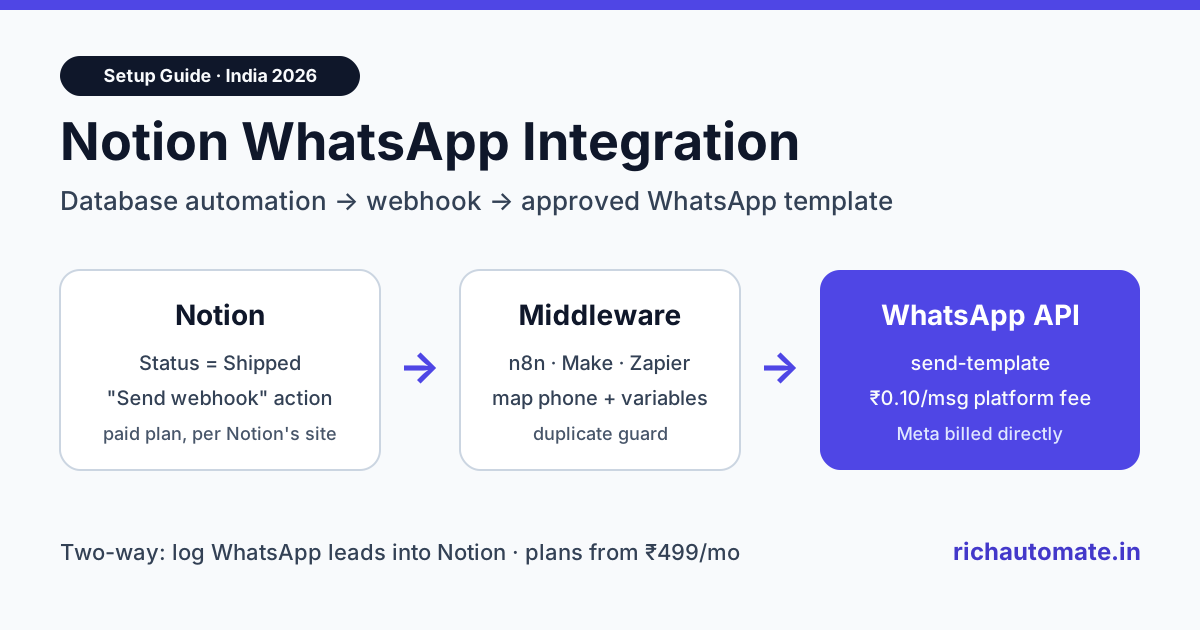
You can connect Notion to WhatsApp in 2026 by pairing Notion's "Send webhook" database automation with the WhatsApp Business API: a status change in Notion fires a webhook, a small middleware step maps the page properties, and an approved WhatsApp template goes out. The reverse direction works too: new WhatsApp leads can land as rows in a Notion database through the Notion API. There is no one-click native connector, so this guide shows the exact wiring and what it costs in India.
Indian teams use Notion as a light CRM, an order tracker, a content calendar or an admissions pipeline. The data sits in Notion, but customers sit on WhatsApp. Copying phone numbers from a Notion table into WhatsApp Web works for ten customers a week; at a hundred it breaks, and it cannot send anything when nobody is at the desk. This guide covers both directions, a worked cost example in rupees, and the mistakes that get templates rejected or automations paused.
Quick answer: what a Notion WhatsApp integration can do
A working setup does three jobs. First, it sends a WhatsApp message when something changes in Notion, for example an order moves to "Shipped" or a lead moves to "Demo booked". Second, it writes WhatsApp activity back into Notion, such as a new enquiry becoming a new database row. Third, it keeps one source of truth, so your team does not maintain two lists.
| Direction | Trigger | What happens | Notion feature used |
|---|---|---|---|
| Notion to WhatsApp | Database property changes, page added, or button click | Approved template message sent to the customer's number | Database automation or button with "Send webhook" action |
| WhatsApp to Notion | New contact or inbound message on WhatsApp | New row created or existing row updated in a Notion database | Notion API (internal integration token) |
| Both ways | Either side | Status stays in sync; replies are logged against the lead | Webhook action plus Notion API |
Be clear on one point before you start: RichAutomate does not ship a native Notion connector today. The integration uses Notion's own webhook action, RichAutomate's public REST API and outbound webhooks, and a middleware step such as n8n, Make, Zapier or a short serverless function. That is the same pattern most WhatsApp platforms use for Notion.
How Notion's "Send webhook" action works
According to Notion's help centre, database automations and buttons can include a "Send webhook" action that makes an HTTP POST request to a URL you choose. Notion added these webhook actions to automations in early 2026. The main rules, as Notion's documentation describes them:
- Paid plans only. Webhook actions are not available on the Free plan, and Enterprise workspace owners can switch the feature off.
- POST only, up to five webhook actions per automation.
- Properties, not page content. The request carries the database page's properties, such as Name, Phone and Status. It does not send the page body.
- Custom headers are allowed, which is how you pass a shared secret to your middleware.
- Failures pause the automation. If the receiving URL errors, Notion can pause the automation and notify you, so the receiver must respond quickly and reliably.
The catch for WhatsApp is the payload shape. Notion sends its own JSON describing the page. A WhatsApp API expects a phone number, a template name, a language code and the variables. Something has to translate between the two, and that is the middleware's job.
Architecture: Notion to middleware to WhatsApp
The flow has four hops, and each one has a single responsibility:
- Notion automation fires when, for example, the Status property becomes "Shipped".
- Middleware receives the POST, checks the secret header, reads the Phone, Name and Order ID properties, and normalises the number to the 91XXXXXXXXXX format.
- WhatsApp API call: the middleware calls RichAutomate's
POST /api/v1/send-templatewith a Bearer API key, the template name, the language (for exampleenorhi) and the variables array. - Write-back: the middleware updates the Notion page, for example setting a "WhatsApp sent" checkbox or storing the message ID, so nobody sends twice.
If you already run automations, you probably have a middleware tool. Our n8n WhatsApp integration guide and Zapier WhatsApp integration guide show the HTTP step in detail. The full request format, authentication and error codes are in the WhatsApp API quickstart.
Choosing the middleware
| Option | Good for | Trade-off |
|---|---|---|
| n8n (self-hosted) | Teams with a developer and steady volume | You run the server; no per-task fee |
| Make | Visual builders who want branching and retries | Operations count against a monthly quota, per Make's site |
| Zapier | Non-technical teams, fastest to set up | Task-based pricing rises with volume, per Zapier's site |
| Serverless function | Developers who want full control and near-zero cost | You write and maintain about 40 lines of code |
Step-by-step setup: send WhatsApp messages from a Notion database
1. Prepare the Notion database
Add these properties to your database: Name (title), Phone (phone number type, stored with country code), Status (select), Opt-in (checkbox), and WhatsApp sent (checkbox). The opt-in checkbox matters: Meta requires that customers have agreed to receive messages from your business before you send templates to them.
2. Get a WhatsApp Business API number and an approved template
Connect your number on RichAutomate through Meta's embedded signup, then create a template such as order_shipped: "Hi {{1}}, your order {{2}} has shipped and should reach you by {{3}}." Utility templates like this are usually approved quickly if they contain no promotional language. Our guide to WhatsApp message templates covers categories and approval rules.
3. Create an API key
Generate an API key in the RichAutomate dashboard. Store it only in your middleware's credentials, never inside a Notion property or page, because anyone with workspace access could read it there.
4. Build the middleware endpoint
Create a webhook trigger in n8n, Make or Zapier, or deploy a function, and copy its URL. The handler should:
- reject requests without your secret header;
- read the Phone, Name and order properties from the Notion payload;
- skip the row if Opt-in is unchecked or WhatsApp sent is already checked;
- call
/api/v1/send-templatewithphone,template,languageandvariables; - return a 200 response within a few seconds, so Notion does not pause the automation.
RichAutomate checks your wallet before sending and returns a clear error if the balance is too low, so log non-200 responses and alert someone rather than retrying blindly.
Get the India 2026 WhatsApp BSP price comparison
Wati vs AiSensy vs Interakt vs RichAutomate: Meta rates, platform fees and hidden costs, side by side. We send it to your WhatsApp in a minute.
5. Add the automation in Notion
Open the database, choose the automation (lightning) icon, set the trigger to "Status is set to Shipped", add the action "Send webhook", paste the middleware URL, add your secret as a custom header, and select the properties to include. Test it on one row with your own number before turning it on for the team.
6. Write the result back
After a successful send, have the middleware use the Notion API to tick "WhatsApp sent" and store the message ID or timestamp. This one step prevents most duplicate messages, which is the number one complaint from customers on automated sends.
The reverse: log WhatsApp leads into Notion
Many Indian businesses run click-to-WhatsApp ads or a website chat button, and they want each new enquiry to appear in a Notion lead tracker. RichAutomate can send outbound webhooks when events happen, including contact.created, contact.updated and message.inbound. You configure them in Settings under Webhooks, where each endpoint gets a signing secret and a test ping.
Point that webhook at your middleware. The middleware verifies the signature, then calls the Notion API to create a page in your leads database with the name, phone number, first message and source. Notion's API is rate limited to an average of about three requests per second per integration, according to Notion's developer documentation, which is plenty for lead logging but worth knowing if you plan to back-fill thousands of old contacts at once.
For teams that prefer a spreadsheet-style base instead, the same pattern appears in our Airtable WhatsApp automation guide. If you are new to webhooks on the WhatsApp side, read the WhatsApp Business API webhook setup guide first.
Use cases that work well for Indian teams
| Team | Notion database | WhatsApp message | Template category |
|---|---|---|---|
| D2C brand | Order tracker | Order confirmed, shipped, out for delivery | Utility |
| Coaching institute | Admissions pipeline | Counselling slot confirmed, fee reminder | Utility |
| Agency or freelancer | Client projects | Draft ready for review, invoice due | Utility |
| Real estate broker | Lead tracker | Site visit confirmed with location | Utility |
| Event organiser | Registrations | Ticket confirmed, day-before reminder | Utility |
| Any business | Customer list with opt-in | Festive offer or new launch | Marketing |
Most Notion-triggered messages are transactional updates, which fall under Meta's utility category and cost far less than marketing messages in India. Keep promotional lines out of utility templates, or Meta may re-categorise them as marketing.
What it costs in India
There are four cost lines. Notion's paid plan is needed for webhook actions; check Notion's pricing page for current per-seat rates. Your middleware may be free (self-hosted n8n or a serverless free tier) or a paid plan. Then come the WhatsApp costs, which are the ones that scale with volume.
On RichAutomate's Client Pay model, Meta bills its message charges directly to your own card, and RichAutomate charges a platform fee of ₹0.10 per message. Plans start at ₹499 a month (Starter), with Pro at ₹899 and White-label at ₹1,199, and the plan fee is credited to your wallet. See the current WhatsApp API pricing for details.
| Cost line | Rate (India, November 2026) | Who bills it |
|---|---|---|
| Meta utility message | About ₹0.115 per message | Meta, on your card |
| Meta marketing message | About ₹0.86 per message | Meta, on your card |
| Replies inside the 24-hour service window | Free from Meta | Meta |
| RichAutomate platform fee | ₹0.10 per message | RichAutomate, from wallet |
| RichAutomate plan | From ₹499 per month, credited to wallet | RichAutomate |
Worked example: a Jaipur D2C brand with 1,500 orders a month
A home-decor brand in Jaipur tracks orders in Notion. Each order triggers two utility messages (confirmed and shipped), so 3,000 utility messages a month. It also sends one festive offer to 2,000 opted-in customers, and its team answers about 1,000 customer replies inside the service window.
- Meta utility: 3,000 × ₹0.115 = about ₹345.
- Meta marketing: 2,000 × ₹0.86 = about ₹1,720.
- Service replies: 1,000 replies, free from Meta.
- RichAutomate platform fee: 6,000 messages × ₹0.10 = ₹600, taken from the wallet that the Pro plan's ₹899 credited.
All in, that is about ₹2,065 to Meta plus the ₹899 plan, roughly ₹2,964 a month before GST for 6,000 messages, or about 49 paise per message. Without the festive campaign the bill falls to about ₹1,244. Compare that with a team member spending two hours a day copying numbers into WhatsApp Web.
Common mistakes and how to avoid them
- Sending to numbers without a country code. Notion stores whatever was typed. Normalise to 91 plus ten digits in the middleware and skip anything that does not match.
- Free-form text instead of a template. Outside the 24-hour window, WhatsApp only allows approved templates. A Notion automation almost always fires outside that window.
- No duplicate guard. Status can flip back and forth. Use the "WhatsApp sent" checkbox or store the message ID, and check it before every send.
- Slow middleware. If the endpoint times out, Notion may pause the automation. Acknowledge fast and process in the background.
- Secrets in Notion. Keep API keys in the middleware, and use a custom header secret so random POSTs are rejected.
- Messaging people who never opted in. This is how numbers get quality warnings and messaging limits reduced. Capture opt-in at the source and respect it in the automation.
Native connector vs webhook setup: which should you choose?
Some platforms advertise a ready-made Notion connector, often built on top of Zapier or Make anyway. A webhook setup takes an afternoon to build but gives you control over the message logic, the duplicate guard and the cost, and it keeps working if a vendor drops its connector. If your team has no technical person at all, start with Zapier for speed; if you have one, n8n or a small function is cheaper over time.
Either way, the WhatsApp side is the same: an approved template, a clean phone number, consent, and a message API you can call. If you also use a CRM, our best WhatsApp CRM for India roundup compares built-in pipelines with a Notion-based setup.
Bottom line
Notion plus WhatsApp is a practical stack for small Indian teams that already live in Notion. Use Notion's webhook action for Notion-to-WhatsApp updates, RichAutomate's outbound webhooks plus the Notion API for WhatsApp-to-Notion logging, and a thin middleware to translate between them. For a typical order-update flow, WhatsApp costs work out to roughly ₹0.22 per utility message all-in on Client Pay, with service replies free from Meta.
Ready to wire it up? Start a 7-day free trial, connect your number, get your first template approved, and send a test message from Notion the same day.