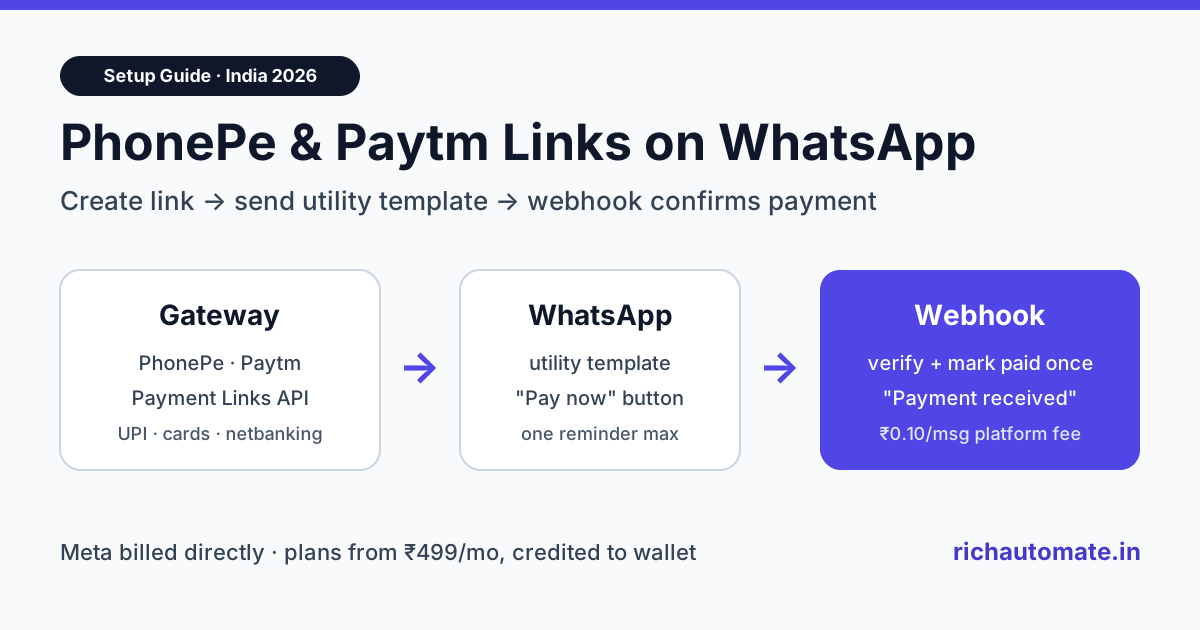
To send PhonePe or Paytm payment links on WhatsApp in 2026, create the link through the gateway's Payment Links API, send it to the customer inside an approved WhatsApp utility template, and let the gateway's webhook trigger an automatic "payment received" message. Customers pay by UPI, card or netbanking on the gateway's hosted page, and you never copy-paste a link into WhatsApp Web again.
Most Indian small businesses already collect money through PhonePe or Paytm. The problem is the last mile: a link generated in the merchant dashboard still has to reach the customer, and someone has to check whether they paid and chase them if they did not. WhatsApp is where the customer actually reads messages, so wiring the gateway to the WhatsApp Business API closes that loop. This guide covers what each gateway offers, the exact flow, template wording that gets approved, a worked cost example in rupees, and the security checks you should not skip.
Quick answer: how payment links on WhatsApp work
A payment-link flow on WhatsApp has four moving parts. Your system (or a no-code tool) asks PhonePe or Paytm to create a link for a specific amount. The link is sent to the customer as a WhatsApp template with the amount and due date filled in. The customer taps, pays on the gateway's page, and the gateway calls your webhook. Your webhook then sends a WhatsApp confirmation and updates your records.
| Step | Who does it | What happens |
|---|---|---|
| 1. Create link | Your app or middleware calls the gateway API | Unique link for one order, invoice or fee with amount and expiry |
| 2. Send on WhatsApp | WhatsApp Business API | Approved utility template with the link in a URL button |
| 3. Customer pays | Gateway's hosted page | UPI, cards, netbanking or wallet, depending on what you enabled |
| 4. Confirm | Gateway webhook to your server | WhatsApp "payment received" message and status update in your system |
One clarification before you start: RichAutomate does not have a native PhonePe or Paytm connector today. The flow uses each gateway's own API and webhooks, RichAutomate's public REST API for sending templates, and either a small backend script or a middleware tool such as n8n, Make or Zapier in between. If you already use Razorpay, our Razorpay WhatsApp integration guide shows the same pattern with a different gateway.
PhonePe vs Paytm payment links: what each gateway offers
Both gateways let you create payment links from a merchant dashboard or by API, and both notify your server when a link is paid. The details differ, so check them against your own merchant account before you build.
| Capability | PhonePe Payment Gateway | Paytm Payment Gateway |
|---|---|---|
| Create link by API | Yes, Payment Links API, per PhonePe's developer docs | Yes, Create Link API, per Paytm's developer docs |
| Create link manually | Merchant dashboard | Merchant dashboard |
| Payment confirmation | Webhook callback with an Authorization header you verify | Server-to-server response on the statusCallbackUrl set when creating the link |
| Fallback if webhook missing | Payment Link Status API, per PhonePe's docs | Fetch Transaction API, per Paytm's docs |
| Built-in notification | Check your merchant dashboard | SMS or email at link creation, per Paytm's docs |
| Customer needs gateway app? | No, any UPI app or card works on the hosted page | No, according to Paytm's site customers do not need a Paytm account |
Notice what is missing from both columns: neither gateway sends the link from your own verified WhatsApp business number. Paytm's built-in notifications go by SMS or email. To get the link onto WhatsApp under your brand name, with a tap-to-pay button and a follow-up reminder, you need the WhatsApp Business API.
Gateway pricing changes, so take MDR and setup fees from your PhonePe or Paytm merchant agreement, not from a blog. UPI payments from customers to merchants carry zero MDR under the government's zero-MDR rule, while cards and wallets usually carry a percentage fee.
The architecture: from link to confirmation
The cleanest setup keeps one record per payment request, with a status that moves from created to sent to paid or expired. Every WhatsApp message is triggered by a change in that status, never by a person.
- Trigger: an invoice is raised, an order is placed with "pay later", a school fee falls due, or a clinic booking needs an advance.
- Link creation: your backend calls the gateway's create-link endpoint with amount, a unique reference (invoice number works well), customer phone and an expiry time.
- WhatsApp send: your backend calls RichAutomate's send-template endpoint with the customer's number, the template name and the variables: name, amount, due date and the link reference for the URL button.
- Webhook: the gateway calls your server when the link is paid. You verify the request, mark the record paid, and send the confirmation template.
- Reminder: a scheduled job checks unpaid links a day before expiry and sends one reminder template. It stops the moment the record is paid.
If you would rather not run a backend, n8n can handle the whole chain with an HTTP Request node for the gateway, another for RichAutomate, and a Webhook node to receive the gateway callback. Our n8n WhatsApp integration setup guide shows how to wire those nodes, and the API quickstart lists the send-template request format.
Get the India 2026 WhatsApp BSP price comparison
Wati vs AiSensy vs Interakt vs RichAutomate: Meta rates, platform fees and hidden costs, side by side. We send it to your WhatsApp in a minute.
Step-by-step setup
- Activate payment links on your gateway account. Log in to the PhonePe or Paytm merchant dashboard, confirm that payment links are enabled for your business, and generate API credentials for the test (sandbox or UAT) environment first.
- Register your webhook URL. Use an HTTPS endpoint. Paytm's docs state that webhook URLs only allow port 443. PhonePe's docs describe setting a username and password for webhook authentication; store both as secrets, never in code.
- Connect a WhatsApp Business API number. Sign up on RichAutomate, connect your number through Meta's embedded signup, and add a payment method in Meta Business Manager. On Client Pay, Meta bills its message charges to your card directly.
- Create three templates. A payment request, a payment confirmation and one reminder, all in the utility category. Put the link in a dynamic URL button rather than in the body text. Our template docs explain variables and buttons.
- Build the send call. When a link is created, call the send-template endpoint with the link suffix as the button variable. Save the WhatsApp message ID against the payment record.
- Handle the webhook. Verify authenticity, check the amount and reference against your record, mark it paid once, then send the confirmation. Return a 200 response quickly so the gateway does not retry.
- Add the status poll. For any link still unpaid near expiry, call the gateway's status or fetch-transaction API before sending a reminder. A missed webhook should never cause a "please pay" message to someone who already paid.
- Test end to end. Pay a ₹1 test link from a personal phone, confirm both WhatsApp messages arrive in the right order, then switch to production keys.
Template examples that get approved
Meta reviews every template. Payment requests tied to a transaction the customer already started are normally accepted as utility. Anything that adds an offer, a discount or a "buy more" line moves the template into marketing, which costs more and can be paused if users block it.
- payment_request (button: URL "Pay now"): Hi {{1}}, your invoice {{2}} for ₹{{3}} is ready. Please pay by {{4}} using the secure link below.
- payment_received (no button, or URL "View receipt"): Thank you {{1}}. We have received ₹{{2}} for invoice {{3}}. Your receipt reference is {{4}}.
- payment_reminder (button: URL "Pay now"): Hi {{1}}, a reminder that ₹{{2}} for invoice {{3}} is due on {{4}}. Ignore this if you have already paid.
Keep the wording factual, name the invoice or order, and avoid urgency words that read like pressure. For more wording options, see our payment confirmation message templates and overdue invoice reminder guide.
Costs in India: a worked example
Take a coaching institute that collects monthly fees from 1,500 students. Each month it sends 1,500 payment requests, about 1,500 confirmations and roughly 600 reminders to students who have not paid by the due date. That is 3,600 utility messages a month.
| Cost line | Rate | Monthly amount |
|---|---|---|
| Meta utility message charge (billed by Meta to your card) | about ₹0.115 per message | about ₹414 |
| RichAutomate platform fee (Client Pay) | ₹0.10 per message | ₹360 |
| RichAutomate Starter plan | ₹499 per month, credited to your wallet | ₹499 (the ₹360 platform fee is drawn from this credit) |
| Approximate total | about ₹913 a month |
Two things lower the bill further. Under Meta's pricing since July 2025, utility templates delivered inside an open 24-hour customer-service window are free from Meta, so a confirmation sent while the customer is chatting with you costs only the platform fee. And because the Starter plan amount is wallet credit rather than a separate charge, small volumes are covered by the plan itself. Compare plans on the pricing page.
The return side is usually larger. If WhatsApp reminders bring forward even 50 of those 1,500 fee payments by a week, the institute's cash position improves far more than ₹913. Track it by comparing days-to-pay before and after the switch.
Security and reconciliation checklist
Payment flows are where shortcuts cost real money. These checks take an afternoon to build and prevent the most common failures.
- Verify every webhook. PhonePe's docs describe an Authorization header derived from your webhook username and password; compare it and reject anything that does not match. For Paytm, follow its checksum verification docs. Never mark a payment paid because a request arrived.
- Match amount and reference. The amount in the webhook must equal the amount on your record, and the reference must be one you created.
- Be idempotent. Gateways retry webhooks. Mark the record paid only once and send the confirmation only on that first transition, or customers get two "payment received" messages.
- Poll as a fallback. Both gateways document a status API. Use it before every reminder and in a nightly reconciliation job.
- Never send card or UPI details on WhatsApp. The link takes the customer to the gateway's hosted page; your messages should never ask for a PIN, OTP or card number.
- Expire old links. Set an expiry on every link so an old message cannot be paid months later against a cancelled invoice.
Common mistakes to avoid
- Putting the link in the body text. A dynamic URL button looks cleaner and is easier to track. Plain links in the body also make the template look like a generic broadcast.
- Using marketing templates for payment requests. A fee or invoice request is utility. Adding "get 10% off if you pay today" turns it into marketing and changes the price.
- Reminding too often. One reminder before the due date and one after is enough. Daily reminders lead to blocks, and a falling quality rating can limit how many people your number can message.
- Sending to numbers without consent. Only message customers who gave you their number for this purpose, such as at checkout, admission or booking.
- Skipping the test payment. A ₹1 live test catches wrong webhook URLs and template variable mismatches before real customers see them.
When to use native WhatsApp payments instead
Payment links send the customer out of WhatsApp to the gateway's page. WhatsApp also supports in-chat payments in India for eligible businesses, where the customer pays without leaving the chat. That suits catalogue-style ordering, while payment links suit invoices, fees, advances and any amount decided outside WhatsApp. Many businesses use both. Our WhatsApp native payments and UPI checkout guide covers the in-chat option, and if you use Cashfree or PayU, see the Cashfree and PayU WhatsApp guide.
Whichever gateway you use, the WhatsApp side stays the same: approved utility templates, a verified webhook, one confirmation per payment and a polite reminder. Start a 7-day free trial of RichAutomate to connect your number and send your first payment-link template today.