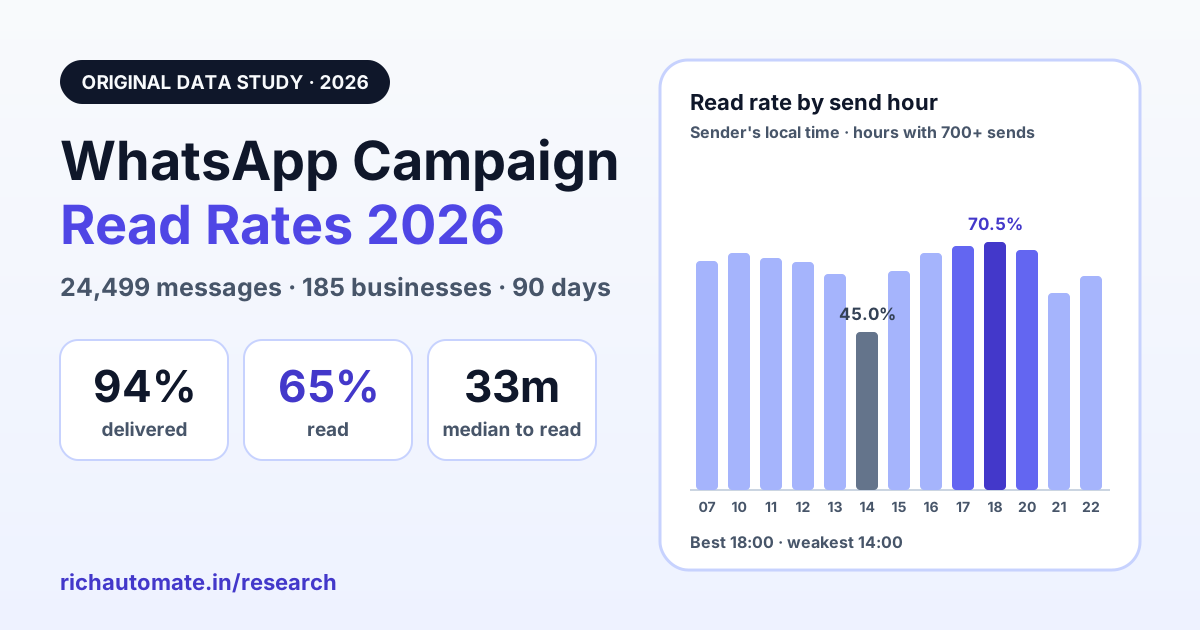
Across 24,499 WhatsApp campaign messages that Meta accepted, 94.0% were delivered and 65.3% were read, and the median message was read 33 minutes after it was sent. Those are the headline numbers from 90 days of anonymised campaign data on the RichAutomate platform, covering 185 businesses that send template broadcasts through the WhatsApp Business Platform.
Most published WhatsApp benchmarks are vendor claims without a sample size. This one states its sample, its window and its exclusions, so you can decide how far to trust it. Most of the businesses are based in India, so treat the absolute numbers as one market's reference point. The mechanics behind them, such as Meta's error codes, the per-user marketing limit and how read receipts work, are the same in Singapore, Dubai, London or anywhere else the platform runs. The full method and its limits are at the end of the article.
Key numbers at a glance
Sample: 24,499 Meta-accepted template campaign messages from 185 businesses, 90 days ending 7 October 2026. Read rate is measured against accepted messages unless stated otherwise.
Best and worst hours to send a WhatsApp campaign
Read rate moved by more than 25 percentage points depending on when a campaign went out. The chart shows every hour with at least 700 sends, in the sender's local time. Hours with fewer sends (including 08:00, 09:00 and 19:00) are left out because their numbers would be too noisy to compare.
Read rate by send hour (local time)
Show the data table
| Send hour | Read rate | Messages |
|---|---|---|
| 07:00 | 65.1% | 1,921 |
| 10:00 | 67.4% | 1,547 |
| 11:00 | 65.8% | 3,528 |
| 12:00 | 64.8% | 1,614 |
| 13:00 | 61.4% | 1,914 |
| 14:00 | 45.0% | 784 |
| 15:00 | 62.2% | 2,964 |
| 16:00 | 67.4% | 2,365 |
| 17:00 | 69.2% | 2,025 |
| 18:00 | 70.5% | 1,998 |
| 20:00 | 68.3% | 996 |
| 21:00 | 56.1% | 856 |
| 22:00 | 60.7% | 764 |
Three patterns stand out:
- Late afternoon into early evening is strongest. 16:00 (67.4%), 17:00 (69.2%), 18:00 (70.5%) and 20:00 (68.3%) were all above the overall rate. That is when many people finish work and check their phones.
- Early afternoon is weakest. 13:00 dropped to 61.4% and 14:00 to 45.0%, the only hour below 50%. Messages that land during lunch and the post-lunch slump appear easier to scroll past.
- Late night falls away. 21:00 (56.1%) and 22:00 (60.7%) were below average, even though they are close to the strong 20:00 slot.
One caution: different businesses send at different hours, so part of each hour's number reflects who sends then, not only when. The 14:00 figure in particular rests on 784 messages. Treat the chart as a strong starting hypothesis, then test two send times against each other on your own list.
Best day of the week to send
Read rate by weekday (local time)
Show the data table
| Weekday | Read rate | Messages |
|---|---|---|
| Mon | 71.1% | 4,230 |
| Tue | 62.8% | 5,276 |
| Wed | 59.8% | 2,998 |
| Thu | 66.0% | 1,975 |
| Fri | 67.7% | 3,465 |
| Sat | 64.1% | 2,889 |
| Sun | 64.7% | 3,666 |
The weekday spread (11.3 points) is less than half the send-hour spread (25.5 points). In practice, the hour you pick matters more than the day. Monday led with 71.1%, followed by Friday (67.7%) and Thursday (66.0%). Wednesday trailed at 59.8%. Weekends sat close to the average (Saturday 64.1%, Sunday 64.7%), so weekend campaigns are not penalised in this data.
How long people take to read a WhatsApp campaign
Among the 15,991 campaign messages that were read, the time from send to read was:
When read messages were read
- 25% read under 5 min after sending
- 25% read 5 to 33 min after sending
- 25% read 33 min to 2.9 h after sending
- 15% read 2.9 h to 16 h after sending
- 10% read over 16 h after sending
A quarter of readers open the message within five minutes, which is why WhatsApp works for time-sensitive offers. But the tail is long: only 59.3% of eventual reads happen in the first hour, and one in ten comes more than 16 hours later. If you judge a campaign, or decide on a follow-up, one hour after sending, you are looking at about 6 in 10 of the reads you will eventually get. Pull campaign reports at 24 hours, and compare campaigns at the same point in time.
Why Meta blocks WhatsApp messages: the 7 error codes that mattered
In the same window, Meta refused 10,964 campaign messages with an error code. Seven codes covered all of them. The chart shows each code's share of those refusals.
Share of Meta-coded refusals by error code
Here is what each code means, in plain English, with what to do about it. Descriptions follow Meta's WhatsApp Cloud API error codes reference.
131049Per-user marketing limit (5,373 · 49.0%)
What it means: WhatsApp limits how many marketing templates one person receives from all businesses over a period. Meta says the limit depends on that person's recent marketing read rate and how busy their inbox is, and it adapts over time. If the person is at their limit, your message is not delivered. Meta's description is "to maintain healthy ecosystem engagement".
What to do: Wait at least 24 hours before resending; Meta warns that repeated retries inside 24 hours can block further attempts to that person for up to a day. Send fewer, better-targeted marketing messages. Invite replies (quick-reply buttons work well): per Meta, marketing messages sent inside an open 24-hour customer service window do not count toward the limit. Source: Meta, per-user marketing template message limits.
131026Message undeliverable (2,608 · 23.8%)
What it means: The message could not reach that recipient. Meta lists causes such as the number not being on WhatsApp, the person not having accepted WhatsApp's latest terms, or an outdated app version.
What to do: Clean your list. Capture numbers with country codes, confirm them at collection (a click-to-chat opt-in is the simplest check), and suppress numbers that keep returning 131026 instead of paying to retry them.
131042Business payment issue (1,007 · 9.2%)
What it means: Something is wrong with the payment setup behind the WhatsApp Business account, for example no payment method attached, a credit line over its limit, or the account's currency or time zone not set.
What to do: This one is entirely in your control. Check billing in WhatsApp Manager before every large campaign, and set a low-balance alert so a campaign never starts on an empty card.
131031Business account locked (1,000 · 9.1%)
What it means: The WhatsApp Business account has been restricted or disabled, usually for a policy violation, or data in the request (such as the two-step PIN) did not match.
What to do: Stop sending; retries will not help. Read the reason in WhatsApp Manager or through Meta's Health Status API, fix it, and appeal if appropriate. Meta's policy enforcement guide explains the process. A sending tool should pause the campaign automatically when this happens.
130472User is in a Meta experiment (488 · 4.5%)
What it means: Meta keeps a very small share of WhatsApp users in an experiment group that receives no marketing templates unless a customer service window is open. You are not billed for these.
What to do: Do not retry; it returns the same error. If the message matters, ask the person through another channel to message you first, then send inside the open window. Source: Meta, marketing message experiment.
131053Media upload error (340 · 3.1%)
What it means: The image, video or document in the template could not be uploaded, for example because the file type is not supported.
What to do: Use supported formats, keep files within Meta's size limits, host media at a stable public URL, and send a test to yourself before launching to the full list.
131048Spam rate limit (148 · 1.3%)
What it means: Meta has limited how many messages your phone number can send, often because too many earlier messages were blocked or reported as spam.
What to do: Slow down and check your quality rating in WhatsApp Manager. Send only to people who opted in, make every template relevant to the segment it goes to, and make opting out easy. See Meta's template quality guide.
The lesson from this breakdown: about 7 in 10 refusals (131049 and 131026) come down to who you send to and how often, and almost 2 in 10 (131042 and 131031) are account problems you can catch before a campaign starts. Very little of it is bad luck.
A practical playbook for WhatsApp campaigns
- Send in the late afternoon or early evening, local time. Start testing at 17:00 to 18:00, with 16:00 and 20:00 as alternatives. If your audience spans time zones, schedule by recipient time zone rather than your own.
- Avoid early afternoon. 13:00 and especially 14:00 were the weakest hours. Late night (21:00 to 22:00) was also below average.
- Pick the hour before the day. Hour-of-day moved read rates more than twice as much as day-of-week. Monday was the strongest day and Wednesday the weakest, but weekends performed close to average.
- Keep marketing frequency low. The per-user limit (131049) depends on how people engage with marketing messages. Fewer, more relevant sends protect your reach.
- Ask for a reply. A reply opens a 24-hour customer service window, and Meta says marketing messages inside that window do not count toward the per-user limit. Quick-reply buttons make replying effortless.
- Never retry 131049 within 24 hours, and never retry 130472. Repeated retries can block further attempts to that person.
- Suppress dead numbers. Remove numbers that keep returning 131026 rather than paying to retry them.
- Run a pre-flight check. Billing, account status and a test send to yourself catch 131042, 131031 and 131053 before they hit your whole list.
- Measure at 24 hours, not 1 hour. Four in ten eventual reads arrive after the first hour.
- Know your market's rules. Meta currently does not deliver marketing templates to US phone numbers at all, per its per-user limits documentation.
If you are planning budget alongside timing, our WhatsApp pricing calculator by country shows per-message costs by market, and the marketing template glossary entry explains how Meta categorises what you send.
Methodology
- Source: message records and status webhooks (sent, delivered, read, failed) from the WhatsApp Cloud API, as stored by the RichAutomate platform.
- Window: the 90 days ending 7 October 2026.
- Population: 185 active businesses, almost all based in India. They sent 48,576 template broadcast (campaign) messages in the window. For context, all outbound traffic on the platform in the window was 104,911 messages (51,981 templates, 43,621 free-form text, 5,332 media, 1,125 interactive) against 54,713 inbound messages.
- Outcome sample: the 24,499 campaign messages that Meta accepted. Delivered counts messages that reached delivered or read status; read counts messages that reached read status.
- Refusals: 10,964 campaign messages that Meta refused with an error code, grouped by code.
- Exclusions: messages that failed or stalled inside the platform before Meta returned a result (internal statuses such as send-failed, unreconciled or still queued) are excluded, so they do not distort Meta-side rates.
- Time zones: send hour and weekday are in the sender's local time (India Standard Time for most of the sample). Hours with fewer than 700 sends are not reported.
- Privacy: only aggregate counts were extracted. No business names, phone numbers or message content were used.
Limitations
- Read rates are probably a floor. WhatsApp reports a read only when the recipient's read receipts allow it, so some messages that were read are counted as unread.
- Mostly one market. Absolute numbers reflect a mainly Indian audience. Patterns such as the evening peak are plausible elsewhere but should be tested locally.
- Correlation, not causation. Send-hour and weekday figures mix the effect of timing with the effect of which businesses send at those times.
- No split by category or industry. The study does not separate marketing from utility templates, or one industry from another.
Cite this study
Journalists, researchers and bloggers are welcome to quote these figures and reuse the charts under CC BY 4.0, with a link to this page.
Permalink: https://richautomate.in/blog/whatsapp-campaign-read-rates-2026-data-study
Suggested citation:
RichAutomate Research (2026). "WhatsApp Campaign Read Rates 2026: Data from 24,499 Messages." RichAutomate, 7 October 2026. https://richautomate.in/blog/whatsapp-campaign-read-rates-2026-data-studyMore original research is collected on the RichAutomate Research page.
Frequently asked questions
What is a good read rate for a WhatsApp marketing campaign?
In our 2026 sample of 24,499 campaign messages that Meta accepted, 65.3% were read and 94.0% were delivered. Counting only delivered messages, 69.4% were read. Treat roughly two in three as a realistic reference point for opted-in lists, then compare against your own past campaigns, which is the benchmark that matters most.
What is the best time to send WhatsApp marketing messages?
In our data, read rates were highest for messages sent in the late afternoon and early evening in the sender's local time: 70.5% at 18:00, 69.2% at 17:00, 68.3% at 20:00 and 67.4% at 16:00. The weakest hour was 14:00 at 45.0%. Use these as starting hypotheses and A/B test send times on your own audience.
How quickly do people read WhatsApp campaign messages?
Of the campaign messages that were read, 25% were read within 5 minutes, half within 33 minutes, and 59.3% within one hour. Three quarters were read within 2.9 hours and 90% within 16 hours, so a campaign report pulled after one hour misses roughly 4 in 10 eventual reads.
What does WhatsApp error 131049 mean?
Error 131049 means Meta did not deliver a marketing template to protect "healthy ecosystem engagement". WhatsApp limits how many marketing templates a person receives from all businesses, based on that person's recent marketing read rate and inbox activity. Meta advises waiting at least 24 hours before resending. In our study it was the cause of 49% of all Meta-coded refusals.
Why does WhatsApp return error 131026?
Error 131026 means the message could not be delivered to that recipient. Meta lists reasons such as the number not being on WhatsApp, the recipient not having accepted the latest terms, or the recipient using an old app version. Validate numbers at collection time and stop re-sending to numbers that keep returning 131026.
Do these benchmarks apply outside India?
Most of the 185 businesses in the sample are based in India, so absolute numbers reflect that market. The mechanics behind them are global: the error codes, the per-user marketing limit and read-receipt behaviour work the same way wherever the WhatsApp Business Platform is used, including Singapore, the UAE, the UK and Europe. Use the patterns as hypotheses and test them on your own audience. Note that Meta does not currently deliver marketing templates to US phone numbers.