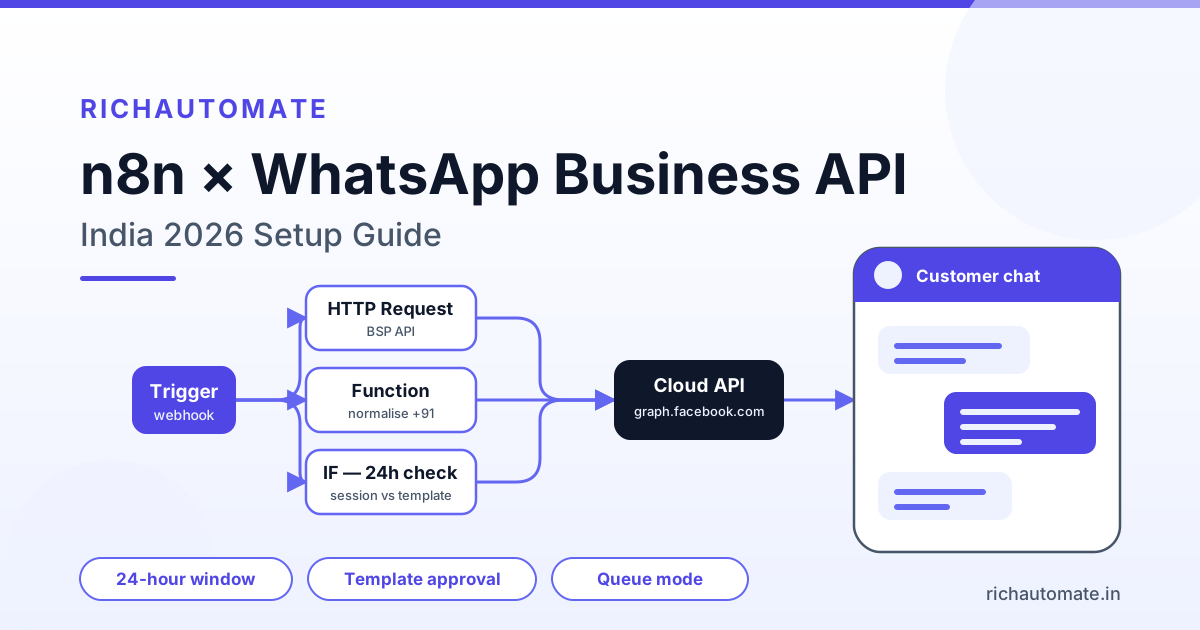
You can connect n8n to the WhatsApp Business API in two supported ways: n8n's built-in WhatsApp Business Cloud node, which talks straight to Meta's Graph API using an access token and a phone number ID, or a generic HTTP Request node pointed at a BSP's REST API. Both work in production; the native node is faster to wire up, while the HTTP Request route gives you a provider that handles templates, delivery status, opt-outs and rupee billing for you — and that difference is what decides which one survives your first real campaign.
This guide is written for Indian teams: SMB ops leads running order updates, agencies building client automations, and technical founders self-hosting n8n on a ₹500-1,500/month VPS. It covers setup end to end, then the parts nobody puts in the demo video — the 24-hour window, template approval, webhook verification, rate limits, queue backpressure, GST, and DPDP Act 2023 consent.
Two ways to connect n8n to WhatsApp — and when each one breaks
n8n ships a first-party WhatsApp Business Cloud node. It authenticates with a Meta system-user access token plus your phone number ID, and exposes send operations (text, media, template) plus a WhatsApp Trigger for inbound events. It is the shortest path from zero to a delivered message.
The HTTP Request route is the same idea one abstraction layer up: you POST JSON to a Business Solution Provider's endpoint with an API key. You lose a little drag-and-drop convenience and gain everything a BSP maintains for you — template submission and rejection reasons, billing reconciliation, an opt-out registry, normalised delivery-status callbacks, and a dashboard your ops person can open at 11pm without SSH access.
| Dimension | n8n native WhatsApp Cloud node | HTTP Request node → BSP API | Hosted BSP dashboard (no n8n) |
|---|---|---|---|
| Time to first message | 15-30 min (token + phone number ID) | 20-40 min (API key + one HTTP node) | Under 10 min, no code |
| Template management | You, in Meta Business Manager | BSP console, rejection reasons surfaced | BSP console |
| Token rotation | Manual, system-user token | BSP-managed, long-lived key | Managed |
| Delivery status | Raw Meta webhooks you parse and store | Normalised callbacks, history stored | Built-in inbox and reports |
| Retries on 5xx / throttling | n8n node retry settings only | BSP queue absorbs bursts | Fully managed |
| Billing visibility | Meta invoice in USD, reconcile yourself | INR ledger with GST invoice | INR ledger |
| Best for | Internal alerts, low volume | Customer-facing flows at volume | Teams with no engineer |
Rule of thumb: recipient is your own team, native node is fine. Recipient is a paying customer and a missed message costs money, put a BSP between n8n and Meta.
Prerequisites: what you actually need before opening n8n
Nothing inside n8n works until the WhatsApp side is real. In India that means:
- A verified Meta Business Manager account. Verification asks for a legal entity document — GST certificate, certificate of incorporation or Udyam registration — plus a matching address and a live website.
- A WABA and a phone number that is not already active on the consumer WhatsApp or WhatsApp Business app. If it is, delete that account first, or you will chase a "number already registered" error all afternoon.
- A display name matching your brand. Meta rejects generic or misleading names.
- GST registration. A trial can run without it, but going live properly — invoiced platform charges, a BSP contract, Meta billing through an Indian entity — effectively requires GST. Treat it as mandatory, not optional.
- A publicly reachable HTTPS URL for inbound webhooks. Meta will not deliver to
http://, a self-signed certificate, orlocalhost. An n8n tunnel URL is fine in development; production needs a real domain with a valid certificate.
The most common blocker. Teams wire the whole workflow, then discover the number they wanted is the one sales has been messaging customers from for two years. Decide the number first, then build.
Step by step: wiring the WhatsApp Business Cloud node
1. Create the credential properly
In Meta Business Manager, create a system user and generate a token scoped to whatsapp_business_messaging and whatsapp_business_management. Use that system-user token — not the 24-hour temporary token on the API Setup page, which is why workflows silently stop working the next morning. In n8n, add a WhatsApp API credential and paste the token and your Business Account ID.
2. Send your first message
Add a WhatsApp Business Cloud node, choose Message → Send, pick your phone number ID, and send to a number that messaged you in the last 24 hours. If nobody has, send a template instead — a plain text send to a cold number returns an error, not a message. That is the window rule, covered below.
3. Map template parameters carefully
Template parameters are positional. If your body is Hi {{1}}, your order {{2}} has shipped, you pass an ordered array of exactly two components; mismatched counts fail with error 132000. Trim every value, strip newlines, and never pass an empty string — Meta rejects blank parameters.
4. Normalise Indian phone numbers
Real Indian data is messy: +91 98765 43210, 098765 43210, 9876543210. Put one Code or Set node before every send that strips non-digits, drops a leading 0, and prefixes 91 when the result is exactly ten digits. That single helper prevents most undelivered-message tickets.
Receiving messages: the webhook half everyone gets wrong
Outbound is easy. Inbound is where n8n deployments break.
Meta verifies a webhook with a GET request carrying hub.mode, hub.verify_token and hub.challenge. Your endpoint must compare the verify token against the string you configured and respond with the raw hub.challenge value as plain text and HTTP 200 — not JSON, not wrapped in quotes. Every message after that arrives as a POST to the same URL.
Three things trip people up:
- The production URL only exists after activation. n8n's Webhook node shows a test URL and a production URL. The test URL works only while the editor is open with "Listen for test event" running. Register the production URL in Meta and make sure the workflow is Active. An inactive workflow returns 404 and Meta eventually disables the subscription.
- Meta wants a fast 200. Acknowledge immediately, then do the work. Set the Webhook node's response mode to respond immediately and push processing downstream, or write to a queue and handle it in a second workflow. If the webhook waits on an LLM call or a slow CRM lookup, Meta retries and you process the same message three times.
- Duplicates are guaranteed. Meta retries on timeout or any non-200. Store the inbound message ID and skip anything you have already seen — a Redis
SETNXor a unique index in Postgres is enough.
The verify token is a security boundary, not decoration. Anyone who finds your webhook URL can POST fake payloads into your automation. Validate the token on the GET, and verify Meta's X-Hub-Signature-256 header on POSTs with your app secret before trusting the body.
The 24-hour window and templates: the rule that kills most workflows
WhatsApp allows free-form messages only inside a 24-hour customer service window, which opens when the user messages you and closes 24 hours after their last inbound message. Outside it you may send only a pre-approved template.
What that means for an n8n workflow:
Get the India 2026 WhatsApp BSP price comparison
Wati vs AiSensy vs Interakt vs RichAutomate: Meta rates, platform fees and hidden costs, side by side. We send it to your WhatsApp in a minute.
- Track
last_inbound_atper contact and branch on it with an IF node — inside the window send a session message, outside send a template. Do not hope. - Templates need approval, and approval is where launches slip. Marketing templates with vague or promotional-sounding copy get rejected; utility templates tied to a real transaction pass fastest. If you keep getting knocked back, the fixes in our guide to common WhatsApp template rejection reasons and how to fix them will save you a week of resubmissions.
- Authentication templates are a separate category with a fixed format and their own rules. If you are building login or transaction verification, read the WhatsApp OTP and authentication setup guide for India before you design the flow.
- Your messaging tier caps how many unique users you can start conversations with per day, and tiers step up based on quality and volume. A workflow that suddenly loops over 10,000 rows will hit that ceiling and start failing mid-run. See how WhatsApp broadcast limits and messaging tiers actually work for the progression.
A blunt warning, because automation makes this easy to get wrong: sending unsolicited bulk marketing to scraped or purchased lists gets numbers flagged. Users press Block and Report, your quality rating drops to Red, your tier is cut, and template approvals start failing. No provider — us included — can promise a number will never be restricted or that every message will be delivered. Send to people who asked, keep opt-out working, and the account stays healthy.
What it costs in India: hosting, Meta charges and GST
n8n's Community Edition is source-available and free to self-host. The real cost is the box, and the hour you spend on it.
| Option | Monthly cost (₹) | What you get | Watch out for |
|---|---|---|---|
| Self-hosted, 1 vCPU / 2 GB VPS | ~₹500-800 | Unlimited executions, full control | Drops webhooks under burst; SQLite locks |
| Self-hosted, 2 vCPU / 4 GB + Postgres + Redis | ~₹1,200-1,800 | Queue mode, 2-3 workers, survives spikes | You own backups, TLS, upgrades |
| n8n Cloud, entry plan | ~₹1,800-2,200 equivalent | Managed hosting, HTTPS, updates | Billed in EUR; execution quotas |
| n8n Cloud, mid plan | ~₹4,500-5,000 equivalent | Higher execution allowance | Same FX exposure |
For most Indian teams under a few thousand executions a day, a ₹1,200/month VPS with Postgres and Redis beats Cloud on price. Above that — or if nobody wants to be paged for a disk-full alert at 2am — Cloud is honest money.
Messaging is billed separately, and this is where budgets get a surprise. Meta charges per conversation category — marketing, utility, authentication, service — at its published India rates, pass-through whichever platform you use. On top sits your platform's per-message fee.
| Message type | RichAutomate platform fee | Meta charge | Typical use |
|---|---|---|---|
| Client Pay — your own Meta billing | ₹0.10 per message | Billed to you directly by Meta | Cheapest at volume; you reconcile Meta's invoice |
| SaaS Pay — marketing | ₹1.50 per message | Included in the rate | Promotions, offers, re-engagement |
| SaaS Pay — utility | ₹0.50 per message | Included in the rate | Order, payment, delivery, appointment updates |
| Replies inside the 24-hour window | Same per-message basis | Per Meta's service-conversation policy | Support follow-up |
Setup is ₹0 and there is no monthly platform fee — you pay for the messages you send. GST at 18% applies to the platform charge as an Indian service supply; if you are GST-registered you claim input tax credit, one more reason to register before go-live. Current figures are on the RichAutomate pricing page.
Production hardening: queue mode, retries and backpressure
By default n8n runs everything in one process — fine for ten messages a day, fatal on the morning you fire a 5,000-row broadcast.
Switch to queue mode
Set EXECUTIONS_MODE=queue, point n8n at Redis, and run separate worker containers. The main process serves the UI and receives webhooks; workers execute. Two workers on a 4 GB box comfortably handle a few thousand light WhatsApp executions an hour. Move off SQLite to Postgres at the same time — concurrent writes to SQLite are the number one cause of "database is locked".
Throttle your own sends
Meta enforces per-second throughput limits and a daily unique-recipient cap by tier. Do not fan out a Split In Batches loop with zero delay. Batches of 20-50 with a short Wait node between them keep you under throttling and keep failures readable. Turn on node-level retry with backoff for 429 and 5xx, and route the error branch to a table a human will actually look at.
Assume a small VPS will drop webhooks
A 1 vCPU instance running n8n, Postgres, Redis and Nginx saturates during an inbound burst — a broadcast to 2,000 people produces a wave of replies within minutes. Meta retries a few times, gives up, and those conversations are lost. If inbound matters, put a BSP in front (it queues and delivers at a steady rate) or size the box for peak, not average.
Prune execution data
n8n stores every execution payload. Left alone it fills the disk and takes the workflow down with it. Set EXECUTIONS_DATA_PRUNE=true with a 7-14 day retention, and back up the Postgres volume nightly.
The customer LTV calculator shows what a retained customer is worth before you set the spend.
DPDP Act 2023: consent, retention and opt-out inside the flow
India's Digital Personal Data Protection Act, 2023 governs the phone numbers and message bodies flowing through your n8n instance. You are the Data Fiduciary, your customer the Data Principal. Three obligations map onto workflow design:
- Consent must be specific, informed and recorded. Store where and when the number was collected — form, checkout, WhatsApp opt-in, imported list — as a field on the contact, and gate every marketing send on it with an IF node. "We had it in a spreadsheet" is not consent.
- Withdrawal must be as easy as giving it. Branch your inbound webhook on STOP, UNSUBSCRIBE and the Hinglish variants customers actually type, flip an opt-out flag, and confirm. Then honour that flag in every send workflow, not just the one you were thinking about.
- Do not keep what you no longer need. n8n execution payloads contain full message bodies and phone numbers, so pruning is a compliance control, not just disk hygiene. Set a retention rule wherever else you log too.
If you self-host, the instance is yours and so is the breach-notification duty. Keep it patched, put the editor behind SSO or at minimum basic auth plus an IP allowlist, and never leave the n8n UI on a public IP with no authentication.
Where n8n fits in the rest of your Indian stack
n8n earns its place in an Indian SMB because it speaks to tools already in the building. Razorpay webhooks trigger payment-confirmation templates. A Google Sheet becomes the ops team's admin panel — the pattern in our walkthrough on connecting Google Sheets to the WhatsApp API is the most reused automation we see in tier-2 and tier-3 ops teams, because it needs no new licence and no training. Tally and Odoo hold the invoices and stock levels customers actually ask about; if that is your source of truth, the Tally to WhatsApp integration guide and the Odoo WhatsApp integration guide cover connector details n8n alone does not solve.
Be honest about where n8n stops. It is an orchestrator, not a messaging platform. It has no concept of a conversation, no shared inbox, no template approval workflow, no per-message ledger, no wallet, no opt-out registry. Teams that build all of that inside n8n end up maintaining a small, undocumented BSP with exactly one author who knows how it works. The architecture that lasts is n8n for orchestration and a BSP for the WhatsApp layer, joined by a single HTTP Request node.
Start building
If you want n8n to own the logic while someone else owns templates, delivery status, opt-outs and billing, that is what a BSP account gives you — one API key, one HTTP Request node, no token rotation on your calendar.
Setup is ₹0, there is no monthly platform fee, and you pay per message: ₹0.10 on Client Pay where you keep your own Meta billing, or ₹1.50 marketing and ₹0.50 utility on SaaS Pay with Meta charges included. Create your RichAutomate account, connect your WABA, and point your first n8n HTTP Request node at it today — then check the numbers against your own volume on the pricing page before you commit.
A common n8n use case is a Bitrix24 trigger feeding a WhatsApp send - the Bitrix24 WhatsApp integration guide maps the fields.
Related: Read how to automate WhatsApp from an Airtable base without a middleware tool.