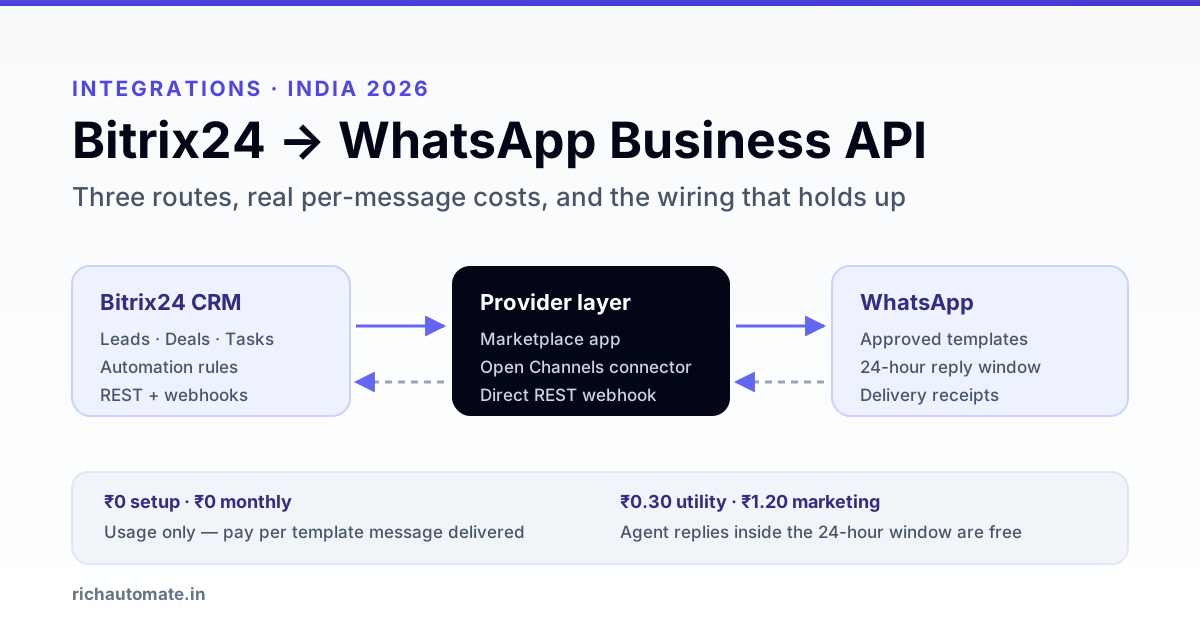
Bitrix24 connects to WhatsApp through the WhatsApp Business API: lead, deal, task and invoice events inside Bitrix24 are handed to a WhatsApp Business API provider, which delivers them as pre-approved template messages, and inbound replies come back into Bitrix24 as Open Channel chats or timeline activities. There is no single official Bitrix24 WhatsApp button in India - every working setup is one of three patterns: a Marketplace connector app, an Open Channels connector run by a provider, or a direct REST webhook from your deal pipeline to the API.
This guide is for Indian teams already running Bitrix24 as their CRM - agencies, real-estate desks, education counsellors, B2B distributors, service companies - who want deal-stage changes, quotes and payment reminders to leave on WhatsApp instead of a salesperson's personal phone. Below: the three routes compared honestly, the exact automation-rule and webhook wiring, the six messages worth automating first, the template and consent rules that trip up Indian rollouts, and what it actually costs per message.
What actually connects Bitrix24 to WhatsApp
Three things get blurred together in most vendor pitches. Separate them before you buy anything.
Bitrix24 is the system of record. Leads, deals, contacts, the pipeline, tasks and activities live in Bitrix24 - cloud in the vast majority of Indian accounts, occasionally self-hosted on-premise. Unlike a desktop ERP, cloud Bitrix24 has a real public REST surface, and that changes everything about the integration: an external service can both call into Bitrix24 and be called by it. That single fact makes Bitrix24 one of the easier Indian CRM stacks to put on WhatsApp.
The WhatsApp Business API is the delivery rail. It is not WhatsApp Business app and it is not WhatsApp Web. It is a Meta cloud endpoint tied to a verified business, a WhatsApp Business Account and a phone number that can no longer be used in the consumer app. Every outbound message sent outside an open conversation window must use a template Meta has approved in advance.
The provider sits between them. A WhatsApp Business Solution Provider holds the Meta relationship, the number registration, template submission and the webhook that receives replies and delivery receipts. Bitrix24 never talks to Meta directly - it talks to the provider, and the provider talks to Meta.
So "Bitrix24 WhatsApp integration" always means the same thing underneath: something watches Bitrix24 for an event, maps CRM fields into template variables, calls a provider API, and writes the result back. The three routes below differ only in who owns that middle piece. The same logic applies across the wider WhatsApp CRM integration patterns - Bitrix24 just exposes more of it to you than most.
The three ways to get Bitrix24 onto WhatsApp
Pick by how much control you need over message logic, not by which one looks cheapest on the listing page.
| Route | How it works | Best for | Watch out for |
|---|---|---|---|
| 1. Marketplace connector app | A third-party app installed from the Bitrix24 Marketplace registers itself as an Open Channels connector and ships its own WhatsApp number handling. Install, authorise, connect a number. | Small teams that mainly want a shared inbox: agents replying to inbound WhatsApp from inside Bitrix24, with chats attached to leads. | You inherit the app vendor's provider, their per-message markup and their template workflow. Outbound automation is usually limited to whatever the app exposes. Check whether the app supports Indian numbers and whether it resells or lets you bring your own WABA. |
| 2. Open Channels connector from your provider | Your BSP registers a connector against the Bitrix24 imconnector REST methods. Inbound WhatsApp lands in Open Channels and routes by your queue rules; agent replies go back out through the provider. |
Sales and support teams that want WhatsApp to behave exactly like every other Bitrix24 channel - queues, transfers, CRM auto-creation, chat history on the contact. | Open Channels availability and the number of channels you get are plan-dependent, and Bitrix24 changes those limits - confirm against your own account before you design around them. Conversation-window rules still apply: an agent cannot free-type to a contact who has been silent 24 hours. |
| 3. Direct REST webhook from the pipeline | An outbound webhook or a Webhook automation rule on a deal stage posts the deal payload to your endpoint; your endpoint maps fields to a template and calls the provider send API. Replies come back via the provider webhook and are written into Bitrix24 with an inbound webhook. | Anyone whose value is in outbound automation - quote sent, site visit confirmed, payment due, renewal - and who wants message logic they control. | You own retries, idempotency and error visibility. Bitrix24 REST is rate-limited at roughly two requests per second per account, so bulk write-backs need queueing rather than a tight loop. |
Most Indian teams that get real value end up on 2 + 3 together: Open Channels for the human inbox, webhooks for the automated sends. Route 1 is a fine starting point if you only need the inbox and want it live this week.
Wiring route 3: automation rules and webhooks
This is the part that gets hand-waved in most guides, so here it is concretely.
Outbound: Bitrix24 tells you a deal moved
In the CRM deal pipeline open Automation rules for the target stage and add a Webhook rule. Bitrix24 will POST the fields you select to your URL when a deal enters that stage. Select at minimum the deal ID, contact phone, contact name and whatever amounts or dates the message needs. Keep the field list tight - fewer fields is fewer things to break when someone renames a custom field.
The alternative, if you want events beyond stage changes, is an outbound webhook registered on events like ONCRMDEALUPDATE or ONCRMLEADADD. Those fire on every change, so your handler must decide what is worth a WhatsApp message - a deal edited five times in a minute must not send five messages. Store the last sent state per deal and compare.
The send
Your handler maps CRM fields onto template variables and calls the provider. With RichAutomate's public API that is one call:
POST https://richautomate.in/api/v1/send-template
Authorization: Bearer <your_api_key>

{
  "phone": "919876543210",
  "template": "deal_quote_sent",
  "language": "en",
  "variables": ["Rahul", "QT-2026-0418", "1,24,000", "5 August"]
}
Note the phone format: country code, no plus, no spaces. Normalise it in your handler rather than trusting whatever a salesperson typed into the contact card - Indian CRM data is full of +91 98765 43210, 098765 43210 and 9876543210 in the same column.
Inbound: writing the reply back into Bitrix24
Create an inbound webhook in Bitrix24 with CRM scope. You get a URL of the form https://<your>.bitrix24.in/rest/<user>/<token>/ and can then call methods directly:
POST https://<your>.bitrix24.in/rest/1/<token>/crm.timeline.comment.add.json

{
  "fields": {
    "ENTITY_ID": 4821,
    "ENTITY_TYPE": "deal",
    "COMMENT": "WhatsApp reply: Yes, please proceed with the quote."
  }
}
Treat that inbound webhook token as a password - it grants whatever scope you gave it, with no per-request signature. Keep it server-side, never in frontend code, and rotate it if a laptop with it walks out of the building.
Get the India 2026 WhatsApp BSP price comparison
Wati vs AiSensy vs Interakt vs RichAutomate: Meta rates, platform fees and hidden costs, side by side. We send it to your WhatsApp in a minute.
If you would rather not build and host the handler yourself, the same pattern runs as a no-code flow - the n8n WhatsApp integration approach works identically here, with a Bitrix24 trigger node in place of the raw webhook. And whichever way you build it, read the WhatsApp webhook reliability notes before you go live: dropped delivery receipts are the single most common reason a working integration quietly stops being trustworthy.
The six Bitrix24 messages worth automating first
Do not start with marketing. Start with the messages a human is already typing by hand every day - they have obvious ROI, they are utility-category, and they are cheap.
- Lead acknowledged. Fires on lead creation from a web form or ad. Confirms you have the enquiry and names the person who will call. Cuts the "did they even get it" follow-up call entirely.
- Quote sent. Fires when the deal hits your Quotation stage. Quote number, amount, validity date, and a link if you host quotes. This is the message that most often shortens a sales cycle, because the buyer can forward it internally without hunting for an email.
- Meeting or site visit confirmed. Fires on activity creation. Date, time, address, the name and number of who is coming. No-shows drop measurably when this goes out on WhatsApp instead of email.
- Payment or invoice due. Fires from stage or a scheduled scan of due dates. Invoice number, amount, due date. Keep the tone flat and factual - this is the message most likely to be read as pushy if you dress it up.
- Deal won - onboarding starts. Fires on the won stage. Sets expectations for what happens next and who owns it. Cheap, and it is the moment goodwill is highest.
- Dormant deal nudge. Fires when a deal has sat in one stage past your threshold. One message, one clear question. Marketing category if it is really a re-pitch, so price it accordingly and only send to contacts who opted in.
Numbers one through five are utility messages tied to something the customer actually did. Number six is the one that needs consent discipline.
Template approval, opt-in and the 24-hour window
Three rules decide whether a Bitrix24 rollout runs smoothly or stalls in review.
Every outbound message outside an open window is a template, and templates are approved in advance. You submit the body with numbered placeholders, Meta reviews it, and you can then only fill the placeholders. Approval usually lands within minutes to a few hours, but plan for a working day. Category matters for cost: utility for transaction-linked messages, marketing for anything promotional, authentication for OTPs. Writing a promotional line into a utility template gets it reclassified or rejected - Meta reads the body, not your intent.
The 24-hour window governs free-typing. When a contact messages you, a 24-hour window opens in which your agents can reply with ordinary free-form text - in Bitrix24 that is a normal Open Channels chat. Once it closes, the next outbound must be a template again. Agents will hit this constantly in the first week; tell them upfront so they do not report it as a bug.
Consent is a legal requirement, not a Meta preference. Under India's DPDP Act 2023 you need demonstrable consent for the purpose you are messaging about, and the ability to withdraw it. Practically: record where and when each Bitrix24 contact opted in, as a custom field on the contact so it is auditable. Honour STOP replies immediately by flagging the contact and excluding it from every future send. Our WhatsApp opt-in and list hygiene guide covers the re-permissioning message for legacy CRM contacts you have never explicitly asked.
No provider can promise a number will never be restricted, and you should be sceptical of any that does. What you control is behaviour: keep transactional sends tied to real Bitrix24 records, keep promotional sends to opted-in contacts, honour opt-outs, and watch your quality rating in WhatsApp Manager.
What it costs to run
Since Meta moved to per-message pricing in July 2025, you pay per template message delivered, by category, and service conversations - replies inside an open window - cost about ₹0.115 each since 1 October 2026. There is no per-conversation bundle to model any more, which makes Bitrix24 volumes easy to forecast: count the pipeline events you are automating, multiply.
| Line item | Client Pay | SaaS Pay |
|---|---|---|
| Setup | ₹0 | ₹0 |
| Monthly platform fee | ₹0 | ₹0 |
| Utility message (quote, invoice, confirmation) | ₹0.10 platform fee + Meta bills you directly | ₹0.50 all-in |
| Marketing message (dormant nudge, offer) | ₹0.10 platform fee + Meta bills you directly | ₹1.50 all-in |
| Agent replies inside the 24-hour window | Free | Free |
A worked example. A twelve-person Bitrix24 sales team closing from a pipeline of roughly 900 deals a month, automating the five utility messages, sends about 3,200 utility messages plus 400 marketing nudges. On SaaS Pay that is ₹960 + ₹480 = ₹1,440 a month, against a salesperson-hour cost of the copy-pasting it replaces. On Client Pay it is ₹360 in platform fees plus whatever Meta invoices you at their rates. Which is cheaper depends on your volume and whether you want one bill or two - the Client Pay vs SaaS Pay billing comparison walks through the crossover, and the WhatsApp API cost calculator does the arithmetic for your own numbers.
Bitrix24's own licence cost is separate and unchanged by any of this - the integration adds no Bitrix24 seats.
Your Bitrix24 to WhatsApp rollout checklist
- Decide the route. Inbox only, this week: Marketplace app. Inbox plus real outbound automation: Open Channels connector plus webhooks. Write down which, so you stop re-litigating it.
- Clean the phone column. Normalise every contact to country-code format before the first send. Do it once in Bitrix24, not per message in your handler.
- Add a consent field. Custom field on the contact: source, date, purpose. Backfill what you can honestly evidence; re-permission the rest.
- Get the number registered. A number currently active in the WhatsApp Business app must be migrated - it cannot be used in both. Pick the number now, not on go-live day.
- Submit templates in batch. All six at once, correct categories, placeholders numbered in the order your handler fills them.
- Wire one stage. Quote sent only. Prove the whole loop - deal moves, message delivers, receipt returns, timeline updates - before adding the rest.
- Test with an internal number. Move a dummy deal through the stage. Read the actual delivered message on a phone, not the API response.
- Brief the team on the 24-hour window before they discover it mid-conversation with a customer.
- Watch the first week. Quality rating, delivery failures, and any contact who replies STOP. Fix the list, not the volume.
If your stack is a different CRM, the same three-route logic applies with different plumbing - see the LeadSquared WhatsApp integration guide for a webhook-first Indian CRM, or Marg ERP WhatsApp integration if your system of record is an on-premise ERP with no public URL.
Start a 14-day RichAutomate trial - no card, connect a number, and wire your first Bitrix24 stage the same day. Full rates on RichAutomate pricing.