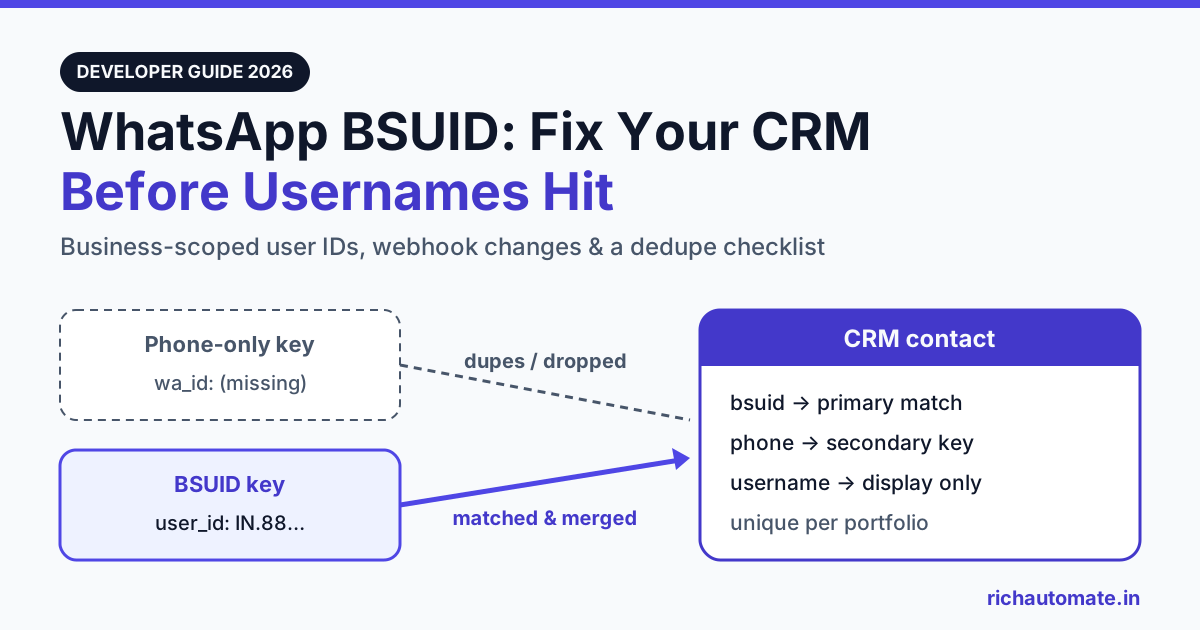
A BSUID (business-scoped user ID) is a stable identifier Meta now attaches to every WhatsApp user in your webhooks, unique to your business portfolio, and it keeps arriving even when the user's phone number does not. If your CRM identifies customers only by phone number, you need to add a BSUID column, match inbound messages on it first, and treat the phone number as a secondary key, because users who adopt WhatsApp usernames can reach you without exposing their number.
This guide is for Indian developers, CRM owners and agencies running on the WhatsApp Business Platform. It covers what Meta has documented so far, what the webhook looks like when the phone number is missing, why phone-only contact tables break, and a migration checklist you can run in one sprint. Field names below are quoted from Meta's developer documentation and Infobip's integration notes at the time of writing (late October 2026). Meta has revised this spec many times since February 2026, so check the source before you ship.
What is a WhatsApp BSUID?
Meta's documentation describes a BSUID as a unique identifier for a WhatsApp user that is tied to a specific business. Three properties matter for anyone designing a data model.
- Format. A two-letter ISO 3166 country code, a period, then up to 128 alphanumeric characters. Meta's example is
US.13491208655302741918. Use the whole string. Meta says that dropping or changing any part, including the country prefix, makes the request fail. - Scope. BSUIDs are scoped to a business portfolio (what used to be called Business Manager). One user gets a different BSUID for each portfolio. A phone number in portfolio A cannot message a BSUID that was issued to portfolio B.
- Stability. The BSUID stays the same when a user changes devices or reinstalls WhatsApp. Meta issues a new one when the user changes their phone number, and announces the change with a system webhook.
There is also a parent BSUID, which adds ENT after the country code (for example US.ENT.11815799212886844830). It is shared across several portfolios owned by one managed business, and it is available only with Meta's approval. Most Indian SMBs and D2C brands run a single portfolio and can ignore it.
BSUIDs are not tied to usernames. Meta says the user_id field appears in messages webhooks whether or not the user has adopted a username. That makes it the most dependable identifier in the payload.
Why usernames change your data model
Until 2026, every WhatsApp conversation began with a phone number. Your webhook carried wa_id and from, both E.164 numbers, and most CRMs used that number as the primary key. Opt-in records, order lookups, lead deduplication and agent assignment all depended on it.
Usernames remove that guarantee. Meta lets users choose an optional handle that WhatsApp shows instead of their phone number. Businesses could reserve and claim usernames from 29 June 2026, and Meta says user adoption will roll out gradually through 2026. If you have not reserved your brand handle yet, read our guide on reserving a WhatsApp business username in India.
Meta's documentation sets out when the phone number is still included for a user who has adopted a username. At least one of these must be true, and the check runs separately for each business phone number:
- You messaged or called the user's number in the last 30 days.
- The user messaged or called you from that number in the last 30 days.
- The user is in your portfolio's Contact Book, a Meta-hosted store of phone and BSUID pairs. Meta says it began capturing these pairs in early April 2026 and holds no data from before then.
If none of these applies, your webhook carries the BSUID and possibly a username, but no phone number. Infobip summarises it this way: active users are not affected, and the users at risk are those with a username and no recent history with your business.
In India that group can be large. Meta has publicly cited more than 500 million WhatsApp users in the country. Many brands get first contact from users who have never messaged them before: a Click-to-WhatsApp ad, a QR code on packaging, a website chat widget or a festive-sale broadcast forwarded by a friend. Each of these is a first message from a number your WABA has never seen, which is exactly the case where the phone number can be missing.
What the webhook looks like without a phone number
Below is a simplified inbound message webhook for a user with a username and no visible phone number. It is assembled from the field list in Meta's documentation at the time of writing and is not a verbatim Meta sample. Meta's own example payloads still include wa_id, and its docs note that wa_id and from "can be omitted" while user_id and from_user_id are always present.
// Illustrative only: simplified from Meta's documented field list
{
  "contacts": [{
    "profile": { "name": "Priya", "username": "priya.styles" },
    "user_id": "IN.8812...redacted"
    // "wa_id" omitted: phone not visible to this business number
  }],
  "messages": [{
    "from_user_id": "IN.8812...redacted",
    // "from" omitted for the same reason
    "id": "wamid.HBg...",
    "type": "text",
    "text": { "body": "Is the blue kurta back in stock?" }
  }]
}
Delivery status webhooks follow the same pattern. Meta lists recipient_user_id as present on statuses, and recipient_id (the phone) as omittable when you sent to a BSUID and the number is not visible. The contacts array is included for sent, delivered and read statuses but not for failed ones, so do not build failure handling that expects a contact object. Infobip reports the same rule for its delivery reports.
If you use a BSP rather than Meta's Cloud API directly, field names can differ. Infobip, for example, exposes contact.userId, contact.phoneNumber and contact.username, and puts either the phone or the BSUID in from. Map your provider's names to one internal schema. Our WhatsApp Business API webhook setup guide covers signature verification and retries, and those apply here unchanged.
How a phone-keyed contacts table breaks
Suppose your contacts table has a unique index on (tenant_id, phone) and the webhook handler runs "find contact by from, else create". With a username user and no visible phone, one of three things happens, depending on how strict the code is:
- Hard failure. E.164 validation rejects the payload, or a
NOT NULLphone column throws. The message is dropped, nobody in support sees it, and the customer gets no reply. - Silent duplicates. The handler treats the missing phone as empty, or writes the BSUID into the phone column. A new "contact" is created with no history, no tags and no opt-in. When the same person later appears with their phone visible, a second record appears.
- Lost history. If the BSUID is regenerated after a number change and you never processed the system webhook, the next message looks like a brand-new person. The agent sees an empty thread for a customer with years of orders.
Outbound sends break too. A campaign tool that reads the phone column has nothing to send to for BSUID-only contacts. Meta's docs list July 2026 as the start of sending by BSUID, through a separate recipient parameter alongside the existing to, with to winning when both are present. Meta first listed May 2026 and moved the date to July. Before you rely on BSUID sends, confirm that your WABA, BSP and SDK support them, and handle error 131062 ("BSUID recipients aren't supported for this message").
| Concern | Phone-only key | BSUID-first key, phone as secondary |
|---|---|---|
| Inbound from a username user with no visible phone | Rejected, or creates an orphan record | Matched by user_id and attached to the existing contact |
| Duplicate contacts | Grow as more users adopt usernames | One row per user per portfolio, merged when the phone appears later |
| User changes phone number | Treated as a new contact, history split | previous_user_id in the system webhook links old and new |
| Replying in a 24-hour service window | Impossible without a phone | Possible by BSUID once Meta's send support is live for your account |
| Authentication / OTP templates | Works | Still needs a phone: Meta excludes one-tap, zero-tap and copy-code templates from BSUID sending |
| Moving to another portfolio or BSP | Phone carries over | BSUID does not carry over (portfolio-scoped). Keep the phone wherever you have it |
Portfolio scope: the trap for agencies and multi-brand groups
Because BSUIDs are portfolio-scoped, the same customer has a different BSUID in every business portfolio they talk to. That has three consequences that are easy to miss.
Get the India 2026 WhatsApp BSP price comparison
Wati vs AiSensy vs Interakt vs RichAutomate: Meta rates, platform fees and hidden costs, side by side. We send it to your WhatsApp in a minute.
Agencies and resellers. If you manage WhatsApp for many clients from one platform, never treat a BSUID as a global person ID. Store it together with the portfolio, or with the WABA that maps to it, and make your uniqueness constraint include that scope. Meta also tells solution providers to confirm asset ownership before messaging a BSUID.
Multi-brand groups. A group that runs separate portfolios for a jewellery brand and an apparel brand will see two unrelated BSUIDs for the same shopper. Cross-brand identity has to come from a phone, an email, a loyalty ID or Meta's parent BSUID (with approval). The BSUID alone cannot provide it. Our explainer on WhatsApp CDP identity resolution and the golden record walks through that merge logic.
Migrations. If you move a number to a different portfolio, existing BSUIDs will not match. Plan to re-key from phone numbers, which is one more reason to collect and keep them.
Who is affected, by business type
| Business type (India) | Typical first-contact pattern | Exposure to missing phone | Priority fix |
|---|---|---|---|
| D2C / ecommerce running Click-to-WhatsApp ads | Cold users from Meta ads, first message to the brand | High | Match on BSUID, use the in-chat contact request before checkout |
| Edtech and coaching lead funnels | Website widget or ad, counsellor follows up days later | High: the 30-day window can lapse before enrolment | Store BSUID at first touch and capture the phone in the lead form |
| Banks, NBFCs, fintech OTP flows | User-initiated login and authentication templates | Low for OTP, which needs a phone anyway; medium for support chats | Keep phone mandatory for authentication, add BSUID for support threads |
| Clinics, salons, local services | Repeat customers, frequent reminders | Low: regular messages keep the 30-day window open | Add the BSUID column, then dedupe on the next contact |
| Agencies / BSP resellers | Many portfolios on one platform | High risk of cross-client mix-ups | Scope the unique key per portfolio or WABA |
CRM migration checklist
This is the order we recommend. Every step adds to the schema and nothing is removed, so you can ship it before usernames reach your users.
| # | Step | Why |
|---|---|---|
| 1 | Add a nullable bsuid column (about 160 chars is enough, since Meta's max is 2 + 1 + 128) and an optional username column | Existing rows keep working, and new rows can arrive without a phone |
| 2 | Make phone nullable and remove strict E.164 checks on inbound from | Stops hard failures. Infobip notes that a value starting with two letters and a period is a BSUID |
| 3 | Add a unique index on (portfolio_or_waba_id, bsuid) | Enforces one record per user per portfolio and avoids cross-client mixing |
| 4 | Change the lookup order to BSUID first, then phone, then create | Catches username users and still matches legacy phone-only rows |
| 5 | When a webhook carries both BSUID and phone, backfill the missing one and merge duplicates | Gradually links every legacy contact to its BSUID |
| 6 | Handle user_changed_number and user_changed_user_id system webhooks using previous_user_id | Keeps history together when the BSUID regenerates |
| 7 | Store opt-in records against the contact ID, with the identifier used (phone or BSUID) and a timestamp | Consent should follow the person, not one column |
| 8 | Keep phone mandatory for OTP and authentication journeys | Meta excludes those templates from BSUID sending |
| 9 | Read recipient_user_id on statuses and do not expect contacts on failed statuses | Delivery tracking still works for BSUID sends |
| 10 | Test with the messages webhook "Test" link in the App Dashboard and a staging tenant | Meta's recommended test path |
A MySQL migration sketch for steps 1 to 3 is below. Adapt the names to your schema, and run the backfill as a queued job rather than in the migration itself.
-- Sketch only: adapt table/column names to your schema
ALTER TABLE contacts
  ADD COLUMN bsuid VARCHAR(160) NULL AFTER phone,
  ADD COLUMN wa_username VARCHAR(40) NULL AFTER bsuid,
  MODIFY phone VARCHAR(20) NULL;

-- One record per user per portfolio (or per WABA if that is your scope)
CREATE UNIQUE INDEX contacts_portfolio_bsuid_unique
  ON contacts (portfolio_id, bsuid);

-- Keep phone as a secondary lookup key
CREATE INDEX contacts_portfolio_phone_idx
  ON contacts (portfolio_id, phone);

-- Merge rule (run in app code, in a transaction):
-- 1. find by (portfolio_id, bsuid)
-- 2. else find by (portfolio_id, phone) and set bsuid
-- 3. else insert; if a later webhook brings the phone,
--    merge the phone-only duplicate into the BSUID row
Two notes on the merge. First, MySQL allows multiple NULL values in a unique index, so legacy rows with no BSUID will not collide. Second, merge into the older record so conversation history, tags and opt-in stay with the contact your team already knows, and keep an audit row for every merge so it can be reversed.
Recovering phone numbers the right way
You will sometimes need the number: for an invoice, a delivery partner, a payment link or an OTP. Meta and Infobip both document a request-contact-info mechanism. During an open service window you can send an interactive contact request. Outside the window, a utility or marketing template can carry a REQUEST_CONTACT_INFO button, whose label WhatsApp fixes as "Share Contact Info". If the user shares their card, a contacts webhook delivers the number. Store it and link it to the BSUID.
Ask only when you have a real reason, and say why in the message. Indian shoppers are used to giving their number for delivery and payment, so "Share your number so our courier partner can call you" works far better than an unexplained prompt. Regular, wanted messaging also keeps the 30-day window open and fills the Contact Book, which keeps numbers visible on later webhooks.
Syncing BSUIDs to HubSpot, Zoho and Salesforce
Most Indian teams don't treat the WhatsApp inbox as the system of record. Leads flow on to HubSpot, Zoho CRM or Salesforce, and those tools usually deduplicate on phone or email. Add a custom field such as "WhatsApp BSUID" to the contact object, and make your sync upsert on it whenever it is present. Otherwise every username user becomes a new lead in your sales CRM. Our guide on WhatsApp CRM integration with HubSpot, Zoho and Salesforce covers field mapping and sync direction.
Where RichAutomate stands
RichAutomate's shared inbox, contact records and public developer API are built on the WhatsApp Business Platform, and today they identify contacts by phone number. RichAutomate is tracking Meta's BSUID and username rollout and will document any change to contact fields or the developer API before it reaches your integration. If you call our API from your own CRM, we recommend adding a nullable BSUID column on your side now, using the checklist above, so the change is a small update rather than an emergency.
Pricing for messaging is listed on our WhatsApp Business API pricing page. Meta's own per-message charges are separate and follow Meta's published rate card.
Want a WhatsApp inbox and campaign stack that tracks Meta's platform changes so your team doesn't have to? Create your RichAutomate account, connect your number and start replying to customers today.