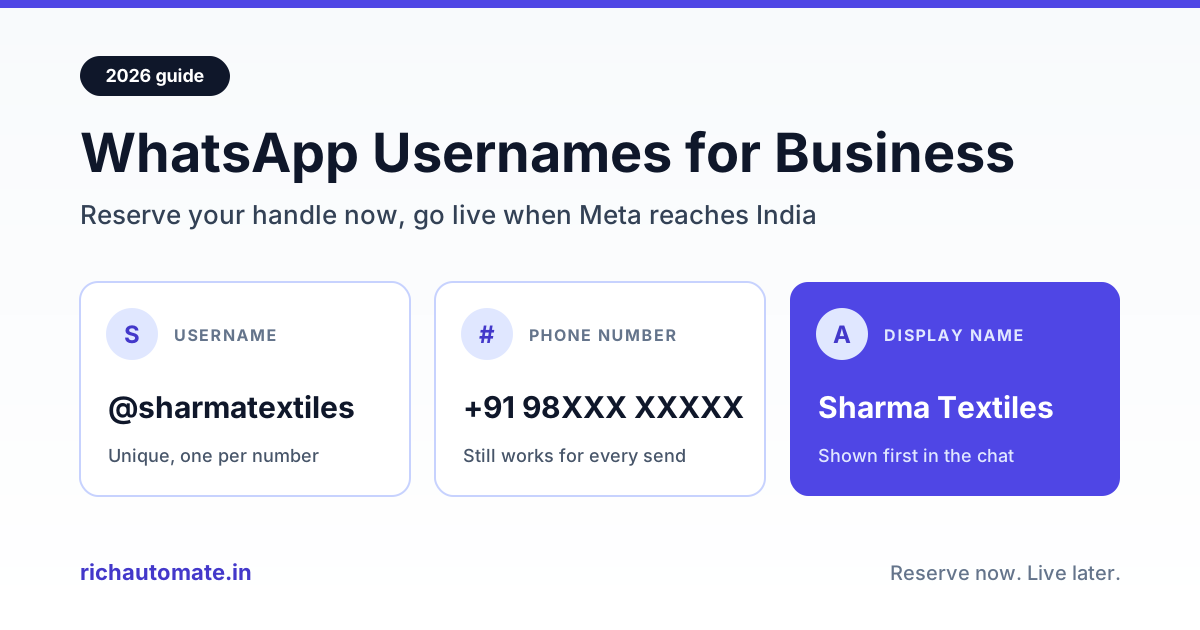
A WhatsApp username for business is a unique @handle, such as @sharmatextiles, tied to one business phone number so customers can find and message you by name instead of typing ten digits. Yes, you can reserve one: Meta's developer documentation states that businesses can reserve and claim usernames from 29 June 2026, but a reserved handle only goes live for customers once Meta's rollout reaches your country.
This guide is written for Indian business owners, not developers. It covers reserve versus live, choosing a handle, marketing use and what stays the same. Where a detail comes from a software vendor's help page rather than from Meta, we say so, because a lot of what is circulating about usernames is second-hand.
What is a WhatsApp username for business?
Until now, the only way to start a WhatsApp chat with a business was its phone number. A username adds a second, human-readable way in. WhatsApp announced usernames on 29 June 2026 (as reported by The Week and other outlets), describing them as "a more private way to connect", and said businesses and creators can claim the same username they already use on Instagram or Facebook, where available.
Meta's documentation for the WhatsApp Business Platform sets out a few basics that matter for any business:
- Usernames are optional, for both customers and businesses. Nobody is forced to adopt one.
- One username per business phone number. No two WhatsApp numbers can share the same username.
- Business usernames are not a privacy feature. Meta's documentation is explicit that adopting a username does not hide the business phone number.
- Customers find you by exact handle. Meta's documentation says end users can search for a business username using the exact username. WhatsApp's own announcement, as reported, says there is no directory to browse and no suggestions, so people need the exact spelling.
Username vs phone number vs display name
Your WhatsApp presence now has three identifiers, each with a different job.
| Identifier | Example | Unique? | What it does |
|---|---|---|---|
| Phone number | +91 98XXX XXXXX | Yes | Registers the WhatsApp account and remains the main way businesses send messages, including template messages |
| Display name | Sharma Textiles | No | The name customers see at the top of the chat; reviewed by Meta and shown first when you also have a username |
| Username | @sharmatextiles | Yes, one per number | A handle customers can type to find and message you; strict format rules apply |
Two points from Meta's documentation are worth remembering. First, when a business has both a username and a display name, the display name is shown first, including in the profile, chat list and messages. Second, display names are not unique, while usernames are. That is why the username matters for discovery: two shops can both be called "Sharma Textiles", but only one of them can be @sharmatextiles.
If your display name is still a work in progress, sort that out first. Our guide to the WhatsApp display name change process in India explains Meta's display-name review, and the username you choose should match the display name you settle on.
Reserve now, live later: where things stand in October 2026
The confusing part is the gap between reserving a username and customers being able to use it. Meta's documentation describes claimed usernames as "approved" or "reserved" and says they activate once the feature is available. Klaviyo's help centre puts it plainly: reserving a username secures it for your business, but customers will not be able to use it to find or message you until Meta's rollout reaches your market.
| Date | What happened | Source |
|---|---|---|
| Early April 2026 | Business-scoped user IDs start appearing in API webhooks, ahead of usernames reaching users | Meta developer documentation |
| 29 June 2026 | Businesses can reserve and claim usernames; WhatsApp announces usernames publicly | Meta developer documentation; news reports |
| 7 July 2026 | First live wave reported in Algeria, Azerbaijan, Ghana, Libya and Nepal | Gallabox (vendor) |
| September 2026 onward | Wider rollout expected to the rest of the world | Gallabox and Klaviyo (vendors, citing Meta's plan) |
| 15 September 2026 | Meta documents that it can revoke a business username and replace it with a generated one | Meta developer documentation (changelog) |
| India go-live | Not confirmed in any Meta page we read | Check WhatsApp Manager |
We could not find a Meta-published go-live date for India. WhatsApp has said it will notify users in the app when usernames become available in their country, and Meta notes that all of these changes are subject to change. The practical takeaway: reserve your handle now, and treat the India launch date as unknown until WhatsApp Manager or the WhatsApp app tells you otherwise.
How to reserve your business username
Meta's documentation says businesses on the WhatsApp Business Platform can claim a username through WhatsApp Manager, Meta Business Suite, or the Username API. Vendor guides describe the WhatsApp Manager route as roughly this:
- Open WhatsApp Manager and go to Phone numbers.
- Select the business number you want the handle on.
- Look for the Username option in the profile settings and choose to create or edit it.
- Type your handle, or pick one of Meta's suggestions, and save.
If you do not see a Username option, the feature is likely not enabled for your account yet. Eligibility points:
- Messaging limit. Meta's documentation says claiming a username requires a messaging limit higher than the default. Klaviyo's help page specifies a limit of at least 2,000; treat that number as vendor-reported and confirm it in WhatsApp Manager.
- Permissions. You need edit access to the WhatsApp account settings in your business portfolio.
- Linked Instagram or Facebook handle. If the username you want is already used by your Facebook Page or Instagram account, Meta's documentation says the phone number must first be linked to that account.
- Several numbers. Each number gets its own username. Moving a handle from one number to another in the same portfolio is a transfer, which removes it from the original number.
Fees: none of the Meta pages we read mention a charge for reserving or using a username, and the vendor guides we read do not mention one either. Klaviyo states that WhatsApp billing and the 24-hour customer service window are unchanged. If a fee ever appears, it will show in WhatsApp Manager, so check there rather than relying on blog posts.
Getting your WhatsApp Business API number ready for usernames? RichAutomate runs on Meta's official Cloud API, with a 14-day free trial and ₹0 setup. Start your free trial on RichAutomate and have your number, templates and inbox live before the India rollout.
How to choose the right handle
Meta's documentation sets strict format rules for business usernames:
- 3 to 35 characters long.
- Only English letters, digits, periods and underscores, with at least one letter. Characters such as é or ñ are not supported, and neither are Hindi, Gujarati or Marathi scripts.
- No period at the start or end, and no two periods in a row.
- Cannot start with "www." and cannot end with a domain-style suffix such as ".com".
- Matching ignores upper and lower case, but periods and underscores count. So @sharma.textiles and @sharma_textiles are different handles.
Within those rules, pick the handle customers will type correctly first time. There is no autocomplete, so a typo lands on nobody, or on someone else.
Get the India 2026 WhatsApp BSP price comparison
Wati vs AiSensy vs Interakt vs RichAutomate: Meta rates, platform fees and hidden costs, side by side. We send it to your WhatsApp in a minute.
| Do | Don't |
|---|---|
| Match your display name and Instagram handle (@sharmatextiles everywhere) | Use a different handle on each platform |
| Keep it short enough to say aloud and print on a bill | Use the full 35 characters because you can |
| Use one separator at most, if the name needs it (@pune.skinclinic) | Mix periods and underscores (@pune_skin.clinic) |
| Add a city or category only if the plain name is taken | Add random digits that customers will forget |
| Use your registered brand or trading name | Use a famous brand, a government body or a celebrity's name |
| Write it in Roman letters that your customers can type on any keyboard | Try ".com", "www." or regional-script characters, which are not allowed |
That last row matters. According to Gallabox, WhatsApp is holding back handles that could be used to impersonate public figures, brands or government entities, and Meta's September 2026 changelog notes that Meta can revoke a business username and replace it with a generated one. A handle that looks like someone else's brand is a risk, not a shortcut.
Three Indian examples of sensible choices:
- A Surat textile trader selling sarees to retailers might pick @sharmatextiles, matching the Instagram page buyers already follow, with @sharmatextiles.surat as a fallback.
- A Pune skin clinic that takes appointment requests on WhatsApp could use @puneskinclinic, printed on the reception standee and the prescription pad.
- A D2C snack brand advertising nationally would want the brand name alone, with no city, so pack, ad and website all match.
Your profile should back up the handle. A clear logo, description, address and hours make the first chat feel trustworthy; our WhatsApp Business profile optimization guide walks through each field.
Putting your username to work: QR codes, ads, signage and website
Once your handle is live in India, it becomes something you can put anywhere you currently print a phone number. Until then, keep using your number and wa.me links everywhere, and plan the switch.
- Shop signage and packaging. "Message us on WhatsApp: @sharmatextiles" is easier to remember than a ten-digit number, especially for walk-in customers taking a photo of your board.
- QR codes. Keep using your existing WhatsApp QR code or wa.me link; they work on your phone number today. Print the username next to it so people who cannot scan still have a way in.
- Ads and reels. A handle can be said in a 15-second video and shown on screen. Your existing click-to-WhatsApp ads keep running as they do today; the handle is an extra line in the creative, not a change to the ad setup.
- Website. Add the handle beside your WhatsApp button and on your contact page.
Do not print the handle on signs or packs until it works for customers in India; a board pointing to an unreachable handle costs enquiries.
A username also does not replace the trust signals customers look for. If your display name carries Meta's verification, that shows ahead of the username, so the work you put into green tick verification for your WhatsApp business still pays off.
What does not change
Based on Meta's documentation and the vendor guides we read:
- Your phone number still works. Customers can keep messaging your number, and you can keep messaging customers whose numbers you already have.
- Sending through the API still works by phone number. Meta's documentation states that messages can be sent by phone number, by the new user ID, or both, and that when both are included the phone number takes precedence. For marketing messages, Meta recommends phone numbers.
- OTP and login messages stay phone-based. Meta's documentation says one-tap, zero-tap and copy-code authentication templates cannot be sent to the new user ID.
- Templates, the 24-hour window and Meta's charges. Klaviyo reports that templates, message types and billing are unchanged, and the Meta pages we read describe no new message fee for usernames.
- Your business number stays visible. A business username does not hide your number.
If you are deciding between the free WhatsApp Business app and the API, usernames do not change that decision much. Our WhatsApp Business app vs API comparison covers the real differences: multiple agents, automation, broadcasts and integrations.
The privacy angle for your customers
The bigger change is on the customer side. WhatsApp users can also set a username, and WhatsApp has described the feature as a more private way to connect with new contacts. For businesses, that means some customers will start chats without sharing their phone number.
Meta's documentation explains what happens in that case. If a customer has turned on a username, their phone number is left out of the message data a business receives, unless you and that customer have messaged or called each other in the last 30 days (counted per business number), or they are in your contact book, a Meta-hosted feature that stores numbers only for interactions after it launched. Meta also offers a "request contact info" button that lets a customer choose to share their number in the chat.
For an Indian business, the practical effects are:
- A new enquiry from a privacy-minded customer may arrive with a name and a handle, but no number. Ask for the number politely if you need it for delivery or billing, and explain why.
- Do not assume you can copy that customer into an SMS list or a calling sheet. If they did not share a number, you do not have one.
The developer side, briefly
Behind the scenes, Meta now assigns every customer a business-scoped user ID (BSUID): an identifier that is unique to the pair of that customer and your business portfolio, whether or not the customer uses a username. Meta's documentation says it has appeared in message webhooks since early April 2026. Your software provider handles this, and we will cover it in a separate article; your platform simply needs to recognise a customer by either a phone number or this ID.
Platforms built on Meta's official Cloud API will pick up these changes as Meta rolls them out, while phone-number sending keeps working throughout. RichAutomate is on the official Cloud API, and on the Client Pay model you pay a flat ₹0.10 platform fee per message while Meta bills its own charges to you directly. See RichAutomate pricing for WhatsApp API plans for Starter (₹499/month), Pro (₹899/month) and White-label (₹1,199/month), all GST inclusive.
Practical checklist for Indian businesses
- Fix your display name first. Make sure it is approved and matches your brand.
- Decide one handle across platforms. Check that it is free on Instagram and Facebook, or that you already own it there.
- Check the format rules. 3 to 35 characters, English letters, digits, periods and underscores only, at least one letter, no "www." and no ".com".
- Link your Facebook Page or Instagram account to the business number if the handle is already used there.
- Check your messaging limit in WhatsApp Manager. If it is still at the default, you may not be able to claim a username yet.
- Reserve the handle in WhatsApp Manager or Meta Business Suite, or ask your platform provider to do it through the Username API.
- Do not print it yet. Wait until WhatsApp confirms usernames are live in India, then update signage, packs, ads and your website.
- Brief your team that some new chats may arrive without a phone number, and agree how to ask for one politely.
- Keep your number and wa.me links running everywhere. Nothing about them stops working.
The bottom line
Reserve a clean handle that matches your brand now, keep using your phone number for everything you already do, and add the handle to your marketing once WhatsApp confirms the India rollout. Businesses whose handle, display name, profile and Instagram all match will get the most from it.
Run WhatsApp on Meta's official Cloud API with shared inbox, broadcasts and chatbots. Plans start at ₹499/month, GST inclusive, with ₹0 setup. Try RichAutomate free for 14 days and be ready when usernames go live in India.