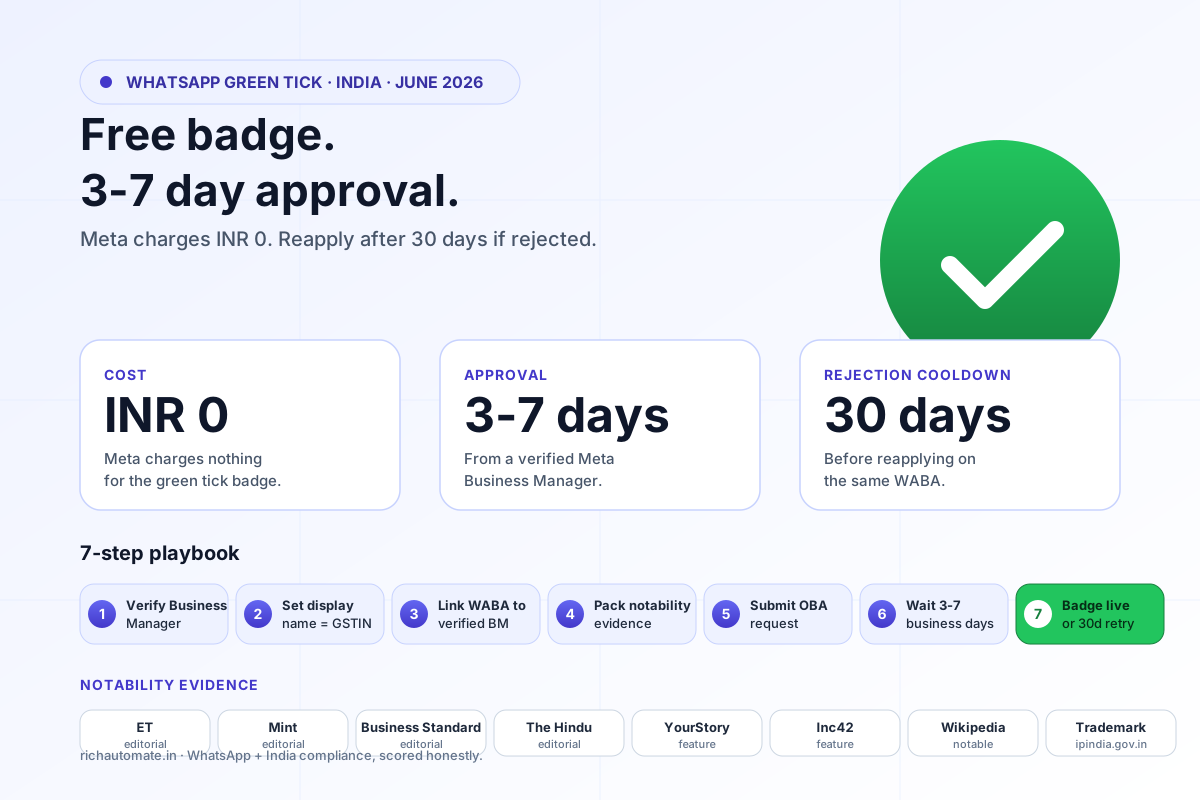
The WhatsApp green tick (Official Business Account) is the trust signal Indian D2C brands, fintechs, EdTechs, and SaaS products need to lift open rates, reduce block rates, and qualify for Meta's "Verified" partner programs. As of 2026 the verification has merged with Meta's blue tick under a unified verification framework, but the operational checklist for Indian businesses is unchanged: documentation, brand presence, and a proven track record on the WhatsApp Cloud API. This guide is the 2026 India application playbook — what Meta actually checks, the six-week realistic timeline, the eight rejection reasons that block first attempts, and the post-approval rules that keep your tick alive.
What Is the WhatsApp Green Tick (and Now Blue Tick)?
The green tick is a verification badge Meta awards to WhatsApp Business numbers that represent notable, well-known businesses. It signals to users that the account is the official, verified channel for that brand. OBA status also unlocks newer Cloud API features such as invite-only WhatsApp API groups, which Meta limits to Official Business Accounts. In 2026 Meta consolidated WhatsApp's green tick with the Facebook/Instagram blue tick into a single Meta Verified business badge, but for Indian Cloud API users the application path still runs through Facebook Business Manager and the operational behaviour of the badge in WhatsApp chats is identical to the legacy green tick. Verified status is permanent until revoked for policy violations or business changes.
Why Indian Businesses Want It
- Read rates lift 8–18% on average — recipients trust verified numbers more.
- Block rate drops 30–50% on cold marketing sends.
- Quality rating recovers faster after dips because Meta weighs verified-business signals positively.
- Eligibility for Meta partner programs (Click-to-WhatsApp ad placements, premium support tiers).
- Display name shown in chat thread (instead of phone number) regardless of whether user has saved the contact.
The Application Eligibility Bar
Meta does not award the green tick on request — it requires evidence the business is "notable" by Meta's quality criteria. Notable means at least three of the following:
- Press coverage in mainstream media (YourStory, Inc42, ETtech, Mint, Economic Times, Business Standard, Forbes India). Two or more articles in the last 12 months.
- Wikipedia entity or comparable third-party encyclopedia entry.
- Verified social presence on at least one of Instagram, Facebook, X, or LinkedIn (blue tick on at least one).
- Active WABA on Meta Cloud API for 60+ days with a healthy quality rating (no recent RED periods).
- Documented opt-in customer base (10,000+ unique active recipients in the last 30 days is the practical floor).
- Domain authority — your website ranking for branded queries with substantial organic traffic.
The Six-Week Realistic Timeline
| Week | Phase | What you do |
|---|---|---|
| 1 | Documentation prep | Compile press articles, register Wikipedia entity if not present, ensure GST and registration docs are current |
| 2 | Brand audit | Verify social profiles, ensure consistent branding across WABA display name, website, and social |
| 3 | WABA quality check | Confirm quality rating GREEN, messaging tier Tier 2 or higher, no recent flagged periods |
| 4 | Application submission | Submit through Facebook Business Manager → WhatsApp Accounts → Verified Status request |
| 5–6 | Meta review | Meta reviews. Outcome: Approved (typical 7–14 days), Pending (request more docs), or Rejected (30-day cool-off before reapply) |
Eight Rejection Reasons That Block First Attempts
- Generic display name. "Best Sarees Online" gets rejected; "RaagSaree" passes. Use your registered brand name.
- Mismatched branding. WABA display name, website, and social profiles must match exactly. Inconsistencies trigger rejection.
- Insufficient press coverage. Two articles from minor blogs are not enough. Mainstream Indian media is the bar.
- Too-new WABA. Numbers under 60 days on the Cloud API rarely qualify. Wait until your WABA matures.
- Recent quality issues. A RED quality rating in the last 30 days is a near-automatic rejection.
- No verified social tick. Submit Instagram or LinkedIn verification first if you don't already have one — verification on one platform speeds the WhatsApp review.
- Restricted category. Gambling, crypto trading, adult content, and certain fintech subcategories face additional scrutiny or outright denial regardless of other criteria.
- Incomplete business documentation. Missing GST certificate, registration certificate (if Pvt Ltd), or address proof slows or stops review.
Application Submission Step-by-Step
- Log in to business.facebook.com with the admin account that owns the WABA.
- Settings → Business Info → confirm verification status of the Business Manager itself (must be verified).
- Settings → Accounts → WhatsApp Accounts → select your WABA → Settings.
- Look for "Official Business Account" or "Verified Business Status" panel → click Apply.
- Upload required documents: GST certificate, registration proof (if applicable), at least three press article URLs, links to verified social profiles.
- Submit. Track status weekly via the same panel.
Post-Approval Rules That Keep Your Tick Alive
- Maintain quality rating at GREEN or YELLOW. Sustained RED can trigger Meta to revoke the verified badge.
- Do not change display name post-approval without re-verification — Meta treats display name change as identity event.
- No major business pivot. If your D2C brand pivots into a restricted category, badge can be revoked.
- Continue documenting press, brand presence, and operational health — Meta re-reviews verified accounts periodically.
Apply for the Green Tick on RichAutomate.
RichAutomate handles the full application — documentation review, WABA quality audit, Meta submission. Concierge service for Indian D2C and fintechs ready to verify.
Get the India 2026 WhatsApp BSP price comparison
Wati vs AiSensy vs Interakt vs RichAutomate: Meta rates, platform fees and hidden costs, side by side. We send it to your WhatsApp in a minute.
New to WhatsApp automation? Start with our step-by-step guide to getting the WhatsApp Business API for the full picture, then come back to apply it here.
\nRelated reading
- WhatsApp Business API foundations guide — business verification steps that come before the green tick application
- WhatsApp broadcast limits and tiers explained — how verification and quality rating unlock higher send tiers
- best WhatsApp API providers in India — BSPs that assist with green tick and Meta Business verification
The green tick is a display badge - it does not raise limits or fix deliverability, and its absence never causes a send to fail. When sends genuinely stop, the cause is one of the account-level blocks: payment settlement, an expired token, an unregistered number or a policy restriction.
Because Meta treats a display-name change on a verified account as an identity event, get the name right before you apply rather than after. Our guide to changing a WhatsApp display name covers the rejection classes, the trade-name evidence path for Indian businesses, and what a change costs you once the badge is live.
Before you submit, check the common reasons WhatsApp display names get rejected in India so your approval isn't delayed by an avoidable naming mistake.
Locked out of registering your number?
Verification and naming go together. Our WhatsApp username for business guide covers the handle rules and the reserve-versus-live timeline.