All articles
Guide

WhatsApp Green Tick Verification 2026: Complete Guide

How Indian SMBs earn the WhatsApp green tick (Meta Official Business Account) in 2026. What the green tick is, why it lifts trust and CTR, eligibility and notability signals, the exact step-by-step path (Meta Business Verification then WABA then display name then OBA request), common rejection reasons with fixes, the blue-tick-vs-green-tick nuance, and how RichAutomate handles managed verification on real pricing: Rs 0 platform fee, Client Pay Rs 0.10/msg + Meta direct or SaaS Pay Rs 1.20/Rs 0.30, plus a 14-day free trial and 100 free credits. Timeline roughly two to four weeks, verified in Meta Business Manager.

RichAutomate Editorial
7 min read 0 views
WhatsApp Green Tick Verification 2026: Complete Guide

The WhatsApp green tick — what Meta officially calls the Official Business Account (OBA) badge — is the single most visible trust signal an Indian SMB can earn on WhatsApp Business. It tells customers your account is verified by Meta as a notable, authentic brand, not a random number. In 2026, with WhatsApp crossing 535 million-plus monthly active users in India, the green tick is what separates a business buyers trust from one they ignore. This guide walks through what the green tick is, who qualifies, the exact step-by-step process (Meta Business Verification then WABA then display name then the OBA request), why most applications get rejected, and how RichAutomate handles the verification grind for you — on real, transparent pricing.

What the WhatsApp Green Tick Actually Is

The green tick is a verified badge that appears next to your business name inside the chat header and contact info on WhatsApp. Meta grants it only to accounts upgraded to Official Business Account status. Two things matter here. First, it is a brand-trust marker — customers see a Meta-verified business, which lifts open rates, reply rates and click-through on your messages. Second, it is separate from your messaging tier and your display name approval. You can send template messages without a green tick; the badge is a layer on top that signals notability and authenticity.

A common confusion: the green tick is not the same as the blue verified badge you see on Facebook or Instagram profiles. As of 2026, WhatsApp uses the green badge for verified business accounts. Meta has been consolidating verification across its apps, so always confirm the current badge treatment in Meta Business Manager before you promise a specific colour to stakeholders.

Why the Green Tick Matters for Indian SMBs

  • Trust at first glance. An Indian customer receiving an order update from a verified brand is far likelier to open and act than one from an unbadged number that looks like spam.
  • Higher effective CTR. Verified accounts see stronger engagement on utility and marketing templates because the badge removes the is-this-real hesitation.
  • Brand protection. The badge makes impersonation harder — customers can tell your official line from a fake one.
  • Display name flexibility. Verified OBA accounts can show their brand name in the chat header instead of just a phone number.

Eligibility — Who Qualifies

Meta does not publish a fixed checklist, and it explicitly evaluates notability. As of 2026, the practical signals that improve your odds are: an established brand presence (website, active social profiles, press or third-party coverage), completed Meta Business Verification for your legal entity, a clean WhatsApp Business Account in good standing, and a display name that matches your real brand. Smaller SMBs are not automatically excluded, but a thin digital footprint is the most common reason an OBA request stalls. Treat the green tick as something you build toward, not a checkbox you tick on day one.

Step-by-Step: How to Get the Green Tick

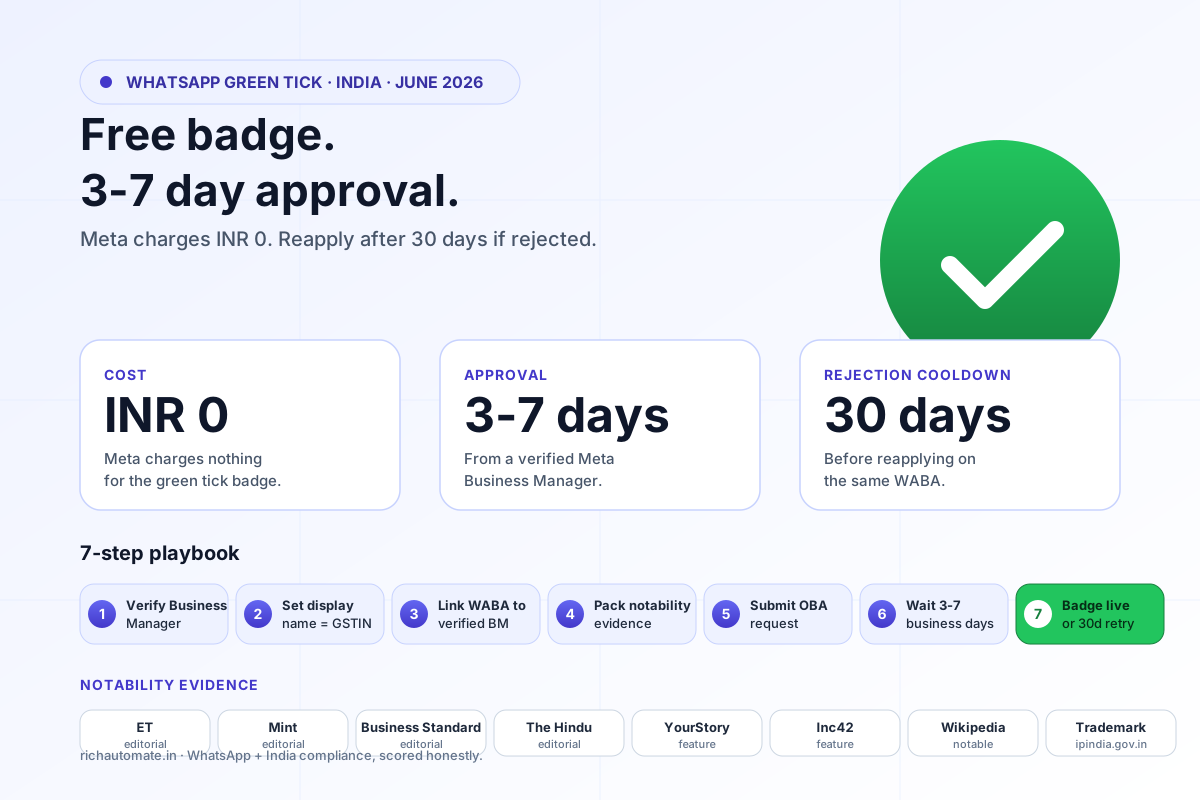
RequirementWhat it meansTip
Meta Business VerificationVerify your legal business entity in Meta Business Manager with registration documents and a matching utility bill or bank statementUse the exact legal name on your GST or incorporation certificate — mismatches are the top rejection cause
WhatsApp Business Account (WABA)A WABA created under your verified business, usually via a BSP like RichAutomateKeep the WABA in good standing — no policy strikes before you apply
Display name approvalMeta approves the public-facing name shown to customersMatch your brand exactly; avoid generic terms like Sales or Support alone
Phone number qualityA connected, verified number with a healthy quality ratingWarm up messaging volume gradually to protect the quality rating
OBA request submissionSubmit the Official Business Account request via Meta Business Manager or through your BSPAttach notability evidence — website, press links, verified social handles

In short: complete Meta Business Verification, stand up a clean WABA, get your display name approved, build a real digital footprint, then submit the OBA request through Meta Business Manager or your BSP. As of 2026, the exact submission entry point can move inside Meta Business Manager, so verify the current path before you file.

Stop overpaying on WhatsApp

Get a 1-minute BSP audit on WhatsApp

Drop your WhatsApp number — we line-item your current invoice against Meta India rates in under 60 seconds. India-hosted, DPDP-compliant.

DPDP-compliant · India-hosted · 1-min reply

Common Rejection Reasons — and Fixes

  • Name mismatch. Your display name does not match your verified legal entity or website. Fix: align all three exactly.
  • Thin notability. No website, no press, weak social presence. Fix: build a credible web footprint and resubmit with evidence links.
  • Incomplete business verification. The OBA request was filed before Meta Business Verification was approved. Fix: finish verification first.
  • Policy strikes. The WABA has recent violations. Fix: resolve issues, let the account age cleanly, then reapply.
  • Poor number quality. A low quality rating from spammy sends. Fix: improve template quality and opt-in hygiene before reapplying.

Blue Tick vs Green Tick — the Nuance

Buyers often ask for a blue tick on WhatsApp. As of 2026, WhatsApp business verification is represented by the green Official Business Account badge, while the blue verified badge is associated with Meta Verified subscriptions on Facebook and Instagram. Meta has been unifying verification, so the safe answer for any client is: we earn the WhatsApp verified business badge through OBA status — confirm the exact badge colour live in Meta Business Manager, since Meta updates this periodically.

How RichAutomate Helps — and What It Costs

RichAutomate is a WhatsApp Business Platform partner that handles the verification grind end to end: Meta Business Verification guidance, WABA provisioning, display-name submission, and managed OBA request support with notability prep. You stay on official Meta infrastructure throughout — no grey-market shortcuts.

Pricing is transparent with zero platform lock-in tricks. The platform fee is Rs 0. On the Client Pay model you pay Rs 0.10 per message plus Meta conversation charges billed directly to you. On the SaaS Pay model RichAutomate fronts Meta costs at Rs 1.20 (marketing) and Rs 0.30 (utility/service) per conversation. Every new account gets a 14-day free trial plus 100 free credits to test verification flows, templates and delivery before committing.

Timeline expectations: Meta Business Verification typically resolves in a few days to about two weeks depending on document clarity; the OBA green-tick review can take additional weeks and is never guaranteed on the first try. Plan for roughly two to four weeks end to end, and treat any all-in-X-days promise from a vendor with caution — Meta controls the final decision.

Get verified on WhatsApp with RichAutomate.

Managed Meta Business Verification + WABA provisioning + display-name approval + Official Business Account (green tick) request support, all on official Meta Cloud API infrastructure. Rs 0 platform fee. Client Pay Rs 0.10/msg + Meta direct, or SaaS Pay Rs 1.20 marketing / Rs 0.30 utility per conversation. 14-day free trial + 100 free credits. We prep your notability evidence and file the OBA request through Meta Business Manager — you keep full ownership of your WABA.

Start free trial → · WhatsApp 917434901027 · Book a 30-min call

Related reading: Best WhatsApp CRM for India 2026 · AiSensy vs Interakt vs Wati vs RichAutomate pricing decoded · WhatsApp message delivery troubleshooting · RichAutomate pricing · WABA cost calculator.

Ready to ship this?

Get the full migration playbook on WhatsApp

A founder-led 1-minute reply with the migration steps, template approval timeline, and a 14-day pilot offer. DPDP-compliant. India-hosted. No spam.

DPDP-compliant · India-hosted · 1-min reply
Tagged
WhatsApp Green TickOfficial Business AccountOBAMeta Business VerificationWABADisplay NameBSPBrand TrustIndia2026
Written by
RichAutomate Editorial
Editorial team at RichAutomate. We build the WhatsApp Business automation platform Indian D2C brands, fintechs, and agencies use to ship campaigns and flows on the official Meta Cloud API.
FAQ

Frequently asked questions

What is the WhatsApp green tick and how is it different from a blue tick?
The green tick is the verified badge Meta grants to a WhatsApp Official Business Account (OBA), shown next to your brand name in the chat header. It signals your business is verified by Meta as notable and authentic. As of 2026, WhatsApp business verification uses the green Official Business Account badge, while the blue verified badge is associated with Meta Verified subscriptions on Facebook and Instagram. Meta has been unifying verification across apps, so always confirm the exact current badge treatment in Meta Business Manager.
Who is eligible for the WhatsApp green tick in India?
Meta does not publish a fixed checklist and evaluates notability. As of 2026, the practical signals that help are: completed Meta Business Verification for your legal entity, an established brand presence (website, active social profiles, press or third-party coverage), a WhatsApp Business Account in good standing with no policy strikes, and a display name matching your real brand. Smaller SMBs are not automatically excluded, but a thin digital footprint is the most common reason an Official Business Account request stalls.
What are the steps to get the green tick?
Complete Meta Business Verification for your legal entity in Meta Business Manager with registration documents, then stand up a clean WhatsApp Business Account (WABA) under that verified business (usually via a BSP like RichAutomate), get your display name approved, build a credible digital footprint, and submit the Official Business Account request via Meta Business Manager or your BSP with notability evidence attached. As of 2026, verify the exact submission entry point in Meta Business Manager, since Meta moves it periodically.
Why do green tick applications get rejected, and how do I fix it?
The top causes are: display-name mismatch with your verified legal entity or website (fix: align all three exactly), thin notability with no website or press (fix: build a credible web footprint and resubmit with evidence links), filing the OBA request before Meta Business Verification is approved (fix: finish verification first), recent policy strikes on the WABA (fix: resolve issues and let the account age cleanly), and poor phone-number quality from spammy sends (fix: improve template quality and opt-in hygiene before reapplying).
How long does it take and how much does RichAutomate charge?
Meta Business Verification typically resolves in a few days to about two weeks depending on document clarity, and the OBA green-tick review can take additional weeks and is never guaranteed on the first attempt — plan for roughly two to four weeks end to end. RichAutomate charges Rs 0 platform fee. On Client Pay you pay Rs 0.10 per message plus Meta conversation charges billed directly to you; on SaaS Pay, RichAutomate fronts Meta costs at Rs 1.20 (marketing) and Rs 0.30 (utility/service) per conversation. Every account gets a 14-day free trial plus 100 free credits.
RichAutomate · WhatsApp BSP for India 2026

Ship WhatsApp campaigns + flows on a transparent, compliance-ready BSP.

₹0 platform fee. DPDP audit log included. Visual flow builder. Multi-tenant from day one.

Start free trial
Want this for your brand?

Get a free 24-hour BSP audit

Send us your last invoice. We line-item it against Meta's published rates and benchmark against three alternatives.

Limited Spots Available

Get a Free
Automation Audit

Stop leaving revenue on the table. Get a custom roadmap to automate your growth.

Secure & Confidential

Continue reading

All articles
WhatsApp API

WhatsApp Cloud API vs On-Premise India 2026: Which to Pick + Migration Guide

WhatsApp Cloud API vs On-Premise compared for Indian SMBs in 2026. Meta has fully deprecated On-Premise (sunset complete), so Cloud API is the only real choice for new businesses — free Meta hosting, go live in hours via Embedded Signup, day-one access to v24.0 features, auto-scaled throughput, and Meta-managed security. The old On-Premise self-hosting cost myth (server + DBA + DevOps + patching) almost always cost more than any per-message saving. Real RichAutomate pricing: ₹0 platform setup, ₹0 monthly subscription, ₹0 infra. Client Pay ₹0.10/message plus Meta conversation charges billed direct, or SaaS Pay all-in at ₹1.20 per marketing conversation and ₹0.30 per utility/authentication conversation. 14-day free trial plus 100 free credits. Includes the 2026 verdict table, the real cost math, a 5-step migration playbook for businesses still on On-Premise, and a Cloud API vs On-Premise vs no-code BSP comparison.

Read article
Guide

WhatsApp Business API Cost India 2026: 10 Questions Answered

The 10 questions Indian buyers actually ask before going live on WhatsApp Business API — answered plainly. How much it costs, whether it is free, App vs API, the green tick, setup time, BSP vs Cloud API, DPDP compliance, Meta per-message charges, legal bulk messaging, and the cheapest option. Real RichAutomate numbers: Rupee 0 platform fee, Client Pay 0.10/msg + Meta direct, or SaaS Pay 1.20 marketing / 0.30 utility-auth, with a 14-day trial + 100 free credits.

Read article
Pricing

How Much Does the WhatsApp Business API Cost in India? (2026 Pricing Guide)

As of June 2026, WhatsApp Business API access is free to set up — you pay only per message. Meta charges roughly ₹0.115 per utility message, ₹0.135 per authentication message, and ₹0.78–₹0.99 per marketing message; service-window replies and free entry-point conversations cost nothing. On top sits an optional BSP platform fee ranging from ₹0 (Meta-direct, RichAutomate) to a tiered monthly subscription (Wati, AiSensy, Interakt) or a per-message markup (Gupshup). This guide gives the exact India rate card, a provider comparison table, a worked monthly-bill estimate, a WhatsApp-vs-SMS cost comparison, hidden costs to watch for, and DPDP Act 2023 context — every figure timestamped to June 2026.

Read article
Operations

WhatsApp WABA Disaster Recovery Architecture India 2026: Multi-WABA Failover + Quality-Rating Isolation

Indian WhatsApp programmes lost an estimated ₹1,180 cr in 2025 to single-WABA outages — Quality-rating Red flips, business verification rejections, App Restrictions for policy strikes, BSP-side incidents, and Meta-side regional throttling. The teams that kept revenue running through 2025-26 (HDFC Bank, Swiggy, Tata 1mg, BlinkIt, Lenskart, Bajaj Finserv) all moved to multi-WABA DR architecture: 2-4 WABAs per business, traffic split by message category + quality tier + geography, automated failover on Yellow → Red, and a documented RTO/RPO. 2026 playbook: three-WABA minimum (Auth + Utility + Marketing) with quality isolation, real fintech / QSR Diwali / D2C cohort numbers, eight common failure-mode runbooks, BSP vs Direct Cloud API tradeoff at different spend tiers, detection + decision + routing architecture, DPDP + Meta categorisation compliance.

Read article
Application Guide

WhatsApp Green Tick Verification India 2026: The Complete Application Guide

Eligibility criteria, six-week realistic timeline, eight rejection reasons that block first attempts, application submission step-by-step, and post-approval rules that keep your verified status alive.

Read article
Comparison

Karix vs RichAutomate India 2026: Pricing Decoded

Comparing Karix and RichAutomate in 2026? Both run on the official Meta WhatsApp Cloud API, so features largely match — the real decision is the pricing model. Karix (a Tanla CPaaS) sells enterprise WhatsApp with a platform fee and volume commitments. RichAutomate charges zero platform fee — no setup, no monthly floor, no commitment — you pay only per message (Client Pay 0.10/msg + Meta direct, or SaaS Pay 1.20 marketing / 0.30 utility-auth), with a 14-day trial + 100 free credits. This guide decodes both models with a side-by-side table, the break-even math for an Indian SMB, feature parity, and 24-48h zero-downtime migration.

Read article