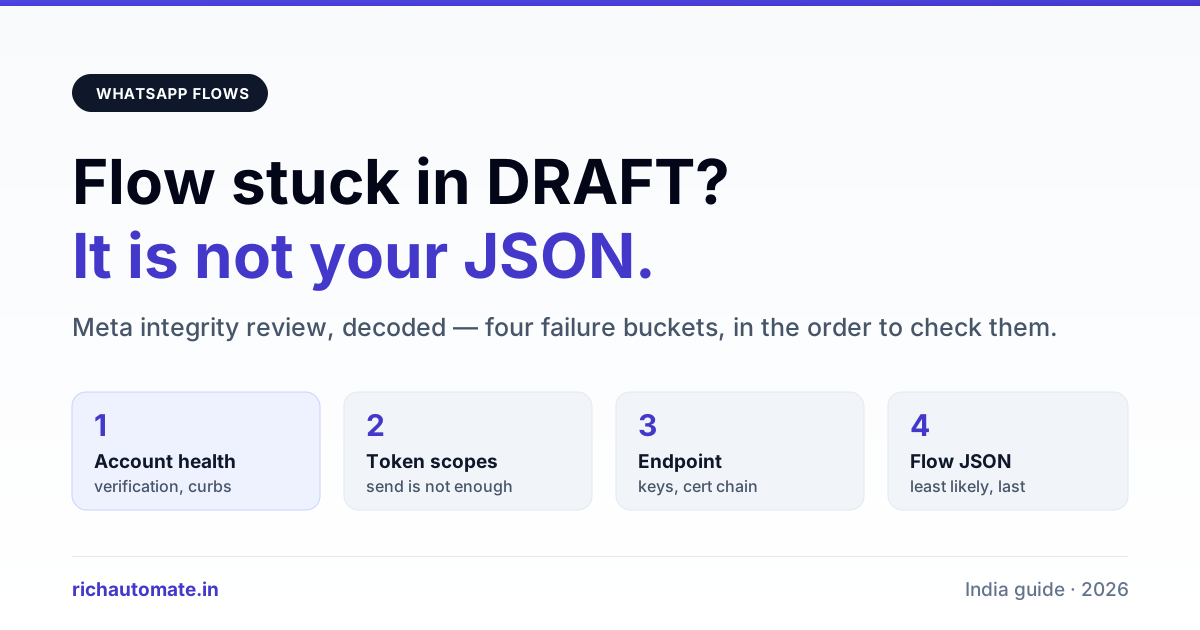
A WhatsApp Flow that stays in DRAFT after you hit Publish has failed Meta's integrity review, not a syntax check — the Flow JSON is usually fine and republishing it unchanged will fail again. The fix is almost always at the account level: the WhatsApp Business Account, the Business Manager behind it, or the endpoint the Flow calls, has an open issue Meta wants cleared before it will let an in-chat form go live.
This is the failure that wastes the most time in Indian WABA projects, because the error text points nowhere. You get a Flow sitting in DRAFT, a publish call that returns an error with the phrase integrity requirements not met, and no field telling you which requirement. Teams then spend days rewriting perfectly valid Flow JSON. This guide separates the three things that actually block a publish, shows how to tell them apart from the API response, and gives the order to check them in.
What "stuck in DRAFT" actually means
A Flow has a lifecycle, and DRAFT is the only state in which you can edit it. When you call the publish endpoint, Meta runs two separate passes:
- Validation — structural checks on the Flow JSON itself. Missing routing, an unreachable screen, a component referencing a variable that was never declared. These come back as validation errors with a screen name and a pointer, and they are the easy ones.
- Integrity review — policy and account checks that have nothing to do with your JSON. This is where the vague failure lives.
If you passed validation and still sit in DRAFT, you failed pass two. The distinction matters because the two produce very different response shapes, and reading the response correctly saves the whole cycle.
| Flow state | Editable | Can be sent to users | What it tells you |
|---|---|---|---|
| DRAFT | Yes | Only to test numbers on the WABA | Never published, or a publish attempt failed |
| PUBLISHED | No — you clone to a new version | Yes | Passed validation and integrity |
| DEPRECATED | No | Existing sessions finish, no new ones | You retired it deliberately |
| BLOCKED / THROTTLED | No | No, or heavily limited | Post-publish enforcement — a different problem from this article |
One detail that catches people: a DRAFT Flow is sendable, but only to phone numbers registered as test numbers on that WhatsApp Business Account. So a Flow can work perfectly in your own testing and still be invisible to every real customer. If your QA passed and your customers see nothing, check the state before you debug anything else.
The publish response, decoded
Read the actual API response rather than the dashboard. The Business Manager UI collapses several distinct failures into one grey banner; the Graph API response keeps them apart. Call the publish endpoint directly and log the full body.
| What you see | Where the problem is | First thing to check |
|---|---|---|
| Validation errors listing screens or components | Flow JSON | The named screen — routing, data keys, required properties |
| Integrity or policy wording, no screen named | Account level | WABA and Business Manager status, open appeals, verification state |
| Endpoint or health-check wording | Your server | The endpoint_uri handshake and signature verification |
| Permission or token errors | Your credentials | Token scopes — Flow management needs more than send permission |
Those four buckets are worth internalising because they map to four completely different teams. Only the first is a developer problem. The second is whoever owns the Business Manager. The third is infrastructure. The fourth is whoever connected the account.
Cause one: account-level integrity
This is the most common cause of a silent DRAFT and the one nobody looks at first. Meta gates interactive, data-collecting surfaces more tightly than plain messaging. An account can be perfectly able to send template messages and still be refused a Flow publish.
Work through these in order:
- Business verification status. An unverified or part-verified business is the single most frequent block. Verification that is "in review" is not verification.
- Any open restriction or warning on the WABA. A prior policy strike, even one you consider resolved, can hold interactive features back. If your account has ever been limited, read our walkthrough of the WhatsApp Business account restriction appeal path before you touch the Flow again.
- Display name state. A display name still pending or previously rejected leaves the account in a half-approved condition that affects more than the name itself.
- Payment method and billing health on the Business Manager. An unsettled balance surfaces in odd, unrelated places — this is one of them.
- Quality rating on the numbers attached to the WABA. A number sitting at low quality drags the account's standing.
In the Flows we have shipped for Indian businesses, account-level integrity has been the blocker more often than the JSON has. The pattern repeats: the developer is sure the JSON is wrong because that is the only thing they can see, and the actual issue is a verification document sitting unreviewed in a Business Manager nobody has opened in three weeks.
There is no API that tells you "this specific requirement failed". You are checking a list and clearing everything on it. That is genuinely how it works, and accepting that early is faster than hunting for a precise error that does not exist. Confirm the current requirement list against Meta's Flows documentation before you conclude an item does not apply to you — Meta adjusts this surface without announcement.
Cause two: the Flow JSON that validates but still does not ship
Some JSON problems pass validation and fail review. The common ones are about what you are asking for rather than how you asked:
- Collecting sensitive data in a plain text input. Payment details, government identifiers, and health information in an unmarked field will not survive review. If a field is sensitive, it needs the right component type and the right declaration.
- A terminal screen that is not actually terminal. Every path must end. A routing model where a user can reach a dead screen fails review even when the validator accepts it.
- Copy that promises something the Flow does not do. A screen headed "Confirm payment" that does not process a payment is a mismatch between stated and actual purpose.
- Data keys declared but never used, or used but never declared. The validator catches most of these; a dynamic Flow can slip one through.
If you are still deciding whether a Flow is even the right tool for the job, the trade-offs are laid out in our comparison of WhatsApp Flows versus a conversational chatbot. A Flow is a form; a chatbot is a conversation. Choosing the wrong one produces a publish problem that no amount of JSON fixing will solve.
Get the India 2026 WhatsApp BSP price comparison
Wati vs AiSensy vs Interakt vs RichAutomate: Meta rates, platform fees and hidden costs, side by side. We send it to your WhatsApp in a minute.
Cause three: the endpoint, for dynamic Flows
A static Flow has no server component and skips this entirely. A dynamic Flow — one with an endpoint_uri that fetches or validates data mid-form — adds a whole failure surface.
Meta will exercise your endpoint before letting the Flow go live. It has to:
- Answer the health check within the timeout, every time. An endpoint that is usually fast and occasionally slow will fail intermittently, which is worse to debug than one that is always broken.
- Decrypt the request correctly. The request is encrypted with your public key; a key uploaded to the wrong account, or rotated on your side without re-uploading, produces an endpoint that looks up but cannot talk.
- Return the exact response shape, including the correct screen name and data object.
- Be reachable over public HTTPS with a valid certificate chain. A self-signed certificate, or a chain that your browser tolerates but a strict client rejects, fails here.
The most common Indian-hosting variant of this: the endpoint works from a laptop and fails from Meta because the server only presents its leaf certificate and omits the intermediate. Browsers patch around missing intermediates. Server-side clients do not.
Test the endpoint yourself before every publish attempt. Encrypt a sample request with the uploaded key, post it, and assert the response shape. If you cannot do that on demand, you are guessing.
The order to check things in
Time cost is asymmetric here. Cheap checks first:
| Step | Check | Cost if it is the cause |
|---|---|---|
| 1 | Read the raw publish API response, not the dashboard | Minutes — tells you which of the four buckets you are in |
| 2 | Token scopes on the credential making the call | Minutes — reconnect the account |
| 3 | WABA and Business Manager status, verification, restrictions | Days to weeks if verification is the gap |
| 4 | Endpoint handshake, for dynamic Flows only | Hours — usually keys or certificate chain |
| 5 | Flow JSON review-level issues | Hours — and least likely if validation already passed |
Doing this in reverse — starting with the JSON because it is the part you control — is the standard mistake and the reason these projects slip by a fortnight.
How long a re-review takes
Once you clear the underlying issue, publishing again is not instant and is not on a published SLA. Treat it as asynchronous. Practical consequences:
- Do not schedule a campaign launch on the assumption that a Flow will publish on a given afternoon.
- Do not republish repeatedly. Repeated failing attempts do not speed anything up and give you nothing new to read.
- Fix the account issue, wait, then attempt once and read the response properly.
If business verification is the blocker, the clock is the verification queue, not the Flow. That is the case where a fortnight is normal rather than alarming.
What to ship while the Flow is blocked
A blocked Flow does not have to block the campaign. Interactive reply buttons and list messages need no Flow, no endpoint, and no integrity review beyond ordinary template approval. For most lead-capture jobs — name, city, budget band, callback slot — a short button-and-list sequence collects the same fields and ships today. The patterns are in our guide to reply buttons, list messages and Flow templates.
Ship the button version, keep the Flow in DRAFT, publish it when the account clears, and swap the entry point. You lose the polished single-screen form and keep the pipeline.
Preventing the next one
- Clear account health before you write a line of Flow JSON. Verification done, no open restrictions, display name approved, billing settled. This ordering alone removes most of the pain.
- Keep a publish smoke test. One script that hits publish, logs the full response body, and prints which of the four buckets the failure belongs to.
- Version the Flow JSON in your own repository. The published version is immutable; you clone to change it. Without your own history you cannot tell what changed between a publish that worked and one that did not.
- Monitor the endpoint like a production dependency, because that is what it is. If it is down when Meta checks, the Flow fails, and nothing in the Flow tells you that was the reason.
- Separate "my Flow does not trigger" from "my Flow will not publish". They feel identical to a business user and have nothing in common technically — the trigger side is covered in our note on a chatbot that stops replying and a Flow that never triggers.
Where this sits in the cost picture
A Flow does not carry its own price tag. It rides inside a conversation, and the conversation is what gets billed. On RichAutomate there is no setup fee and no monthly platform fee; on Client Pay you pay ten paise per message, and on SaaS Pay roughly one rupee twenty per marketing conversation and thirty paise per utility conversation, with service conversations inside the twenty-four hour window free. So a Flow sent as part of a utility conversation costs what that utility conversation costs, and nothing more. Verify current Meta conversation rates before you build a business case on any of these numbers — Meta revises them, and the platform layer is not the part that moves.
Worth noting that a Flow usually reduces conversation cost rather than adding to it. Ten back-and-forth messages to collect five fields is a conversation that can drift out of the free window; one Flow screen collecting the same five fields does not. That is the real argument for getting the publish unblocked, and it is laid out properly in our piece on Flows as an in-chat mini-app for conversion.
If fixes like this take days with your current provider, compare a Gupshup alternative and a Wati alternative, and estimate your monthly bill with the WhatsApp API cost calculator.
The short version
A Flow stuck in DRAFT is a message about your account, not your code. Read the raw publish response to find out which of the four buckets you are in. Clear business verification and any open WABA restriction before anything else. If the Flow is dynamic, prove the endpoint handshake works on demand. Only then go back to the JSON — and if validation already passed, it is probably not the JSON at all. Meanwhile, ship the reply-button version so the pipeline keeps running.