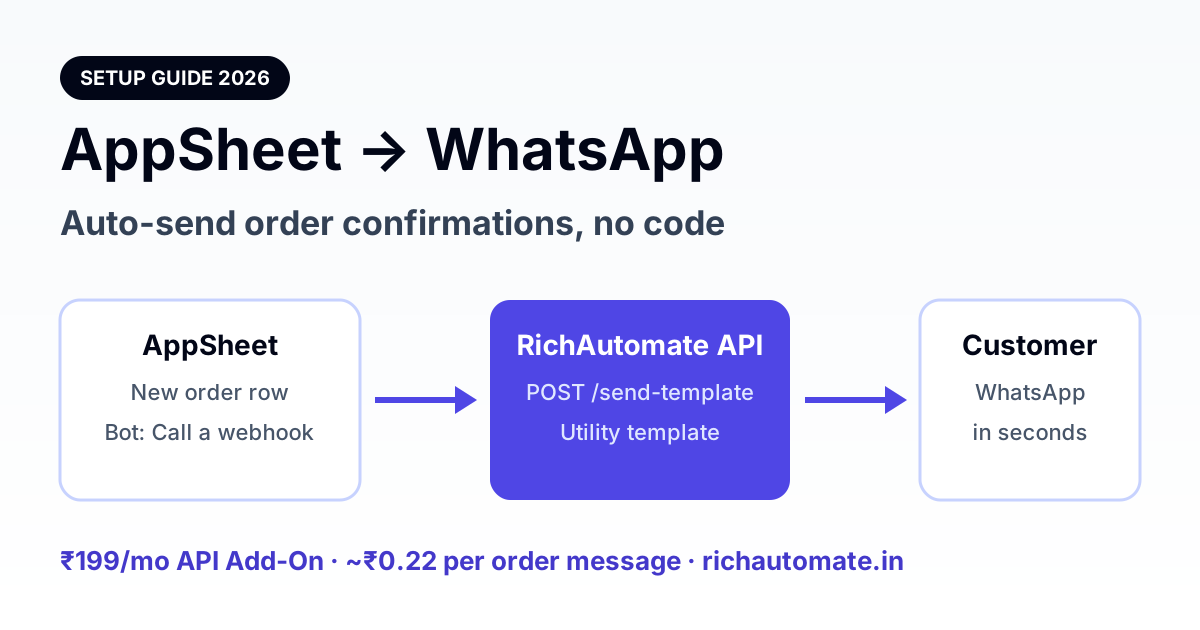
You can connect AppSheet to WhatsApp by adding an Automation bot that runs "Call a webhook" whenever a row is added, and posting to a WhatsApp Business API provider's send-template endpoint with an approved Utility template. With RichAutomate that costs a ₹199/month API Add-On plus about ₹0.22 per order message on Client Pay, with no developer and no middleware subscription.
This guide is for Indian businesses that already run orders, bookings, or field work inside an AppSheet app and want every new record to trigger a WhatsApp message on its own. It covers the three ways to wire it, the exact webhook body, how to handle a variable number of order items, and what it really costs per month.
Three ways to connect AppSheet to WhatsApp
AppSheet has no native WhatsApp Business API connector. It can open a wa.me link on the user's phone, but that is a manual tap per message, not automation. For hands-free sending you need a webhook to an official API provider.
| Method | Fully automatic? | Extra monthly tool | Setup effort | Best for |
|---|---|---|---|---|
AppSheet wa.me deep link | No, a person taps Send | None | Minutes | A handful of messages a day |
| AppSheet → Zapier / Make → API | Yes | Zapier or Make plan | 1-2 hours | Multi-step workflows across many apps |
| AppSheet bot → direct API webhook | Yes | None | Under 1 hour | Order, booking and status updates at volume |
The direct webhook wins for most AppSheet users: one fewer tool to pay for, one fewer point of failure, and messages go out within seconds of the row being saved. If you already live in Zapier, our Zapier WhatsApp integration guide covers that route, and the n8n WhatsApp setup guide covers self-hosted automation.
What you need before you start
- An AppSheet app with a table holding the data you want to send, for example Orders with customer name, phone, order number, items and total.
- A WhatsApp Business API number connected to RichAutomate (a new number or one migrated from the WhatsApp Business app).
- An API key. In RichAutomate, activate the API Add-On (₹199/month) from Dashboard → Upgrade, then generate a key under API settings. Full reference is in the developer API docs.
- An approved Utility template. Business-initiated WhatsApp messages must use a Meta-approved template. Order confirmations belong in the Utility category.
- Customer opt-in. Add a checkbox or line in your order form saying the customer agrees to receive WhatsApp updates.
Step 1: Create the order template
In RichAutomate go to Templates → Create template, choose category Utility and language English, and use a body like this:
Hi {{1}}, thank you for your order with {{2}}.

Order No: {{3}}
Items: {{4}}
Total Amount: Rs. {{5}}

We will update you when your order is dispatched. For any questions, reply to this message.
Meta asks for sample values when you submit, for example Ramesh, Sharma Traders, ORD-1045, Rice 5kg x2, Oil 1L x3, 1,250. Keep the wording transactional. A discount line or "shop now" pushes the template into Marketing, which costs more. Our template variables guide explains the variable rules in depth.
Step 2: Build the AppSheet bot and webhook
- In the AppSheet editor open Automation → Bots → New bot.
- Set the Event to Data change → Adds only on your Orders table. Use Updates with a condition such as
[Status] = "Dispatched"for a dispatch message. - Add a Step → Run a task → Call a webhook.
- Preset: Custom. URL:
https://richautomate.in/api/v1/send-template. HTTP verb: POST. Body content type: JSON. - Under HTTP headers add
Authorization: Bearer YOUR_API_KEY. - Paste the body below, save, and add a test row.
{
  "phone": "91<<[Phone]>>",
  "template": "order_confirmation",
  "language": "en",
  "variables": [
    "<<[Customer Name]>>",
    "Sharma Traders",
    "<<[Order ID]>>",
    "<<[Item Summary]>>",
    "<<[Total]>>"
  ]
}
The variables array fills {{1}} to {{5}} in order, so keep the sequence identical to the template. Store phone numbers as 10 digits in AppSheet and prefix 91 as shown, or store the full number with country code and drop the prefix.
Get a 1-minute BSP audit on WhatsApp
Drop your WhatsApp number — we line-item your current invoice against Meta India rates in under 60 seconds. India-hosted, DPDP-compliant.
Want us to set it up with you? Activate the ₹199 API Add-On and our team will share the webhook body mapped to your own AppSheet columns. See RichAutomate pricing or start free at richautomate.in/register.
Step 3: Handle 5 items or 50 with one variable
A WhatsApp template has a fixed number of variables, but orders do not have a fixed number of items. The fix is to join the whole item list into one variable. Meta does not allow line breaks inside a variable, so separate items with commas.
In AppSheet, add a virtual column Item Summary on the Orders table with a formula like:
SUBSTITUTE(
  CONCATENATE(SELECT(Order Items[Line Text], [Order ID] = [_THISROW].[Order ID])),
  " , ", ", "
)
Here Line Text is a virtual column on the Order Items table, for example [Product] & " x" & [Qty]. The result reads Rice 5kg x2, Oil 1L x3, Sugar 1kg x1. For very large orders, cap it with TOP() to the first 8 items and append "and N more" so the message stays readable.
What AppSheet to WhatsApp really costs in India
RichAutomate offers two billing modes. Figures below are for a wholesaler sending about 6,000 order confirmations a month (200 a day).
| Cost item | Client Pay | SaaS Pay |
|---|---|---|
| Who pays Meta | Your card on your Meta account | RichAutomate wallet, all-inclusive |
| Per utility message | ₹0.10 platform fee + about ₹0.115 Meta (+GST on Meta's bill) | ₹0.50 flat |
| 6,000 messages / month | About ₹1,290 + GST on Meta's share | About ₹3,000 |
| API Add-On | ₹199/month | ₹199/month |
| Setup fee | ₹0 | ₹0 |
Client Pay is cheaper at volume. SaaS Pay is simpler: no card with Meta and a single bill. The full breakdown is in Client Pay vs SaaS Pay explained, and you can model your own volume with the WhatsApp API cost calculator. If you also need the flow builder and Google Sheets sync, the Pro plan at ₹899/month includes API access.
Limits, testing and common errors
- Daily limit: a new WhatsApp API number can start conversations with 250 unique customers in 24 hours. Meta Business Verification raises this to 2,000 and beyond.
- Language code: must match the approved template exactly, such as
enoren_US. - "Insufficient balance." On SaaS Pay, top up the wallet. On Client Pay, check the card on your Meta account.
- Duplicate sends: A retried webhook can fire twice. Add an
Idempotency-Keyheader set to<<[Order ID]>>so a retry never sends the same order twice. - Test first: point the bot at a test table and your own number, then switch the event to the live table.
Ready to automate your AppSheet orders? Start on pay-as-you-go with ₹0 setup and ₹0 monthly minimum, add the ₹199 API Add-On, and send your first order confirmation today. Create your free account or compare plans on the pricing page.