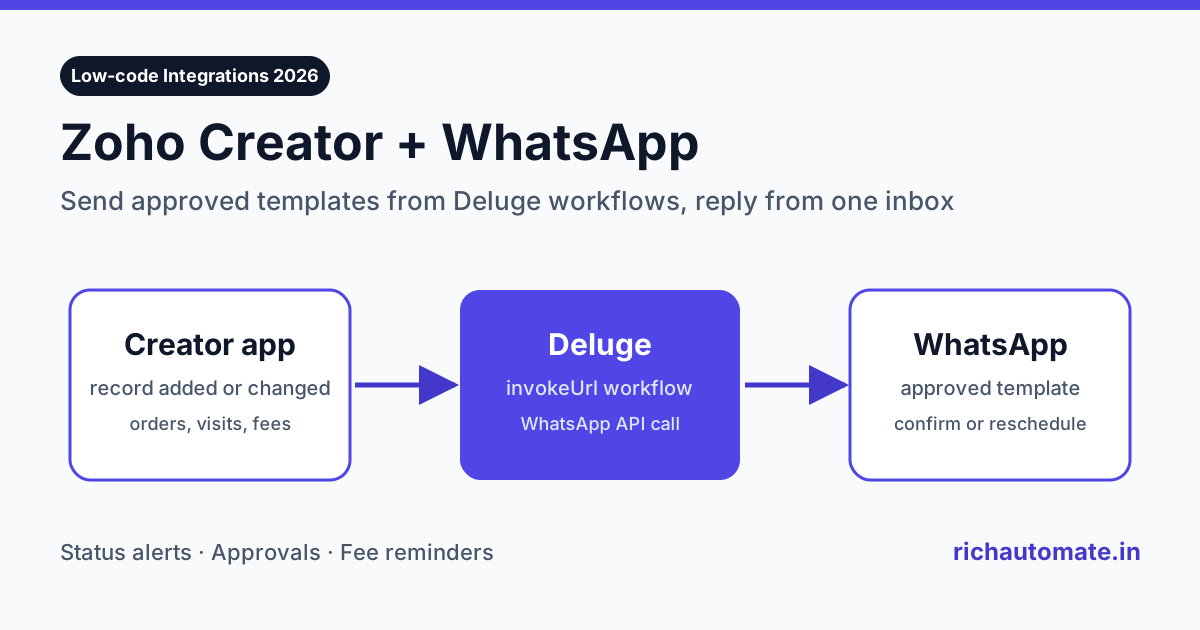
To connect a Zoho Creator app to WhatsApp, add a Deluge workflow that calls a WhatsApp Business API with the invokeUrl task whenever a record is added or changed, and send a Meta-approved template to the customer's number. You can call Meta's Cloud API directly, as Zoho's own WhatsApp connector help page describes, or call a provider such as RichAutomate so that replies land in a shared team inbox instead of nowhere.
This guide is for Indian businesses and Zoho partners who have built an order desk, approval system, field-service tracker, admissions register or dealer portal on Zoho Creator and now want that app to talk to customers on WhatsApp. It covers the three working routes, which Creator events deserve a message, a copy-ready Deluge example, how replies come back, and what it all costs in rupees. Zoho features below come from Zoho's own website and help pages. RichAutomate does not have a native Zoho Creator connector, so this guide shows the API route that works today.
Why Zoho Creator apps need WhatsApp
Zoho Creator is a low-code platform. Teams use it to replace spreadsheets with real apps: a form, a few reports, some workflows and a customer portal. Indian SMBs build everything on it, from a distributor order book in Ludhiana to a lab sample tracker in Hyderabad. The weak point is the last mile. The app knows the order is approved, the technician is assigned or the fee is due, but the customer only finds out if someone remembers to call.
Email does not fix this in India. Customers read WhatsApp within minutes and email within days, if at all. SMS is cheap but one-way, and DLT template registration slows every change. WhatsApp gives you delivery and read status, rich buttons and a reply channel in one message. For a Creator app, that means the record that triggered the message can also receive the answer.
Typical results our customers chase with this setup:
- Fewer follow-up calls. Status messages go out the moment a record changes, so customers stop phoning to ask.
- Faster approvals. A quote or delivery slot with Confirm and Reschedule buttons gets answered in the chat, not in a callback queue.
- Cleaner data. Replies are written back to the Creator record, so the app stays the single source of truth.
If your customer master lives in Zoho CRM rather than Creator, start with our Zoho CRM WhatsApp integration guide, because RichAutomate syncs CRM contacts natively.
Three ways to connect Zoho Creator to WhatsApp
There is no single "WhatsApp" switch inside Creator. There are three practical routes, and the right one depends on who will answer the customer's reply.
| Route | How it works | Good for | Watch out for |
|---|---|---|---|
| Meta Cloud API direct | A Deluge workflow calls the Graph API messages endpoint with invokeUrl. According to Zoho's help docs, its WhatsApp connector works this way. | One-way alerts where nobody needs to read replies | You manage the Meta app, access token, templates and webhook yourself. Replies need your own webhook receiver. |
| WhatsApp API provider via Deluge | The workflow calls a provider's REST API, such as RichAutomate's send-template endpoint, with an API key. | Alerts plus a team that must answer replies in a shared inbox | Templates must be approved in the provider panel before the workflow can use them. |
| Zoho Flow or other middleware | Creator triggers a flow in Zoho Flow, Zapier, Pabbly Connect or Make, and the flow calls the WhatsApp API. | Teams who prefer no-code and already pay for a middleware tool | Extra monthly cost and one more place for a message to fail silently. |
For most Indian businesses we recommend the second route. Deluge is already part of every Creator app, invokeUrl needs no extra subscription, and a provider handles template approval, delivery status and the reply inbox. You keep one integration point and one place to debug. According to Zoho's pricing page, Creator plans also include REST APIs and custom connectors, so the app can receive data back as well as send it.
Which Creator events should trigger a WhatsApp message
Do not message on every save. Pick the moments where the customer is waiting for news or where their answer moves the record forward. Every business-initiated message outside the 24-hour customer service window needs an approved template, so plan templates around these events before you write any code.
| Creator app | Trigger event | Template idea | Category |
|---|---|---|---|
| Distributor order book | Order record added | Order {{1}} received for {{2}} items. Expected dispatch {{3}}. | Utility |
| Quote and approval app | Status changed to Sent | Your quote {{1}} for ₹{{2}} is ready. Buttons: Approve, Talk to sales | Utility |
| Field-service tracker | Technician assigned | {{1}} will visit on {{2}} between {{3}}. Buttons: Confirm, Reschedule | Utility |
| Admissions register | Fee due date minus 3 days (scheduled workflow) | Fee of ₹{{1}} for {{2}} is due on {{3}}. Pay here: {{4}} | Utility |
| Dealer portal | New scheme published | New dealer scheme for {{1}}: {{2}}. Reply YES for the price list. | Marketing |
| Any app | Login or portal access | {{1}} is your verification code. | Authentication |
Keep transactional updates in the utility category. Marketing templates cost more at Meta's end and need clear opt-in, so send them only to contacts who agreed to receive offers. Our guide to Zoho Forms WhatsApp integration shows how to capture that opt-in on the form itself, which works the same way in a Creator form with a consent checkbox.
Step by step: send a WhatsApp template from a Deluge workflow
This is the route most Creator developers will use. It takes about an hour once the template is approved.
- Connect your number. Sign up on RichAutomate and connect a WhatsApp number through Meta's embedded signup. You can use a new number or move an existing WhatsApp Business API number.
- Create and approve the template. In the RichAutomate panel, create a utility template such as
order_receivedwith numbered variables. Approval is usually quick for plain transactional text. - Generate an API key. Create a key in the developer settings. Treat it like a password.
- Store the key safely in Creator. Keep it out of any form field that users can see. A Creator connection or a restricted settings form readable only by the workflow are both reasonable choices.
- Add the workflow. In Creator, open Workflows, create a form workflow on your Orders form, and run it on successful record creation. Paste the Deluge below and map your own field names.
- Test with your own number. Add a test record with your phone number, confirm the message arrives, then check the delivery status in the RichAutomate inbox.
A minimal Deluge script looks like this. Replace the field names and template name with your own:
Get the India 2026 WhatsApp BSP price comparison
Wati vs AiSensy vs Interakt vs RichAutomate: Meta rates, platform fees and hidden costs, side by side. We send it to your WhatsApp in a minute.
headers = Map();
headers.put("Authorization", "Bearer " + apiKey);
headers.put("Content-Type", "application/json");

body = Map();
body.put("phone", input.Mobile_Number);
body.put("template", "order_received");
body.put("language", "en");
body.put("variables", {input.Order_ID, input.Item_Count.toString(), input.Dispatch_Date.toString("dd-MMM-yyyy")});

resp = invokeurl
[
  url: "https://richautomate.in/api/v1/send-template"
  type: POST
  parameters: body.toString()
  headers: headers
];
info resp;
Three details save hours of debugging. First, store mobile numbers with the country code, such as 919812345678, and strip spaces and the leading zero in the form's validation script. Second, send variables in the same order as the numbered placeholders in the template; a blank variable makes Meta reject the message. Third, log resp to a hidden field or a log form so support staff can see why a message failed without opening the code. The full request format, including media headers and buttons, is in our WhatsApp API quickstart.
Getting replies back into Zoho Creator
Sending is half the job. When a customer taps Reschedule or types a question, someone has to see it. With a provider, every reply arrives in the RichAutomate team inbox with the full chat history, so your staff can answer immediately. Since 1 October 2026, Meta does not charge for the first 1,000 replies a month per number inside the 24-hour customer service window, which keeps support conversations cheap.
If you also want the reply stored on the Creator record, add a webhook from RichAutomate to a small receiver that calls Creator's REST API and updates the record, for example setting Visit Status to Confirmed when the Confirm button is pressed. Many teams start without this step. The inbox alone removes most of the phone calls, and the write-back can be added later when the volume justifies it.
Keep one rule fixed: the Creator app owns the business data and the WhatsApp inbox owns the conversation. Do not try to rebuild a chat window inside a Creator report. It is slow to build and slower to use.
What it costs: Zoho Creator plus WhatsApp in India
You pay for three things: the Creator plan, the WhatsApp provider, and Meta's per-message charge. The table below uses Zoho's US-dollar list prices from its own pricing page; Zoho also shows rupee prices to visitors in India, so check the rate for your account. RichAutomate prices come from our live WhatsApp API pricing page.
| Item | Price | Notes |
|---|---|---|
| Zoho Creator Free | $0 | According to Zoho's site, a free edition is available |
| Zoho Creator Standard | $8 per user per month billed annually, $12 monthly | Per Zoho's pricing page |
| Zoho Creator Professional | $20 per user per month billed annually, $30 monthly | Per Zoho's pricing page |
| Zoho Creator Enterprise | $25 per user per month billed annually, $37 monthly | Per Zoho's pricing page |
| RichAutomate Starter | ₹499 per month | Plan fee credited to your wallet, ₹0 setup, 7-day free trial |
| RichAutomate Pro | ₹899 per month | Adds the developer API, webhooks and flow builder |
| RichAutomate platform fee | ₹0.10 per message | Client Pay: Meta bills its charge directly to your card |
| Meta utility message (India) | about ₹0.12 | Approximate; check Meta's pricing page for current rates |
Worked example. A Pune spare-parts distributor runs its order book on Creator. It takes 50 orders a day and sends three utility messages per order: order received, dispatched and delivered. That is about 4,500 messages a month. The RichAutomate platform fee is 4,500 × ₹0.10 = ₹450, which the ₹899 Pro plan credit covers because the plan fee is added to the wallet. Meta's charge is roughly 4,500 × ₹0.12 = ₹540, billed to the distributor's own card. The team's answers to customer replies inside the 24-hour window fall within Meta's 1,000 free service replies a month at this volume. The total WhatsApp cost lands near ₹1,450 a month, less than one sales executive's phone bill.
Want the numbers for your own volume? Start a free trial and send your first template from a test record today.
Common mistakes and how to avoid them
- Hard-coding the API key in the script. Anyone with edit access to the app can read it. Keep it in a connection or a restricted record and rotate it if a developer leaves.
- Firing on every edit. An "on edit" workflow without a condition sends a message each time someone fixes a typo. Check that the status field actually changed before calling the API.
- Bad phone numbers. Ten-digit numbers without 91, spaces and leading zeros cause most failed sends. Validate on the form, not in the workflow.
- Free text outside the window. A plain text message only works within 24 hours of the customer's last message. Everything else must be a template.
- No opt-in for offers. Marketing templates sent to people who never agreed lead to blocks and a falling quality rating. Collect consent first and keep a record of it.
- Bulk loops in one workflow. Looping over thousands of records in a single Deluge run can hit Creator's execution limits. For large sends, use a campaign in the WhatsApp panel instead.
When Zoho Creator plus WhatsApp is the right fit
This setup suits businesses whose core process already runs in a Creator app and whose customers expect quick status updates: distributors, service companies, coaching institutes, clinics with custom booking apps, and manufacturers with dealer portals. If your process lives in Zoho Desk tickets or Zoho Books invoices instead, use the matching guide: Zoho Desk WhatsApp integration for support teams, or Zoho Books WhatsApp integration for invoice and payment reminders.
Skip it if you send fewer than a hundred messages a month and nobody needs to answer replies. In that case, a WhatsApp click-to-chat link on the Creator portal page is enough, and you can add the API later.
Bottom line
Zoho Creator does not ship a turnkey WhatsApp inbox, but Deluge's invokeUrl task makes the connection a short script. Call a WhatsApp Business API provider from a form workflow, send approved utility templates on the events customers care about, and let replies land in a shared inbox your team already watches. On RichAutomate that costs ₹0.10 per message plus Meta's charge, with plans from ₹499 a month credited back to your wallet.
Ready to wire up your first Creator app? Create a free RichAutomate account, approve one utility template, and paste the Deluge above into a test workflow.