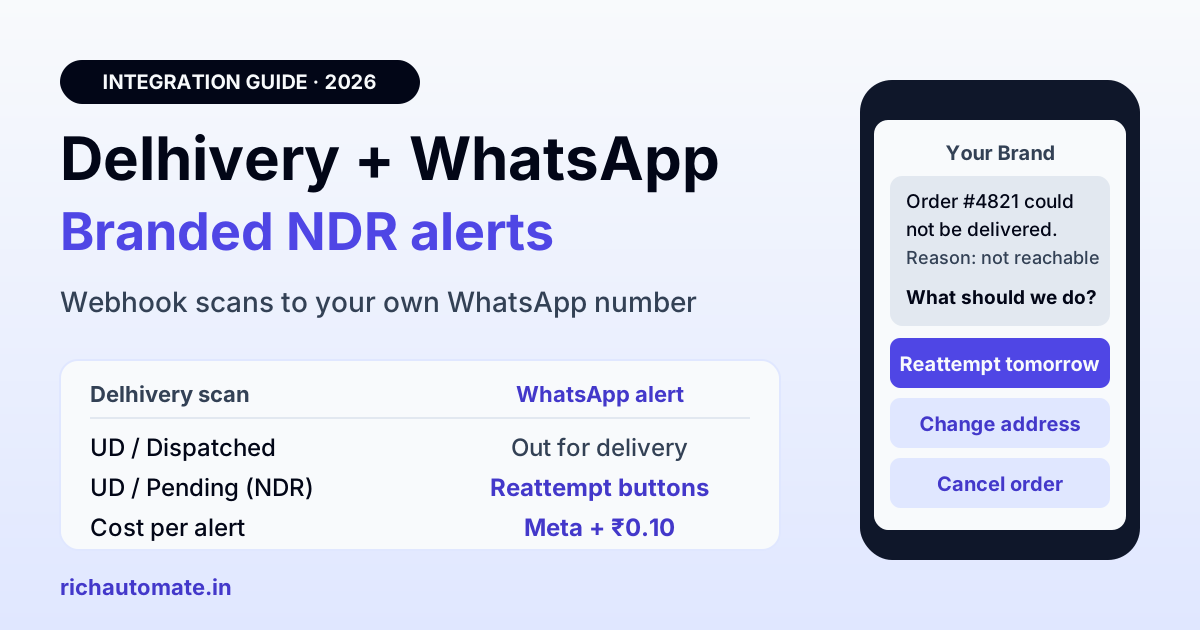
A Delhivery WhatsApp integration takes Delhivery's shipment scans, either pushed to your server by Delhivery's tracking webhook or pulled from its tracking API, and turns each one into a WhatsApp template sent from your own business number. That means branded dispatched, out-for-delivery, failed-delivery (NDR), RTO and delivered alerts, with quick-reply buttons that can feed a reattempt back to Delhivery's NDR API, at Meta's rate plus ₹0.10 per message on RichAutomate.
This guide is for Indian D2C brands and online sellers who ship directly with Delhivery, through the Delhivery One panel or the Delhivery B2C (Express) API, rather than through an aggregator like Shiprocket. It covers what Delhivery already sends your buyers, the two ways to get scan data out, how to map each status to a template, how to build an NDR flow with buttons, and what the whole thing costs per order.
What Delhivery already sends your buyers
Delhivery One has a paid communication add-on. You find it under Services > Value Added Service > Communication, click Activate, add the shipment stages you want, preview each template and agree to the terms. Delhivery's help documentation lists these WhatsApp events for forward shipments: NDR verification, manifested, picked up, out for delivery, out for delivery with OTP, and delivered. Reverse pickups get their own set.
It is a sensible starting point, but it has limits for a brand that cares about its customer relationship:
- Preset wording. You choose stages and preview Delhivery's templates. The help page does not describe writing your own copy, adding your order number format or linking to your own tracking page.
- Sender identity is not documented. The help page does not say which WhatsApp number these messages come from. If the buyer replies, Delhivery says NDR replies show up inside Delhivery One, not in your support inbox.
- Per-message pricing is higher. Delhivery charges per delivered message, plus GST, as shown below.
| Event | Delhivery One Communication (per delivered message) | Your own number via WhatsApp API (Client Pay) |
|---|---|---|
| Manifested / picked up | ₹1 + GST | about ₹0.215 (Meta ≈ ₹0.115 + ₹0.10) |
| Out for delivery | ₹1.5 + GST | about ₹0.215 |
| Out for delivery with OTP | ₹2 + GST | Keep on Delhivery if you use OTP delivery |
| Delivered | ₹1 + GST | about ₹0.215 |
| NDR verification | Free | about ₹0.215, replies land in your inbox |
Delhivery's figures come from its own communication help page and are billed every 15 days. The right column assumes a utility template at Meta's India rate. Notice that Delhivery's NDR verification message is free, so the case for your own number is about branding, wording and owning the reply, not only about price.
Getting Delhivery status out: push webhook or tracking API
To send alerts from your own number you need Delhivery's scan events in your system. Delhivery's developer documentation for the B2C Express API describes two routes.
1. Push webhook (recommended). Delhivery documents a "tracking via push API" setup where you give them an HTTPS endpoint and Delhivery posts every scan on your packages to it. You share the URL, any authorization header your endpoint expects, a sample curl request and the response you return (they recommend "200 OK" with a success body). Delhivery then sends a test scan using one or two live waybills from your account. Their docs say development, testing and deployment take at least 5 to 6 working days once requirements are frozen, so ask your Delhivery account team early.
The sample payload is a Shipment object carrying the AWB, your reference number, an NSL code and a Status block with status, status type, timestamp, location and instructions. Delhivery also advises consuming every scan it pushes rather than filtering hard at the door, because scans can arrive more than once or out of order. Store them, de-duplicate on AWB plus status plus timestamp, and only then decide whether to send a message.
2. Tracking API polling. If you cannot get the webhook set up yet, poll the pull tracking API at track.delhivery.com/api/v1/packages/json/ with your API token and waybill numbers. Delhivery's docs cap this at 750 requests per 5 minutes per IP. For a few hundred live shipments, polling each open AWB every 30 to 60 minutes stays well inside that. Stop polling an AWB once it reaches a final state such as Delivered or RTO.
Either way, the WhatsApp side is the same. Your middleware calls the RichAutomate developer API for template sends with the buyer's phone number and the placeholders, and the message goes out from your verified number.
Map Delhivery statuses to WhatsApp templates
Delhivery's forward shipment flow uses a status type (UD for undelivered, DL for delivered or final, RT for return) plus a status. Its docs show this as a happy-path flow and warn against hard-coding it, so treat the mapping below as a default and log anything unexpected.
| Delhivery status type / status | WhatsApp template | Meta category | Buttons |
|---|---|---|---|
| UD / Manifested | Order packed, AWB number, expected dispatch | Utility | Track order |
| UD / In Transit (first scan after pickup) | Shipped with Delhivery, AWB, ETA | Utility | Track order |
| UD / Dispatched | Out for delivery today, keep cash or UPI ready for COD | Utility | Talk to support |
| UD / Pending with an NDR reason | Delivery attempt failed, reason, choose next step | Utility | Reattempt tomorrow, Change address, Cancel order |
| RT / In Transit | Your order is being returned to us | Utility | Talk to support |
| DL / Delivered | Delivered, how to raise an issue | Utility | Need help |
Four to five alerts per order is plenty. Skip "In Transit" hub-to-hub scans, which can fire several times a day and read as spam. One "shipped" message after pickup and one "out for delivery" message on the day do most of the work.
If part of your volume still goes through Shiprocket, keep a single source of truth per order so the buyer does not get two "shipped" messages. Our Shiprocket WhatsApp order tracking guide covers that side.
The NDR flow: reattempt, change address or cancel
An NDR (non-delivery report) is raised when the delivery executive cannot complete the drop: buyer unreachable, door locked, address incomplete, cash not ready, or the buyer refuses. This is the one message where speed changes the outcome. In the Delhivery One NDR panel you can opt to reattempt a forward shipment up to three times, and after the third failed attempt the status moves to RTO. Every hour you lose before acting shrinks those chances.
The WhatsApp flow looks like this:
Get the India 2026 WhatsApp BSP price comparison
Wati vs AiSensy vs Interakt vs RichAutomate: Meta rates, platform fees and hidden costs, side by side. We send it to your WhatsApp in a minute.
- Trigger. A webhook scan arrives with status type UD, status Pending, and an NDR reason in the instructions or status code.
- Template. "Hi Priya, Delhivery could not deliver order #4821 today. Reason: customer not reachable. What should we do?" with three quick-reply buttons: Reattempt tomorrow, Change address, Cancel order.
- Reattempt tomorrow. Your middleware calls Delhivery's NDR package action API (
POST track.delhivery.com/api/p/update) with the waybill andact: "RE-ATTEMPT". If the buyer wants a later day, the same API documentsDEFER_DLVwith a deferred date, which can be at most 6 days after the first pending date. - Change address. The button reply opens a 24-hour customer service window, so you can ask for the corrected address and an alternate phone number in free-form messages. Then call the same API with
act: "EDIT_DETAILS"(it accepts name, phone and address fields and only works while the package is pending), followed by a reattempt. - Cancel order. Confirm once, tag the order as buyer-cancelled in your store, and let the shipment move to RTO. Delhivery's public NDR API reference lists only reattempt, defer and edit actions, so mark the return in the Delhivery One NDR panel or ask your account manager whether your account can send an RTO instruction by API.
Two details from Delhivery's documentation matter here. First, the NDR API is asynchronous: it always returns a UPL id, and you check the final result with the Get NDR status API. Do not tell the buyer "reattempt confirmed" until that status comes back successful. Second, RE-ATTEMPT is only accepted for certain pending status codes, so log rejections and route them to a person rather than failing silently.
Because the buyer's tap opens the service window, every follow-up you send in the next 24 hours, including the address questions and the confirmation, is free from Meta. You pay for the NDR template and nothing else in that conversation.
Why NDR and RTO alerts pay for themselves in India
Cash on delivery still dominates Indian e-commerce outside the metros, and COD orders are where failed deliveries and returns concentrate. Published figures vary by source and category, so use them as ranges rather than precise benchmarks:
| Metric | Figure | Source |
|---|---|---|
| Share of orders paid by COD | Over 76% of 1.59 billion orders in FY25 | Meesho's draft IPO papers (Meesho's own platform) |
| RTO rate on COD orders | About 26% overall, up to about 35% in some cities | Shipway ShipNotes FY25 analysis |
| RTO rate on prepaid orders | Under 2% | Shipway ShipNotes FY25 analysis |
| COD vs prepaid RTO | Commonly 25 to 30% vs 2 to 3% | Razorpay's COD guide |
Every RTO costs you forward shipping, return shipping, packaging and blocked inventory, and on a ₹600 to ₹900 order that can wipe out the margin. An NDR message the buyer actually reads, from a brand name they recognise, is one of the cheapest ways to save a share of those failed attempts. Pair it with a pre-dispatch check: the WhatsApp COD confirmation flow catches fake and impulse orders before they are ever manifested with Delhivery.
What it costs on your own number
Meta charges per delivered template. In India a utility template costs about ₹0.115 and a marketing template about ₹0.8631. Service conversations, meaning replies within 24 hours of the buyer's last message, are free from Meta, and utility templates sent inside that open window are free too.
On RichAutomate's Client Pay model you pay Meta directly at its rate and RichAutomate adds a ₹0.10 platform fee per message. Plans start at ₹0 a month on pay-as-you-go, and Starter is ₹499 a month. Here is a worked example for a brand shipping 3,000 Delhivery orders a month with four utility alerts per order (shipped, out for delivery, delivered, plus an NDR or COD reminder where needed):
- Messages: 3,000 × 4 = 12,000 utility templates
- Meta charges: 12,000 × ₹0.115 = ₹1,380
- RichAutomate fee: 12,000 × ₹0.10 = ₹1,200
- Total: ₹2,580 a month, about ₹0.86 per order
That is the worst case. Any alert that lands while the buyer has an open chat with you costs less, and NDR follow-ups after a button tap are free from Meta. For comparison, the same four stages on Delhivery's communication add-on at ₹1 to ₹1.5 each come to roughly ₹4 to ₹4.5 per order plus GST, though its NDR message is free. Check current numbers on the RichAutomate pricing page before you budget.
Keep alerts factual so they stay Utility
The cost example only holds if Meta keeps your templates in the Utility category. Meta reviews templates and can reclassify one as Marketing if it reads as promotional, which moves the price from about ₹0.115 to about ₹0.8631, roughly 7.5 times more per message.
- Do not add "use code SAVE10 on your next order" to a delivered message.
- Do not push a prepaid discount inside an NDR template. If you want to convert COD buyers to prepaid, send that as a separate, clearly marketing message. The COD to prepaid conversion guide covers how to do it without hurting delivery rates.
- Keep one purpose per template: one event, one set of facts, one action.
- Use the buyer's order number and AWB as placeholders. Specific transactional details are what make a message clearly utility.
Setup checklist for a Delhivery-direct brand
- Number and verification. Register a WhatsApp Business API number that is not running on the WhatsApp app. To go live on RichAutomate you need a GST certificate or MSME (Udyam) registration in your business name. You can trial without it.
- Opt-in. Add a WhatsApp consent line at checkout. Meta requires opt-in before you message a buyer first.
- Templates. Submit the five utility templates from the mapping table, including the NDR template with three quick-reply buttons.
- Delhivery data. Request the push webhook from Delhivery with your endpoint and auth header. Poll the tracking API in the meantime.
- Middleware. Store every scan, de-duplicate, map status to template, and call the WhatsApp API. Wire the button replies to Delhivery's NDR API and check the UPL status before confirming.
- Avoid duplicates. Deactivate the matching stages in Delhivery One's communication add-on so buyers do not get two messages. If you use OTP-verified delivery, confirm with Delhivery before switching off its OTP out-for-delivery message, since that message carries the code.
- Test. Ship one order to your own address, refuse it once, and walk through every button.
Fashion, beauty and electronics brands with high COD shares usually see the biggest change in the first month. More playbooks for online stores are on the WhatsApp for ecommerce page.
Getting started
Delhivery already knows when a parcel is picked up, out for delivery or stuck at the door. A Delhivery WhatsApp integration puts that information in front of the buyer under your brand, at the moment it matters, and gives them one tap to save the delivery. Create your free RichAutomate account, submit your NDR template today, and ask Delhivery for the push webhook this week.