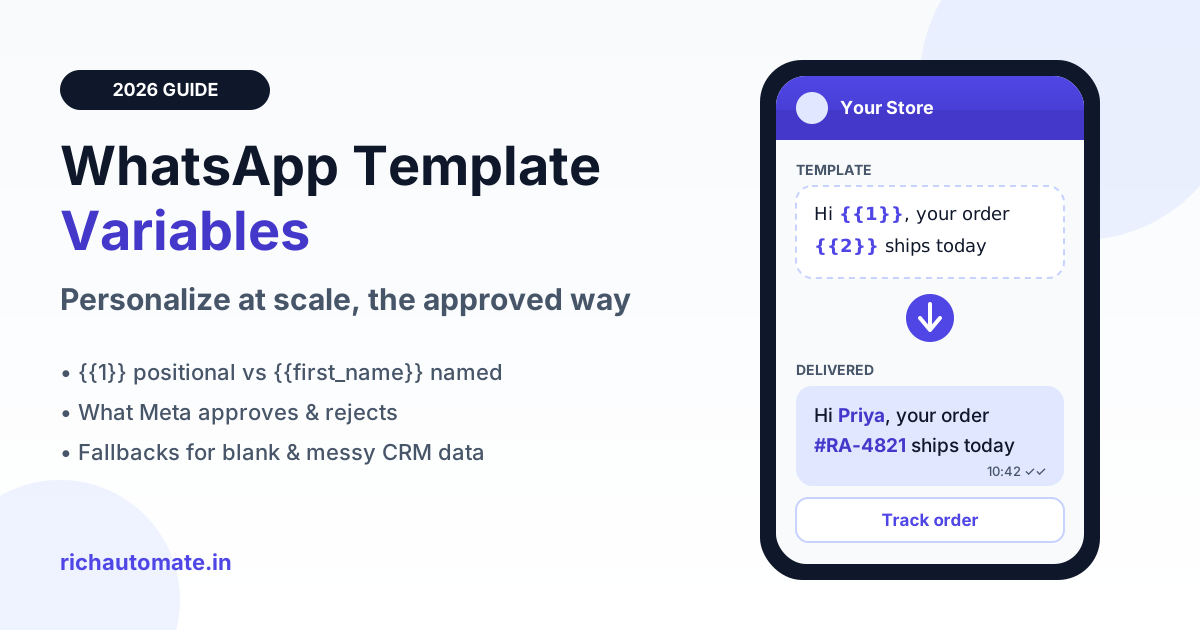
WhatsApp template variables are numbered or named placeholders, such as {{1}} or {{first_name}}, that you fill with each customer's data at send time, so one approved template can say "Hi Priya, your order #RA-4821 ships today" to thousands of people individually. To get them approved and working at scale, keep fixed text around every variable, submit realistic sample values, plan fallbacks for missing or messy CRM data, and send only the fields the message actually needs.
Personalization is the cheapest lift available in WhatsApp marketing and notifications. It does not change what you pay per message, but it changes whether people open, trust and act on it. It is also where many Indian teams get stuck: templates rejected for "variable formatting", customers greeted as "Hi NULL", or a Hinglish name mangled into ALL CAPS. This guide covers the mechanics, the review patterns we see accepted and rejected, and a practical data-hygiene playbook.
How WhatsApp template variables work
Every business-initiated WhatsApp message outside the 24-hour customer service window must use a pre-approved template. A template has fixed text that Meta reviews once, plus placeholders you fill per recipient. When your system calls the WhatsApp Business API, it sends the template name, language and an ordered list (or named map) of parameter values. WhatsApp assembles the final message on delivery.
Positional vs named parameters
The classic format is positional: {{1}}, {{2}}, {{3}}. Values are matched by order, so {{1}} is always the first value you pass. It works, but it is fragile. If someone on your team reorders columns in the Excel sheet, "Rahul" can land where the order ID should be.
Meta has also added named parameters, such as {{first_name}} or {{order_id}}, for Cloud API templates. Named placeholders make templates easier to read, easier to review internally and harder to mis-map. Availability and exact rules can change, so check current Meta documentation, but where you can use named parameters, we recommend them for any template with more than two variables.
Where variables can go: header, body and buttons
- Header: a text header typically allows one variable, for example "Order update for {{1}}". Media headers (image, video, document) take a media link or ID at send time instead, which is useful for a personalised invoice PDF.
- Body: the main place for personalization: name, order ID, amount in ₹, delivery date, appointment slot, branch city.
- Buttons: a URL button can carry a dynamic suffix appended to a fixed base URL. Quick-reply buttons carry a payload you set at send time, which helps you route replies to the right flow.
- Footer: generally fixed text only. Do not plan personalization here.
What Meta reviewers accept vs reject
Meta does not publish every internal review signal, and its policy can change, so treat the table below as patterns from our experience helping Indian businesses submit templates, not an official rulebook. The underlying principle is consistent: a reviewer must be able to understand the message from the fixed text alone, and the variables should not turn the template into a blank canvas for arbitrary content.
| Pattern | Example | Typical outcome | Why |
|---|---|---|---|
| Variable at the very start | "{{1}}, your order is ready" | Often rejected | Body should open with fixed text. Use "Hi {{1}}, your order is ready". |
| Variable at the very end | "Your OTP-free login link is {{1}}" | Often rejected | Add closing text: "...is {{1}}. It expires in 30 minutes." |
| Adjacent variables | "Hi {{1}} {{2}}, welcome" | Usually rejected | Merge into one full-name variable, or put words between them. |
| Too many variables, little text | "{{1}} {{2}} at {{3}} for {{4}}" | Usually rejected | Looks like a free-text container. Add context and cut variables. |
| Missing or vague samples | Sample for {{1}}: "abc" | Frequently rejected | Reviewers need realistic values to judge the category and intent. |
| Clear sentence, spaced variables | "Hi {{1}}, your order {{2}} of ₹{{3}} ships today from our Jaipur warehouse." | Usually approved | Fixed text carries the meaning; each variable has a clear role. |
| Variable used to swap the whole message | Body = "{{1}}" | Rejected | This bypasses review entirely. |
If a template has already been bounced, our WhatsApp template rejection fixes guide walks through the common rejection reasons and how to rewrite for re-approval.
Sample values: the step most teams skip
When you submit a template with variables, Meta asks for sample content for each placeholder. Treat this as part of the pitch to the reviewer. Good samples look exactly like real data: "Priya" not "name", "#RA-4821" not "123", "₹1,499" not "amount", "12 Oct, 4:00 PM" not "date".
Samples also help the reviewer confirm the category. A utility template with sample "Your order #RA-4821 has been dispatched" reads as a transactional update. The same template with sample values like "50% OFF Diwali sale" in a variable signals marketing content hiding in a utility template, which can lead to rejection or re-categorisation.
Fallbacks for missing or messy data
An approved template is only half the job. The other half is what happens when the data behind a variable is empty, wrong or badly formatted. Indian customer lists are especially messy: names typed by delivery agents, leads captured from Facebook forms, POS exports in ALL CAPS, and phone numbers saved as names.
Blank first names
Decide the fallback before the campaign, not during. For a greeting, a neutral word such as "there" ("Hi there, your order...") reads naturally. Avoid sending an empty value: the API may reject it, and even when it goes through, "Hi , your order" looks broken.
Hinglish, regional and ALL CAPS names
Names like "RAHUL KUMAR", "priya s", "Mohd. Imran" or "Sunita ji" all come from real lists. Convert to title case, keep only the first token for greetings, and strip honorifics your team added for internal use. Be careful with automatic transliteration: if a customer typed their name in Devanagari, sending it back the same way is often more respectful than a machine-romanised version.
Junk CRM fields
Watch for values like "NULL", "test", "na", "-", "customer1", a phone number in the name field, or a 400-character address pasted into a city field. In our experience, WhatsApp parameters also do not accept newlines, tab characters or long runs of spaces, so clean these before sending or the message can fail at the API.
| Field | Common problem | Recommended fallback | If essential and missing |
|---|---|---|---|
| First name | Blank, "NULL", phone number, ALL CAPS | "there" or cleaned title-case first token | Send with neutral greeting |
| Order ID | Missing, wrong format | None; do not guess | Skip the contact and flag for ops |
| Amount (₹) | Stored as "1499.0" or with commas missing | Format as "₹1,499" | Skip; never send a wrong amount |
| City / branch | Pincode or full address in field | Generic "your nearest store" | Send with generic wording |
| Delivery date | Past date, timezone mismatch | "soon" is weak; better to recompute | Hold the message until data is fixed |
| URL suffix | Spaces, special characters | URL-encode, keep short | Use a fallback landing page code |
The rule of thumb: cosmetic fields (name, city) get a friendly fallback, transactional fields (order ID, amount, OTP-style codes, dates) never get guessed. A wrong amount in a payment reminder does far more damage than a generic greeting.
Get a 1-minute BSP audit on WhatsApp
Drop your WhatsApp number — we line-item your current invoice against Meta India rates in under 60 seconds. India-hosted, DPDP-compliant.
Mapping CRM and Excel columns to variables
Most personalization failures are mapping failures. Before every campaign, write down the mapping in plain language: {{1}} = first_name column, {{2}} = order_id column, {{3}} = amount column. Then do three checks.
- Preview five real rows. Pick the first row, a random row, a row with a blank name, a row with a long name and the last row. Read the rendered message aloud.
- Lock the column order or use named parameters. Positional templates break silently when someone inserts a column in the sheet.
- Send a test to your own number first. Check the message on an actual phone, including line breaks and the button link.
If your data lives in a CRM, sync fields directly instead of exporting CSVs every week. Our guide to WhatsApp CRM integration with HubSpot, Zoho and Salesforce explains how to push contact properties into template variables automatically. Personalization also works best when the list itself is focused; WhatsApp broadcast audience segmentation shows how to split lists so each segment gets a relevant template instead of one message for everyone.
Dynamic URL button suffix for tracking
A URL button with a dynamic suffix is one of the most useful and underused template features. You define a base URL at approval time, such as https://richautomate.in/track/, and pass a suffix per recipient at send time, such as RA-4821. Each customer gets a unique link.
Practical uses for Indian businesses:
- Order tracking: base URL plus order ID, so the button opens that exact shipment.
- Payment links: base URL plus an invoice reference for a D2C brand or a coaching institute collecting fees.
- Campaign attribution: base URL plus a short code like "diwali-blr" so you can see which city or segment clicked.
- Appointment management: base URL plus a booking ID for clinics and salons to reschedule.
Keep the base URL on your own domain, keep suffixes short and URL-safe, and never put a phone number, email or full name in the suffix. Links get forwarded and screenshotted. Once clicks are flowing, tie them to delivery and read data in a WhatsApp API analytics and metrics dashboard to see which variables and segments actually convert.
Personalization that lifts reads vs "creepy" personalization
More variables are not automatically better. Useful personalization answers "why am I getting this?" in the first line. Creepy personalization shows the customer you know more than they expected you to, or uses data in a context they did not agree to.
| Approach | Example message | Likely reaction |
|---|---|---|
| Generic | "Dear customer, your order has been shipped." | Low trust, easy to ignore; looks like spam when it arrives without context. |
| Helpful personalization | "Hi Priya, your order #RA-4821 (₹1,499) ships today from Jaipur. Track it below." | Clear, specific, easy to act on. |
| Helpful marketing personalization | "Hi Rahul, the running shoes you saved are back in size 9. Want us to hold a pair?" | Relevant because the customer created the signal. |
| Over-personalized | "Hi Rahul, we noticed you visited our site 7 times at night from Andheri. Still thinking?" | Feels like surveillance; higher chance of block or report. |
| Wrong context | "Hi Sunita, happy 42nd birthday! Here is 10% off on anti-ageing cream." | Uses sensitive detail in a pushy way; damages the relationship. |
Blocks and reports feed into your quality rating, so creepy messages carry a real cost beyond one lost customer. If read rates are already falling, see how to fix a low WhatsApp message read rate for the other levers (timing, frequency, template category) that interact with personalization.
DPDP and data minimisation: send only what the message needs
India's Digital Personal Data Protection Act, 2023 is built around processing personal data for a specified purpose and limiting it to what that purpose requires. For WhatsApp templates, that translates into a simple habit: every variable should earn its place.
- Ask of each field: does the customer need this to understand or act on the message? An order ID in a delivery update, yes. Their date of birth in a delivery update, no.
- Mask where you can: show "account ending 4821" rather than a full account or policy number.
- Keep sensitive data out: health conditions, financial details beyond what is needed, and exact location rarely belong in a template variable.
- Respect opt-outs across all templates, not just the campaign where the customer replied "STOP".
This is general guidance, not legal advice; talk to your counsel about your specific obligations. The practical benefit is that minimal templates are also easier to get approved, cheaper to maintain and less likely to break when a CRM field goes missing.
Cost: personalization does not change the per-message price
A common question from finance teams is whether adding variables makes messages more expensive. It does not. Meta prices WhatsApp messages by template category (marketing, utility, authentication and so on), not by how many variables a template contains. A utility template with one variable costs the same as one with five.
On RichAutomate, billing is usage-only, with ₹0 setup and ₹0 monthly fees. You choose one of two models:
- Client Pay: ₹0.10 per message as our platform fee, with Meta's charges billed directly to your own Meta account.
- SaaS Pay: ₹1.20 per marketing message and ₹0.30 per utility message, all-inclusive through us.
Personalization only affects cost indirectly, and usually in your favour: fewer failed sends from bad data, fewer blocks, and better response per rupee spent. Compare both models on the RichAutomate pricing page, or read Client Pay vs SaaS Pay for WhatsApp Business billing to decide which fits your volume.
Start free on RichAutomate
RichAutomate lets you create templates with header, body and URL button variables, map them to your contact fields or uploaded Excel columns, preview real rows before sending, and track delivery, reads and clicks per campaign. There is no setup fee and no monthly fee; you pay only for messages you send. Approval still depends on Meta's review, and good sending practice still matters, but the tooling removes most of the mapping mistakes that cause broken or rejected messages.
Start free on RichAutomate and send your first personalised WhatsApp template today.