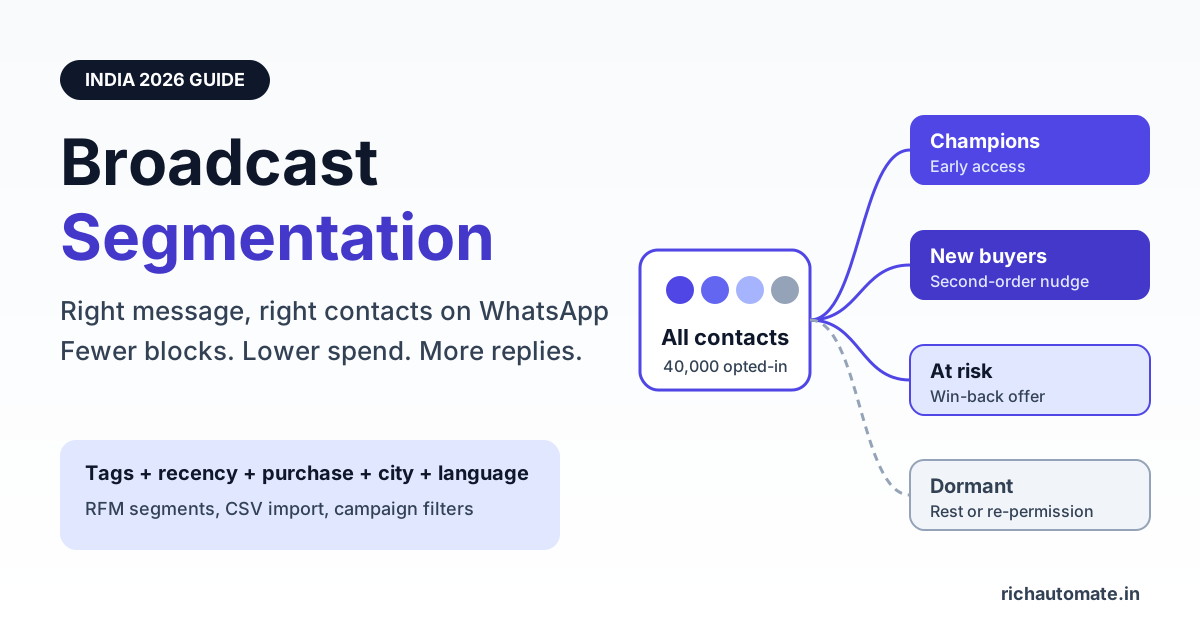
To segment a WhatsApp broadcast audience, split your opted-in contacts into small groups by tags, profile attributes (city, language, product interest), behaviour (clicks, replies, purchases) and recency, then send each group a template written for that group only. Segmented campaigns in India typically see fewer blocks and opt-outs, a healthier quality rating and less wasted spend than one blast to the whole list, because every marketing message costs roughly ₹0.78-0.88 in Meta fees alone.
This guide shows Indian D2C brands, coaching institutes, real estate teams and clinics how to build segments that actually move revenue: which attributes matter, how segmentation interacts with Meta per-message pricing, marketing message pacing, frequency caps and messaging tiers, an RFM model you can run from a spreadsheet, and a step-by-step build using tags, CSV import and campaign filters.
What WhatsApp broadcast segmentation actually means
A WhatsApp broadcast on the Business API is a template message sent to many contacts at once. Segmentation is the step before sending: you decide who gets which message. Instead of one offer going to 40,000 numbers, you might send five different templates to five groups of 2,000 to 12,000 contacts each, and skip the 8,000 people who have not engaged in six months.
The goal is relevance. A contact who bought a moisturiser last week does not need the same "flat 30% off" blast as a contact who has never purchased. A NEET aspirant in Kota does not need the Bengaluru weekend batch announcement. Each irrelevant message is a small invitation to block or report you, and on WhatsApp those signals are counted.
Segment vs list vs tag
- List - everyone who has opted in to hear from you on WhatsApp.
- Tag - a label on a contact such as "bought-skincare", "hindi", "pune" or "demo-attended".
- Segment - a filter built from one or more tags and attributes, for example "Pune AND bought in last 90 days AND not tagged opted-out".
Tags are the raw material. Segments are the rules you apply at send time. Keep tags simple and factual, and do the clever combining in campaign filters.
Why segmented campaigns beat blasting everyone
Blasting feels efficient because it is one campaign and one template approval. In practice it is usually the most expensive way to use WhatsApp. Here is how the two approaches compare on the metrics that matter.
| Metric | Blast to full list | Segmented campaigns |
|---|---|---|
| Relevance per message | Low for most recipients | High, message matches the group |
| Block and report risk | Higher, many recipients feel spammed | Lower, fewer irrelevant sends |
| Quality rating trend | Can slide towards Medium or Low | More likely to stay stable |
| Meta spend | Paid on every number, engaged or not | Paid mainly on contacts likely to act |
| Reply rate and CTR | Diluted by uninterested contacts | Usually higher per message sent |
| Learning | One average number, hard to act on | Per-segment results show what works |
The reply rate and CTR point is worth measuring rather than assuming. Track delivered, read, clicked, replied and converted per segment using the framework in our guide to WhatsApp campaign KPIs and metrics, and compare segments against each other, not against a vague industry benchmark.
How segmentation interacts with Meta pricing, pacing and quality
WhatsApp is not email. Meta charges per delivered template message, watches how users react, and limits how many marketing messages a person receives. Segmentation touches every one of these levers.
Per-message pricing
Approximate Meta rates for India are about ₹0.78-0.88 per marketing message and about ₹0.115-0.13 per utility message. These rates are set by Meta and may change, so check the current rate card before budgeting. The maths is simple: every contact you remove from a campaign because they are unlikely to care saves you close to a rupee.
Marketing message pacing and frequency caps (131049)
Meta limits how many marketing template messages an individual user receives from businesses in a given period. When a send is held back for this reason, the API returns error code 131049. It is not a bug in your platform, it is Meta protecting the user's inbox. Blasting the whole list every other day makes this far more likely, because your least engaged contacts are exactly the people Meta is protecting. Smaller, more relevant segments sent less often tend to see fewer 131049 failures. Meta may also pace a new marketing template, sending to a portion of recipients first and releasing the rest based on early feedback, so a well-targeted first batch matters.
Quality rating and messaging tiers
Your phone number has a quality rating (High, Medium or Low) driven by recent user feedback such as blocks and reports. Your messaging tier controls how many unique users you can start conversations with in a rolling 24-hour window. A dropping quality rating can hold you back from moving up tiers and, if it stays low, can restrict your number. Segmentation does not guarantee a high rating, but sending relevant messages to people who asked for them is the single biggest thing you control.
| Meta lever | What blasting does | What segmentation does |
|---|---|---|
| Per-message cost (about ₹0.78-0.88 marketing) | Pays for every uninterested number | Concentrates spend on likely buyers |
| Frequency cap (error 131049) | Hits fatigued users repeatedly | Rests low-engagement contacts |
| Template pacing | First batch includes cold contacts | First batch goes to warm contacts |
| Quality rating | More blocks and reports | Fewer negative signals |
| Messaging tier growth | Can stall if quality drops | Steadier path to higher tiers |
The segmentation attributes that matter in India
You do not need fifty attributes. Most Indian businesses get 80% of the value from six or seven.
- Source - website form, Click-to-WhatsApp ad, store QR code, missed call, marketplace order. Source predicts intent.
- City or state - essential for offline stores, delivery zones, real estate projects and clinics.
- Language - English, Hindi, Hinglish, Tamil, Marathi and so on. A regional-language template often reads far more naturally than a translated English one.
- Product or course interest - skincare vs haircare, JEE vs NEET, 2BHK vs 3BHK, dental vs dermatology.
- Behaviour - replied, clicked a button, attended a demo, abandoned a cart.
- Recency - last interaction or last purchase date. The most underused attribute and often the most predictive.
- Purchase history - number of orders and total spend, the basis of RFM.
One attribute is not optional: consent. Under India's DPDP Act 2023 and WhatsApp's own Business Messaging Policy, you should only send marketing messages to people who have opted in, and you should honour opt-outs promptly. Keep an "opted-out" tag and exclude it from every campaign filter by default. If your list is old or was collected loosely, run it through the WhatsApp opt-in list hygiene and re-permissioning process before you segment it.
RFM segmentation for D2C brands
RFM stands for Recency, Frequency and Monetary value. It is an old retail technique that works well on WhatsApp because it tells you who deserves a marketing message and who needs rest.
Score each customer 1 to 3 on each dimension from your order export. For example: Recency 3 if they bought in the last 30 days, 2 for 31-120 days, 1 for older. Frequency 3 for four or more orders, 2 for two or three, 1 for one. Monetary 3 for lifetime spend above ₹5,000, 2 for ₹1,500-5,000, 1 below ₹1,500. Then group the scores into a handful of practical segments.
Get a 1-minute BSP audit on WhatsApp
Drop your WhatsApp number — we line-item your current invoice against Meta India rates in under 60 seconds. India-hosted, DPDP-compliant.
| RFM segment | Typical profile | What to send | How often |
|---|---|---|---|
| Champions | Bought recently, often, high spend | Early access, new launches, referral ask | Up to weekly if they engage |
| Loyal | Regular buyers, mid spend | Replenishment reminders, bundles | Every 1-2 weeks |
| New customers | First order in last 30 days | How-to-use tips, second-order nudge | A short drip, then monthly |
| At risk | Used to buy, nothing in 90-180 days | Win-back offer, feedback question | One or two attempts |
| Dormant | No purchase or reply in 180+ days | Re-permission message or nothing | Rest, or once a quarter |
Illustrative example: a skincare D2C brand with 40,000 opted-in customers blasts one festive offer to everyone. At about ₹0.85 per marketing message in Meta fees, that is roughly ₹34,000. If it instead sends only to Champions, Loyal, New and At-risk customers, say 22,000 contacts, the Meta cost drops to about ₹18,700, and the 18,000 dormant contacts are rested instead of being nudged towards the block button. Actual conversion depends on your offer and audience, but the saving is certain.
New customers and at-risk customers are best handled with sequences rather than one-off sends. Our guide to WhatsApp drip campaigns covers how to space those messages so each step is triggered by what the contact did.
Segment examples by industry
D2C and e-commerce
- Cart abandoners in the last 24 hours, split by cart value above and below ₹1,000.
- Replenishment segment: bought a 30-day product 25-28 days ago.
- Category segments: "bought-skincare" gets skincare launches, not haircare.
- COD vs prepaid buyers: prepaid-incentive message only to past COD buyers.
Education and coaching
- By exam or course: JEE, NEET, CA Foundation, spoken English.
- By stage: enquiry, demo booked, demo attended, fee pending, enrolled.
- By city and batch mode: offline Kota batch vs online Hindi-medium batch.
- Parents vs students, since fee reminders and results updates suit parents better.
Real estate
- By project and micro-market: Whitefield vs Sarjapur, Wakad vs Hinjewadi.
- By configuration and budget band: 2BHK under ₹80 lakh vs 3BHK above ₹1.2 crore.
- By stage: site visit done, site visit pending, negotiation, booked.
- NRI enquiries, who need different timing and often different content.
Clinics and healthcare
- By department: dental, dermatology, physiotherapy, diagnostics.
- By visit recency: follow-up due, annual check-up due, lapsed patient.
- By branch or locality for multi-location clinics.
- Keep appointment reminders and reports as utility templates, and keep health camp or package promotions as marketing sends to consenting patients only.
Step-by-step: build segments with tags, CSV import and campaign filters
Here is a practical build you can do in an afternoon on RichAutomate or any WhatsApp Business API platform with tagging and filters.
Step 1: Export and clean your data
Pull contacts from your store, CRM, LMS or spreadsheet. Keep columns for phone number with country code (91XXXXXXXXXX), name, city, language, source, last purchase or interaction date, order count and total spend. Remove duplicates and numbers without consent records.
Step 2: Turn columns into tags and attributes
In your sheet, add a tags column with comma-separated values such as "pune, hindi, bought-skincare, rfm-loyal". Keep tag names lowercase and consistent. Five good tags per contact beat twenty messy ones.
Step 3: Import the CSV
Import the file into your contacts, mapping name, phone, attributes and tags. Spot-check ten contacts after import to confirm tags landed correctly. A wrong mapping here silently ruins every campaign that follows.
Step 4: Auto-tag new behaviour
Static tags age quickly. Use chatbot flows and quick-reply buttons to add tags when people act: tapping "Interested in 3BHK" adds "3bhk", attending a demo adds "demo-attended", replying STOP adds "opted-out". This keeps segments fresh without re-importing.
Step 5: Build the campaign filter
When creating a campaign, filter by included tags and exclude the rest. A typical filter reads: include "rfm-loyal" OR "rfm-champion", include "pune", exclude "opted-out", exclude contacts messaged in the last 3 days. Note the final audience size before you send.
Step 6: Write one template per segment
Mention the thing that defines the segment: the product they bought, the course they asked about, the project they visited. Use variables for name and product, and keep one clear call to action.
Step 7: Schedule by segment
Different segments are awake and attentive at different times. Working professionals, students and homemakers do not read WhatsApp at the same hour. Use the timing patterns in our guide on the best time to send WhatsApp campaigns in India and test two slots per segment.
Step 8: Measure and re-tag
After 48-72 hours, review each segment's read rate, reply rate, clicks, conversions, 131049 failures and opt-outs. Promote engaged contacts, and move contacts who ignored three campaigns in a row into a rest segment.
What segmentation costs on RichAutomate
RichAutomate is usage-only: ₹0 setup and ₹0 monthly fee. You choose one of two models.
- Client Pay - you pay Meta directly for conversations, and RichAutomate charges a ₹0.10 platform fee per message.
- SaaS Pay - all-inclusive pricing of ₹1.20 per marketing message and ₹0.30 per utility message, with no separate Meta bill.
Because you pay per message, segmentation directly lowers your bill. Using the illustrative skincare example above, cutting a send from 40,000 to 22,000 contacts on SaaS Pay reduces the campaign from ₹48,000 to ₹26,400. On Client Pay, the platform fee falls from ₹4,000 to ₹2,200, alongside the Meta saving. See the full breakdown on our WhatsApp API pricing page.
Segmentation mistakes to avoid
- Over-segmenting into tiny groups. A segment of 40 people is hard to learn from. Start with four to six segments and split further only when results justify it.
- Letting tags go stale. "Interested in 2BHK" from 2024 may not be true now. Pair interest tags with a recency filter.
- Ignoring the opted-out tag. Every filter should exclude it by default. Messaging someone who asked to stop is a fast route to reports.
- Sending the same template to every segment. Different filters with identical copy is not segmentation, it is just scheduling.
- Using marketing templates for utility content. Order updates and appointment reminders belong in utility templates. Mixing them makes pricing and user expectations messy.
- Treating 131049 as a platform error. It is Meta's frequency protection. Rest the affected contacts rather than retrying them repeatedly.
- Chasing dormant contacts with discounts. A dormant segment should get a re-permission message or silence, not a weekly offer.
- Assuming segmentation removes all risk. It lowers block and report risk, but no platform or tactic can guarantee your number will never be restricted. Consent, relevance and frequency still decide the outcome.
A simple starter segment plan
If you are starting from a single list today, build these five segments this week: recent buyers or enrolments (last 30 days), engaged non-buyers (replied or clicked in the last 60 days), at-risk (90-180 days quiet), dormant (180+ days quiet, rest or re-permission) and opted-out (always excluded). Send each a different template, measure for two weeks, then add city, language or product splits where the numbers show a clear difference.
Ready to stop blasting and start targeting? Start free on RichAutomate - import your contacts, tag them, and send your first segmented WhatsApp broadcast with ₹0 setup and ₹0 monthly fee.