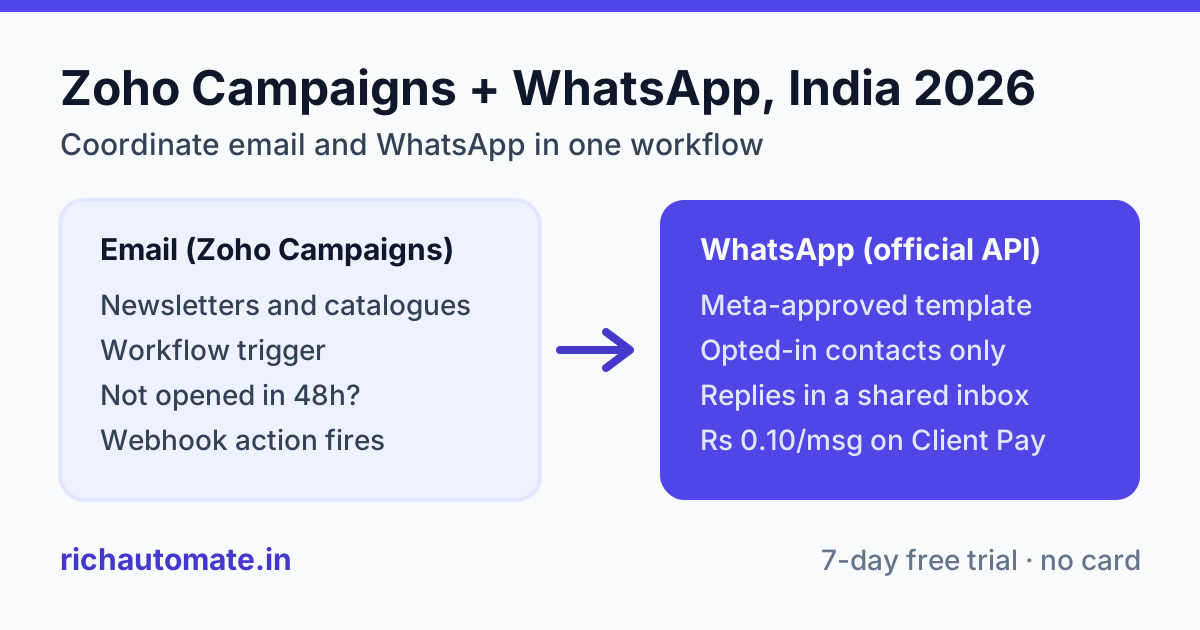
Yes, you can run WhatsApp alongside email from Zoho Campaigns in 2026: according to Zoho's site, Zoho Campaigns now sends WhatsApp campaigns natively as an official WhatsApp Business Solution Provider, on paid plans, with WhatsApp inside automation workflows on the Professional plan. If you also want a shared team inbox, chatbot flows or a separate WhatsApp provider, you can connect the official WhatsApp Business API through a provider such as RichAutomate using a Zoho Campaigns workflow webhook or Zapier, Make or Pabbly.
This guide is for Indian marketers who already send email from Zoho Campaigns and want WhatsApp in the same journey. It covers which route to pick, how to keep your lists clean and opt-in compliant, which triggers work, how to set it up step by step, and what it costs in rupees.
Does Zoho Campaigns support WhatsApp in 2026?
It does. According to Zoho's WhatsApp marketing page for Zoho Campaigns, you can "create, automate, and send personalized WhatsApp campaigns with Zia AI", and the same page states that "Zoho is an official WhatsApp Business Solution Provider (BSP)". A few older Zoho community threads say WhatsApp was not available yet; those are out of date.
The details that matter for planning, all according to Zoho's site:
- Paid plans only. Zoho's WhatsApp marketing page says "WhatsApp campaign sending is available in paid plans", and per Zoho's pricing page WhatsApp on Standard and Professional "requires WhatsApp credits". The Free plan does not include it.
- Automation is a Professional feature. Per Zoho's WhatsApp pricing page, "WhatsApp messages can be included in Zoho Campaigns automation workflows on the Professional plan."
- You need your own verified WhatsApp Business Account. Zoho's FAQ says you will need "a verified WhatsApp Business Account connected to the WhatsApp Business API".
- Templates go to Meta for approval. Zoho's page says you can "submit for Meta approval right from Zoho Campaigns".
- Coexistence is opt-in. Zoho's help article says coexistence lets you connect a number already active on the WhatsApp Business App, but it "is not enabled by default" and you need to contact Zoho Campaigns support to turn it on.
Zoho also sells a separate product, Zoho Marketing Automation, which according to Zoho's site has its own WhatsApp campaigns and journey builder. If you are choosing between the two Zoho products, compare them directly on Zoho's site; this article sticks to Zoho Campaigns.
So the honest question is not "can Zoho Campaigns do WhatsApp?" but "is the built-in option enough for how my team works, or do I want a dedicated WhatsApp platform wired into my Zoho Campaigns workflows?"
Email vs WhatsApp inside one Zoho Campaigns journey
Email and WhatsApp do different jobs. Email carries detail, design and long-form content cheaply. WhatsApp carries short, time-sensitive nudges that people actually see on their phone. A coordinated journey uses each for what it does well instead of sending the same message twice.
| Factor | Email (Zoho Campaigns) | WhatsApp (official API) |
|---|---|---|
| Best job in the journey | Newsletters, catalogues, long offers, invoices | Reminders, deadlines, order and payment updates, quick replies |
| Consent needed | Email opt-in | Separate WhatsApp opt-in for that number |
| Content approval | None from a third party | Every business-initiated template is reviewed by Meta |
| Cost per send | Included in your plan's contact tier | Meta charges per template message by category, plus any provider fee |
| Two-way conversation | Replies land in a mailbox | Replies open a 24-hour window where service replies are free from Meta |
| Contact key | Email address | Mobile number with country code (+91) |
| Risk if misused | Spam folder, sender reputation | Blocks and reports lower your quality rating and messaging limits |
If you are still deciding whether WhatsApp is worth adding at all, our breakdown of WhatsApp vs email marketing ROI in India runs the numbers. The rest of this guide assumes you have decided to use both.
Three ways to add WhatsApp to a Zoho Campaigns setup
There are three practical routes. None of them is wrong; they suit different teams.
| Route | How it works | Good for | Watch out for |
|---|---|---|---|
| 1. Zoho Campaigns native WhatsApp | Connect your WhatsApp Business Account inside Zoho Campaigns; use Send WhatsApp in workflows | Teams that want one tool and mainly send outbound campaigns | Workflow automation needs Professional, per Zoho's site; check how replies and team chat are handled for your use case |
| 2. Zoho Campaigns webhook to RichAutomate | A Zoho Campaigns workflow Webhook action posts the contact to a RichAutomate flow with an Incoming Webhook trigger, which sends an approved template and handles replies | Teams that want a shared WhatsApp inbox, chatbot flows and click-to-chat follow-up | The Webhook action is listed on the Professional plan on Zoho's pricing page; no native Zoho Campaigns connector exists, so you configure the URL and fields yourself |
| 3. Zapier, Make or Pabbly in between | The automation tool watches Zoho Campaigns or Zoho CRM and calls RichAutomate's POST /api/v1/send-template with your API key | Teams already using an automation tool, or needing field mapping and filters | Extra subscription; one more place to debug |
One related piece is worth knowing. RichAutomate has a native Zoho CRM integration (OAuth) that syncs opted-in WhatsApp contacts into Zoho CRM as Leads or Contacts, with stage-gated sync by pipeline tag. According to Zoho's help documentation, Zoho Campaigns can then sync Zoho CRM Leads, Contacts or custom modules into your Campaigns lists via Contacts > Sync Services. That gives you a clean loop: people who start a WhatsApp chat land in CRM, and from CRM into your email lists. Our guide to WhatsApp Zoho CRM integration covers the CRM half in detail.
Want to test the webhook route on your own Zoho account? Connect the official WhatsApp API with 100 free credits and no card. Start your 7-day free trial.
Opt-in and list hygiene: email consent is not WhatsApp opt-in
This is where most Indian teams get into trouble. A contact who ticked "send me offers by email" on your website has not agreed to receive WhatsApp marketing. Meta requires opt-in for business-initiated WhatsApp messages, and Zoho's own FAQ says existing Zoho Campaigns contacts can be used "as long as contacts have opted in and have a valid phone number".
Practical list hygiene before your first WhatsApp send:
- Add a separate WhatsApp consent field. Create a custom field such as "WhatsApp opt-in" with a date, and only add contacts to WhatsApp lists when it is set.
- Collect opt-in where you already collect email. Add a clearly worded WhatsApp checkbox to your sign-up and checkout forms. If you use Zoho Forms, see our Zoho Forms WhatsApp integration guide.
- Normalise mobile numbers. Indian lists are full of 10-digit numbers, numbers with a leading 0 and landlines. Store them as 91 followed by the 10-digit mobile number, and drop landlines.
- Remove duplicates across lists. The same customer often sits in three Zoho lists. Sending one WhatsApp per list means three identical messages and a likely block.
- Honour STOP replies. When someone replies STOP or asks to be removed, clear their WhatsApp opt-in field the same day so your next workflow skips them.
- Start with your warmest segment. Recent buyers and recent enquirers are far less likely to block you than a three-year-old email list.
No provider can promise that a number will never be restricted. What keeps you safe is opt-in, relevant templates, sensible frequency and watching your quality rating.
Get the India 2026 WhatsApp BSP price comparison
Wati vs AiSensy vs Interakt vs RichAutomate: Meta rates, platform fees and hidden costs, side by side. We send it to your WhatsApp in a minute.
Triggers that work for Indian SMBs
The best triggers send WhatsApp only when the email alone is likely to be missed. A few patterns we see work well, with an Indian example for each:
- Email not opened after 48 hours. A Jaipur handicraft exporter sends its Diwali catalogue by email. Contacts who have not opened after two days get a short WhatsApp template with the top three products and a link.
- Event or webinar reminder. A Pune coaching institute sends the full schedule by email, then a WhatsApp utility reminder one hour before the demo class, when an email would sit unread.
- Abandoned cart or pending payment. A Surat saree brand on a D2C site sends a WhatsApp nudge a few hours after checkout is abandoned, and the detailed product email next morning.
- Re-engagement of inactive email subscribers. A Chennai B2B distributor whose dealers ignore email newsletters moves price-list alerts to WhatsApp for dealers who have opted in.
- New subscriber welcome. The welcome email carries the brand story and lead magnet; a single WhatsApp message gives a way to ask questions directly.
Keep WhatsApp frequency well below email frequency. If you email weekly, one or two WhatsApp marketing messages a month to the same person is a sensible ceiling to start with.
Setup: Zoho Campaigns workflow plus RichAutomate, step by step
This walk-through uses route 2, the webhook route. According to Zoho's help documentation, Zoho Campaigns workflows include a Webhook action that can send contact data to an external address using a POST request, alongside Send Email and Send WhatsApp actions.
- Create your RichAutomate account and connect your number. Sign up, connect a number to the official WhatsApp Business API and complete Meta business verification. To go live in India you need GST or MSME (Udyam) registration; the trial works without it.
- Get a template approved. Write the WhatsApp version of your message as a Meta template, for example a utility reminder with the contact's name and event time as variables. Submit it and wait for approval.
- Build a RichAutomate flow with an Incoming Webhook trigger. In the flow builder, start the flow with the Incoming Webhook trigger, add a step that sends your approved template, and add follow-up steps for replies (for example, quick-reply buttons that answer FAQs or hand over to a human in the shared inbox). Copy the flow's webhook URL.
- Add a mobile number field in Zoho Campaigns. Make sure every contact on your WhatsApp list has a normalised mobile number and the WhatsApp opt-in field set.
- Create the Zoho Campaigns workflow. Set the entry trigger (for example, joining a list or not opening an email), add a time delay or wait condition, then add the Webhook action pointing at your RichAutomate flow URL with POST. Map the contact's mobile number to a field named
phoneand, optionally, the first name toname. - Test with your own number first. Add yourself to the list, let the workflow run, and confirm the template arrives and your replies show up in the RichAutomate inbox.
- Roll out to a small segment. Send to a few hundred opted-in contacts, watch replies, blocks and your quality rating for a week, then widen.
If your Zoho webhook cannot shape the payload the way you need, or you prefer to send a specific template directly, put Zapier, Make or Pabbly in the middle and call RichAutomate's POST /api/v1/send-template endpoint with your API key. Teams on Zoho CRM can also call the same endpoint from a Deluge function.
What it costs: a worked estimate in rupees
Zoho side first, according to Zoho's site: WhatsApp sending in Zoho Campaigns uses prepaid WhatsApp credits on top of a paid plan. Zoho's WhatsApp marketing page says "Zoho doesn't add any margin to Meta's WhatsApp pricing", while Zoho's WhatsApp pricing page says "a 3% service fee (or VAT equivalent) is applied to the total cost of credits purchased or messages sent" and that "credits never expire". Plan prices on Zoho's pricing page depend on your contact count and billing cycle, and the page offers an INR currency option, so check the rupee price for your own tier there.
On the RichAutomate side there is ₹0 setup. On Client Pay, Meta bills its own charges to your business directly and RichAutomate charges a platform fee of ₹0.10 per message. Plans are optional: Starter ₹499/mo, Pro ₹899/mo, White-label ₹1,199/mo, or Custom. Meta's India rates are currently ₹0.8631 per marketing message and ₹0.1150 per utility or authentication message; Meta can change these. Service replies inside the 24-hour customer-service window are free from Meta.
Estimate only. Take the Pune coaching institute above: 2,000 opted-in WhatsApp contacts, two marketing broadcasts a month, 1,500 utility reminders and about 800 service replies to student questions.
| Line item | Volume | Rate | Monthly estimate |
|---|---|---|---|
| Meta marketing templates | 4,000 | ₹0.8631 | ₹3,452.40 |
| Meta utility templates | 1,500 | ₹0.1150 | ₹172.50 |
| Service replies in 24h window | 800 | Free from Meta | ₹0 |
| RichAutomate platform fee (upper bound, counting all 6,300 messages) | up to 6,300 | ₹0.10 | up to ₹630 |
| Total, pay-as-you-go | up to about ₹4,255 | ||
| Optional Starter plan | ₹499 | up to about ₹4,754 with plan |
Marketing templates are about 80% of the bill here, which is typical. The cheapest lever is not the provider; it is sending fewer, better-targeted marketing messages and moving routine updates to utility templates where they genuinely qualify. Plug in your own numbers with the WhatsApp API cost calculator, or see every plan on our WhatsApp API pricing page.
See your real cost before you commit. Run a test journey from Zoho Campaigns with 100 free credits, no card and ₹0 setup. Start your 7-day free trial.
Which route should you pick?
- Stay with Zoho Campaigns native WhatsApp if your WhatsApp use is mostly one-way campaigns, you are on (or happy to move to) the Professional plan for automation, and you want everything in one Zoho screen.
- Add RichAutomate through the webhook or an automation tool if replies matter: a sales or support team answering in a shared inbox, chatbot flows that qualify leads, or click-to-chat follow-ups that need to land back in Zoho CRM.
- Use the Zoho CRM route if your CRM is the source of truth. Let RichAutomate sync opted-in WhatsApp contacts into Zoho CRM, and let Zoho Campaigns pull its lists from CRM.
Whichever route you choose, the fundamentals do not change: a verified WhatsApp Business Account, Meta-approved templates, a separate WhatsApp opt-in, and WhatsApp used for the short, timely messages email cannot deliver.
Verdict
Zoho Campaigns is no longer email-only. According to Zoho's site it sends WhatsApp natively, which makes it a reasonable choice for outbound campaigns. Where a dedicated WhatsApp platform earns its place is the conversation that follows: shared inbox, chatbot flows and CRM sync. RichAutomate does not have a native Zoho Campaigns connector, but a workflow webhook or an automation tool connects the two cleanly, with ₹0 setup and ₹0.10 per message on Client Pay.
Add WhatsApp to your Zoho Campaigns journeys this week. Official WhatsApp Business API, 100 free credits, no card. Start your 7-day free trial.