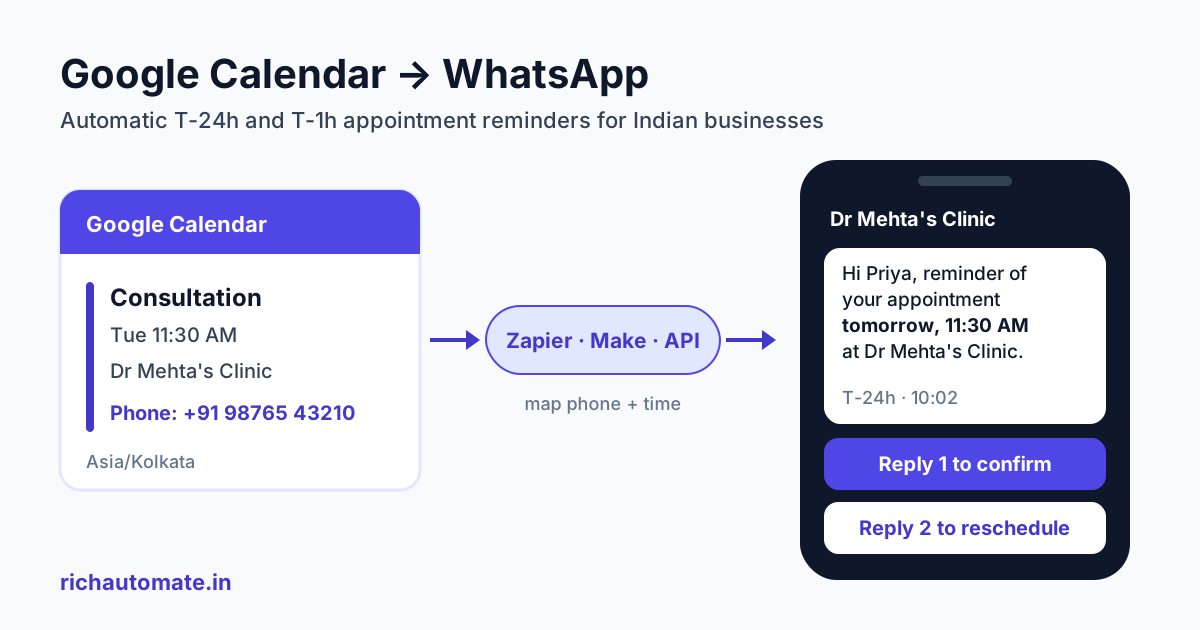
Google Calendar cannot send WhatsApp reminders on its own. It only sends email and app notifications. To get automatic WhatsApp reminders 24 hours and 1 hour before each appointment, you connect the calendar to the WhatsApp Business API through an automation tool (Zapier, Make or Pabbly Connect) or a small script, and send an approved utility template. This guide covers the setup, the one gotcha that breaks most setups (the phone number), and what it costs in rupees.
It is written for Indian clinics, salons, consultants, coaches and tutors who already run their day out of Google Calendar and are tired of empty slots. If you book through our booking page instead, read our our booking page WhatsApp reminders integration guide, because the trigger works differently there.
Why WhatsApp reminders beat calendar emails in India
A Google Calendar invite only reminds the customer if they accepted it into their own calendar and have notifications switched on. Most walk-in patients, salon clients and parents of tuition students never do either. They booked over a phone call or a WhatsApp chat, and the event lives only in your calendar.
WhatsApp is the app they actually open. A short message the day before, with the time, the address and a way to confirm, does three jobs: it reminds them, it gives you an early warning when someone cannot come, and it lets you refill the slot from your waiting list.
We could not find a peer-reviewed national figure for no-shows in Indian OPDs or salons. Vendor reports commonly put clinic no-shows in the 20 to 30 percent range, but treat those as rough. Your own appointment book is the better baseline. Count last month's no-shows before you switch reminders on, then compare after four weeks. For the wider playbook, see our guide on how WhatsApp appointment reminders cut no-shows.
How Google Calendar to WhatsApp works (and what it does not do)
First, the honest part: RichAutomate has no direct Google Calendar integration. Its built-in integrations today are Zoho CRM, Razorpay, Google Sheets and the Meta Cloud API, plus its own booking and appointment feature. Google Calendar always needs a bridge in the middle, with a mapping step that puts calendar fields into template variables.
Every working setup has the same four parts:
- A trigger that fires a set time before the event starts.
- A lookup that finds the customer's phone number and name.
- A mapper that formats the date in Indian time and fills the template variables.
- A send call to the WhatsApp Business API with an approved utility template.
For the send step you have three options in RichAutomate:
- Route A: Zapier, Make or Pabbly Connect runs on a schedule, then makes an HTTP call to RichAutomate.
- Route B: that HTTP call goes to the public API,
POST /api/v1/send-template, authenticated with your Bearer API key. - Route C: the HTTP call goes to an Incoming Webhook flow trigger,
POST /api/v1/public/flows/{token}/trigger, with a JSON body ofphone,nameanddata. The chatbot flow then sends the reminder and handles the "confirm or reschedule" reply.
Route B is simplest. Route C suits replies that should trigger something, like a reschedule menu.
The phone number problem: Google Calendar has no phone field
This is where most do-it-yourself setups fail. A Google Calendar event has a title, a start and end time, a location, a description and a list of guest emails. It has no phone number field. Your automation cannot message someone it has no number for.
You need to pick one place where the number lives, and stick to it:
- The event description. Train your front desk to add a line such as
Phone: +91 98765 43210to every booking. In the automation, extract it with a text formatter or a regular expression, then strip spaces and the plus sign so it reads919876543210. Cheap and fast, but one typo means no reminder. - A booking form. If customers book through a form that creates the calendar event, the form already captured the phone. Pass it through to the event description, or store it alongside the event ID.
- A Google Sheet. Keep a patient or client sheet keyed by name or email, and have the automation look up the row.
- A contacts lookup. Match the guest email against Google Contacts or your CRM. Zoho CRM users can keep the phone in the CRM record.
Whatever you choose, add a filter step: if no valid 12-digit Indian number is found, skip the send and email the front desk instead. A silent failure is worse than no automation, because staff assume the reminder went out.
Choosing a route: Zapier, Make, Pabbly or direct API
All three automation tools can read Google Calendar on a schedule, but they expose the "before the event" timing differently. Check the current trigger options inside each tool before you build, because vendors change modules.
- Zapier lists an "Event Start" trigger for Google Calendar with a "Time Before" setting, so you can ask it to fire, say, 24 hours before. It is a polling trigger, so it checks on an interval that depends on your plan rather than firing at the exact minute. Our Zapier WhatsApp integration setup guide walks through the Webhooks step.
- Make has a "Watch Events" module that can watch by start date, and community answers describe a separate event-start module. Both are polling, so the scenario's schedule decides how precise the timing is. See our Make.com WhatsApp integration guide for the HTTP module setup.
- Pabbly Connect tutorials mostly use a "New Event" trigger and then subtract time from the start date with a date-math step, before a delay or scheduler step. Some guides also mention an "Event Start" option. Confirm what your account shows.
- Direct API means writing your own small service against the Google Calendar API. Google's Calendar push notification docs explain that you create a watch channel pointing at an HTTPS webhook. Google then sends a ping when something changes, but the notification carries no message body and no event details. Your service must call
events.listwith a saved sync token to fetch what changed. Channels expire and there is no automatic renewal, so you must create a new channel before the old one lapses. You also need your own scheduler to fire the T-24h and T-1h sends.
| Route | Running cost | Timing precision | Setup effort | Best for |
|---|---|---|---|---|
| Zapier | Paid plan usually needed for multi-step Zaps; check current pricing | Depends on plan polling interval | Low: no code, about an hour | Single clinic or consultant |
| Make | Billed by operations; low volumes are cheap | Set by your scenario schedule | Medium: visual builder, some date formatting | Teams comfortable with logic |
| Pabbly Connect | Task-based plans; check current pricing | Depends on trigger and delay step | Medium: date-math step needed | Budget-conscious small businesses |
| Direct API (your own code) | Server plus developer time | Exact, you own the scheduler | High: watch channels, sync tokens, renewals | Clinic chains with a tech team |
Step-by-step setup with the RichAutomate API
Here is the Route A plus B pattern, which works in all three automation tools.
1. Get a reminder template approved
In your RichAutomate dashboard, create a template in the Utility category. Utility templates are for transactional updates the customer expects, like a booking confirmation or reminder. Keep it factual. The moment you add "20% off your next visit", Meta may reclassify it as marketing, which costs far more. Three samples that suit utility:
Send these messages on WhatsApp, from your own number
We get your templates approved on the official WhatsApp API and set up your first broadcast with you. ₹0 platform fee, you pay only Meta's per-message rate.
Hi {{1}}, this is a reminder of your appointment on {{2}} at {{3}}. Reply 1 to confirm or 2 to reschedule.
Hello {{1}}, your consultation with {{2}} starts in 1 hour, at {{3}}. Address: {{4}}. Please carry your previous reports.
Hi {{1}}, your appointment on {{2}} has been moved to {{3}}. Reply 2 if the new time does not suit you.
2. Build the trigger
Create two automations, one with a 24-hour offset and one with a 1-hour offset, both reading the same calendar. If your tool only offers a "New Event" trigger, compute the send time by subtracting from the event start, then add a delay-until step.
3. Map the fields
Extract the phone (see the section above), take the first name from the event title or your sheet, and format the start time as something like "Tue 4 Nov, 11:30 AM" in Asia/Kolkata.
4. Send the HTTP request
Add a Webhooks or HTTP action that sends a request like this to your RichAutomate account, with your API key in the Authorization: Bearer header. See your RichAutomate API docs for the exact fields.
POST /api/v1/send-template
Authorization: Bearer YOUR_API_KEY
Content-Type: application/json

{
  "phone": "919876543210",
  "template_name": "appointment_reminder",
  "language": "en",
  "variables": ["Priya", "Tue 4 Nov, 11:30 AM", "Dr Mehta's Clinic"]
}
If you want replies handled automatically, point the request at your Incoming Webhook flow URL instead and pass the appointment details inside data. The flow can then send the template and branch on "1" or "2".
5. Test with your own number
Create a dummy event 25 hours ahead with your own phone in the description, then check the run history and the RichAutomate message log. Fix formatting now, not after a patient gets "{{2}}" in their reminder.
6. Set a reminder schedule
Two reminders cover most service businesses. A third, after the visit, is optional and only stays utility if it is purely transactional, such as a receipt or a prescription follow-up date.
| When | Purpose | Template category | What to include |
|---|---|---|---|
| T-24 hours | Confirm attendance, free the slot early | Utility | Name, date, time, place, reply 1 or 2 |
| T-2 hours or T-1 hour | Last nudge, reduce late arrivals | Utility | Time, address or map pin, what to bring |
| Post-visit (optional) | Receipt, next-visit date, report ready | Utility if purely transactional | Facts only; no offers or discounts |
Tutors with online sessions may prefer T-24h plus T-15 minutes, with the meeting link kept in the event location field.
Gotchas: timezones, recurring events and reschedules
Timezones and all-day events
Your calendar may be set to a different timezone than Asia/Kolkata, especially if the Google account was created abroad or a team member travels. Automation tools also often work in UTC internally. Set the calendar's timezone to India Standard Time, and set the timezone explicitly in your formatter step. Otherwise "11:30 AM" goes out as "6:00 AM". All-day events have a date but no time; filter them out, or your leave days and holidays will trigger reminders to nobody.
Recurring events
A weekly physiotherapy or tuition slot is one recurring event in Google Calendar. Make sure your trigger expands each occurrence individually, so the reminder fires before every session, not just the first. Test with a recurring dummy event across two weeks.
Cancellations and reschedules
The worst reminder is one for an appointment that was moved. Polling triggers that captured the event earlier may still fire on the old time. Before each send, re-fetch the event by its ID and check that it still exists, is not cancelled and still starts at the time you expect. If the time changed, send the "has been moved" template instead. In the direct API route, sync tokens return deleted and changed events, so handle both.
Consent, opt-in and STOP handling
Meta requires you to collect opt-in before you message someone on WhatsApp, and to make clear what they are opting in to. Read Meta's WhatsApp opt-in guidance before you go live. India's Digital Personal Data Protection Act also expects consent to be specific and given through a clear affirmative action, so a pre-ticked box will not do.
In practice: add a line to your booking form or front-desk script, such as "We will send appointment reminders on WhatsApp to this number", with a tick box the customer selects themselves. Note the consent date in your sheet or CRM.
Handle opt-outs as well. If someone replies STOP, add them to a do-not-message list and have your automation check that list before every send. A RichAutomate flow can catch the keyword and tag the contact. Ignoring opt-outs leads to blocks and reports, which hurt your number's quality rating.
What it costs: a worked rupee example
RichAutomate setup is ₹0. On Client Pay, the platform fee is ₹0.10 per message, and Meta bills its own template rate directly to you. In India, a utility template is about ₹0.115 and a marketing template about ₹0.8631, plus 18% GST on Meta's charges. Replies you send inside an open 24-hour customer service window carry no Meta charge. Full details are on the RichAutomate pricing page.
Take a clinic with 40 appointments a day and two reminders each. Assumptions: every reminder is a utility template billed at the full rate, and no message falls inside a free service window.
- Messages: 40 × 2 = 80 utility templates a day
- RichAutomate platform fee: 80 × ₹0.10 = ₹8.00
- Meta utility charge: 80 × ₹0.115 = ₹9.20, plus 18% GST (₹1.66) = ₹10.86
- Total: about ₹18.86 a day, or roughly ₹490 for 26 working days
Now compare one no-show. If a consult is ₹500, a single empty slot costs more than a full day of reminders, and preventing one no-show a month covers almost the whole month's messaging. Add the automation tool's own subscription to the total, since Zapier, Make and Pabbly bill separately.
Monthly plans are optional: Starter is ₹499 a month and Pro is ₹899 a month, GST-inclusive. There is a 14-day free trial with no card required.
Google Calendar plus middleware vs RichAutomate built-in booking
If you are setting this up from scratch, ask whether you need Google Calendar in the loop at all. RichAutomate has a built-in booking feature where the customer picks a slot inside WhatsApp, and reminders run automatically because the phone number is already known. Our WhatsApp appointment booking automation guide covers it in detail. Here is an honest comparison:
| Factor | Google Calendar + middleware | RichAutomate built-in booking |
|---|---|---|
| Where bookings live | Your existing Google Calendar | RichAutomate's appointment module |
| Phone number | Must be added to description, form or sheet | Captured automatically from the WhatsApp chat |
| Extra tools to pay for | Zapier, Make or Pabbly subscription | None beyond RichAutomate |
| Reschedule handling | You build checks for moved or cancelled events | Handled inside the booking flow |
| Staff habits | No change; front desk keeps using Calendar | Staff work from RichAutomate for appointments |
| Best fit | Teams deeply tied to Google Workspace or shared calendars | New setups or businesses that book mostly over WhatsApp |
Neither is wrong. If schedules are shared across Google Workspace, keep the calendar and add middleware. If most bookings already arrive on WhatsApp, built-in booking removes the phone-number problem and the extra subscription.
Either way, pick your route, put the phone number in one reliable place, get one utility template approved and test with your own number first. Most clinics and salons can have T-24h and T-1h reminders running within a day. Start your 14-day free trial of RichAutomate, with no card needed, and send your first reminder this week.