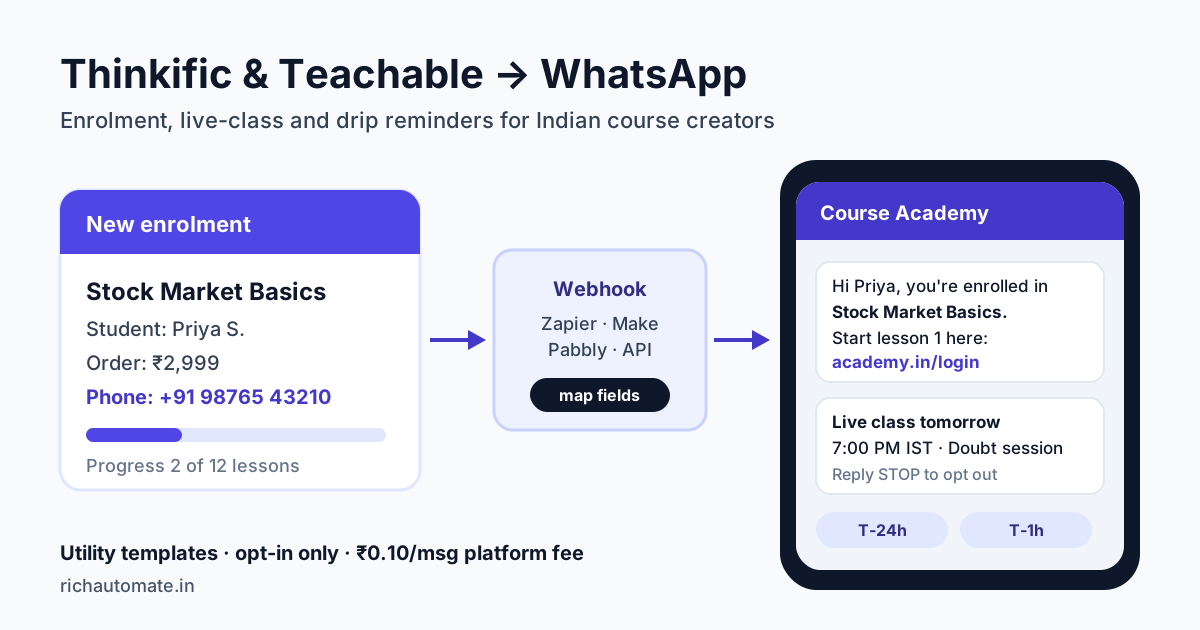
Thinkific and Teachable cannot send WhatsApp messages on their own. To send course reminders on WhatsApp, you connect an enrolment or order event (a webhook, or a Zapier, Make or Pabbly trigger) to a WhatsApp Business API platform, which then sends an approved template to students who opted in.
This guide is for Indian course creators, coaches and cohort-based academies selling on Thinkific or Teachable. It covers which events to use, how to capture the phone number neither checkout asks for, the five reminders worth automating, what it costs in rupees, and the mistakes that get templates rejected or numbers flagged.
Why course creators in India move reminders to WhatsApp
Course platforms send email by default: a welcome mail, a receipt, maybe a "new lesson available" notice. For an Indian audience, email is the weak channel. Many students sign up with an address they rarely open, and course mails land in the Promotions tab next to dozens of others. The result is familiar to every creator: students pay, never log in, and ask for a refund or simply drop off.
WhatsApp fixes the reach problem. India has more WhatsApp users than any other country, and a message from a course they paid for is read within minutes, not days. That matters most at four moments:
- Right after purchase, when the student is most motivated and needs the login link.
- Before a live class, where attendance for a Zoom or Meet session often drops below half without a reminder.
- In week two or three, when self-paced learners stall and quietly stop.
- At completion, the natural point to ask for a review or offer the next course.
If you also run live webinars to sell the course, the same setup works for those. Our guide on WhatsApp webinar reminders that boost attendance covers the pre-sale side in detail.
What Thinkific and Teachable can and cannot do
Be clear on this before you build anything. Neither platform has a built-in WhatsApp Business API sender, and neither offers a one-click WhatsApp connection to a provider. What they do offer is a way to tell another system that something happened.
| Capability | Thinkific | Teachable |
|---|---|---|
| Built-in WhatsApp sending | No | No |
| Webhooks for enrolment, order, signup, completion | Yes, plan-dependent | Yes, plan-dependent |
| Zapier app with triggers | Yes | Yes |
| Phone number at checkout by default | No, add a custom field | No, add a custom field |
| Live class scheduling | Via live lessons or a Zoom integration | Usually an external tool such as Zoom or our booking page |
| Abandoned-checkout event | Not reliably exposed | Not reliably exposed |
Feature access changes with plans on both platforms, so check the webhook and API section of your own plan before you start. If webhooks are not on your plan, the Zapier app usually exposes the same triggers.
Indian platforms such as Graphy and Classplus follow the same pattern: they push events out, and a WhatsApp platform does the sending. The steps below work for them too.
The three ways to connect them to WhatsApp
Every route has the same shape: course event → middleware or script maps the fields → WhatsApp API sends an approved template. The difference is who maintains the middle step.
| Route | Best for | Setup time | Monthly cost (approx.) |
|---|---|---|---|
| Zapier | Solo creators who want the simplest setup | 1-2 hours | Free tier for low volume; paid plans from about ₹1,700/mo |
| Make or Pabbly Connect | Creators with several courses and branching logic | 2-4 hours | Make from about ₹900/mo; Pabbly has one-time plans |
| Direct webhook to your own script | Academies with a developer and high volume | 1-2 days | Hosting only |
Middleware prices move with exchange rates and plan changes, so treat these as ballpark figures and check each vendor's pricing page.
On the WhatsApp side, RichAutomate gives you two entry points. The first is the template send endpoint, POST /api/v1/send-template, which takes the phone number, template name and variables. The second is an Incoming Webhook trigger on a chatbot flow, POST /api/v1/public/flows/{token}/trigger, which starts a multi-step flow, for example a welcome message followed by a lesson nudge three days later.
Whichever you choose, a mapper step is always needed. The course platform's payload names fields its own way, such as user.first_name or student_email, and the WhatsApp API needs a clean phone number plus template variables in the right order. If you are new to this, our Zapier WhatsApp integration setup guide and Make.com WhatsApp integration guide walk through the mapper screen by screen.
Step-by-step: enrolment to WhatsApp in under an hour
Here is the Zapier route for a new Thinkific enrolment. Teachable works the same way with its own trigger names.
- Add the phone field. In your checkout or signup settings, add a required phone number field with a short note: "We'll send your login and class reminders on WhatsApp." Add a separate opt-in checkbox. Do not pre-tick it.
- Create and submit the template. In RichAutomate, create a utility template such as: "Hi {{1}}, you're enrolled in {{2}}. Log in here to start lesson 1: {{3}}. Reply STOP to opt out." Approval usually takes minutes to a few hours.
- Set the trigger. In Zapier, choose the Thinkific app and the "New Enrollment" trigger, or Teachable's equivalent. Pull a test record.
- Clean the phone number. Add a Formatter step that strips spaces and dashes and adds
+91when a 10-digit Indian number arrives without a country code. This one step prevents most failed sends. - Add a filter. Continue only if the opt-in field is true. This is your consent record in practice.
- Send. Add a Webhooks by Zapier POST action to the send-template endpoint with your API key, the cleaned number, the template name and the three variables mapped from the enrolment.
- Test with your own number first. Enrol yourself in a free or ₹1 test course and confirm the message arrives with the right name and link.
Once this works, every other reminder is a copy of the same Zap with a different trigger, delay or template.
The five reminders worth automating
More messages is not better. Students mute or block senders that over-message, and blocks lower your quality rating with Meta. These five cover almost everything a course business needs.
Send these messages on WhatsApp, from your own number
We get your templates approved on the official WhatsApp API and set up your first broadcast with you. ₹0 platform fee, you pay only Meta's per-message rate.
| Reminder | Trigger | Timing | Category |
|---|---|---|---|
| Enrolment confirmation + login link | New enrolment or order | Immediately | Utility |
| Live class reminder | Scheduled class time | T-24h and T-1h | Utility |
| Stalled-learner nudge | No lesson completed in 7 days | Once, day 7-10 | Utility if it only links to their course |
| Completion + certificate | Course completed | Immediately | Utility |
| Review request or next-course offer | Course completed | 2-3 days later | Marketing |
Live class reminders need a schedule source
The live class reminder is the one creators ask about most, and the one that needs extra thought. Thinkific and Teachable do not always know when your live session happens. If you schedule classes in Zoom, Google Calendar or our booking page, that tool is the trigger, not the course platform. Use a scheduled Zap or a Make scenario that runs daily, reads tomorrow's sessions and sends T-24h reminders to enrolled students, then a second one for T-1h.
For a cohort course with fixed dates, the simplest route is often a flow: when the enrolment webhook fires, the flow sends the welcome message and then waits until each class date to send the reminder. That keeps the schedule in one place.
Stalled-learner nudges
Self-paced courses lose most students in the first two weeks. A single message on day 7 or 10 that says "You're 2 lessons in. Lesson 3 takes 12 minutes. Pick up here: [link]" brings a meaningful share back. Keep it to one nudge. A second or third reads as spam, and the student who ignores one will usually block the next. Our cohort retention lifecycle guide goes deeper on sequencing these messages.
What it costs: a real example
Take a Hindi-medium stock-market course creator in Jaipur selling a ₹2,999 self-paced course plus a weekly live doubt session. In a typical month they get 300 new enrolments.
- Enrolment confirmations: 300 utility messages
- Live class reminders: 4 sessions × 2 reminders × about 250 active students = 2,000 utility messages
- Stalled-learner nudges: about 120 utility messages
- Completion messages: about 90 utility messages
- Review or next-course offers: about 90 marketing messages
That is 2,510 utility and 90 marketing messages, or 2,600 in total. On Client Pay, the platform fee is ₹0.10 per message and Meta bills its own template rate directly to you. In India, a utility template is about ₹0.115 and a marketing template about ₹0.86 per message.
- RichAutomate platform fee: 2,600 × ₹0.10 = ₹260
- Meta utility charge: 2,510 × ₹0.115 ≈ ₹289
- Meta marketing charge: 90 × ₹0.86 ≈ ₹77
- Optional plan: Starter ₹499/mo or Pro ₹899/mo, GST-inclusive
- Middleware: free to about ₹1,700/mo depending on tool and volume
All in, roughly ₹600 to ₹2,500 a month. If better live-class attendance and fewer drop-offs save just one refund on a ₹2,999 course, the setup has paid for itself. Setup on RichAutomate is ₹0, and the 14-day free trial needs no card. Meta's rates change from time to time, so check the current rate card before you budget.
Consent, templates and Meta's rules
Course creators get into trouble here more than anywhere else, usually by importing an old student list and blasting a launch offer to everyone.
- Opt-in must be explicit. A phone number in a checkout form is not consent on its own. Meta requires a clear opt-in to WhatsApp messages from your business, and India's DPDP Act expects consent to be specific and given through a clear affirmative action. Keep the checkbox, and store the date and source with the contact.
- Keep utility templates factual. "Your class starts at 7 PM, join here" is utility. "Your class starts at 7 PM, and use code NEXT20 for 20% off our advanced course" will be recategorised as marketing. Put offers in a separate marketing template.
- Old lists need fresh consent. Students who bought two years ago through email never agreed to WhatsApp. Ask them by email first, with a link to opt in.
- Honour STOP immediately. Unsubscribes should update the contact the same day. Repeated messages after a STOP lead to blocks and reports.
- Never promise outcomes Meta controls. No provider can guarantee a number will never be restricted. Following the opt-in and quality rules is what keeps it healthy.
For the wider picture on how education businesses use WhatsApp beyond reminders, see our WhatsApp for EdTech onboarding and conversion playbook.
Common mistakes and how to avoid them
- No country code. Indian students type 10 digits. Without
+91, the send fails. Fix it in the Formatter step, not by hand. - International students. If you sell globally, don't add
+91blindly. Use a country dropdown on the phone field, or check the length before formatting. - Duplicate triggers. Some platforms fire both an order and an enrolment event for one purchase. Pick one trigger per message, or you will send the welcome twice.
- Wrong variable order. Template variables are positional. If {{1}} is the name and {{2}} is the course, mapping them backwards sends "Hi Python Basics". Test every template with a real record.
- Blank variables. A missing first name makes Meta reject the send. Add a fallback such as "there" in the mapper.
- Reminders for cancelled or refunded students. Add a filter on enrolment status so refunded students stop getting class reminders.
Course platform webhooks vs WhatsApp-first enrolment
Some creators skip the course platform's checkout for Indian buyers altogether: they take payment through a Razorpay link on WhatsApp, then add the student to the course manually or by API. That works when most sales already start in a WhatsApp chat.
If your course platform is the source of truth for students, keep it and use webhooks plus middleware as described above. If most of your buyers come from Instagram or ads straight into a WhatsApp chat, a WhatsApp-first flow that collects the number at the very first message removes the missing-phone problem entirely. RichAutomate's native Razorpay integration lets you send the payment link in the same chat. Our roundup of the best WhatsApp API for education in India compares providers for both setups.
Either way, start small: get one utility template approved, wire the enrolment confirmation, and test with your own number. Most creators have the first reminder live in an afternoon, then add live-class and nudge messages over the next week. Start your 14-day free trial of RichAutomate, with no card needed, and send your first course reminder this week.