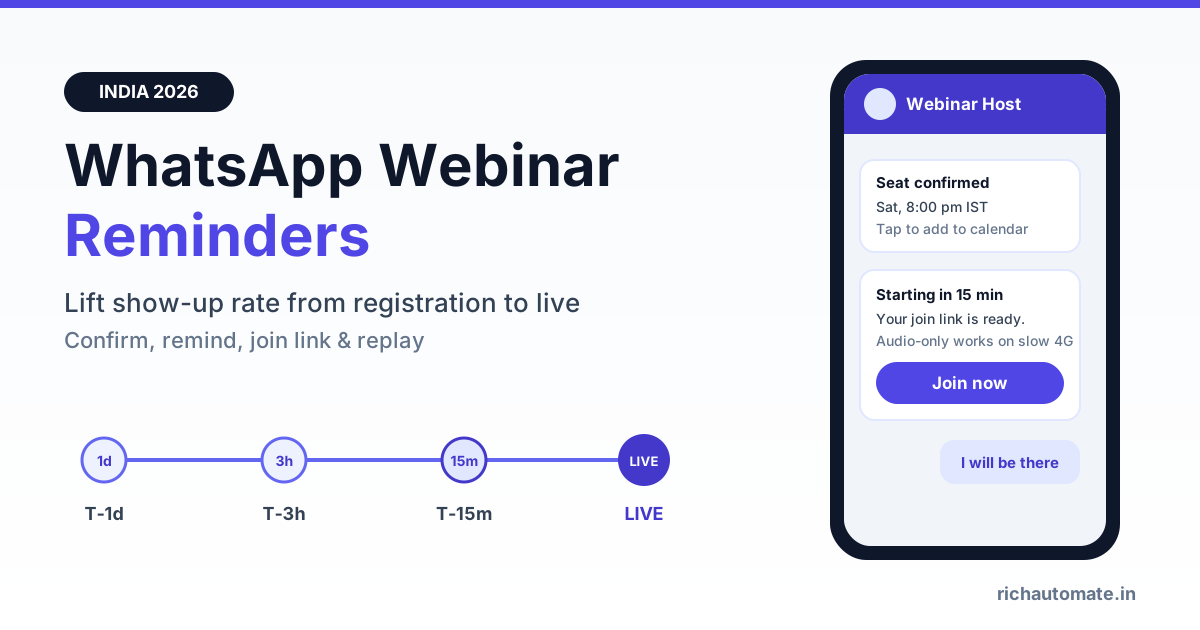
WhatsApp reminders increase webinar attendance because they reach registrants on the app they open dozens of times a day, and each reminder carries a one-tap join link right when the session is about to start. A simple cadence of confirmation, day-before, 3-hour, 15-minute and live-now messages, followed by a replay for no-shows, typically lifts show-up rate well above email-only reminders, though you should measure your own baseline before and after.
Indian webinar hosts know the pattern. A B2B SaaS demo gets 400 registrations and 90 people on the call. A coaching institute runs a free masterclass, 2,000 sign up, and the room feels empty. A financial advisor hosts a Sunday tax-planning session and half the attendees are still searching their inbox for the link at 11:05 am. The problem is rarely interest. People registered because they wanted to attend. They simply forgot, could not find the link, or joined late on a weak Jio connection and gave up. This guide shows how to fix that with a WhatsApp reminder sequence: registration, confirmation, reminder cadence, join link, live-now nudge, no-show replay and a clean handoff to sales, with template categories and rupee costs.
Why webinar show-up rates are low in India
Registrations are cheap. A free webinar asks for a name, phone and email, and a click costs the registrant nothing. That is why show-up rates for free online events are often low, and why the gap between "registered" and "attended" is the most expensive leak in an event funnel. Every registrant who does not attend is ad spend, landing-page work and speaker time that produced nothing.
In our experience, the reasons cluster into a few buckets:
- The reminder was never seen. Email reminders land in Promotions or spam, and SMS reminders from unknown sender IDs are easy to ignore among bank alerts and OTPs.
- The link was lost. The registrant got the join link once, a week ago, and cannot find it at 7:58 pm.
- Timing drift. People register on Tuesday for a Saturday session and their plans change. A single reminder the morning of the event is too late to reschedule their evening.
- Join friction on mobile. Many Indian attendees join from a phone on mobile data. If the platform asks them to install an app or sign in, a share of them drop off before the session loads.
- No reason to show up live. If people assume a recording will be emailed anyway, the live session loses urgency.
WhatsApp addresses the first four directly. The fifth is a content decision: give live attendees something the replay will not have, such as live Q&A, a bonus resource or a time-limited offer.
The registration step: opt-in and data you need
Everything downstream depends on capturing a clean WhatsApp number and a documented opt-in at the moment of registration. Meta requires opt-in before a business sends template messages, and a clear opt-in also keeps block and report rates down, which protects your number's quality rating.
- Add a WhatsApp opt-in checkbox. Something like "Send me the join link and reminders on WhatsApp". Keep it unticked by default and store the timestamp, form URL and campaign source.
- Validate the number. Default the country code to +91, strip spaces and leading zeros, and reject obviously invalid numbers at the form so reminders do not fail silently later.
- Capture language preference. A dropdown for English, Hindi or a regional language lets you send reminders in the language the registrant is most comfortable with. For tier-2 and tier-3 audiences this often matters more than copy tweaks.
- Record the session and slot. If you run multiple sessions (for example 11 am and 8 pm IST), store the chosen slot so each reminder carries the right time.
- Tag the source. Ads, organic, partner, email list or Click-to-WhatsApp. You will want show-up rate by source later.
You can also let people register inside WhatsApp itself. A Click-to-WhatsApp ad or a QR code opens a chat, the bot asks two or three questions and confirms the seat. Because the user messaged first, a 24-hour customer-service window opens and the confirmation can be sent as a free-form reply.
The reminder cadence: T-7d to live and replay
The goal is to be present at every moment a registrant might forget, without becoming noise. Here is a cadence that works for most Indian webinars and live sessions. Template category shown is the likely category if the message is purely transactional; Meta makes the final call at review.
| When | Message | Buttons | Likely template category |
|---|---|---|---|
| At registration | Seat confirmed: event name, date, time in IST, what to expect | Add to calendar, Remind me | Utility (or free-form if the user messaged first) |
| T-7 days (optional) | Reminder for early registrants, with agenda | Still attending, Change slot | Utility |
| T-1 day | Tomorrow at 8 pm IST, one-line agenda, join link | I will be there, Change slot | Utility |
| T-3 hours | Today at 8 pm, tips to join on mobile | Remind me 15 min before | Utility |
| T-15 minutes | Starting soon, one-tap join link | Join now (URL button) | Utility |
| Live (T+0 to T+5 min) | We are live now, join link again | Join now | Utility |
| T+1 hour to next morning | Replay link for no-shows; thank-you for attendees | Watch replay, Talk to us | Utility if replay only; Marketing if it includes an offer |
A few details make this cadence work:
- Send in IST and respect quiet hours. Schedule by the registrant's slot, and avoid reminders late at night. A T-1d reminder at 7 pm for an 8 pm event the next day is better than one at 11 pm.
- Suppress people who already joined. If your webinar platform tells you who is in the room, do not send the live-now nudge to them.
- Keep the link identical. Use the same join URL in every message so people can scroll up and find it.
- Make "Change slot" real. For recurring sessions, a rescheduled attendee is far better than a no-show.
If you already run appointment reminders for clinics or salons, the logic is similar, but webinars have a hard start time and many more people per slot. Our guide to WhatsApp appointment reminders that cut no-shows covers the one-to-one version.
Buttons, the 24-hour window and free replies
Quick-reply buttons do more than make reminders easy to act on. When a registrant taps "Remind me", "I will be there" or "Add to calendar", that reply is an inbound message, and it opens a 24-hour customer-service window. Replies you send inside that window are free of Meta charge, so the follow-up messages ("Great, here is your calendar link", "We will ping you 15 minutes before") cost only your platform fee.
This has two practical effects. First, a well-placed button on the T-1d reminder can make the T-15m and live-now messages free-form service replies for everyone who tapped, rather than paid templates. Second, a registrant who replies is signalling intent, which is a useful input for your sales team later. We explain how the window works, and how to design flows that keep it open, in our breakdown of WhatsApp 24-hour window session economics.
"Add to calendar" usually works best as a URL button pointing to a calendar file or a Google Calendar link generated for the session. Calendar entries act as a second, independent reminder on the phone, and they survive even if the registrant mutes your chat.
Utility vs marketing: keep reminders transactional
This is where many hosts lose money. A confirmation or reminder for an event the user signed up for is generally eligible for the utility category, because it relates to a specific action the user took. The moment you add "Use code WEBINAR20 for 20% off the course" or "Also check our new batch", the message is promotional, and Meta is likely to classify it as marketing, which costs more and counts against marketing delivery limits.
- Utility-safe content: event name, date and time in IST, join link, agenda, how-to-join tips, change-slot option.
- Marketing triggers: discounts, course or product upsells, "limited seats" urgency for another product, cross-promotion of other events.
Meta decides the category at template review and can reclassify templates it thinks are mislabelled. Keep your reminder templates clean and send any offer as a separate marketing message only to the people who attended or engaged. For how reclassification works and how to avoid it, read our guide to WhatsApp template category reclassification.
Get a 1-minute BSP audit on WhatsApp
Drop your WhatsApp number — we line-item your current invoice against Meta India rates in under 60 seconds. India-hosted, DPDP-compliant.
Email vs SMS vs WhatsApp reminders
Most hosts should not drop email. Email is still where calendar invites live and where many B2B attendees expect event details. The question is what to add on top. Here is how the channels usually compare for Indian webinar audiences. The figures are typical, directional ranges from what we see across senders, not a benchmark study, and they vary a lot by audience and list quality, so measure your own.
| Factor | SMS | ||
|---|---|---|---|
| Typical open or read rate (directional) | Often 15-30% | Delivered widely, but read rates hard to measure | Often 70-90% read |
| One-tap join link | Yes, but buried in the inbox | Yes, plain link, looks like spam to some | Yes, URL button with brand name |
| Two-way replies | Rarely used | Limited | Buttons and free text, opens 24h window |
| Rich content (agenda, speaker image) | Yes | No | Yes, image header and buttons |
| Language flexibility | Yes | Regional scripts can break or cost more | Yes, Hindi and regional templates |
| Regulatory setup in India | Sender domain setup | DLT registration of headers and templates | Meta template approval and opt-in |
| Best role | Calendar invite, full details | Fallback for non-WhatsApp numbers | Primary reminder and join nudge |
A sensible stack: email for the calendar invite and full details, WhatsApp for confirmation, reminders and the join link, and SMS only as a fallback for numbers that are not on WhatsApp.
Join-link tips for low bandwidth and regional audiences
Getting someone to click "Join now" is only half the job. The session has to load on their phone. Put these tips in the T-3h reminder, briefly:
- Link to a browser join where possible. Many webinar platforms let attendees join from the mobile browser. Say so, so people do not think they must install an app.
- Suggest Wi-Fi or a stable 4G spot. A one-line "Join from a place with good network; audio-only works if video is slow" helps attendees on crowded Jio or Airtel cells.
- Keep the link short and branded. A recognisable domain looks safer than a long tracking URL.
- Offer an audio-only or YouTube Live fallback. For large free masterclasses, a parallel stream can catch people whose connection cannot handle the main platform.
- Send in the registrant's language. A Hindi or Tamil reminder with the same join link often gets more taps than an English one for regional audiences. Get each language version approved as its own template.
No-show replay and post-event sales handoff
The event does not end when the session does. Two groups need different messages:
- No-shows: send a replay link within a few hours or the next morning, with a short "here is what you missed" line. Keep it transactional so it can stay in the utility category.
- Attendees: send a thank-you with the slides or resource you promised, plus a "Talk to us" or "Book a call" button.
Anyone who taps "Talk to us", asks a question during the session, or watched most of the replay is a warm lead. Pass them to sales with context: which event, attended live or replay, what they asked. This is where the reminder sequence starts paying for itself, because the same WhatsApp thread becomes the sales conversation. Score those leads the same way you score inbound enquiries; our WhatsApp lead qualification and scoring playbook shows a points model you can reuse.
Any promotional follow-up, such as a course discount valid for 48 hours, should be a separate marketing template sent only to engaged segments. Blasting the full registrant list with offers raises opt-outs. See how to split audiences by behaviour in our guide to WhatsApp broadcast audience segmentation.
Cost per 1,000 registrants in ₹
Here is a worked example for 1,000 opted-in registrants using RichAutomate rates. We assume five utility reminders per registrant (confirmation, T-1d, T-3h, T-15m and live-now), a replay message to an estimated 500 no-shows, and one marketing offer to an estimated 400 engaged attendees. Your numbers will differ; this is an illustration, not a benchmark.
| Message group | Messages | SaaS Pay (all-in) | Client Pay platform fee |
|---|---|---|---|
| 5 utility reminders x 1,000 registrants | 5,000 | ₹1,500 (at ₹0.30) | ₹500 (at ₹0.10) plus Meta charges |
| Replay to no-shows (utility) | 500 | ₹150 (at ₹0.30) | ₹50 plus Meta charges |
| Post-event offer to engaged attendees (marketing) | 400 | ₹480 (at ₹1.20) | ₹40 plus Meta charges |
| Service replies after button taps (inside 24h window) | Varies | Platform fee only | ₹0.10 each, no Meta charge |
| Total (templates) | 5,900 | About ₹2,130 | About ₹590 plus Meta charges |
On SaaS Pay the total is roughly ₹2 per registrant for the full sequence. On Client Pay you pay Meta directly for template charges; Meta's per-message utility and marketing rates for India change from time to time, and Meta has said utility templates sent inside an open customer-service window are not charged, so check Meta's current rate card before you budget. Either way, if the sequence moves even a few percentage points of registrants into the live room, it usually costs far less than the ad spend it rescues. To choose between the two billing models, read Client Pay vs SaaS Pay billing for WhatsApp Business. RichAutomate has ₹0 setup and ₹0 monthly fee; full rates are on the RichAutomate pricing page.
Metrics, mistakes and a quick setup checklist
Track these per event and per source:
- Show-up rate: live attendees divided by registrants. Compare against your email-only baseline.
- Replay recovery: share of no-shows who watched the replay.
- Button engagement: taps on "I will be there", "Remind me" and "Join now". A falling tap rate suggests reminder fatigue.
- Opt-out and block rate: if it rises, cut a reminder or tighten the copy.
- Post-event conversations and pipeline: the number that tells you whether the webinar produced revenue.
Common mistakes
- Adding offers to reminders. It can push the template into marketing and annoys people who just want the link.
- Too many messages. Six to seven touches around a single event is usually the ceiling.
- Messaging without opt-in. Importing a registrant list with no WhatsApp consent invites blocks and reports. No provider can guarantee delivery or protect a number that sends unwanted messages.
- Stale links. Changing the meeting link after reminders go out strands people. Lock the link early.
- Ignoring replies. Registrants will ask questions in the chat. Route them to a person or a bot answer, not silence.
Setup checklist
- Add the WhatsApp opt-in checkbox and language field to your registration form.
- Create and submit confirmation, T-1d, T-3h, T-15m, live-now and replay templates, in each language you need.
- Connect your form or webinar platform so registrations create contacts with session, slot and source tags.
- Schedule the cadence relative to each slot's start time in IST.
- Build the post-event branch: replay for no-shows, thank-you and "Talk to us" for attendees, handoff to sales.
Start free on RichAutomate
RichAutomate gives Indian businesses the WhatsApp Business API with scheduled template campaigns, quick-reply and URL buttons, Hindi and regional templates, contact tags for session and slot, a no-code flow builder for replay and sales handoff, and a shared inbox for questions, with ₹0 setup and ₹0 monthly fee. Set up your webinar reminder sequence once and reuse it for every session. Start free on RichAutomate and send your first reminder before your next event.