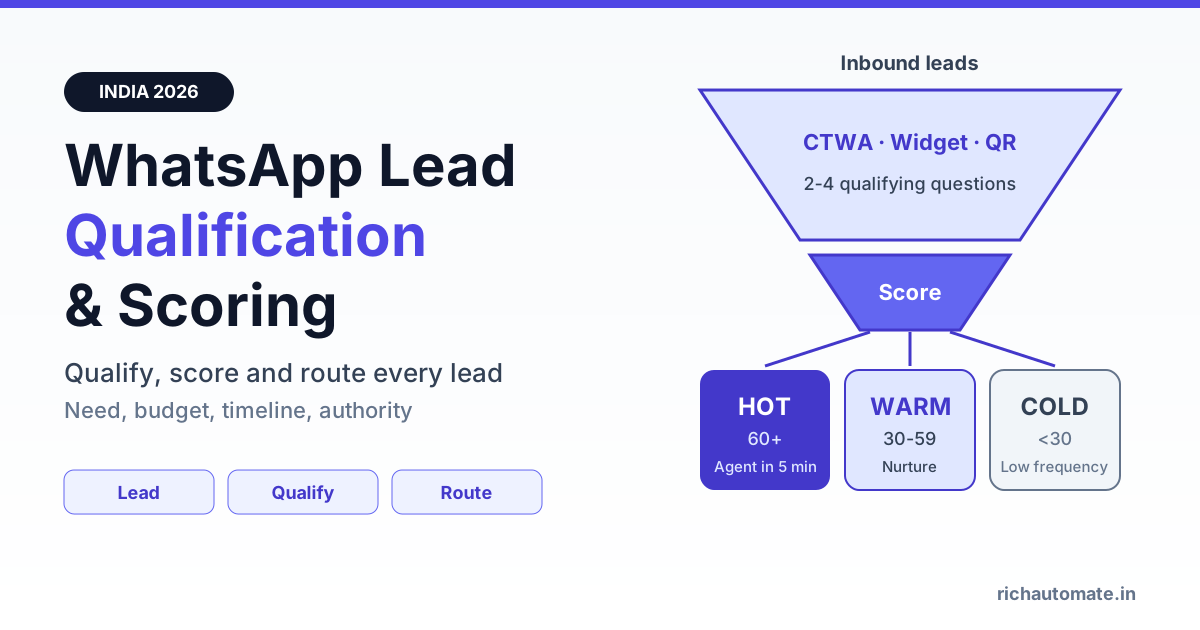
To qualify leads on WhatsApp, reply to every inbound enquiry within seconds and ask 2-4 short questions about need, budget, timeline and decision authority, using quick-reply buttons or a WhatsApp Flows form. Each answer and behaviour adds points to a lead score, and the score routes the lead: hot leads go to a human agent within 5 minutes, warm leads get a nurture sequence and cold leads move to a low-frequency list.
Most Indian businesses already get plenty of WhatsApp leads from Click-to-WhatsApp ads, website chat widgets, QR codes on packaging and shop counters, and lead forms. The problem is not volume. It is that sales teams spend their day chatting with people who were never going to buy, while the one serious buyer waits three hours and books with a competitor. This playbook shows how to fix that with a qualification bot, a points-based score, clear routing rules, junk filtering, CRM sync and a 30-day rollout, with cost math in rupees.
Adapting BANT for Indian SMB, D2C and B2B leads
BANT (Budget, Authority, Need, Timeline) is the classic sales qualification framework. It works on WhatsApp, but not in its textbook form. Nobody wants to be asked "What is your budget?" as the first message in a chat. Indian buyers in particular often avoid stating a number early because they expect to negotiate. So adapt each letter into a softer, button-friendly question, and ask the easiest one first.
- Need first. "What are you looking for?" with 3-4 buttons: product A, product B, pricing info, something else. This is the easiest question to answer and it filters wrong-fit enquiries immediately.
- Timeline second. "When do you plan to buy?" with buttons like This week, This month, Just exploring. Timeline is the strongest single predictor of a near-term sale for most SMBs.
- Budget as bands, not numbers. "Which range suits you?" with price bands that match your catalogue, such as Under ₹25,000, ₹25,000-75,000, Above ₹75,000. Bands feel less intrusive than an open question.
- Authority only for B2B. "Are you the decision maker, or evaluating for your team?" For D2C and most B2C, skip authority entirely because the buyer is the chat user.
How this looks by business type:
- D2C and e-commerce: need (which product or concern), timeline (buying now or browsing), and maybe a size or city question. Two questions are often enough.
- Real estate, education, clinics and local services: need, location or branch, timeline and budget band. Location matters because a lead outside your service area is cold no matter how keen.
- B2B and SaaS: need, team size or monthly volume, timeline and authority. A GST-registered business with a named use case is worth far more than an anonymous "price?" message.
Keep it to four questions at most. Every extra question loses some leads, and you can always collect details later once a human agent takes over.
WhatsApp Flows vs chatbot buttons vs web forms
There are three ways to collect qualifying answers. Each has a place, and the right choice depends on how many fields you need and where the lead came from.
| Factor | Chatbot quick-reply buttons | WhatsApp Flows form | Web form (landing page) |
|---|---|---|---|
| Best for | 2-3 simple questions | 4+ fields, dropdowns, date pickers | Long forms, SEO traffic |
| Feel for the lead | Conversational, one tap per answer | Native form inside WhatsApp | Leaves the chat, loads a page |
| Drop-off risk | Lowest | Low if kept to 1-2 screens | Highest on mobile data |
| Structured data for scoring | Yes, one field per button | Yes, all fields in one submit | Yes, but needs phone matching |
| Typical use | First-touch qualification | Demo booking, site visit, quote request | Ads that do not use Click-to-WhatsApp |
A practical pattern: start with two button questions (need and timeline) so the lead feels a conversation, then open a short Flow for budget band, city and preferred callback slot. We cover form design in detail in our guide to WhatsApp Flows for in-chat lead capture forms.
A points-based lead scoring model you can copy
Lead scoring turns answers and behaviour into one number your team can act on. You do not need machine learning to start. A 100-point model built from explicit answers plus a few behavioural signals is enough for most Indian SMBs, and it is easy to explain to a sales team. Here is a starting table. Adjust the points to your business after the first month.
| Signal | Answer or behaviour | Points |
|---|---|---|
| Need | Picked a specific product or service | +20 |
| Need | "Just exploring" or "something else" | +5 |
| Timeline | This week or within 15 days | +25 |
| Timeline | Within 1-3 months | +10 |
| Budget band | Fits your core price range | +20 |
| Budget band | Below your minimum | -10 |
| Authority (B2B) | Decision maker or owner | +15 |
| Location | Inside your service area or delivery zone | +10 |
| Behaviour | Replied to each question within 2 minutes | +5 |
| Behaviour | Tapped "See pricing" or opened the catalogue | +10 |
| Behaviour | Asked for a demo, call or site visit | +20 |
| Behaviour | No reply for 24 hours mid-qualification | -10 |
| Junk signal | Job-seeker or scam keywords, wrong country | -50 (disqualify) |
Suggested thresholds: 60 or more is hot, 30-59 is warm, below 30 is cold. A lead who wants a specific product this week and fits your budget scores 65 before any behaviour, which is exactly the person your best salesperson should call. A lead who is "just exploring" with a 1-3 month timeline scores 15 before budget and behaviour and usually lands warm or cold, so it should not interrupt anyone.
Two rules make scoring reliable. First, store every answer as a contact attribute or tag, not just the total, so you can recalculate if you change the weights. Second, let one explicit request override the score: if a lead types "please call me", route them to a human regardless of the number.
Hot, warm and cold routing
A score is only useful if it changes what happens next. Define routing rules once, automate them, and make the response-time promise explicit to your team.
| Tier | Score | Action | Response target | Messages used |
|---|---|---|---|---|
| Hot | 60+ | Assign to a sales agent in the shared inbox, notify on mobile | Within 5 minutes during working hours | Free-form service replies inside the 24-hour window |
| Warm | 30-59 | Nurture sequence: case study, offer, reminder, then re-score | Automated, over 7-14 days | Marketing and utility templates |
| Cold | Below 30 | Low-frequency list, monthly update at most | No human time | Occasional marketing template |
| Junk | Disqualified | Tag, close conversation, exclude from all sends | None | One polite closing reply |
Hot routing is where most money is won or lost. When a qualified buyer is ready, a reply in five minutes feels like service and a reply in five hours feels like indifference. Use round-robin or skill-based assignment so hot leads never sit in an unowned queue, and set an escalation if nobody picks up within the target. Our guide to the WhatsApp shared team inbox covers assignment rules, SLAs and agent notifications.
Get a 1-minute BSP audit on WhatsApp
Drop your WhatsApp number — we line-item your current invoice against Meta India rates in under 60 seconds. India-hosted, DPDP-compliant.
Outside working hours, tell hot leads honestly when a person will call ("Our team will call you by 10:30 am tomorrow") and offer a booking slot so the intent is captured instead of lost overnight.
Warm nurture should feel useful, not pushy. A good sequence for a warm lead might be: a short customer story on day 1, a pricing explainer or buying guide on day 3, a limited offer or free consultation on day 7, and a final "still interested?" button on day 14. Any reply or button tap re-scores the lead and can promote it to hot.
Filtering junk and scam leads before they reach sales
Click-to-WhatsApp ads are cheap per lead, but a meaningful share of those leads can be junk: job seekers who think your ad is a hiring post, people replying to scam-style "work from home" campaigns they confused with yours, bots, or numbers from outside your market. Some Indian advertisers find a large part of their daily CTWA leads are fake job enquiries. If sales has to read every one, qualification has already failed.
- Ask a separating first question. "Are you looking to buy, or looking for a job?" costs one tap and removes most job seekers politely.
- Keyword rules. Auto-tag replies containing words like job, vacancy, salary, part time, work from home or resume as junk and apply the -50 score.
- Country and format checks. Flag numbers outside your serviceable countries if you only sell in India.
- Never nurture junk. Exclude junk-tagged contacts from every campaign and custom audience. Sending marketing templates to people who never wanted them wastes money and invites blocks and reports.
- Fix the source. If junk stays above 15-20% of leads, the ad creative or targeting is attracting the wrong people. Our Click-to-WhatsApp ads ROI playbook covers creative and targeting fixes.
Filtering also protects your number. No provider can promise your number will never be restricted, but keeping unwanted messages away from people who did not ask for them is one of the best ways to keep your quality rating healthy.
Syncing lead score to your CRM
WhatsApp is where qualification happens, but the CRM is where your pipeline lives. Push the score, tier and each answer to the CRM as soon as qualification finishes, and update it whenever the score changes. At minimum sync: phone number, name, lead source (CTWA campaign, widget, QR, form), each qualifying answer, score, tier, assigned agent and timestamps for first reply and first human contact.
That gives your sales manager one view of pipeline by source and tier, and it lets you close the loop: when a deal is won or lost in the CRM, you can compare it with the WhatsApp score and tune your weights. See our walkthrough of WhatsApp CRM integration with HubSpot, Zoho and Salesforce for field mapping and webhook setup.
Cost per qualified lead in ₹
Messaging is the smallest part of lead qualification cost. Here is a worked example with estimated numbers for an Indian SMB running Click-to-WhatsApp ads. Your ad costs and conversion rates will differ, so treat these as illustrations, not benchmarks.
- Ad spend: ₹50,000 for the month, bringing about 1,000 WhatsApp conversations (an estimated ₹50 per conversation).
- Qualification bot: about 6 messages per lead inside the 24-hour window. Meta does not charge for these service replies. On RichAutomate Client Pay, the platform fee is ₹0.10 per message, so 6,000 messages cost about ₹600.
- Result: 150 junk leads filtered, 350 qualified (warm or hot), of which 120 are hot.
- Warm nurture: 230 warm leads receive 4 marketing templates each. On SaaS Pay at ₹1.20 per marketing message, that is 920 messages, or ₹1,104.
- Utility reminders: 120 demo or visit confirmations at ₹0.30 each on SaaS Pay, about ₹36.
Total: about ₹51,740, of which ₹50,000 is ads. That works out to roughly ₹148 per qualified lead and about ₹431 per hot lead. Messaging adds under ₹5 per qualified lead. The bigger saving is human time: your team speaks to 120 hot leads instead of 1,000 random chats. If you are deciding between paying Meta on your own card or an all-inclusive rate, read Client Pay vs SaaS Pay billing. RichAutomate has ₹0 setup and ₹0 monthly fee; full rates are on the RichAutomate pricing page.
Metrics to track and common mistakes
Track a small set of numbers weekly, split by lead source:
- Speed-to-lead: time from first inbound message to first bot reply (should be seconds) and to first human reply for hot leads (target under 5 minutes).
- Qualification completion rate: share of leads who answer all questions. If it drops below about 50-60%, your questions are too many or too intrusive.
- Qualification rate: share of leads scoring warm or hot.
- SQL rate: share of hot leads your sales team accepts as genuine sales-qualified leads. A low SQL rate means your score is too generous.
- Hot-to-won conversion and cost per won deal: the numbers that prove the system pays for itself.
- Junk rate by campaign: tells you which ads to fix or pause.
Common mistakes
- Asking budget first. It feels like an interrogation. Start with need.
- Too many questions. Five or six questions before a human appears kills completion. Stay at two to four.
- No human escape. Always offer a "Talk to a person" button. A frustrated buyer stuck in a bot is a lost buyer.
- Scoring but not routing. A score that nobody acts on is decoration. Automate assignment and alerts.
- Never recalibrating. Compare scores with won deals every month and adjust weights and thresholds.
- Nurturing cold and junk leads. Blasting everyone wastes spend and hurts your quality rating.
30-day rollout plan
- Days 1-5: Define. Pick your 2-4 questions, write button options, set the scoring table and hot, warm and cold thresholds with your sales lead. Decide the response-time target.
- Days 6-12: Build. Create the qualification bot and optional Flow, add junk keyword rules, set up tags and contact attributes, and configure inbox assignment for hot leads. Get nurture templates approved.
- Days 13-18: Connect. Sync fields to your CRM, attach the bot to every entry point (CTWA ads, website widget, QR codes, forms) and tag each source separately.
- Days 19-25: Soft launch. Run on one campaign or source first. Read transcripts daily, fix confusing questions, and check that hot leads are reaching agents within target.
- Days 26-30: Review and scale. Compare score bands with actual outcomes, adjust weights and thresholds, then roll out to all sources.
Start free on RichAutomate
RichAutomate gives Indian businesses the WhatsApp Business API with a no-code chatbot builder, WhatsApp Flows, tags and contact attributes for scoring, a shared team inbox with assignment rules, and CRM sync, with ₹0 setup and ₹0 monthly fee. Build your qualification bot, route hot leads to your team in minutes and stop wasting sales time on chats that were never going to convert. Start free on RichAutomate and have your first scored lead in your inbox this week.