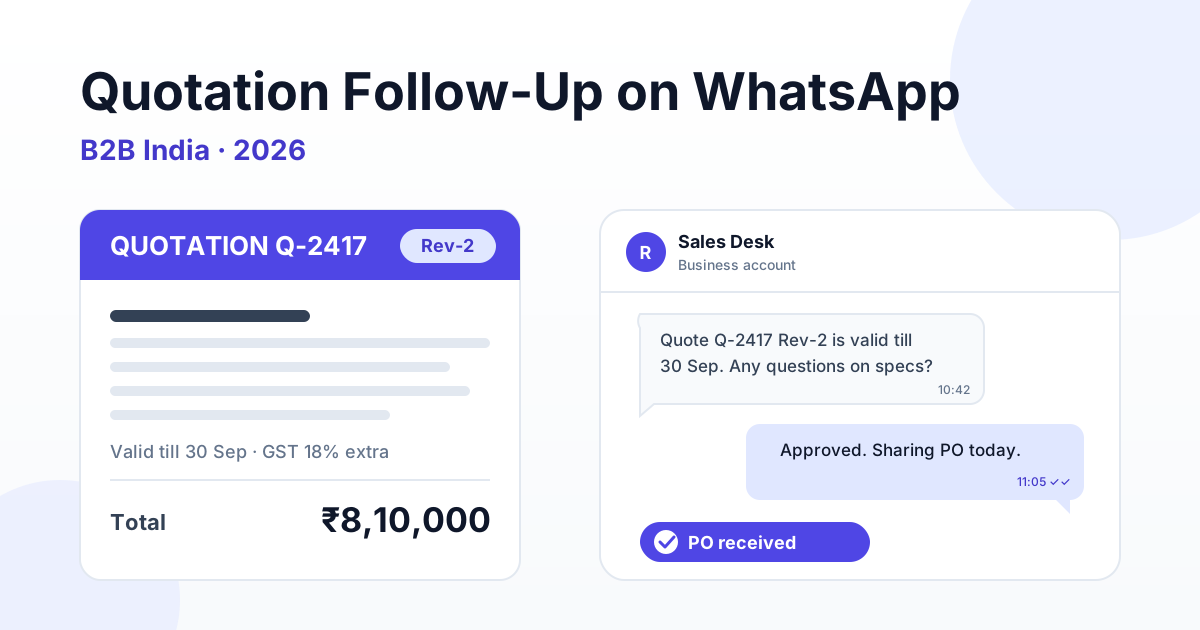
To follow up on a quotation on WhatsApp, send the PDF with a three-line summary (total, validity, delivery) on Day 0, check in on Day 2, add a value nudge on Day 5, remind the buyer before the validity date and close the loop on Day 14. Reply free-form while the buyer is actively chatting, switch to an approved utility template once the 24-hour window has closed, and log every revision and reply so you can measure quote-to-PO conversion.
That is the short answer. The rest of this guide is written for the seller side of Indian B2B: manufacturers, distributors, traders and service firms who send dozens or hundreds of quotations a month and watch most of them disappear into silence. We will walk through the quote-to-PO cycle, why quotes go cold, a day-by-day cadence, which message type to use at each step, how to handle commodity-linked price revisions, and how to measure whether any of it is working.
Why WhatsApp works for quotation follow-up in Indian B2B
Email is still where formal quotes and purchase orders live, but it is not where Indian buyers actually reply. A purchase manager at a mid-sized fabrication unit in Pune or a textile processor in Surat may have 200 unread emails and three WhatsApp chats open with vendors at any given time. In our experience, a clarification that takes four days on email often gets answered in forty minutes on WhatsApp.
The Business API version of WhatsApp adds what the phone app cannot: approved templates you can send after the chat goes quiet, shared team inboxes so the quote does not live on one salesperson's phone, delivery and read status for each message, and an audit trail you can push to your CRM. For quotations worth anywhere from ₹50,000 to ₹50 lakh, that visibility matters.
- Speed: buyers answer technical clarifications faster in chat than on email threads.
- Visibility: read status tells you whether the quote was even opened before you chase.
- Continuity: a shared inbox means the quote survives a salesperson going on leave.
- Structure: templates keep every follow-up consistent, on-brand and compliant.
The quote-to-PO cycle: five stages to track
Before you automate anything, agree internally on the stages a quotation moves through. Most Indian B2B deals follow the same five steps, even if the names differ between a steel trader and an IT services firm.
1. Quote sent
The PDF goes out with a quote number, line items, GST treatment, freight terms, payment terms, delivery lead time and a validity date. On WhatsApp, the PDF should always travel with a short text summary, because many buyers preview on mobile and never open the attachment.
2. Viewed
The message shows as read. This is a signal, not a commitment, but it tells you whether a follow-up should be "did you receive it?" or "any questions on the specs?"
3. Clarification
The buyer asks about material grade, make, HSN code, freight inclusion, or whether the rate is ex-works or delivered. Fast, accurate answers here win more deals than discounts do.
4. Negotiation
The buyer shares a competitor's number, asks for a better rate, longer credit or a lower MOQ. This is where revisions (Rev-1, Rev-2) are born and where version confusion kills deals.
5. PO or advance
The deal closes when a purchase order arrives or the advance payment lands. Once it does, the conversation moves from sales follow-up to order updates and, later, WhatsApp payment reminders for overdue invoices.
Why B2B quotes go cold in India
A cold quote is rarely a rejected quote. More often the buyer is stuck somewhere in their own process and your follow-up does not help them get unstuck. These are the causes we see most often and what fixes each one.
| Why the quote went cold | What is really happening | WhatsApp fix |
|---|---|---|
| Buyer is comparing three quotes | Procurement policy requires multiple vendors; yours is one of three PDFs on the desk | Day 0 summary that makes your quote easy to compare: total with GST, freight, lead time, validity |
| Purchase manager goes silent | Waiting on the user department or plant head to approve specs | Day 2 message offering a spec sheet or a quick call with your technical person |
| Approval chain is long | Quote needs sign-off from finance, the director or head office | Offer a one-page summary the buyer can forward internally |
| Budget timing | Purchase is being held for month-end, quarter-end or the next financial year budget | Ask directly when the budget opens and schedule the reminder for that week |
| GST, freight or validity confusion | Buyer cannot tell if 18% GST, loading or transport is included | State "₹4,20,000 + 18% GST, freight extra at actuals, valid till 15 Oct" in plain text |
| Price moved after quoting | Steel, copper or aluminium rates changed and the quote is now stale | Proactive revision message with a new validity date before the buyer asks |
| Wrong contact | The person you quoted is not the decision-maker | Qualify early; see our guide to WhatsApp lead qualification and scoring |
Notice that almost none of these fixes involve a discount. Most cold quotes need clarity or timing, not a lower price.
A 14-day WhatsApp quotation follow-up cadence
Here is a cadence that works for most B2B quotes between ₹1 lakh and ₹25 lakh. Very large project quotes run longer; repeat-order quotes for existing customers can be compressed to a week.
| Day | Message | Message type | Goal |
|---|---|---|---|
| Day 0 | Quote PDF plus summary: quote number, total with GST, delivery lead time, validity date | Free-form if the buyer messaged you in the last 24 hours; otherwise a utility template | Make the quote easy to open, compare and forward |
| Day 2 | "Did the quote reach the right person? Happy to share the spec sheet or test certificate." | Utility template (window has usually closed) | Confirm receipt and surface clarifications |
| Day 5 | Value nudge: a relevant test report, delivery commitment, or a similar job delivered locally | Utility if it stays about this quote; marketing if it promotes other products or offers | Differentiate beyond price |
| 2 days before validity | "Quote Q-2417 is valid till 30 Sep. Rates are linked to steel prices, so we can hold them until then." | Utility template | Create an honest, factual deadline |
| Day 14 | Close the loop: "Shall we close this quote for now, or is the requirement still open?" | Utility template | Get a clear yes, no or later, and a reason |
Two rules make this cadence work. First, any reply from the buyer resets the clock: you switch to a live conversation and pause the automated steps. Second, the Day 14 message should make "no" easy to say. A clear "we went with another vendor on price" is far more valuable than another month of silence, because it tells you something about your pricing.
Personalise each step with template variables such as the buyer's company name, quote number, total and validity date. Our guide to WhatsApp template variables and personalisation covers how to structure these so templates get approved and still read like a human wrote them.
A sample Day 0 summary message
"Hello, sharing quotation Q-2417 for 12 MT MS plates (IS 2062 E250). Total: ₹7,85,000 + 18% GST. Freight: included to your Chakan plant. Delivery: 10 working days from PO. Valid till: 30 Sep 2026. PDF attached. Reply here for any spec or rate clarification."
Five lines, zero ambiguity. The buyer can forward this to their director without opening the PDF, which is exactly what you want.
Get a 1-minute BSP audit on WhatsApp
Drop your WhatsApp number — we line-item your current invoice against Meta India rates in under 60 seconds. India-hosted, DPDP-compliant.
Utility, marketing or free-form: which message to use and what it costs
WhatsApp Business API messages fall into categories, and the category decides both whether you can send the message and what it costs. Getting this right keeps your follow-up affordable and keeps templates from being rejected.
| Message type | When you can use it | Quote-cycle example | Meta charge | RichAutomate fee |
|---|---|---|---|---|
| Free-form (service window) | Within 24 hours of the buyer's last message | Answering a clarification, sharing Rev-1 while the buyer is chatting | Free from Meta | Client Pay: ₹0.10/msg platform fee |
| Utility template | Any time, about a specific transaction the buyer requested | Day 2 check, validity reminder, revision notice, Day 14 close-the-loop | Per-message Meta rate; confirm current Meta rates | SaaS Pay: ₹0.30/msg, or Client Pay: ₹0.10/msg + Meta billed to you |
| Marketing template | Any time, to opted-in contacts | New product range, festive rate offer, clearance stock | Per-message Meta rate, higher than utility; confirm current Meta rates | SaaS Pay: ₹1.20/msg, or Client Pay: ₹0.10/msg + Meta billed to you |
The practical lesson: keep quote reminders transactional. A validity reminder that says "Quote Q-2417 is valid till 30 Sep" is a utility message. Add "and get 5% off our new range" and Meta will likely classify it as marketing, which costs more on SaaS Pay and can be rate-limited. Send offers separately, if at all.
To put the numbers in context, take a typical distributor sending 300 quotes a month with two utility follow-ups and one marketing nudge each on SaaS Pay: 300 × (2 × ₹0.30 + ₹1.20) = ₹540 a month in RichAutomate fees. If the average order is ₹3 lakh, one extra PO pays for years of follow-ups. You can see the full model on our pricing page. And every clarification the buyer starts opens a free service window, so a chatty buyer is also a cheap buyer; our guide to 24-hour window cost optimisation explains how to plan around it.
Quote validity and price revisions for commodity-linked rates
If you sell anything made of steel, copper, aluminium, polymers or cotton, your quote has a shelf life. A quote for copper cables or MS structural sections can be wrong within a week if LME or domestic rates move. Handling this badly damages trust; handling it well is a genuine differentiator.
Put validity on every quote, in the message and the PDF
"Valid till 30 Sep 2026" should appear in the WhatsApp summary, not just on page two of the PDF. Where only some items are commodity-linked, say so: "Rates for copper items are valid for 7 days; fabrication charges are fixed for 30 days."
Revise proactively, and label every revision
When rates move, send the revision before the buyer discovers it at PO stage. Every revision should carry a label and a reason:
- Label: Q-2417 Rev-1, Q-2417 Rev-2. Never send an unlabelled "updated quote".
- Reason: one line, such as "HR coil rates increased by ₹2,500/MT this week" or "revised as per your MOQ request".
- Delta: old total and new total side by side, e.g. "₹7,85,000 to ₹8,10,000 + GST".
- New validity: every revision resets the clock with a fresh date.
Track revisions so nobody quotes the wrong version
Version confusion is one of the most common reasons B2B deals stall at PO stage: the buyer raises a PO on Rev-1 while your team is billing on Rev-2. Store each revision against the original quote number, mark the latest as active, and make sure whoever answers the chat can see the full history. A shared inbox with conversation notes, synced to your CRM, is the simplest way to do this.
Price drops deserve the same treatment. If rates fall and you pass it on without being asked, say so in the revision reason. In our experience, buyers remember the vendor who revised a rate downward voluntarily.
Handing quotes to your CRM and measuring quote-to-PO conversion
WhatsApp is where the conversation happens, but your CRM is where the pipeline lives. Every quotation should exist in both, linked by the quote number.
What to sync
- Quote number, revision, total value, validity date and assigned salesperson.
- Stage changes: sent, viewed, clarification, negotiation, won or lost.
- Lost reason, captured from the Day 14 close-the-loop reply: price, lead time, specs, budget deferred, or no response.
- Every WhatsApp message and reply, so a manager can review the thread without asking for screenshots.
If you use HubSpot, Zoho or Salesforce, our guide to WhatsApp CRM integration with HubSpot, Zoho and Salesforce covers field mapping and how to trigger follow-up templates from deal stages.
The metrics that matter
- Quote-to-PO conversion rate: POs received divided by quotes sent, by value and by count. Track both, because winning many small quotes and losing every large one is a pricing problem.
- Time to first reply: how long after Day 0 the buyer first responds. Faster replies usually mean better-qualified enquiries.
- Response rate by cadence step: which step (Day 2, Day 5, validity, Day 14) gets the most replies. Rewrite or drop steps that never get answers.
- Revision count per won deal: if wins routinely need three revisions, your first quote is priced wrong or scoped badly.
- Lost-reason mix: a spike in "lost on price" after a commodity move tells you something very different from "lost on lead time".
A directional benchmark from our own conversations with Indian B2B sellers: many firms simply do not know their quote-to-PO rate. Measuring it for one quarter, before changing anything, is the most useful first step.
Mistakes that kill quotes on WhatsApp
- Spamming: "Sir, any update?" every day is the fastest route to being blocked or reported. Blocks and reports hurt your number's quality rating, which affects every customer you message, not just this buyer.
- Price-only images: a photo of a handwritten rate or a cropped screenshot with no GST, freight, validity or quote number cannot be compared, forwarded or approved. Always send a proper PDF with a text summary.
- No validity date: without one, the buyer may raise a PO three months later on a rate you can no longer honour, and you either absorb a loss or lose the customer.
- Chasing after a no: when a buyer says they went with another vendor, thank them, ask one question about why, log it and stop. Re-engage only when they send a fresh enquiry.
- Mixing offers into reminders: discount language in a validity reminder turns a utility message into marketing and can get templates rejected.
- Unlabelled revisions: "updated quote attached" with no Rev number guarantees a PO against the wrong version.
- Quotes on personal phones: when the salesperson leaves, the pipeline leaves with them. Use a shared business number and inbox.
One more caution: no tool or cadence can guarantee that your number will never be restricted. What protects your number is messaging people who asked for a quote, keeping follow-ups relevant and infrequent, and stopping when a buyer asks you to.
Start automating quotation follow-up with RichAutomate
RichAutomate gives Indian B2B sellers the WhatsApp Business API with a shared team inbox, approved utility and marketing templates, template variables for quote numbers and validity dates, scheduled follow-up sequences and CRM sync, all on usage-only pricing with ₹0 setup and ₹0 monthly fee.
Set up your Day 0 to Day 14 cadence once, and every quote your team sends gets a consistent, compliant follow-up without anyone remembering to chase. Start free with RichAutomate and send your first quotation follow-up today, with ₹0 setup.