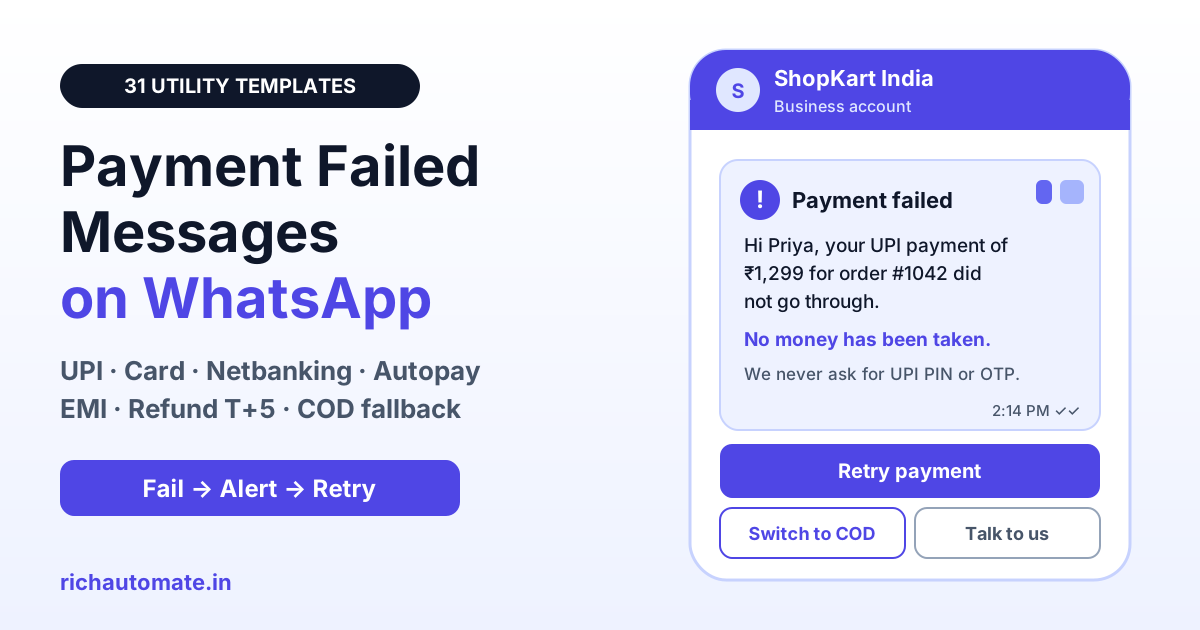
A payment failed message is a WhatsApp alert that tells a customer their UPI, card, netbanking, autopay or EMI payment did not go through, and what to do next. On the WhatsApp Business API it is a utility template, because it updates a transaction the customer already started, so it should state the amount, whether money was debited, the refund timeline and one Retry payment button.
Failed payments are a normal part of digital commerce in India: bank servers time out, UPI requests expire, cards hit limits and mandates get revoked. What costs you the sale is silence. A clear message within minutes, with a working retry link or a Cash on Delivery fallback, turns most failures into completed orders and stops panicked "money cut, no order" calls. Below are 31 ready-to-copy payment failed templates, the RBI refund timelines to quote, utility vs marketing rules and the costs to plan for.
What a payment failed message must include
Definition: a payment failed message is a transactional WhatsApp template triggered by a final failure status from your payment gateway, bank mandate or loan system. Its job is to remove doubt and give the customer one safe way to finish the payment.
- Customer name and reference: order, invoice, booking or loan account number, so the customer knows exactly which payment failed.
- Amount and method: "₹1,299 by UPI" or "card ending 4821". Never show full card numbers or bank account numbers.
- Debit status: say clearly whether money was taken. "No money has been taken" or "if money was debited, your bank will reverse it" ends most support calls.
- Refund timeline: when an amount was debited, give the date or number of working days for the auto-reversal.
- One next step: a Retry payment URL button, Switch to COD, Update card or Pay EMI, plus a support option.
- Safety line where useful: remind customers you will never ask for their UPI PIN, OTP or CVV on WhatsApp. Fraudsters target people right after a failed payment.
Once the retry succeeds, close the loop with a receipt. Our WhatsApp payment confirmation message templates cover that next step.
Utility or marketing: how Meta classifies payment failed templates
Meta assigns every template a category. A message about a specific transaction the customer started, with no promotional content, is a utility template. The moment you add an offer, it becomes marketing. Keep failure alerts plain and send offers, if at all, as a separate marketing template to opted-in customers.
| Message | Likely category | Why |
|---|---|---|
| UPI or card payment failed for order 1042, Retry payment | Utility | Update on an order the customer placed |
| Autopay or EMI debit failed, pay before due date | Utility | Account and payment status update |
| Refund for failed payment initiated | Utility | Transaction update |
| Payment failed, use code SAVE10 to complete | Marketing | Contains a discount to drive a purchase |
| Payment failed, also see our new arrivals | Marketing | Cross-sell beyond the transaction |
| Left items in cart, no payment attempt made | Marketing | No transaction exists yet; this is cart recovery |
RBI refund timelines to quote in failed payment messages
India has a clear rule for failed digital transactions. The RBI circular of 20 September 2019 on harmonisation of turnaround time (TAT) and customer compensation for failed transactions sets deadlines by which a failed transaction must be auto-reversed, and requires compensation of ₹100 per day for any delay beyond that deadline, paid to the customer without them having to file a claim.
| Scenario (RBI 2019 framework) | Auto-reversal deadline | Compensation after deadline |
|---|---|---|
| UPI person-to-person: account debited, beneficiary not credited | T+1 day | ₹100 per day |
| UPI to merchant: account debited, merchant did not receive confirmation | T+5 days | ₹100 per day |
| Card payment at online merchant: account debited, merchant did not receive confirmation | T+5 days | ₹100 per day |
| IMPS: account debited, beneficiary not credited | T+1 day | ₹100 per day |
| ATM cash not dispensed but account debited | T+5 days | ₹100 per day |
T is the day of the transaction. For your messages, two points follow. First, the reversal comes from the customer's bank, so say "your bank will reverse it" instead of promising a refund date you do not control. Second, if your own system received the money but failed to create the order, that is not a failed transaction under the framework: refund it yourself quickly and send a refund template with a reference number.
Timing and retry link best practices
- Send within minutes, on final status only: trigger the template from the gateway webhook for a final failure. Speed matters because purchase intent fades fast.
- Never send a retry on pending: UPI and netbanking payments can sit in a pending state and then succeed. Sending a retry link then can lead to a double debit. Send a "still confirming, do not pay again" message instead.
- One order, one link: the retry link should reopen the same order with the amount prefilled, not create a new order. Expire it when the order is paid or cancelled.
- Your own domain over HTTPS: use a link on your domain or your gateway's hosted page. Customers have learned to distrust unknown short links.
- Offer a different method: if a card failed, show UPI first. If UPI failed, show card and netbanking. A COD fallback recovers buyers whose bank is down.
- Cap follow-ups: one alert at failure and at most one reminder before the order hold expires. Repeated nudges feel like pressure and lead to blocks.
31 payment failed templates by scenario
Copy these into your template manager and submit them in the utility category. Variables appear as {{1}}, {{2}} and so on, and each template starts and ends with fixed text, because Meta rejects templates that begin or end with a variable. Give realistic sample values, such as "Priya" and "₹1,299", when you submit, and attach the URL button named in the last line.
Checkout failures: UPI, card, netbanking and wallets
1. UPI payment failed at checkout
Hi {{1}}, your UPI payment of ₹{{2}} for order {{3}} did not go through.
No money has been taken for this order.
Tap Retry payment to complete it in one step.
2. Card payment declined
Hi {{1}}, your card ending {{2}} was declined for order {{3}} (₹{{4}}).
You can try another card, UPI or netbanking.
Tap Retry payment to continue.
3. Netbanking session expired
Hi {{1}}, your netbanking payment for order {{2}} timed out before it was completed.
Amount: ₹{{3}}
Tap Retry payment to pay again from your bank.
4. UPI request not approved
Hi {{1}}, the UPI request of ₹{{2}} for order {{3}} expired before approval in your UPI app.
Tap Retry payment and approve the new request within {{4}} minutes.
5. Wallet or pay-later failed
Hi {{1}}, the {{2}} payment for order {{3}} could not be processed.
Your cart is saved for {{4}} hours.
Tap Retry payment to choose another method.
6. Booking payment failed
Hi {{1}}, payment for your {{2}} booking on {{3}} did not complete, so the booking is not confirmed yet.
We are holding it till {{4}}.
Tap Retry payment to confirm.
Money debited but order not placed
7. Money debited, order not placed
Hi {{1}}, we see a payment attempt of ₹{{2}} for order {{3}}, but we did not receive confirmation from your bank.
If money was debited, your bank will reverse it automatically within {{4}} working days.
Tap Check status for updates.
8. Gateway timeout with pending status
Hi {{1}}, your payment for order {{2}} is still being confirmed by your bank.
Please do not pay again yet. We will update you here within {{3}} minutes.
Reference: {{4}}
9. Pending payment resolved as failed
Hi {{1}}, your bank has marked the ₹{{2}} payment for order {{3}} as failed.
Any amount debited will be reversed to your account by {{4}}.
Tap Retry payment if you still want the order.
10. Late success after failure
Get a 1-minute BSP audit on WhatsApp
Drop your WhatsApp number — we line-item your current invoice against Meta India rates in under 60 seconds. India-hosted, DPDP-compliant.
Hi {{1}}, good news: your bank has now confirmed the ₹{{2}} payment for order {{3}}.
Your order is placed and you do not need to pay again.
Tap Track order for details.
11. Duplicate debit detected
Hi {{1}}, we received two payments of ₹{{2}} for order {{3}}.
The extra amount will be refunded to your original payment method by {{4}}.
Refund reference: {{5}}
Autopay, UPI AutoPay and e-mandate failures
12. Autopay mandate debit failed
Hi {{1}}, the autopay debit of ₹{{2}} for {{3}} due on {{4}} could not be completed.
Please keep enough balance or update your payment method.
Tap Update payment to avoid interruption.
13. UPI AutoPay mandate paused or revoked
Hi {{1}}, your UPI AutoPay mandate for {{2}} is no longer active in your UPI app.
The next payment of ₹{{3}} is due on {{4}}.
Tap Set up AutoPay to continue without a break.
14. E-mandate registration failed
Hi {{1}}, your e-mandate registration for {{2}} was not approved by your bank.
Reason shared by bank: {{3}}
Tap Try again to register with another account or card.
15. Retry date for failed autopay
Hi {{1}}, we will retry the autopay debit of ₹{{2}} for {{3}} on {{4}}.
Please keep the amount in your account.
Tap Pay now if you prefer to pay today.
16. Card expired on standing instruction
Hi {{1}}, the card ending {{2}} saved for your {{3}} plan has expired, so this month's payment failed.
Tap Update card to keep your plan active.
Subscription and membership renewal failures
17. Subscription renewal failed
Hi {{1}}, we could not renew your {{2}} plan of ₹{{3}} today.
Your access stays active till {{4}}.
Tap Renew now to continue without interruption.
18. Grace period reminder
Hi {{1}}, your {{2}} subscription payment is still pending.
Your grace period ends on {{3}}.
Tap Renew now to keep your account and data active.
19. SaaS invoice payment failed
Hi {{1}}, payment for invoice {{2}} of ₹{{3}} failed on the card on file.
Your workspace stays active till {{4}}.
Tap Pay invoice to settle it.
EMI auto-debit and NACH failures
20. EMI auto-debit failed
Dear {{1}}, the EMI of ₹{{2}} for loan account {{3}} due on {{4}} could not be debited.
Please pay to avoid charges as per your loan agreement.
Tap Pay EMI to pay now.
21. NACH bounce notice
Dear {{1}}, the NACH debit for your loan {{2}} was returned by your bank on {{3}}.
Amount due: ₹{{4}}
Tap Pay EMI or reply CALL for a callback from our team.
22. EMI paid after failure confirmation
Dear {{1}}, we have received ₹{{2}} for loan account {{3}}.
Your EMI for {{4}} is now marked paid. Thank you.
Lenders should pair these with the due-date and bounce sequences in our EMI due and bounce reminder templates, and card issuers with the credit card payment reminder templates. Keep collection wording factual and polite, in line with RBI's fair practices expectations.
Refund on failure
23. Refund initiated for failed payment
Hi {{1}}, the failed payment of ₹{{2}} for order {{3}} has been refunded from our side.
It should reach your account within {{4}} working days.
Refund reference: {{5}}
24. Refund credited confirmation
Hi {{1}}, the refund of ₹{{2}} for the failed payment on order {{3}} has been credited to your {{4}}.
Thank you for your patience.
25. Refund delayed, raise with bank
Hi {{1}}, our records show the ₹{{2}} reversal for order {{3}} was processed on {{4}}.
If it is not in your account yet, share reference {{5}} with your bank.
Reply HELP for support.
Cash on Delivery fallback
26. Switch to Cash on Delivery
Hi {{1}}, your online payment for order {{2}} did not go through.
You can still get it by paying ₹{{3}} as Cash on Delivery.
Tap Switch to COD or Retry payment.
27. Pay on delivery by UPI
Hi {{1}}, payment for order {{2}} failed, but your order can still ship.
Pay ₹{{3}} by UPI or cash when it arrives.
Tap Confirm order to keep it.
28. Order hold before cancellation
Hi {{1}}, order {{2}} is on hold because the payment failed.
It will be cancelled automatically on {{3}} if unpaid.
Tap Retry payment or Switch to COD.
If many of your buyers fall back to COD, the reverse flow matters too. See how brands nudge COD orders to prepaid in our COD to prepaid conversion playbook.
Hindi and Hinglish payment failed messages
29. Hinglish payment failed
Hi {{1}}, aapka ₹{{2}} ka payment order {{3}} ke liye fail ho gaya.
Account se paise nahi kate hain.
Retry payment dabakar dobara try kijiye.
30. Hinglish money debited
Namaste {{1}} ji, agar order {{2}} ke liye ₹{{3}} kat gaye hain, to bank {{4}} din mein khud wapas kar dega.
Dobara payment abhi mat kijiye. Status ke liye Check status dabaiye.
31. Hindi payment failed
नमस्ते {{1}} जी, ऑर्डर {{2}} के लिए ₹{{3}} का भुगतान पूरा नहीं हुआ।
दोबारा भुगतान के लिए Retry payment दबाएं।
Opt-in, opt-out and DPDP consent
Utility templates still need permission. Collect WhatsApp consent at checkout, sign-up or loan onboarding, with a clear line such as "Get order and payment updates on WhatsApp". India's Digital Personal Data Protection Act, 2023 expects consent that is free, specific and informed, tied to a stated purpose, and as easy to withdraw as it was to give. Our DPDP Act WhatsApp compliance checklist explains how to record it.
- Purpose-limited data: use payment status data to help finish that payment, not to build ad audiences without separate consent.
- Minimal details: show the last four card digits at most. Never include full account numbers, CVV or OTP in any message.
- Opt-out: offer a way to stop non-essential messages and honour it at once. Customers who opt out of promotions can still receive alerts about their own transactions if they agreed to them.
WhatsApp vs SMS vs email for failed payment alerts
| Factor | WhatsApp utility template | SMS | |
|---|---|---|---|
| Retry action | Tap-to-open Retry payment button | Plain link in text | Button, but often opened late |
| Two-way help | Customer can ask "money cut?" in the same chat | Rarely answered | Slow |
| Verified sender | Business name and profile visible | Header ID only | Sender address |
| Setup in India | Approved template on WhatsApp Business API | DLT registration of header and template | Domain authentication |
| Best use | Instant failure alert and retry | Fallback when WhatsApp is not delivered | Detailed receipt and refund record |
Automate payment failed alerts with RichAutomate
- Gateway webhooks to templates: connect your payment gateway or store, and send the right template the moment a final failure arrives.
- Pending-safe logic: send the "still confirming" message on pending, then the failure or success template once the status settles.
- Quick reply routing: "Money debited?" and "Talk to us" replies go to a chatbot or an agent with the order details attached.
- Reports: see delivered, read and clicked for every failure template, so you can tell which wording recovers most payments.
Pricing is simple: ₹0 setup and ₹0 monthly on pay-as-you-go. On SaaS Pay, a utility message such as a payment failed alert costs ₹0.50 and a marketing message ₹1.50. On Client Pay you pay Meta's per-message charge plus ₹0.10 per message. Teams wanting more seats and automation can choose Starter at ₹499/mo, Pro at ₹899/mo or White-label at ₹1,199/mo. See the full breakdown on our pricing page.
Stop losing orders to silent payment failures. Start your free RichAutomate trial with 14 days and 100 free credits, load these payment failed templates, and recover your next failed payment within minutes.