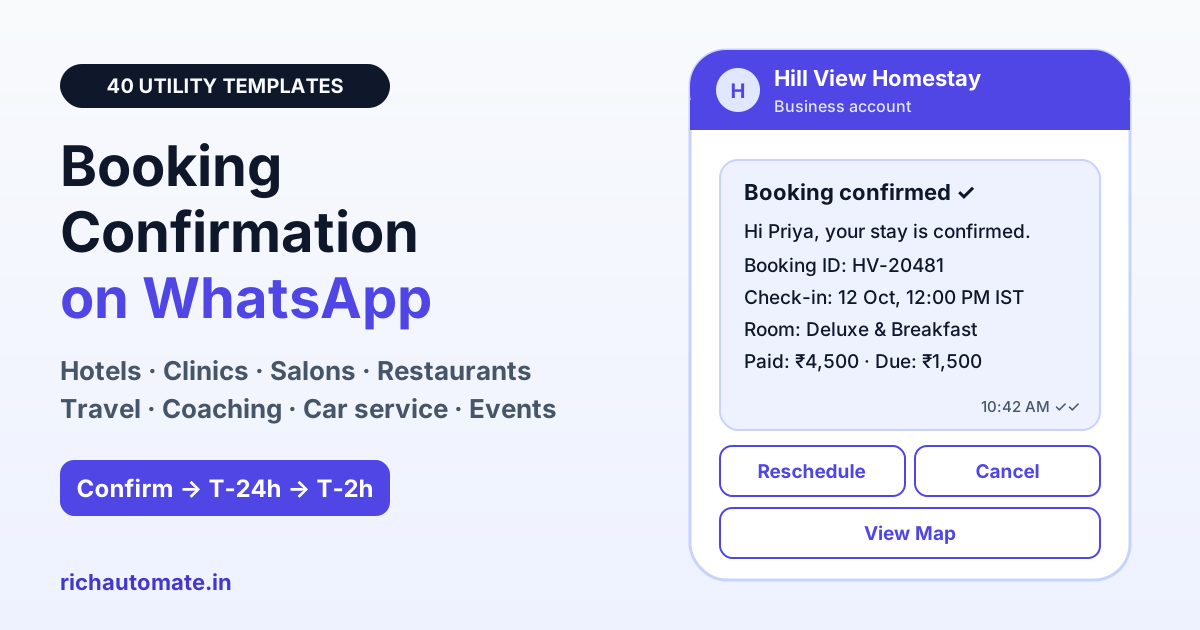
A booking confirmation message on WhatsApp should tell the customer, in one glance, their name, booking ID, date and time, venue or address, amount paid or still due, and how to reschedule or cancel. On the WhatsApp Business API it is sent as a pre-approved UTILITY template, so keep it factual and free of promotions, and it will reach customers reliably at utility rates.
Indian customers book everything on their phones now: a homestay in Coorg, a thyroid test at a diagnostic lab, a Saturday haircut, a table for eight on Diwali night. What happens in the next sixty seconds decides whether they trust the booking. An SMS from a random sender ID or an email that lands in Promotions does not do that job. A branded WhatsApp message with a green tick, the booking ID and a Reschedule button does. Below are 40 ready-to-copy booking confirmation templates for eight industries, plus the reminder schedule, Meta approval rules and automation set-up that make them work.
What a booking confirmation message must include
Every good confirmation answers the five questions customers would otherwise call you about: Is it confirmed? When? Where? How much? What if my plans change?
- Customer name so the message feels personal and is easy to find in the chat list.
- Booking ID that your front desk can search in seconds.
- Date and time, written in full, with IST for travellers and NRI customers.
- Venue or address, ideally with a View Map URL button.
- Amount paid or due in rupees, so there is no argument at the counter.
- Reschedule or cancel path, usually Quick Reply buttons.
Required fields by industry
The core six fields stay the same, but each industry needs one or two extras. Use this table to decide your template variables before you write anything.
| Industry | Must-have extras | Best button |
|---|---|---|
| Hotels and homestays | Check-in and check-out time, guests, ID rule, balance due | View Map, Reschedule |
| Clinics and diagnostic labs | Doctor or test name, token number, fasting or prep instructions | Reschedule, Cancel |
| Salons and spas | Service, stylist or therapist, estimated bill | Reschedule |
| Restaurants | Party size, hold time, set menu for groups | Cancel, View Map |
| Travel and tours | Travel dates, travellers, pickup point, driver and vehicle | View Itinerary, Call |
| Coaching demo classes | Course, mode (online or centre), faculty, joining link timing | Reschedule |
| Car and bike service | Vehicle number, job card, pickup address | Track Status, Reschedule |
| Events and tickets | Ticket count, gate time, QR code | View Ticket |
Utility or marketing? How Meta classifies booking confirmations
Meta reviews every template and assigns a category. A confirmation of something the customer booked is utility. The moment you add a sales pitch, Meta can move it to marketing, which costs more, is subject to stricter frequency limits and may not reach customers who have limited marketing messages.
| Line in your template | Likely category | Why |
|---|---|---|
| "Your appointment on 12 Oct at 4 PM is confirmed." | Utility | Confirms a transaction the customer started |
| "Balance of ₹2,000 is due at check-in." | Utility | Payment detail for the same booking |
| "Tap Reschedule to change your slot." | Utility | Manages the existing booking |
| "Use code SPA20 for 20% off your next visit." | Marketing | Promotional discount |
| "Add a facial for just ₹499 more." | Marketing | Upsell of a new service |
| "Check out our new Goa packages." | Marketing | Promotes unrelated products |
Rule of thumb: if a line would still make sense to a customer who never booked, it is promotional. Move it to a separate opt-in campaign.
40 booking confirmation templates by industry
Copy these into your template manager. Variables appear as {{1}}, {{2}} and so on. Each one opens with text and closes with text, because Meta rejects templates that start or end with a variable.
Hotels and homestays
1. Hotel room confirmed
Hi {{1}}, your stay at {{2}} is confirmed.
Booking ID: {{3}}
Check-in: {{4}}, 12:00 PM IST
Check-out: {{5}}, 11:00 AM IST
Amount paid: ₹{{6}}
Tap Reschedule or Cancel below if your plans change.
2. Homestay with balance due
Hi {{1}}, your homestay booking {{2}} is confirmed for {{3}}.
Advance received: ₹{{4}}
Balance due at check-in: ₹{{5}}
Your host {{6}} will share directions one day before arrival.
3. Pre-arrival details (T-2 days)
Hi {{1}}, we look forward to hosting you at {{2}} on {{3}}.
Check-in starts at 12:00 PM IST. Please carry a government photo ID for every guest. Tap View Map for directions.
4. Group or banquet booking
Hi {{1}}, your booking for {{2}} guests at {{3}} on {{4}} is confirmed.
Booking ID: {{5}}
Advance paid: ₹{{6}}
Our events manager will call you to finalise the menu.
5. Hinglish hotel confirmation
Namaste {{1}} ji, aapki booking {{2}} confirm ho gayi hai.
Check-in: {{3}}
Room: {{4}}
Payment: ₹{{5}} received.
Plan badalna ho to neeche Reschedule dabayein.
Clinics and diagnostic labs
6. Doctor appointment confirmed
Hi {{1}}, your appointment with {{2}} is confirmed.
Date and time: {{3}}
Clinic: {{4}}
Token no.: {{5}}
Please arrive 10 minutes early with previous prescriptions.
7. Diagnostic lab test booked
Hi {{1}}, your {{2}} test is booked for {{3}} at {{4}}.
Booking ID: {{5}}
Please fast for 10 to 12 hours before the test. Water is allowed.
8. Home sample collection
Hi {{1}}, our phlebotomist will visit {{2}} on {{3}} between {{4}}.
Order ID: {{5}}
Amount due on collection: ₹{{6}}
You will get a message when the technician is on the way.
9. Teleconsultation confirmed
Hi {{1}}, your video consultation with {{2}} is confirmed for {{3}}.
Consultation fee paid: ₹{{4}}
We will send the joining link 15 minutes before the call.
10. Hinglish clinic confirmation
Namaste {{1}}, Dr. {{2}} ke saath aapka appointment {{3}} ko confirm hai.
Clinic: {{4}}
Kripya 10 minute pehle pahunchein. Time badalna ho to Reschedule dabayein.
For a full patient journey, pair these with our guide to WhatsApp appointment booking automation, which covers slot selection inside the chat.
Salons and spas
11. Salon appointment confirmed
Hi {{1}}, your {{2}} appointment at {{3}} is confirmed for {{4}}.
Stylist: {{5}}
Estimated bill: ₹{{6}}
Need another slot? Tap Reschedule below.
12. Spa session booked
Hi {{1}}, your {{2}} session at {{3}} is booked for {{4}}.
Booking ID: {{5}}
Please arrive 15 minutes early to relax and fill the wellness form.
13. Bridal package confirmed
Hi {{1}}, your bridal package booking {{2}} is confirmed.
Trial: {{3}}
Wedding day slot: {{4}}
Advance paid: ₹{{5}}
Balance due: ₹{{6}}
14. Home salon visit
Hi {{1}}, our beautician {{2}} will visit {{3}} on {{4}} for {{5}}.
Amount payable: ₹{{6}}
Please keep a well-lit space ready.
Restaurants: table booking
15. Table reservation confirmed
Hi {{1}}, your table for {{2}} at {{3}} is confirmed for {{4}}.
Reservation ID: {{5}}
We hold tables for 15 minutes. Tap Cancel below if you cannot make it.
16. Large party booking
Hi {{1}}, your booking for {{2}} guests at {{3}} on {{4}} is confirmed.
Set menu: {{5}}
Advance paid: ₹{{6}}
Final headcount is needed 24 hours before.
17. Waitlist converted to booking
Hi {{1}}, good news. A table for {{2}} is now available at {{3}} for {{4}}.
Reply YES within 10 minutes to confirm it.
18. Hinglish table booking
Hi {{1}}, {{2}} mein {{3}} logon ke liye aapki table {{4}} ko book hai.
Booking ID: {{5}}
Plan cancel ho to neeche Cancel dabayein.
Travel and tours
19. Tour package confirmed
Hi {{1}}, your {{2}} tour is confirmed.
Booking ID: {{3}}
Travel dates: {{4}}
Travellers: {{5}}
Amount paid: ₹{{6}}
Your itinerary PDF is attached.
20. Cab or airport pickup
Get a 1-minute BSP audit on WhatsApp
Drop your WhatsApp number — we line-item your current invoice against Meta India rates in under 60 seconds. India-hosted, DPDP-compliant.
Hi {{1}}, your pickup is confirmed for {{2}} from {{3}}.
Driver: {{4}}
Vehicle no.: {{5}}
The driver will call 15 minutes before arrival.
21. Bus or train ticket booked
Hi {{1}}, your ticket {{2}} from {{3}} to {{4}} is confirmed.
Departure: {{5}} IST
Seats: {{6}}
Please carry a valid photo ID.
22. Balance payment due for tour
Hi {{1}}, your {{2}} trip starts on {{3}}.
Balance due: ₹{{4}} by {{5}}.
Tap View Invoice to see the payment details.
Coaching institutes: demo class
23. Demo class booked
Hi {{1}}, your free demo class for {{2}} is booked.
Date and time: {{3}}
Mode: {{4}}
Faculty: {{5}}
We will share the joining link one hour before class.
24. Parent confirmation for a student
Hello {{1}}, the demo class for {{2}} ({{3}}) is confirmed for {{4}} at our {{5}} centre.
Please arrive 10 minutes early.
25. Counselling session booked
Hi {{1}}, your counselling session for {{2}} is confirmed for {{3}}.
Counsellor: {{4}}
Keep your latest marksheet handy for the discussion.
26. Batch seat confirmed
Hi {{1}}, your seat in the {{2}} batch is confirmed.
Start date: {{3}}
Timings: {{4}}
Fee paid: ₹{{5}}
Receipt no.: {{6}}
Car and bike service
27. Car service slot booked
Hi {{1}}, your {{2}} ({{3}}) is booked for service on {{4}} at {{5}}.
Job card: {{6}}
Please bring the service booklet.
28. Doorstep pickup confirmed
Hi {{1}}, our driver {{2}} will pick up your car {{3}} from {{4}} on {{5}}.
You will get updates as work progresses.
29. Estimate approved
Hi {{1}}, thank you for approving the estimate for {{2}}.
Estimated amount: ₹{{3}}
Expected delivery: {{4}}
We will message you once the car is ready.
30. Two-wheeler service booked
Hi {{1}}, your bike {{2}} is booked for service at {{3}} on {{4}}.
Booking ID: {{5}}
Tap Reschedule below if the time does not suit you.
Events and tickets
31. Event ticket confirmed
Hi {{1}}, your tickets for {{2}} are confirmed.
Booking ID: {{3}}
Date: {{4}}, gates open {{5}} IST
Tickets: {{6}}
Show the attached QR code at entry.
32. Workshop or webinar seat
Hi {{1}}, your seat for {{2}} on {{3}} is confirmed.
Venue or link: {{4}}
Amount paid: ₹{{5}}
Add it to your calendar so you do not miss it.
33. Venue booking confirmed
Hi {{1}}, {{2}} is booked for your {{3}} on {{4}}.
Booking ID: {{5}}
Advance received: ₹{{6}}
Our coordinator will call to plan the set-up.
34. Sports turf or court booking
Hi {{1}}, your {{2}} slot at {{3}} is confirmed for {{4}}.
Court or turf: {{5}}
Amount paid: ₹{{6}}
Please reach 10 minutes early.
Send-timing schedule: confirm, T-24h, T-2h
A confirmation alone does not stop no-shows. A short sequence of three messages does most of the work, and each one is a utility template.
| When | Message | Goal |
|---|---|---|
| Within 1 minute of booking | Booking confirmation | Trust and a searchable record |
| 2 to 3 days before (hotels, tours) | Pre-arrival details | Directions, ID rules, balance due |
| 24 hours before | Reminder with Confirm and Reschedule | Free up slots early instead of losing them |
| 2 hours before (same-day bookings) | Final nudge with map | Cut late arrivals |
| After the visit | Thank-you or feedback | Reviews and repeat bookings |
Our deep dive on WhatsApp appointment reminders that cut no-shows explains how clinics and salons tune these intervals.
35. Reminder T-24h
Hi {{1}}, a reminder that your {{2}} booking at {{3}} is tomorrow, {{4}}.
Booking ID: {{5}}
Tap Confirm to keep it, or Reschedule to pick another time.
36. Reminder T-2h
Hi {{1}}, see you soon. Your {{2}} is at {{3}} today.
Tap View Map for directions to {{4}}.
37. Hinglish reminder T-24h
Namaste {{1}}, kal {{2}} baje {{3}} par aapki booking hai.
Booking ID: {{4}}
Aana confirm karne ke liye Confirm dabayein.
Reschedule, cancellation and payment-pending templates
Close the loop when a booking changes. Customers who tap Reschedule or Cancel should get a written record as quickly as the original confirmation.
38. Booking rescheduled
Hi {{1}}, your booking {{2}} has been moved to {{3}}.
Venue: {{4}}
Everything else stays the same.
39. Booking cancelled with refund
Hi {{1}}, your booking {{2}} for {{3}} has been cancelled as requested.
Refund of ₹{{4}} will reach your original payment method in 5 to 7 working days.
40. Payment pending to confirm booking
Hi {{1}}, your slot for {{2}} on {{3}} is on hold.
Pay ₹{{4}} by {{5}} to confirm it. Tap Pay Now to complete the payment.
If you collect advance payments, reuse our payment confirmation message templates for the receipt, and our thank-you message templates for customers after the visit. Retail and D2C teams can adapt the same structure from our order confirmation message templates.
Getting booking templates approved by Meta
- Give realistic sample values. For {{1}} enter "Priya", for a date enter "12 Oct 2026, 4:00 PM". Empty or vague samples are a common rejection reason.
- Keep the ratio sensible. A template that is mostly variables with little fixed text looks like a loophole for free-form messages and gets rejected.
- Never put a variable first or last, and never place two variables side by side without text between them.
- No promotions in utility. No discount codes, offers or "book again" pushes.
- Use buttons well. Quick Reply buttons such as "Reschedule", "Cancel" and "Confirm" capture intent in one tap. A URL button can open Google Maps for the venue or a dynamic invoice link such as your booking page plus the booking ID.
- Attach media headers when useful: a ticket QR code, an itinerary PDF or a hotel photo.
- Submit language variants separately. A Hinglish or Hindi version is its own template with its own language code.
The 24-hour window: what you can send after the customer replies
Templates are for messages you start. When a customer taps a Quick Reply button or types a question, WhatsApp opens a 24-hour customer service window. Inside that window your team or chatbot can send free-form text, slot lists, images and documents without a template. That is where the real work happens: offering three new slots after a Reschedule tap, answering "is parking available?", or sharing a revised invoice. Once the window closes, you need an approved template again to restart the conversation.
Automate confirmations from your booking system
Nobody should type confirmations by hand. With RichAutomate you can trigger the right template the moment a booking is created:
- Booking software or website: call the RichAutomate API from your booking system with the template name and variable values whenever a booking is saved.
- Webhook: tools that fire a webhook on new bookings can pass customer and slot details straight into a template send.
- Google Sheet: front desks that log bookings in a sheet can send a confirmation as each new row is added.
- Flow builder: build the Reschedule and Cancel branches visually, so a button tap shows available slots and updates the booking without staff involvement.
Pricing is simple: ₹0 setup and ₹0 monthly on pay-as-you-go. On SaaS Pay, a utility message like a booking confirmation costs ₹0.50 and a marketing message ₹1.50; on Client Pay you pay Meta's rate plus a ₹0.10 platform fee per message. Teams wanting more seats and automation can choose Starter at ₹499/mo, Pro at ₹899/mo or White-label at ₹1,199/mo. See the full breakdown on our pricing page.
Ready to send your first booking confirmation? Start your free RichAutomate trial with 14 days and 100 free credits, load these templates, and connect your booking system in an afternoon.