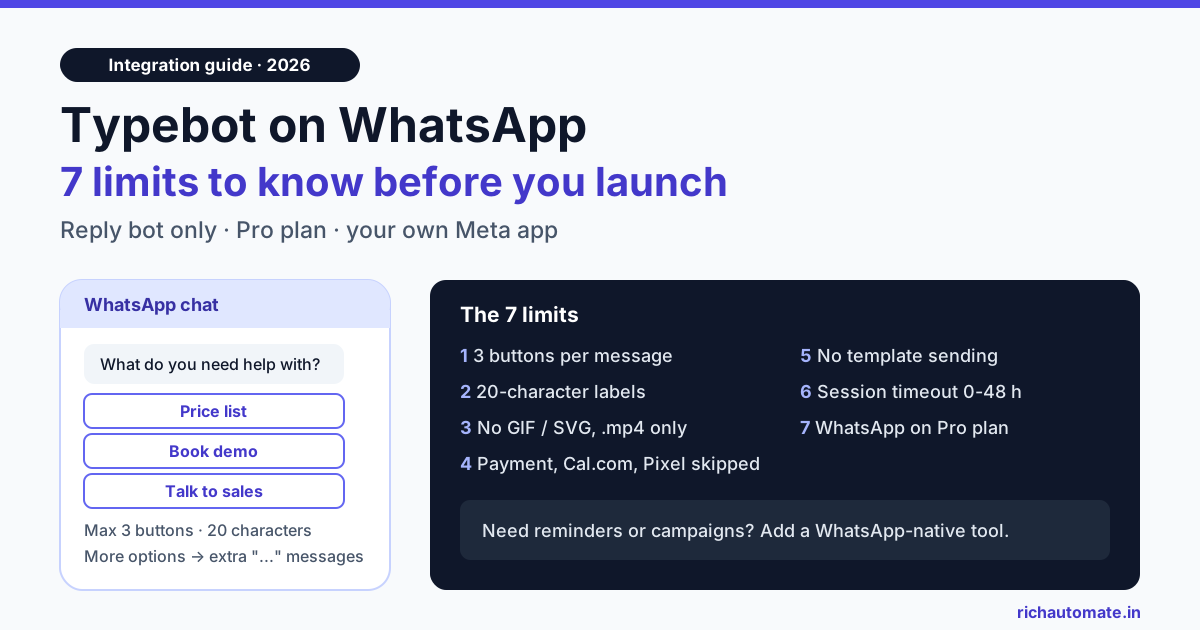
Typebot can run on WhatsApp, but only as a reply bot: you connect your own Meta app to the Pro plan ($89 a month on typebot.com), and the bot answers people who message you first, with at most 3 buttons on screen, 20-character button labels and several blocks skipped. If you need to start conversations with approved templates, send broadcasts or take payments inside WhatsApp, Typebot is the wrong layer and you need a WhatsApp-first tool next to it or instead of it. This guide lists the seven limits Indian teams hit, what each one costs you, and when a form-style bot builder is still a good fit.
We checked every Typebot detail below against Typebot's own WhatsApp deployment guide, its Meta app guide, its API reference index and its public pricing page on 28 October 2026. Typebot ships updates often, so treat this as a snapshot and confirm anything you plan a launch around in your own workspace.
How Typebot connects to WhatsApp
Typebot is a visual, form-style chatbot builder. You design a conversation as a chain of blocks (text bubbles, inputs, conditions, integrations) and publish it to a web widget, a full-page bot, an API, or WhatsApp. For WhatsApp, Typebot uses a "bring your own Meta application" model:
- Create a Meta Business account at business.facebook.com and verify your identity if Meta restricts the new account.
- Create an app at developers.facebook.com, choose "Other", then the "Business" type, and enable the WhatsApp product.
- Open the Share tab of your bot in Typebot, click WhatsApp, and follow the instructions to connect your Meta app and phone number.
- Set the session expiration timeout and, if you run more than one bot on the number, a start bot condition for each bot.
You can preview by clicking Test in the editor and switching the runtime to WhatsApp. If you are still on Meta's free +1 555 test number, the phone you message from must be on that number's allow-list, which we explain in our guide to the WhatsApp Cloud API test number and its 5-recipient limit.
Two things follow from this model. First, the WhatsApp number, the business verification, the display-name review and Meta's billing all sit in your own Meta account, so you handle that setup yourself. Second, Typebot is the conversation engine only. It is not a WhatsApp inbox, a template manager or a broadcast tool.
The 7 Typebot WhatsApp limits at a glance
The table summarises the limits we found in Typebot's documentation and pricing page, plus the practical effect for a business in India.
| # | Limit | What Typebot's docs say | Effect in practice |
|---|---|---|---|
| 1 | Buttons per message | WhatsApp shows 3 buttons at a time; Typebot adds "..." messages to show more. Cards show at most 3 buttons per card. | A 6-option menu arrives as two or more messages instead of one tidy list. |
| 2 | Button label length | Labels longer than 20 characters are truncated. | "Book a free site visit" becomes a cut-off label. |
| 3 | Media formats | GIF and SVG images are not supported; only .mp4 video. | Web-bot assets often need re-exporting for WhatsApp. |
| 4 | Skipped blocks | Payment input, Chatwoot, Cal.com, Google Analytics, Meta Pixel, and Script or Set Variable with "Execute on client" are skipped. | A web bot that takes payment or books a slot will silently skip that step on WhatsApp. |
| 5 | Who starts the chat | The docs describe bots that start when a user messages you. We found no documented endpoint for sending WhatsApp template messages. | No reminders, follow-ups or campaigns from Typebot itself. |
| 6 | Session timeout | 0 to 48 hours, default 4 hours. After that, a new message starts a new chat. | A lead who replies the next morning may restart the bot from the top. |
| 7 | Plan and number | WhatsApp is included on Pro ($89/month, 10,000 chats), not on Free or Starter. The docs recommend a dedicated number. | A fixed USD bill on top of Meta charges, and a number that cannot double as your phone app. |
Limits 1 to 3: buttons, labels and media
These three limits come from WhatsApp itself rather than from Typebot. Meta's interactive reply-button message allows a maximum of 3 buttons, and button titles are capped at 20 characters. Every WhatsApp tool works inside the same rules. The difference is how each tool handles a menu with more than three choices.
Typebot's answer is to split the choices across several messages joined by "..." bubbles. That works, but on a phone it looks like the bot is sending a stream of messages. WhatsApp-first builders usually switch to a list message for anything over three options: one message with a "View options" button that opens a menu of up to 10 rows. Our breakdown of reply buttons vs list messages vs WhatsApp Flows shows when each format fits.
For labels, write for 20 characters from the start. "Price list", "Talk to sales" and "Book demo" fit. "I want to know the price" does not. For media, export animations as .mp4 and logos as PNG or JPG before you reuse a web bot on WhatsApp.
Limit 4: blocks that are skipped on WhatsApp
This is the limit that causes the most silent damage, because the bot does not error. It simply moves past the block. According to Typebot's WhatsApp page, these blocks are skipped if present:
- Payment input: no in-chat payment step.
- Cal.com: no embedded booking calendar.
- Chatwoot: no handover to that live-chat tool from inside the bot.
- Google Analytics and Meta Pixel: no client-side tracking events.
- Script or Set Variable with "Execute on client": any logic that ran in the visitor's browser does not run.
If you built a web bot that qualifies a lead, books a slot and collects a token amount, the WhatsApp version will qualify the lead and then stop doing the two steps that earn money. The usual workarounds are to send a payment link or booking link as plain text, or to call your own server through a webhook block and let the server do the work. Both are fine, but test them on a real phone before launch. Our WhatsApp chatbot test cases template includes cases for exactly these hand-offs.
Limit 5: Typebot answers, it does not start conversations
This is the biggest limit for Indian businesses. On WhatsApp, a business can only send free-form messages within 24 hours of the customer's last message. Outside that window, every message must be an approved template: an order update, an appointment reminder, a payment reminder, an offer. That is how WhatsApp is designed, and no tool can change it.
Typebot's WhatsApp documentation is written around inbound chats: a user messages your number, the start bot condition matches, the bot runs. Its API reference (checked 28 October 2026) covers starting and continuing chats, typebots, results, workspaces and billing, but it lists no endpoint for creating, submitting or sending WhatsApp message templates. In practice that means Typebot alone cannot:
- send a reminder the day before an appointment,
- follow up with a lead who went quiet after 24 hours,
- send an order confirmation or a shipping update from your store,
- run a broadcast campaign to opted-in contacts.
For many teams, those outbound messages are where the return on WhatsApp comes from. A reply bot without them is useful for FAQs and lead capture, but it covers only half of what WhatsApp is used for in India.
Get the India 2026 WhatsApp BSP price comparison
Wati vs AiSensy vs Interakt vs RichAutomate: Meta rates, platform fees and hidden costs, side by side. We send it to your WhatsApp in a minute.
Limits 6 and 7: sessions, plans and your number
Session timeout. Typebot lets you set a timeout from 0 to 48 hours, with a default of 4 hours. If the person does not reply within that time, their next message starts a new chat. Indian buyers often reply hours later, after work or the next morning, so a lead who answered three of five questions may be asked the first question again. Raising the timeout to 24 hours or more helps. Remember, though, that once 24 hours pass, WhatsApp itself closes your free-form window, and Typebot has no template step to reopen it.
Plan. On typebot.com's pricing page, the WhatsApp integration is included on the Pro plan at $89 a month with 10,000 chats. Free (200 chats) and Starter ($39, 2,000 chats) do not include it. Typebot can also be self-hosted, which moves the cost to your own servers and your team's time.
Number. Typebot's guide recommends a dedicated number. It says a number registered on the WhatsApp Business app must be removed from that app first, and that the number unlocks for API use after about 24 hours. Meta's coexistence onboarding now lets some providers keep the Business app and the API on the same number, but it is offered through each provider's own signup flow. Check before you assume it is available, and see our note on why the coexistence option can be missing.
Typebot vs a WhatsApp-native flow builder
This is not a "which is better" question. Typebot is built for conversations that run on many channels, mostly the web. A WhatsApp-native builder is built around WhatsApp's own message types and rules. The table shows where each one fits.
| Capability | Typebot on WhatsApp | WhatsApp-native flow builder (for example RichAutomate) |
|---|---|---|
| Reply to inbound messages with a guided bot | Yes | Yes |
| Menus with more than 3 options | Split across several button messages | List message with up to 10 rows |
| Send approved templates (reminders, updates, offers) | No documented template sending | Yes, from flows, campaigns or the API |
| Broadcast campaigns | No | Yes, to opted-in contacts |
| Meta WhatsApp Flows (in-chat forms) | Not documented | Yes |
| Team inbox and human handover | Chatwoot block is skipped; needs a separate tool | Shared inbox with agent handover |
| Same bot on your website | Yes, Typebot's main strength | WhatsApp-focused |
| Who handles Meta setup | You, via your own Meta app | Guided Embedded Signup inside the dashboard |
If your bot lives mainly on your website and WhatsApp is a side channel for a few FAQs, Typebot is a reasonable choice. If WhatsApp is your main sales and support channel, you will want templates, campaigns, an inbox and WhatsApp's native message types, and a builder designed around them saves you from stitching together three tools. Our WhatsApp chatbot builder guide for India walks through how such a builder is set up, and WhatsApp Flows for in-chat lead capture shows what native forms look like.
What it costs to run a WhatsApp bot in India
Whatever bot tool you use, Meta bills WhatsApp per message. On RichAutomate's published rate card, Meta's charge in India is ₹0.8631 per marketing message and ₹0.1150 per utility or authentication message, and replies inside the 24-hour customer service window carry no Meta charge. Typebot's WhatsApp page still mentions free "service conversations", which reflects Meta's older conversation-based model. Since July 2025 Meta has billed per delivered template message, so check Meta's current pricing page rather than older guides.
| Cost line | Typebot Pro + your own Meta app | RichAutomate Client Pay |
|---|---|---|
| Tool subscription | $89/month (Pro, includes WhatsApp, 10,000 chats) | ₹0 setup, ₹0 monthly minimum; optional plans from ₹499/month |
| Per-message platform fee | None listed; chats count against your plan | ₹0.10 per message |
| Meta charges | Billed to your Meta account | Billed to your own Meta account |
| Bot replies inside 24-hour window | No Meta charge | No Meta charge; ₹0.10 platform fee |
| Templates and broadcasts | Need another tool | Included |
A worked example: a coaching institute gets 3,000 inbound enquiries a month and sends each lead one utility follow-up template. On Client Pay that is about ₹345 in Meta charges (3,000 × ₹0.1150) plus ₹300 in platform fees (3,000 × ₹0.10), so roughly ₹645 a month for the follow-ups, with no fixed subscription required. Bot replies inside the 24-hour window add only the ₹0.10 platform fee per message. On Typebot, the inbound bot is covered by the Pro plan, but the follow-up templates need a second tool with its own pricing. Full rates are on the RichAutomate pricing page.
A practical setup for Indian teams
If you already have a Typebot you like, you do not have to throw it away. Three patterns work well:
- Typebot for the website, a WhatsApp-native tool for WhatsApp. Keep Typebot as the web widget. When a visitor leaves a phone number and consent, pass it to your WhatsApp tool through a webhook and send an approved welcome template. On RichAutomate that is either the public API (
POST /api/v1/send-templatewith a Bearer key) or an incoming webhook that triggers a flow with{phone, name, data}. Typebot's webhook payload will not match that shape on its own, so map the fields first, directly or through n8n, Make or Zapier. - Typebot as the inbound FAQ bot, templates elsewhere. Possible, but you now run two systems on one number, which gets messy with webhooks and inbox history. Most teams end up moving the inbound bot too.
- Everything in one WhatsApp-native builder. Rebuild the conversation with list messages, WhatsApp Flows, templates and agent handover in one place. This is the simplest to run once WhatsApp is your main channel.
If you choose the first pattern, our n8n WhatsApp integration guide shows how to map a webhook payload into a WhatsApp template send, step by step.
Checklist before you launch a Typebot on WhatsApp
- Every button label is 20 characters or fewer, and no message needs more than 3 buttons.
- No GIFs or SVGs; videos are .mp4.
- No payment, Cal.com, Pixel, Analytics or client-side script block sits on the main path, or each one has a link-based fallback.
- The session timeout matches how slowly your customers actually reply.
- Each bot on a shared number has its own start bot condition.
- You know which tool will send reminders, follow-ups and campaigns, because Typebot will not.
- The number, display name and business verification are ready in your Meta account before launch day.
Want reply bots, templates, campaigns and an inbox on one WhatsApp number? Create your free RichAutomate account, connect your business number, and build your first flow with list messages and WhatsApp Flows on Client Pay, with ₹0 setup.