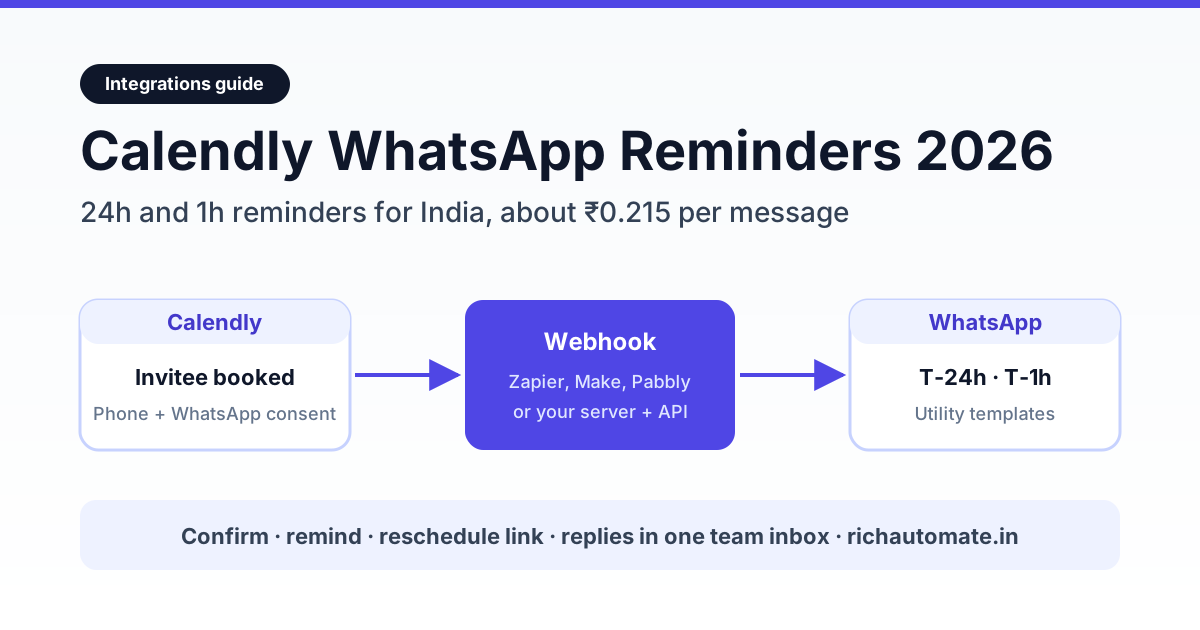
our booking page has no native WhatsApp reminders, so the working setup in India is to send our booking page's booking webhook through Zapier, Make or Pabbly (or your own server) to a WhatsApp Business API platform that sends approved reminder templates 24 hours and 1 hour before each meeting. On RichAutomate Client Pay, each utility reminder costs about ₹0.215 (₹0.10 platform fee plus Meta's ₹0.1150 India utility rate as of October 2026), so two reminders for 1,000 bookings come to roughly ₹430.
This guide is for Indian clinics, coaches, consultants, sales teams and agencies that already take bookings on our booking page and see too many empty slots. It covers what our booking page gives you out of the box, the three routes to WhatsApp, the exact templates to submit to Meta, a step-by-step Zapier build, the cost per 1,000 bookings and the mistakes that get reminder numbers flagged. If you have not set up booking yet and want it inside WhatsApp itself, start with our guide to WhatsApp appointment booking automation instead.
Why Indian teams want our booking page reminders on WhatsApp
our booking page's own reminders arrive by email. For an Indian invitee, that is often the weakest channel: a booking made from an Instagram ad on a phone gets an email confirmation that lands in a Promotions tab and is never opened. WhatsApp is where the same person reads messages within minutes, which is why reminder workflows in India have moved there.
The business case is simple arithmetic. Every no-show is a slot you could have given to someone else, plus the time your team spent preparing. A reminder that carries a one-tap reschedule link turns many would-be no-shows into reschedules, which you can refill, instead of silent gaps. Our deeper look at WhatsApp appointment reminders that cut no-shows covers timing and wording research in detail. This post focuses on wiring our booking page into it.
Three things make WhatsApp reminders work better than email or SMS for most Indian bookings:
- Read rates. People check WhatsApp many times a day. A T-1h reminder only helps if it is seen within the hour.
- Two-way replies. The invitee can answer "running 10 minutes late" or "can we move to Friday?" in the same thread, and your team sees it in a shared inbox.
- No DLT paperwork for each template. Indian SMS needs DLT entity and template registration with an operator. WhatsApp templates are approved by Meta instead, usually within minutes to a few hours.
What our booking page gives you natively (and what it does not)
our booking page's pricing page lists four plans as of October 2026: Free, Standard at $10 per seat per month, Teams at $16 per seat per month and Enterprise from $15,000 a year. The per-seat prices shown appear to be annual-billing rates, so confirm the monthly figure on the pricing page before you budget. "Automations and reminders" and "custom webhooks to get our booking page meeting information in real time" are listed from the Standard plan up. They are not on Free.
That matters for this setup. Every route in this guide needs our booking page to tell another system "a booking just happened". That means webhooks, or a Zapier, Make or Pabbly trigger that relies on them, so plan on at least one paid Standard seat for the calendar that takes bookings.
our booking page's own community forum has users asking for WhatsApp reminders and being pointed to third-party automation. There is no first-party our booking page-to-WhatsApp switch to flip.
The three routes from our booking page to WhatsApp
All three routes do the same job: catch our booking page's booking event, work out when each reminder is due, and call a WhatsApp Business API platform to send an approved template. They differ in who runs the waiting and how much you maintain.
| Route | Best for | Monthly tool cost | Effort | Watch out for |
|---|---|---|---|---|
| A. Zapier (our booking page trigger, Delay Until, Webhooks step) | Non-technical teams, under a few hundred bookings a month | Zapier paid plan (delay and webhook steps are paid features) | About 30 minutes | Each delayed reminder uses tasks; cancellations need a check step |
| B. Make or Pabbly Connect | Cost-conscious teams with higher volume | Make operations plan or Pabbly's one-time or annual plans | About 1 hour | Long waits are better handled with a sheet or data store than a sleep step |
| C. our booking page webhook to your own server | Teams with a developer, high volume, custom logic | Hosting only | Half a day | You own retries, time zones and cancellation handling |
RichAutomate does not have a native one-click our booking page connector. All three routes reach it through the public developer API (an authenticated POST /api/v1/send-template call with your API key) or through the Zapier, Make and Pabbly webhook steps that call that API. If you have used our Zapier WhatsApp integration guide, Route A will feel familiar.
Step 1: Capture the phone number and WhatsApp consent in our booking page
our booking page does not ask for a phone number by default, and you cannot send a WhatsApp reminder without one. In the event type settings, open Invitee questions and add:
- A required phone question, labelled "WhatsApp number with country code (e.g. +91 98xxxxxxxx)". Asking for the country code up front saves you from normalising ten-digit numbers later.
- A consent line, such as "I agree to receive booking confirmations and reminders on WhatsApp." Make it a required checkbox or a radio question. Meta requires opt-in before you send the first business-initiated template, and a stored, time-stamped yes is your evidence if a number is ever reviewed. Our WhatsApp opt-in evidence guide shows what to keep.
In the webhook payload, these answers arrive inside the invitee's questions-and-answers list. our booking page's developer documentation describes the payload fields. Check the exact field names against a test booking before you map them, because they differ between Zapier's flattened view and the raw JSON.
Step 2: Get your reminder templates approved
Every reminder sent outside an open 24-hour customer service window must be a pre-approved template. Booking confirmations and reminders for a meeting the person scheduled are utility messages. Keep them free of offers and upsells. A reminder with "also get 20% off our premium package" can be reclassified as marketing, and Meta's India marketing rate is about 7.5 times its utility rate. Our explainer on template category reclassification covers how Meta decides.
| Template | When it sends | Category | Example body |
|---|---|---|---|
| booking_confirmed | Right after the booking | Utility | Hi {{1}}, your {{2}} is confirmed for {{3}}. Need to change it? Use the link below. |
| booking_reminder_24h | 24 hours before start | Utility | Reminder: your {{1}} with {{2}} is tomorrow at {{3}}. Reply here if you have questions. |
| booking_reminder_1h | 1 hour before start | Utility | Your {{1}} starts at {{2}}. Join link: {{3}}. Running late? Just reply to this message. |
| booking_cancelled | On cancellation | Utility | Your {{1}} on {{2}} has been cancelled. Book a new time with the link below. |
Add our booking page's reschedule and cancel URLs as a URL button or a variable in the body. Those links come in the booking payload, so the invitee can move the meeting in one tap without contacting you. You can create and submit these templates from the RichAutomate dashboard or through the public templates API.
Step 3: Build the reminder flow
Route A in Zapier, step by step
This is the quickest build for most teams. It assumes a paid our booking page Standard seat, a Zapier plan with Delay and Webhooks, and a RichAutomate account with a connected WhatsApp number and approved templates.
Get the India 2026 WhatsApp BSP price comparison
Wati vs AiSensy vs Interakt vs RichAutomate: Meta rates, platform fees and hidden costs, side by side. We send it to your WhatsApp in a minute.
- Trigger: our booking page, "Invitee Created". Connect your our booking page account and pick the event types that should get reminders.
- Formatter: clean the phone answer. Strip spaces and dashes, and add +91 if the invitee typed a ten-digit Indian number.
- Webhooks by Zapier, POST: send
booking_confirmedstraight away. The URL ishttps://richautomate.in/api/v1/send-template, the header isAuthorization: Bearer YOUR_API_KEY, and the body holdsphone,template,language(for exampleen) and avariablesarray for {{1}}, {{2}} and {{3}}. - Formatter, Date/Time: subtract 24 hours from the event start time, keeping Asia/Kolkata as the time zone.
- Delay by Zapier, "Delay Until": the T-24h time you just calculated.
- Check for cancellation: look up the invitee's status (our booking page API lookup, or a "cancelled" flag your cancellation Zap writes to a Google Sheet) and stop the Zap if the meeting was cancelled.
- Webhooks POST: send
booking_reminder_24h. - Repeat steps 4 to 7 for the T-1h reminder.
Build a second, small Zap on our booking page's "Invitee Canceled" event that sends booking_cancelled and sets the flag the main Zap checks. Without that check, people who cancel still get reminders, which looks careless and draws blocks.
Edge cases worth handling on day one: bookings made less than 24 hours ahead (skip the T-24h step if the delay time is already past), reschedules (our booking page treats a reschedule as a cancel plus a new booking, so both Zaps fire) and group events with several invitees.
Routes B and C: Make, Pabbly or your own server
Make and Pabbly Connect follow the same logic with cheaper per-run pricing, which matters once you pass a few hundred bookings a month. The difference is how you handle waiting. Rather than holding a scenario open for a day, write each booking to a Google Sheet or a Make data store with its two reminder times, then run a scheduled scenario every 10 or 15 minutes that sends anything due and marks it sent. Cancellations simply update the row. Our Google Sheets WhatsApp integration guide shows the sheet-as-queue pattern.
Your own server is the cleanest at scale. Create a our booking page webhook subscription for the invitee created and invitee canceled events, store bookings in your database, and let a scheduler (cron or a queue worker) call the RichAutomate send-template endpoint when each reminder is due. Verify our booking page's webhook signature on every request, make the send idempotent so a retried webhook never sends twice, and receive replies through RichAutomate's own webhooks. Our WhatsApp API webhook setup guide covers the receiving side. Full endpoint details are in the RichAutomate API documentation.
What it costs per 1,000 our booking page bookings
WhatsApp in India is billed per delivered template message. Meta's India utility rate is ₹0.1150 and the marketing rate is ₹0.8631 as of October 2026. On RichAutomate Client Pay, Meta bills you directly and RichAutomate adds a flat ₹0.10 per message. On SaaS Pay you pay one all-inclusive rate of ₹0.50 per utility message and ₹1.50 per marketing message on a single INR invoice. Setup is ₹0, plans are optional from ₹499 a month, and there is a 14-day free trial. See the full RichAutomate pricing page for current numbers.
| Messages per booking | Client Pay (₹0.215 each) | SaaS Pay (₹0.50 each) | Per 1,000 bookings, Client Pay |
|---|---|---|---|
| 2 reminders (24h + 1h) | ₹0.43 | ₹1.00 | ₹430 |
| Confirmation + 2 reminders | ₹0.645 | ₹1.50 | ₹645 |
| Confirmation + 2 reminders + cancel notice (10% of bookings) | about ₹0.67 | about ₹1.55 | about ₹667 |
Two things can lower this further. Meta's pricing documentation says utility templates delivered inside an open 24-hour customer service window are not charged, so if the invitee replied to your confirmation, the next reminder within that window costs Meta nothing. Free-form replies inside the window, such as answering "is parking available?", carry no Meta fee either. Add your Zapier, Make or Pabbly subscription and your our booking page seat on top. Those tools usually cost more each month than the WhatsApp messages themselves.
Now compare that with the value of a recovered slot. Take an illustrative clinic with 400 our booking page bookings a month and a ₹700 consultation fee. If reminders turn just 12 would-be no-shows into attended or rescheduled visits, that is ₹8,400 recovered against roughly ₹258 of WhatsApp spend (400 bookings × 3 messages × ₹0.215). Use your own no-show rate and ticket size. The point is that the messages cost very little compared with an empty slot.
Should you keep our booking page at all?
If our booking page is embedded in your website, your team's calendars sync through it and invitees mostly book from links in emails, keep it and add WhatsApp reminders on top. That is what this guide builds.
If most of your bookings already start in WhatsApp, from a click-to-WhatsApp ad, a QR code at the counter or a reply to a broadcast, sending people out to a our booking page page and back is an extra step where some of them drop off. In that case, consider taking the booking inside WhatsApp with a WhatsApp Flow form (pick a service, date and slot without leaving the chat) built in the RichAutomate flow builder, as described in our WhatsApp booking automation guide. Event businesses can borrow the same reminder logic from our webinar reminder playbook.
- Bookings come from website, email and LinkedIn links: Keep our booking page, add WhatsApp reminders (Route A or B).
- High volume, in-house developer, custom rules: our booking page webhooks to your server plus the RichAutomate API (Route C).
- Most enquiries start in WhatsApp chats or ads: Book inside WhatsApp with a Flow form and send reminders from the same platform.
- Solo consultant, a handful of bookings a week: our booking page email reminders may be enough; add WhatsApp once no-shows hurt.
Common mistakes that get reminder numbers flagged
- No consent question. Booking a meeting is not the same as agreeing to WhatsApp messages. Ask, store the answer, and keep it.
- Promotions inside reminders. Upsells turn a utility template into marketing, which multiplies the Meta fee about 7.5 times and invites blocks. Send offers separately, only to people who opted into marketing.
- Reminding cancelled meetings. Always check status before each delayed send. Reschedules fire a cancel plus a new booking.
- Wrong time zone. our booking page sends times in UTC. Convert to IST (UTC+5:30) in the message, or invitees will see 4:30 am for a 10 am slot.
- Badly formatted numbers. Ten-digit numbers without +91, or with a leading zero, fail delivery. Normalise before sending.
- Too many messages. Confirmation plus two reminders is plenty. A fourth "just checking" message lowers your quality rating. No provider can promise a number will never be restricted, so treat quality as something you manage, not something you buy.
Start sending our booking page reminders on WhatsApp
The fastest path is: add the phone and consent questions to your our booking page event, submit the three utility templates, connect a WhatsApp number on RichAutomate, generate an API key and build the Zapier flow above. Most teams have the first reminder going out the same day the templates are approved. You can also browse all supported apps on the RichAutomate integrations page.
Start your 14-day free trial on RichAutomate: ₹0 setup, ₹0.10 per message on Client Pay, and 100 free credits to test your our booking page reminders before you go live.