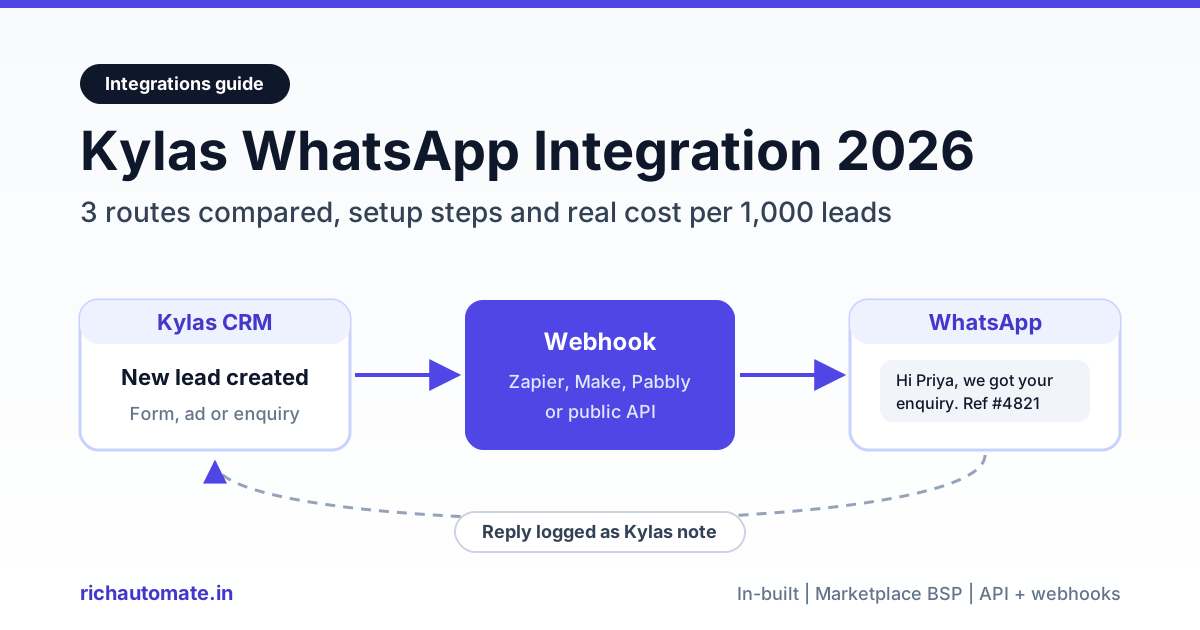
You can integrate Kylas with WhatsApp in three ways: turn on Kylas's in-built WhatsApp Business (Elevate plan plus the WhatsApp Business add-on), install a marketplace connector such as Interakt, WATI, Gupshup or Twilio, or wire Kylas webhooks to an external WhatsApp API platform like RichAutomate. The right route depends on whether your sales team needs a simple inbox inside the CRM, a full-featured BSP, or low per-message cost with automated lead follow-ups.
This guide compares all three routes for Indian SMB sales teams, walks through the webhook route step by step, gives template examples for each Meta category, and works out what 1,000 leads actually cost you on WhatsApp in 2026.
Why Kylas teams want WhatsApp in the CRM
Kylas is a sales CRM built in India, and most of its users sell to Indian buyers who answer WhatsApp much faster than email or cold calls. When a lead fills a form, a Facebook lead ad or an IndiaMART enquiry and lands in Kylas, the first few minutes matter most. A rep who sends a confirmation on WhatsApp within a minute usually gets the conversation; a rep who calls two hours later usually gets voicemail.
The problem is that WhatsApp chats often live on reps' personal phones, so history leaves when a rep does and the CRM timeline shows nothing. A proper integration fixes three things at once: messages go out from one official business number, the lead record shows the conversation, and repetitive first-touch messages are sent automatically instead of by hand.
Every route below uses the official WhatsApp Business Platform (Cloud API) rather than unofficial WhatsApp Web automation, which Meta can restrict at any time. Even on the official API, Meta enforces quality ratings and messaging limits, so no provider can honestly promise that your number will never be restricted. What you can control is opt-in, template quality and send volume.
The three Kylas WhatsApp integration routes at a glance
Route 1 is Kylas's own in-built WhatsApp Business (Elevate plan plus the add-on). Route 2 is a marketplace connector such as Interakt, WATI, Gupshup or Twilio, linked with your Kylas API key. Route 3 sends a Kylas "Lead created" webhook to RichAutomate's public API, directly or through Zapier, Make or Pabbly, and pushes replies back through the Kylas API.
One thing to state plainly: RichAutomate does not have a native, one-click Kylas app. Route 3 works through RichAutomate's public API plus webhooks, or through Zapier, Make or Pabbly. RichAutomate's native integrations today are Zoho CRM, Razorpay, Google Sheets, the Meta Cloud API and its built-in booking pages. If you prefer a no-code connector for everything, read our Zapier WhatsApp integration setup guide first.
Route 1: Kylas in-built WhatsApp Business
Kylas lists "Inbuilt WhatsApp Business" in its product menu, and its help centre describes the native setup. According to the Kylas support article on connecting a WhatsApp account, native Business WhatsApp needs the Elevate plan with the WhatsApp Business add-on. Users also need Read All and Update All permission on WhatsApp Business under Communication management.
The flow is short. In Kylas, open the WhatsApp Business menu, go to Account Details and choose Connect WhatsApp. Accept the WhatsApp terms, and a Facebook pop-up asks you to log in and pick or create your business account and number. If you do not have a WhatsApp Business account yet, Kylas points you to Meta Business Suite to create one first.
What you get, based on Kylas's own pages, is a conversation history inside the CRM alongside email and SMS, pre-approved message templates, and workflows that can trigger follow-ups. Kylas does not publish the add-on price or message charges on its public pages, so check the Kylas pricing page and ask your Kylas account manager how Meta's per-message charges are billed before you commit.
Choose this route if your team mainly needs reps to chat with leads from inside Kylas and you are already on, or happy to move to, the Elevate plan.
Route 2: Kylas marketplace connectors (Interakt, WATI, Twilio and more)
Kylas's Business WhatsApp integrations page lists a long set of providers: Gallabox, Green Ads Global, Gupshup, Interakt, Moplet, Netcore, Pinnacle, Twilio, Wati and Whatzapi, with Interakt marked as featured. The Kylas blog post on WhatsApp Business describes the general pattern: install your chosen provider from the Kylas marketplace, enter your Kylas API key, and log in to the provider account you want to connect.
The Kylas API key lives under CRM Settings, Integrations, API Key. The marketplace guides also expect the key to have lead and contact permissions. Once connected, messages sent through the provider are logged against the matching Kylas record, and you keep the provider's own features such as chatbots, broadcasts and shared inboxes.
The trade-off is cost stacking. You pay Kylas for the Elevate plan, the BSP for its own monthly plan, and Meta for each template message, sometimes with a BSP markup on top. For a five-rep team this can easily add a few thousand rupees a month before a single lead is messaged. Compare plans carefully, and confirm whether the BSP passes Meta charges through at cost.
Outside the marketplace there is also a per-seat inbox. TimelinesAI's Kylas WhatsApp integration page lists Starter at $35 per seat per month and Pro at $49 per seat per month, with messages syncing to the matching Kylas record. Per-seat pricing suits small teams with heavy one-to-one chatting, but it scales linearly with headcount.
Route 3: RichAutomate with Kylas webhooks, step by step
This route treats Kylas as the system of record and RichAutomate as the WhatsApp engine. Kylas fires a webhook when a lead is created; RichAutomate sends an approved template within seconds; when the lead replies, RichAutomate fires its own webhook so you can log the reply back on the Kylas lead. The pattern is the same one we use in our LeadSquared WhatsApp integration guide.
Step 1: Connect your number and get opt-in right
Sign up on RichAutomate, connect your WhatsApp Business number through Meta's embedded signup, and complete business verification where Meta asks for it. Before you message any lead, make sure your forms and ads collect clear WhatsApp opt-in, such as a checkbox reading "Send me updates on WhatsApp". Meta requires opt-in before you send the first template, and messaging people who did not ask is the fastest way to collect blocks and lower your quality rating.
Step 2: Create and approve your templates
Create at least two templates in RichAutomate: a utility template that confirms the enquiry and a marketing template for follow-ups. Submit them for Meta review. Approval is often quick, but it can take longer and Meta may reclassify a template's category, so build in a day of buffer before launch. Examples are in the next section.
Step 3: Generate a RichAutomate API key
In the RichAutomate dashboard, create an API key for the developer API. The RichAutomate API documentation shows the send-template call: a POST to https://richautomate.in/api/v1/send-template with the key as a Bearer token, and a JSON body containing the phone number, template name, language code and template variables. Keep the key secret and rotate it when staff with access leave.
Step 4: Create the Kylas webhook on "Lead created"
Kylas offers two ways to send lead data out. The first is a webhook subscription: per the Kylas webhook subscription guide, go to CRM Settings, Integration, Webhook, add a new webhook, and subscribe to the Lead entity's Created event. Kylas supports no authentication, API key, Bearer token and Basic authentication, and the guide lists webhooks for all product plans.
Get the India 2026 WhatsApp BSP price comparison
Wati vs AiSensy vs Interakt vs RichAutomate: Meta rates, platform fees and hidden costs, side by side. We send it to your WhatsApp in a minute.
The second is a workflow webhook action. The Kylas workflow webhook guide shows a workflow triggered "When Lead is created", with a webhook action where you choose the request type (GET, POST or PUT), target URL, authorisation and the lead fields to send. This version needs the Elevate plan, but it lets you add conditions, for example only leads from a certain source or city.
Step 5: Map the payload to a send-template call
Kylas webhook payloads do not match RichAutomate's request body field for field, so you need a small translation step. The no-code way is to point the Kylas webhook at a Zapier, Make or Pabbly catch-hook, then add an HTTP action that calls RichAutomate's send-template endpoint with the lead's phone number and first name as variables. Pabbly publishes a guide on setting up a Kylas webhook inside Pabbly Connect, and Zapier works the same way with "Webhooks by Zapier". The developer way is a tiny serverless function that does the same mapping. Either way, normalise phone numbers to the international format with the 91 country code, because Indian forms often store numbers with a leading 0 or with spaces.
Step 6: Push replies back into Kylas
In RichAutomate, add an outbound webhook subscribed to the message.inbound event. Deliveries are signed with an X-RichAutomate-Signature header (HMAC-SHA256), which your receiver should verify. Route that webhook to your automation tool, look up the lead in Kylas by phone number, and create a note or activity on it through the Kylas API, authenticated with your Kylas API key. Check Kylas's current API documentation for the exact endpoint and fields for notes, because Kylas does not publish them on its support pages. Our WhatsApp Business API webhook setup guide covers signature checks, retries and idempotency in more depth.
Step 7: Test, then go live slowly
Create a test lead in Kylas with your own number, confirm the template arrives, reply to it, and check that the note appears on the lead. Then switch on real traffic. A new number starts with a lower messaging limit that Meta raises as you send good-quality messages, so ramp up rather than blasting your whole backlog on day one.
Template examples: utility vs marketing
Meta classifies every template, and the category decides the price. A utility template must relate to a specific transaction or request the user made; anything promotional is marketing. If a utility template contains sales language, Meta can reclassify it as marketing, so keep each one honest.
| Use case | Category | Example template text |
|---|---|---|
| Enquiry confirmation | Utility | Hi {{1}}, we have received your enquiry about {{2}}. Your reference number is {{3}}. Our team will contact you within 2 working hours. |
| Site visit or demo reminder | Utility | Hi {{1}}, this is a reminder of your demo on {{2}} at {{3}}. Reply 1 to confirm or 2 to reschedule. |
| Quote shared | Utility | Hi {{1}}, the quotation {{2}} you requested is attached. Reply here if you have any questions. |
| Follow-up after no response | Marketing | Hi {{1}}, still looking for {{2}}? This month we are offering free installation on orders above Rs 50,000. Reply YES and our advisor will call you. |
| Re-engagement of old leads | Marketing | Hi {{1}}, our new {{2}} range has just launched. Want the brochure? Reply BROCHURE. |
A good pattern is a utility confirmation the moment the lead is created, then at most one or two marketing follow-ups spaced a few days apart if there is no reply. Once the lead replies, a 24-hour customer service window opens and your reps can chat freely with non-template messages.
Cost per 1,000 leads on RichAutomate Client Pay
RichAutomate has no setup fee and no monthly minimum, and a 14-day free trial with 100 credits. On Client Pay, RichAutomate charges a ₹0.10 platform fee per message and Meta bills your business directly for its own charges. Optional plans are Starter at ₹499 a month, Pro at ₹899 and White-label at ₹1,199 (GST inclusive), and the plan fee is credited to your wallet as usage credit, so you are not paying twice. Full details are on the RichAutomate pricing page.
As of October 2026, Meta's India rates are about ₹0.8631 per marketing message and ₹0.1150 per utility or authentication message. Check Meta's WhatsApp pricing page for the current rate card, because Meta revises rates and rules periodically. Adding the ₹0.10 platform fee gives roughly ₹0.2150 per utility template and ₹0.9631 per marketing template.
| Sequence for 1,000 new Kylas leads | Messages | Approx. cost (Client Pay) | Per lead |
|---|---|---|---|
| Utility confirmation only | 1,000 utility | ₹215 | ₹0.22 |
| Utility confirmation plus 1 marketing follow-up | 1,000 utility + 1,000 marketing | ₹1,178 | ₹1.18 |
| Utility confirmation plus 2 marketing follow-ups | 1,000 utility + 2,000 marketing | ₹2,141 | ₹2.14 |
These figures assume every follow-up is sent. In practice, leads who reply early drop out of the sequence, so real spend is usually lower. Conversations after a reply are free-form service messages; Meta revises its service-window pricing rules often, so check Meta's current pricing page before you budget for them. Verify the latest rules on Meta's page before you budget.
Compare that with the other routes. On route 2, a BSP's monthly plan plus any per-message markup sits on top of the same Meta charges. On a per-seat inbox at $35 to $49 per seat, a five-rep team spends roughly $175 to $245 a month before Meta charges. For high-volume lead follow-up, a low per-message fee usually wins; for a small team that mostly chats one-to-one, per-seat can be simpler.
Which Kylas WhatsApp route fits you?
| Your situation | Best route | Why |
|---|---|---|
| Small team, mostly one-to-one chats, already on Kylas Elevate | Route 1: Kylas in-built | Fewest tools; chats stay in Kylas |
| Already paying Interakt, WATI, Gupshup or Twilio | Route 2: marketplace connector | Reuse your existing number, templates and bot flows |
| Need chatbots, broadcasts and a shared inbox from one BSP | Route 2 or Route 3 | Both give a full WhatsApp toolset outside the CRM |
| High lead volume, cost per lead matters most | Route 3: RichAutomate via API | ₹0.10 platform fee plus Meta's charges, no monthly floor |
| On Kylas's free Embark plan | Route 3 (webhook subscription) | Embark does not include Kylas's WhatsApp integration; webhooks are listed for all plans |
| No developer and no appetite for Zapier or Pabbly | Route 1 or Route 2 | Point-and-click setup inside Kylas |
Common mistakes to avoid
- Messaging without opt-in. A lead form submission is not automatically WhatsApp consent. Add an explicit opt-in line to your forms and ads.
- Dressing up marketing as utility. Meta reviews and can reclassify templates. A "confirmation" that pushes a discount will be treated as marketing.
- Broken phone formats. Numbers stored as 098xxxxxxx or with spaces fail silently. Normalise to 91 plus the 10-digit number before calling the API.
- Duplicate sends. Kylas may fire both a webhook subscription and a workflow webhook if you set up both. Pick one, and de-duplicate by lead ID in your automation.
- No reply logging. If replies never reach Kylas, reps keep working blind. Set up the message.inbound webhook from day one.
Start with a free trial
The quickest way to judge route 3 is to test it on your own leads. Start a 14-day RichAutomate free trial with 100 credits, connect your number, get one utility template approved, and point a Kylas "Lead created" webhook at it through Zapier, Make or Pabbly. Once the template is approved, the first automated confirmation can land on a test lead the same day, and you will know within a week whether faster WhatsApp follow-up moves your conversion rate.