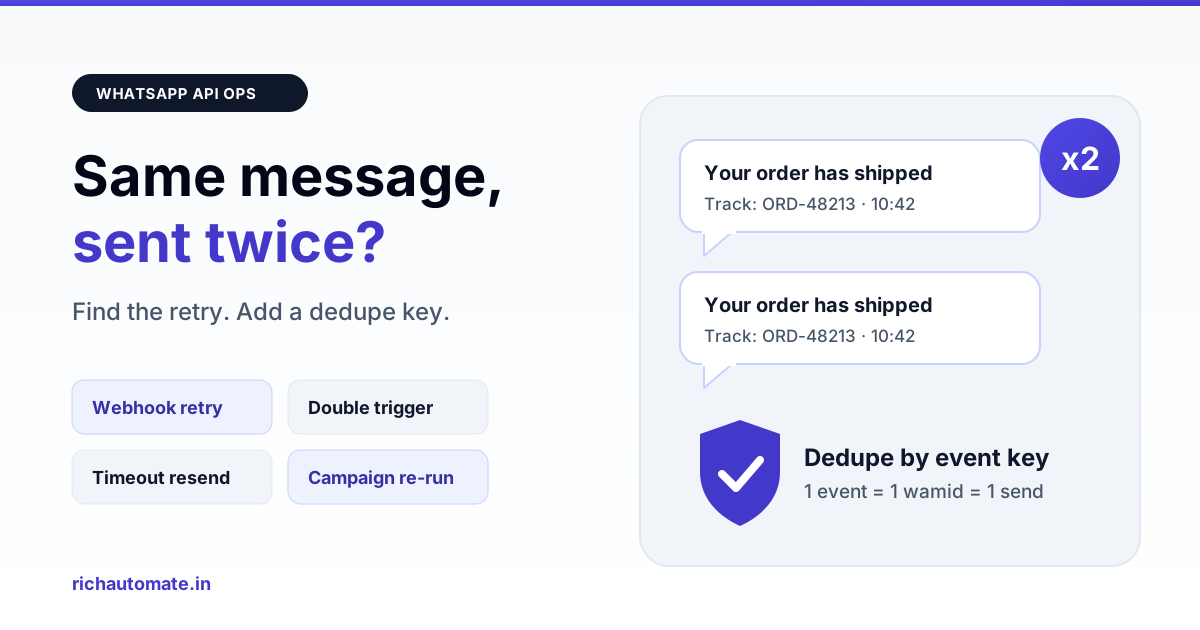
Customers get the same WhatsApp Business API message twice when one business event is turned into two send requests — usually a retry after a timeout, a webhook processed twice, or two automations firing on one trigger. The fix is idempotency: give every event a unique key, store it before you call the API, and refuse to send anything whose key already exists.
Duplicates are one of the most common complaints Indian teams raise after going live on the API. A customer forwards a screenshot showing "Your order has been shipped" twice, a sale broadcast lands two times in a row, or an OTP arrives in pairs and the customer is no longer sure which one is valid. Each copy is billed, each copy chips away at trust, and repeated identical messages are exactly the kind of experience that makes people tap Block. This guide walks through where duplicates really come from, how to measure them, and a 30-day plan to get them to zero.
Why duplicates are almost never Meta's fault
When you call the Cloud API send endpoint, Meta accepts the request and returns a message id, the wamid. One accepted request produces one message. Meta does not normally deliver a single accepted request twice to the handset. So when a customer sees two identical messages, the useful assumption is that your system — or something connected to it — made two requests.
That is good news, because it means the problem is fixable in your own code and configuration. The hard part is that duplicates tend to come from the edges: network timeouts, retry policies, integrations nobody remembers switching on, and webhooks that arrive more than once. Meta may retry webhook deliveries when your endpoint responds slowly or with an error, and many queue systems retry failed jobs automatically. Each of these is sensible on its own. Together, without a dedupe layer, they multiply sends.
The seven causes, from most to least common
1. Webhook redelivery processed twice
Your webhook receives an inbound message and triggers an auto-reply. If the endpoint took too long to answer, Meta may deliver the same event again. If you do not check whether you have already processed that inbound message id, the auto-reply goes out twice. This is the single most frequent cause we see in chatbot setups, and the engineering patterns to avoid it are covered in our WhatsApp webhook reliability engineering guide.
2. Client retry after a timeout
Your server calls the send API, the request succeeds at Meta, but the response is slow and your HTTP client times out at, say, 10 seconds. Your code treats it as a failure and retries. Meta now has two valid requests. Without an idempotency key on your side there is no way to tell that the first one worked.
3. Double-click and double-submit
An agent clicks Send in a shared inbox and the button does not disable immediately. A website lead form posts twice on a slow mobile connection in a tier-2 city. A staff member refreshes the page that confirmed a broadcast. Each of these creates a genuine second request.
4. Campaign re-run or overlapping audience lists
A campaign stalls, someone clicks Run again, and the contacts who already received it get it a second time. Or a Diwali offer goes to "All customers" and "Mumbai customers" as two separate campaigns on the same afternoon. If a campaign ever looks stuck, read our note on WhatsApp campaigns stuck in queued or processing before pressing Run a second time.
5. Two automations on one event
A keyword trigger for "price" and a separate welcome flow for new contacts both match the first inbound message "price?". Both fire. The customer receives two different replies, or two copies of the same one if both nodes use the same template.
6. CRM or Shopify integration plus your BSP both sending
The order-confirmation message is configured in a Shopify WhatsApp app and also in your BSP's order automation. Or your CRM sends payment reminders through its own connector while your team built the same reminder on the platform. Two systems, one event, two messages.
7. Queue worker retry after partial success
A job sends the message, then fails on the next step — writing to the database, updating the CRM, broadcasting a status event. The queue marks the whole job as failed and retries it, and the retry sends again. This one is subtle because the logs show a failure, not a duplicate.
Symptom to cause to fix
Use the pattern the customer describes to narrow the cause quickly.
| What you see | Likely cause | Fix |
|---|---|---|
| Auto-reply arrives twice, seconds apart | Webhook redelivered and processed twice | Dedupe inbound by message id; respond 200 fast, process async |
| Two copies with different wamids, a few seconds apart | Client retry after timeout | Idempotency key per event; check before retry |
| Duplicates only on agent or form sends | Double-click or double-submit | Disable button on click; server-side unique key |
| Whole segment got the broadcast twice, minutes or hours apart | Campaign re-run or overlapping lists | Exclude already-sent contacts; dedupe audience before launch |
| Two different replies to one inbound message | Two automations or triggers matched | Trigger priority and one active flow per contact |
| Order message twice, one in a different format | Store app and BSP both sending | Pick one sender per event; disable the other |
| Duplicate appears only when a job shows as failed | Worker retry after partial success | Record send result before later steps; skip send on retry |
What duplicates actually cost
Every accepted request is billed as a message, so a duplicate costs exactly what the original did. On RichAutomate there is no setup fee and no monthly fee; you pay only for usage. On Client Pay the platform fee is ₹0.10 per message and Meta bills its own message charges to you directly. On SaaS Pay it is ₹1.50 per marketing message and ₹0.50 per utility message, all-inclusive. The figures below are illustrative volumes and duplicate rates, not measured averages.
| Scenario (illustrative) | Duplicates | SaaS Pay extra | Client Pay extra |
|---|---|---|---|
| Festive broadcast, 50,000 marketing messages, 3% duplicated | 1,500 | ₹1,800 | ₹150 platform fee + Meta's charge for 1,500 messages |
| D2C brand, 2,00,000 utility order updates a month, 2% duplicated | 4,000 | ₹1,200 a month | ₹400 platform fee + Meta's charge |
| Clinic reminders, 20,000 utility messages a month, 5% duplicated | 1,000 | ₹300 a month | ₹100 platform fee + Meta's charge |
The direct rupee cost is rarely the biggest problem. The larger cost is the customers who block the number after the second identical promotion, and the support tickets asking which OTP or payment link is real. For the full cost model behind these rates, see our breakdown of WhatsApp Business API cost in India.
Quality rating and block risk
Meta does not publish a rule that says "N duplicates lowers your rating". What is known is that quality rating is influenced by how recipients react, including blocks and spam reports, and that messaging limits can be affected when quality drops. A customer who receives the same promotion twice in a minute is more likely to block than one who receives it once. Duplicated marketing messages are therefore a real, if unquantified, risk to your number.
Send these messages on WhatsApp, from your own number
We get your templates approved on the official WhatsApp API and set up your first broadcast with you. ₹0 platform fee, you pay only Meta's per-message rate.
Be careful with anyone who promises that duplicates, or any bulk sending pattern, carry "no ban risk". No provider controls Meta's enforcement. The only dependable protection is to send each message once, to people who opted in, with content they expect. If you are also seeing sends rejected rather than duplicated, our list of WhatsApp Business API error codes decoded will help separate throttling and policy errors from dedupe problems.
The idempotency and dedupe checklist
These controls cover all seven causes above. Most teams need four or five of them, not all at once.
- One unique key per business event. Build it from what the event is, not when it ran:
order_shipped:ORD-48213,otp:+9198XXXXXX12:session-77,campaign:412:contact:9031. A retry of the same event produces the same key. - Enforce the key with a database unique constraint. Insert the key into an outbound-events table before calling the API. If the insert fails on the constraint, the event was already handled — do not send.
- Store the wamid against the key. When Meta returns the message id, save it. On any retry, a stored wamid means "already sent", even if the original job later failed.
- Deduplicate inbound webhooks by message id. Keep processed inbound ids for at least a day. If an id is already present, acknowledge the webhook and stop.
- Acknowledge webhooks fast. Return 200 immediately and do the work on a queue, so slow processing does not invite redelivery.
- Lock per contact plus event. A short lock (for example 30 to 60 seconds in Redis) on
contact:eventstops two workers or two triggers from sending the same thing concurrently. - Separate the send from the side effects. Mark the send complete first; CRM updates and notifications run as their own retryable jobs that never call the send API.
- Disable buttons and forms on submit, and still rely on the server-side key, because the browser cannot be trusted to prevent a second request.
- Exclude already-sent contacts on any campaign re-run, and deduplicate phone numbers in the audience after normalising to E.164 format, so 9876543210 and +91 98765 43210 are one contact.
- One owner per event type. Write down which system sends each message — store app, CRM, or WhatsApp platform — and switch off the others.
How to find the duplicates you already sent
You cannot fix what you have not measured. The query is conceptually simple: find the same recipient receiving the same content more than once within a short window.
- Pick a window. Ten minutes catches retries, double-clicks and double triggers. A few hours catches campaign re-runs and overlapping lists.
- Group outbound messages by recipient number and by template name or body text, restricted to that window.
- Keep groups with more than one row. Each extra row is a duplicate; the sum is your duplicate count, and dividing by total sends gives the duplicate rate.
- Look at what the pairs share. Same campaign id means a re-run. Same automation id means a double trigger. Two different sources means an integration overlap. Gaps of exactly your HTTP timeout point to client retries.
- Trace who created each send. An audit trail that records the user, automation or API key behind every message turns this from guesswork into a five-minute check — see our guide to a WhatsApp API audit log that shows who sent what.
Be careful not to count legitimate repeats. A payment reminder sent on day 1 and day 3 is intentional; two identical ones in the same minute are not. Tune the window to your business before you report a number.
Duplicate prevention by cause
| Cause | Primary control | Backup control |
|---|---|---|
| Webhook redelivery | Inbound message id dedupe | Fast 200 response, async processing |
| Client retry after timeout | Unique event key with DB constraint | Stored wamid checked before retry |
| Double-click or form resubmit | Server-side unique key | Disabled button on submit |
| Campaign re-run or overlap | Exclude already-sent contacts | Normalised audience dedupe |
| Two automations on one event | Trigger priority, one active flow per contact | Per contact plus event lock |
| Integration plus BSP both sending | Single owner per event type | Shared event key across systems |
| Worker retry after partial success | Record send before side effects | Stored wamid means skip send |
A 30-day plan to reach zero duplicates
Days 1 to 7: measure and stop the obvious
- Run the duplicate query over the last 30 days and record the baseline rate, split by marketing and utility.
- List every system that can send a WhatsApp message on your number: platform automations, store apps, CRM connectors, custom scripts.
- Switch off any second sender for the same event. This alone often removes the largest share.
- Stop re-running stalled campaigns until you can exclude contacts who already received them.
Days 8 to 15: fix webhooks and automations
- Add inbound message id dedupe and make the webhook respond immediately.
- Review keyword triggers and flows for overlaps; set priority so only one fires per inbound message.
- Add a short per contact plus event lock around auto-replies.
Days 16 to 23: make outbound sends idempotent
- Create the outbound-events table with a unique key column and a wamid column.
- Route every custom send through it: insert key, send, store wamid.
- Split send jobs from side-effect jobs so a CRM failure never triggers a resend.
- Disable Send buttons and form submits on click.
Days 24 to 30: verify and monitor
- Re-run the duplicate query and compare against the baseline.
- Schedule it daily with an alert when the rate goes above a threshold you choose, for example 0.5%.
- Test deliberately: force a timeout, replay a webhook, double-click a button, and confirm only one message goes out each time.
- Write the "one owner per event" list into your runbook so the next integration does not reintroduce the problem.
The short version
A customer receiving the same WhatsApp message twice is a sign that one event became two requests. Find the pattern with a same-contact, same-content, short-window query. Remove duplicate senders first, then dedupe inbound webhooks by message id, then make outbound sends idempotent with a unique key and a stored wamid. Every duplicate is billed and every duplicate nudges a customer toward Block, so this work pays for itself quickly.
If you want usage-only pricing with ₹0 setup and ₹0 monthly fees while you clean this up, you can create a RichAutomate account and route your sends through one place.
Meta's Cloud API has no idempotency key, so retries after a timeout can double-send. Our WhatsApp API retry and idempotency guide for Node.js shows how to dedupe with a client key.