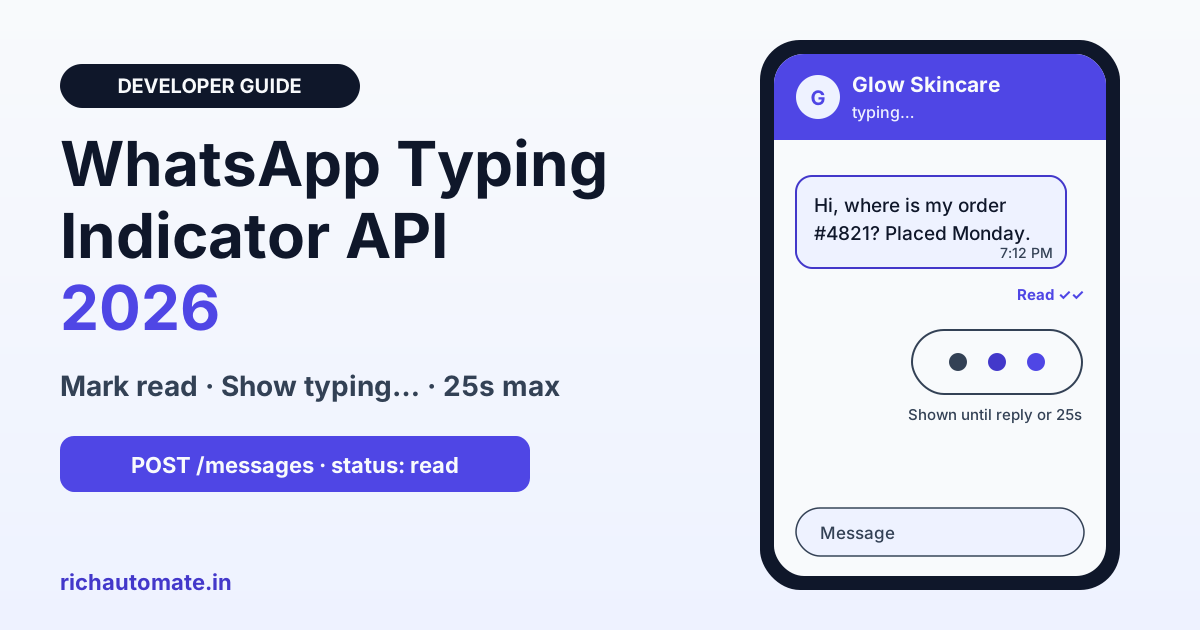
The WhatsApp typing indicator is a Cloud API call that marks a customer's message as read and shows "typing…" in their chat until you reply or 25 seconds pass, whichever comes first. You trigger it with one POST to the /messages endpoint using the wamid of the customer's inbound message, and because it is a status update rather than a message, it is not billed.
For Indian businesses running AI agents, order bots or busy team inboxes, those few seconds between a customer's question and your answer decide whether the chat feels alive or ignored. This guide covers exactly what the typing indicator API does, the request and response format, a webhook pattern in Node.js and PHP, when it helps and when it hurts, the 25-second rule for slow replies, common errors, and the questions to ask your WhatsApp provider before you depend on it.
What the WhatsApp typing indicator API does
Definition: the WhatsApp typing indicator is a status update you send through the Meta WhatsApp Cloud API that does two things at once. It marks a specific inbound message as read, so the customer sees blue ticks, and it shows a "typing…" state in their chat so they know a reply is on the way.
Four facts define how it behaves:
- It is tied to an inbound message. The request carries the wamid (WhatsApp message ID) of a message the customer sent you. No inbound message, no typing indicator.
- It ends on its own. The indicator disappears as soon as you send your reply, or after 25 seconds, whichever happens first.
- It is not a message. It is a status update on the same endpoint you use for sending, and it is not a billable message.
- It is a promise. Meta's guidance is to show it only when you are actually going to respond. Showing typing… and then going silent is worse than showing nothing.
If you are new to how WhatsApp signals delivery and read status, our guide to WhatsApp message ticks and read receipts explains what single grey, double grey and blue ticks mean for the customer on the other end.
Typing indicator vs mark-as-read vs holding message
There are three ways to tell a customer you have seen their message. They look similar from the outside but behave very differently, so pick the one that matches how long your reply will actually take.
| Option | What the customer sees | How you send it | Billed as a message? | Best when |
|---|---|---|---|---|
| Typing indicator | Blue ticks plus "typing…" for up to 25 seconds | status "read" + message_id + typing_indicator | No | Your reply will land within a few seconds to about 25 seconds |
| Mark as read only | Blue ticks, no typing… | status "read" + message_id, no typing_indicator | No | You have seen it but will not reply right away, or the reply is instant anyway |
| Holding message | A real text such as "Checking your order, one moment" | Normal text message to the customer | Yes, as a normal message under your pricing | The answer will take longer than 25 seconds or needs a human |
A practical rule of thumb: if your bot answers in under a second, the indicator adds nothing because it is dismissed almost immediately. If the reply takes a few seconds, the indicator is ideal. If it takes longer than 25 seconds, combine it with a holding message.
How to call the typing indicator API
The request goes to the same Cloud API messages endpoint you already use for replies: POST to graph.facebook.com/v24.0/{PHONE_NUMBER_ID}/messages with your access token as a Bearer header. The body sets status to read, passes the wamid of the inbound message as message_id, and adds a typing_indicator object with type text. A successful call returns a simple success flag.
# 1) Mark read + show typing... (use the wamid from your webhook)
curl -X POST "https://graph.facebook.com/v24.0/<PHONE_NUMBER_ID>/messages" \
  -H "Authorization: Bearer <ACCESS_TOKEN>" \
  -H "Content-Type: application/json" \
  -d '{
    "messaging_product": "whatsapp",
    "status": "read",
    "message_id": "<WAMID_OF_INBOUND_MESSAGE>",
    "typing_indicator": { "type": "text" }
  }'

# Success response
{ "success": true }

# 2) Plain mark-as-read (blue ticks only, no typing...)
#    Same body without the typing_indicator object:
#    { "messaging_product": "whatsapp", "status": "read",
#      "message_id": "<WAMID_OF_INBOUND_MESSAGE>" }
Three details matter in practice:
- Use the right wamid. It is the id field of the inbound message in your webhook payload, received on the same phone number ID you are calling from.
- Use the same phone number ID. The wamid belongs to the conversation on one business number. Calling from a different number ID will not work.
- Keep the token server-side. Never call the Cloud API from a browser or mobile app with your access token exposed. Make the call from your backend or queue worker.
Wiring it into your webhook: inbound, typing, reply
The typing indicator only makes sense inside your reply pipeline. The clean pattern is: receive the inbound message on your webhook, acknowledge the webhook quickly, call the typing indicator once, do the slow work (AI generation, database lookup, CRM fetch), then send the reply. Sending the reply dismisses the indicator automatically, so you never need a separate "stop typing" call.
// Node.js (Express): inbound -> typing indicator -> generate -> reply
// Verify the X-Hub-Signature-256 header first (omitted for brevity).
app.post('/webhook', async (req, res) => {
  res.sendStatus(200); // acknowledge fast, work after
  const msg = req.body.entry?.[0]?.changes?.[0]?.value?.messages?.[0];
  if (!msg || msg.type !== 'text') return;

  const url = `https://graph.facebook.com/v24.0/${PHONE_NUMBER_ID}/messages`;
  const headers = { Authorization: `Bearer ${TOKEN}`, 'Content-Type': 'application/json' };

  // 1. Mark read + show typing... once for this reply
  await fetch(url, { method: 'POST', headers, body: JSON.stringify({
    messaging_product: 'whatsapp', status: 'read',
    message_id: msg.id, typing_indicator: { type: 'text' }
  }) });

  // 2. Slow work: LLM call, order lookup, CRM fetch
  const answer = await generateReply(msg.from, msg.text.body);

  // 3. Send the reply - this dismisses the indicator
  await fetch(url, { method: 'POST', headers, body: JSON.stringify({
    messaging_product: 'whatsapp', to: msg.from,
    type: 'text', text: { body: answer }
  }) });
});
The same flow in a Laravel queued job looks like this. Running it in a queue keeps your webhook response fast, which Meta expects, while the typing indicator covers the wait on the customer's side.
// PHP (Laravel queued job): same pattern
$url = "https://graph.facebook.com/v24.0/{$phoneNumberId}/messages";

Http::withToken($token)->post($url, [
    'messaging_product' => 'whatsapp',
    'status'            => 'read',
    'message_id'        => $wamid,          // from the inbound webhook
    'typing_indicator'  => ['type' => 'text'],
]);

$answer = $this->generateReply($from, $text); // AI or DB lookup

Http::withToken($token)->post($url, [
    'messaging_product' => 'whatsapp',
    'to'   => $from,
    'type' => 'text',
    'text' => ['body' => $answer],
]);
If you have not set up the inbound side yet, start with our WhatsApp Business API webhook setup guide, which covers verification, signature checks and parsing the messages array that gives you the wamid.
When to use it: scenarios and expected wait times
The indicator earns its place wherever there is a visible pause between question and answer. The wait times below are examples to help you decide, not benchmarks; measure your own pipeline before choosing.
Get a 1-minute BSP audit on WhatsApp
Drop your WhatsApp number — we line-item your current invoice against Meta India rates in under 60 seconds. India-hosted, DPDP-compliant.
| Scenario | Example (India) | Typical wait (example) | Recommended approach |
|---|---|---|---|
| Instant keyword or menu reply | Customer sends "Hi" and gets a button menu | Under 1 second | Mark as read only, or nothing; typing… would flash and vanish |
| AI agent or LLM answer | Coaching institute lead asks about JEE batch fees and timings | A few seconds | Typing indicator, then the AI reply |
| Order or booking lookup | D2C skincare buyer asks "Where is my order?" | 1 to 10 seconds | Typing indicator, then tracking details |
| Appointment slot check | Clinic patient asks for a Saturday slot with the dermatologist | A few seconds to longer if the calendar system is slow | Typing indicator; holding message if it runs past 25 seconds |
| Human agent picking up the chat | Support executive opens an escalated refund chat in the team inbox | Varies | Typing indicator only when the agent is actually composing |
| Long report or multi-system job | Distributor asks for a ledger statement for the last quarter | Longer than 25 seconds | Holding message first, then the answer; re-send typing if needed |
AI agents are the biggest winner. A large language model often needs several seconds to produce a good answer, and without a signal the customer may assume the bot is broken and type the question again. Our guide to WhatsApp AI chatbot integration with ChatGPT and Claude covers the generation side; the typing indicator is the small piece that makes that wait feel intentional.
The 25-second rule and long-running replies
The indicator lasts a maximum of 25 seconds. Plan around that limit instead of hoping your reply always beats it.
- Under 25 seconds: one typing indicator call is enough. Send the reply and the indicator disappears.
- Slightly over 25 seconds: re-send the typing indicator call for the same inbound wamid so the customer keeps seeing activity until your answer arrives.
- Well over 25 seconds, or unpredictable: send a short holding message such as "Checking your order, one moment" or "Pulling up your appointment details, give me a few seconds", then send the full answer when it is ready.
A holding message is a real message, so it counts under your normal pricing, but it sets an honest expectation. For a Mumbai D2C brand whose order system sometimes takes half a minute to respond, a holding message is far better than a typing indicator that disappears with nothing after it.
A simple implementation is a timer in your worker: start it when you send the indicator, and if the reply is not ready by around 20 seconds, either re-send the indicator or send the holding message, depending on how long the job usually runs.
Common mistakes and the after-hours trade-off
The typing indicator is easy to call, which makes it easy to misuse. These are the patterns to avoid.
- Calling it when no reply follows. If your bot decides not to answer (spam, unsupported message type, outside scope), do not show typing…. Customers read it as a promise.
- Calling it on every message in a burst. Customers often send three short messages in a row. One indicator per reply is enough; firing it for every inbound message just adds API calls.
- Calling it after the reply has gone. The reply already dismissed any indicator. Sending one afterwards is pointless and can confuse the customer.
- Using a stale wamid. Reply to the latest relevant inbound message, not one from earlier in the day.
- Calling it too often under load. Each indicator is an API request. During a campaign spike, those extra calls count towards your throughput, so read our guide to WhatsApp Cloud API rate limits and throttling before you add it to a high-volume bot.
The after-hours trade-off: marking a message as read instantly tells the customer you have seen it, and that creates an expectation of an instant answer. If your clinic's front desk closes at 8 pm and there is no bot to answer, a customer who sees blue ticks and typing… at 11 pm, followed by silence until morning, will feel ignored. At night, skip the read and typing calls and use an away message instead. Our WhatsApp auto-reply setup guide for Indian SMBs shows how to set away messages and business hours so customers know when to expect a human.
Errors and fixes
Most problems with the typing indicator come from the wamid, the phone number ID or the access token. The table below describes symptoms in plain terms; always read the error message and details Meta returns in the response body, because that is the most reliable guide to the exact cause.
| Symptom or error | Likely cause | Fix |
|---|---|---|
| Error saying the message ID is invalid or not found | Wrong or mistyped wamid, or a wamid from a different business number | Use the exact id from the inbound webhook, called from the same phone number ID that received it |
| Error or no effect on an old message | The wamid is stale or outside the active conversation | Only use the indicator for recent inbound messages you are about to answer |
| Authentication or permission error | Access token expired, revoked, or lacks messaging permission for this WhatsApp Business Account | Regenerate or re-authorise the token with messaging access for the right account, and store it server-side |
| Success response but customer never notices typing… | Reply was sent almost immediately, so the indicator was dismissed at once | Expected behaviour; for instant replies the indicator is unnecessary |
| Typing… disappears before the answer arrives | The 25-second limit passed | Re-send the indicator, or send a holding message, then the answer |
| Throttling errors during a spike | Too many API calls in a short window, including extra indicator calls | Send one indicator per reply, queue work, and back off and retry on throttling |
Questions to ask your BSP before relying on it
Many Indian businesses use a Business Solution Provider (BSP) or a platform on top of the Cloud API instead of calling Meta directly. Support for the typing indicator varies, so ask before you design your customer experience around it:
- Does your platform support the WhatsApp typing indicator today, or only plain mark-as-read?
- Does your platform mark inbound messages as read automatically? If so, when: on arrival, when an agent opens the chat, or when a reply is sent?
- Can I trigger the typing indicator from my chatbot or AI agent flow before a slow reply?
- Can I turn automatic read receipts off outside business hours?
- If I use my own Meta Cloud API connection, can I call the endpoint directly alongside your inbox without conflicts?
- Do indicator calls count against any platform-level API limit?
Clear answers tell you whether you can rely on the provider or need a small custom worker of your own. Either way, the customer experience you want is the same: honest read receipts, typing… only when a reply is coming, and an away message when nobody is there. Missed chats are the real risk, so whichever route you choose, make sure every inbound message ends with a reply, an away message or a clear handover to a person.
Using typing indicators with RichAutomate
To be clear about what exists today: RichAutomate does not currently offer a built-in typing indicator toggle. What you can do on RichAutomate is build chatbots and AI agents, set keyword auto-replies and away messages, and manage conversations in a shared team inbox. Developers who connect their own Meta Cloud API number can call Meta's typing indicator endpoint directly from their own backend, using the webhook pattern shown above, for the moments where it adds value.
If typing indicators matter for your use case, tell our team; we track these requests for the roadmap, without promising dates. Pricing starts at ₹0 setup and ₹0 monthly on pay-as-you-go. See the details on our pricing page.
Ready to make your WhatsApp replies feel faster and more human? Start your free RichAutomate trial with 14 days and 100 credits, connect your number and set up your first chatbot or AI agent today.