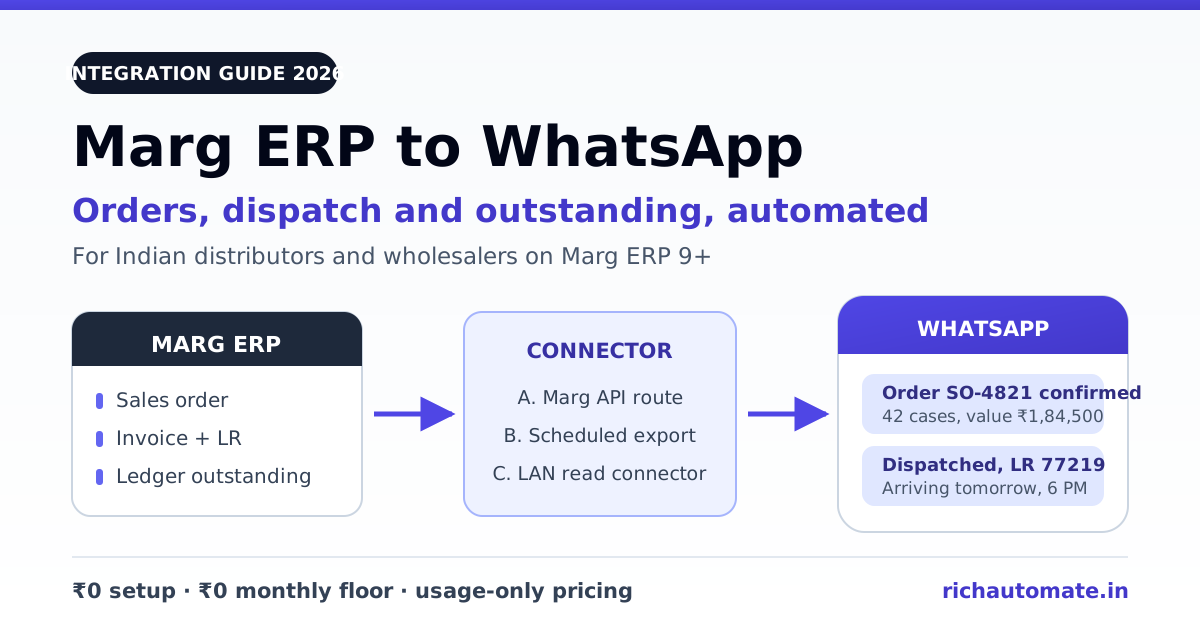
Marg ERP connects to WhatsApp through the WhatsApp Business API: order, invoice, dispatch and outstanding data from Marg is handed to a WhatsApp Business API provider, which delivers it as pre-approved template messages to your buyer's phone. There is no official one-click button inside Marg, so every working setup in Indian distribution is one of three patterns - Marg's own API route if your licence exposes it, a scheduled Excel/CSV export picked up by an automation tool, or a read-only connector on your office LAN.
This guide is for distributors and wholesalers on Marg ERP 9+ - pharma, FMCG, general trade, agri-input, hardware - who are tired of a staff member copy-pasting order numbers and LR details into WhatsApp Web all day. Below: the three routes compared, the five messages worth automating first, the template and opt-in rules, and what it costs per message.
What actually connects Marg ERP to WhatsApp
Separate three things that people usually blur together.
Marg is the system of record. Orders, invoices, dispatch and LR entries, ledger and outstanding all live in Marg - almost always on a Windows machine or small server in your own office, database on the same LAN. That is the most important fact about Marg integrations: unlike a cloud ERP there is usually no public URL an external service can call into, so data has to be pushed, exported or read out from inside your network.
The WhatsApp Business API is the delivery channel. It is not WhatsApp Web and not the WhatsApp Business app. It has no inbox you type into - it accepts a phone number, a template name and a set of variables, then returns a message ID plus delivery-status webhooks. Because it is an API, a machine can drive it.
The connector is whatever moves data from the first to the second. That is the only real decision you have to make. Everything else - onboarding a WhatsApp Business Account, business verification, display-name approval, template submission - is identical regardless of route, and is the same groundwork a Tally WhatsApp integration needs.
Be sceptical of any vendor claiming a universal Marg plugin - installations vary by version, licence and partner-enabled add-ons.
The three ways to get Marg data onto WhatsApp
Route A - Marg's own API or add-on route. If your Marg licence and version expose an integration surface, a partner maps your documents - sales order, invoice, dispatch, ledger - onto it and pushes events out as they happen. Best data fidelity, since you read Marg's own document definitions rather than a flattened export. It needs Marg-side enablement, so step one is asking your Marg partner in writing exactly what your licence and version expose.
Route B - scheduled export into an automation tool. Marg exports the day's orders, invoices or an outstanding statement to Excel or CSV on a schedule, into a watched folder. A watcher - n8n, Zapier or a twenty-line script - picks up each new file, loops the rows, and calls the WhatsApp API once per row with the right template. Most distributors should start here: it touches nothing inside Marg, works on old versions, and can be live in days. If you already run workflow automation, an n8n WhatsApp integration gives you retries, error branches and logging for free.
Route C - middleware or read-only DB connector. A small service on the same LAN as Marg polls the Marg database or a staging table your partner writes to, detects new or changed rows, and pushes them out over HTTPS. Latency drops to seconds and you can trigger on precise events such as "invoice marked dispatched". The cost is IT involvement: someone owns that box and re-tests after Marg upgrades. Keep it strictly read-only - a WhatsApp integration should never write back into your ERP.
| Route | Setup effort | Latency | IT dependency | Works on older Marg | Best for |
|---|---|---|---|---|---|
| A. Marg API / add-on | Medium-high, needs Marg-side enablement | Near real time | Marg partner leads it | Depends on licence and version | Distributors with an active Marg partner |
| B. Scheduled export | Low, live in days | The export interval (15 min to daily) | Minimal - an operator and a folder | Yes, nearly always | First rollout, single branch, proving value |
| C. LAN read connector | Medium, needs a host and stable outbound path | Seconds | High - you need an IT owner | Usually yes, if the data is readable | High-volume or multi-branch, event-level triggers |
Start on Route B, prove the wording on real buyers, then graduate to A or C once volume justifies it. Template wording and opt-in discipline are what make or break the project, and Route B teaches both without an integration bill.
Want to test the flow on your own orders first? Start a 14-day RichAutomate trial - 100 free credits, ₹0 setup.
The five Marg messages worth automating first
Do not automate everything in month one. These five carry almost all the value.
1. Order confirmation. The moment an order is punched in Marg, the retailer gets order number, item count, value and expected dispatch date. This kills the biggest question your telecalling desk handles - "order laga kya?" - and catches wrong-party or wrong-quantity entries in minutes, not at delivery.
2. Dispatch and LR update. Invoice number, transporter, LR number, case count, expected arrival. For stock going upcountry this removes a whole category of follow-up calls - the retailer can chase the transporter themselves.
3. Payment and outstanding reminder. A weekly statement of bills due, amount and days overdue, straight from the Marg ledger. Keep it factual and include a "reply if this is already paid" line - those replies catch reconciliation errors before they become arguments. Usually the clearest rupee return of the five.
Get the India 2026 WhatsApp BSP price comparison
Wati vs AiSensy vs Interakt vs RichAutomate: Meta rates, platform fees and hidden costs, side by side. We send it to your WhatsApp in a minute.
4. Delivery confirmation and short-supply note. Confirm what actually shipped and flag short-supplied or substituted items. Written notice at delivery time prevents the credit-note dispute three weeks later.
5. New-stock and scheme offers. New arrivals, expiring schemes, price revisions - only to retailers who opted in. Treat it differently from the other four: it is marketing, costs several times more per message, and damages your quality rating if you over-send.
Pharma distributors carry extra considerations around batch, expiry and scheduled-drug handling; the WhatsApp Business API for pharma distributors breakdown covers those.
Template approval and opt-in: the part rollouts get wrong
Outside a 24-hour window that only opens when the customer messages you first, every message must use a template Meta approved in advance. Three practical consequences.
Utility versus marketing is a real distinction, not a label. Order confirmations, dispatch and LR updates, delivery notices and payment reminders are utility - they refer to a transaction the customer already made. New-stock offers, scheme pushes and price lists are marketing, cost significantly more, and require prior opt-in. Dressing a marketing blast up as a utility template is the fastest way to get templates rejected and your quality rating pulled down.
Approval is neither guaranteed nor instant. Templates get reviewed and can be rejected for vague wording, for variables sitting at the very start or end of the body, or for promotional language inside a utility category. Submit all five early, in English plus your regional language, and keep a manual fallback for the first fortnight.
Opt-in has to be real and recorded. A ticked box on your onboarding form, an agreement clause, or a WhatsApp "START" reply all work - what matters is proving when and how each number consented, and processing STOP immediately. Nobody can promise you will never be restricted; you can keep sends tied to genuine Marg documents and re-permission periodically. The WhatsApp opt-in and list hygiene guide has the re-permissioning script we hand to distributors.
What it costs to run
RichAutomate is usage-only: ₹0 setup, ₹0 monthly floor, 14-day trial, 100 free credits. Beyond that there are two billing models, and for a Marg-driven distributor the difference is material because your volume is almost entirely utility.
| Message from Marg | Meta category | Client Pay (you hold Meta billing) | SaaS Pay (all-in) |
|---|---|---|---|
| Order confirmation | Utility | ₹0.10 / message + Meta bills you direct | ₹0.50 / message |
| Dispatch / LR update | Utility | ₹0.10 / message + Meta bills you direct | ₹0.50 / message |
| Payment / outstanding reminder | Utility | ₹0.10 / message + Meta bills you direct | ₹0.50 / message |
| Login OTP for your retailer portal | Authentication | ₹0.10 / message + Meta bills you direct | ₹0.50 / message |
| New-stock / scheme offer | Marketing | ₹0.10 / message + Meta bills you direct | ₹1.50 / message |
A worked example: 200 orders a day at three utility messages each is roughly 18,000 messages a month. On SaaS Pay that is ₹5,400 all-in on one invoice. On Client Pay it is ₹1,800 in platform fees plus whatever Meta charges your account directly - usually the cheaper total on a utility-heavy mix, but you own the Meta billing relationship. The trade-off is laid out in Client Pay vs SaaS Pay billing; model your own mix in the WhatsApp API cost calculator, and plan details sit on RichAutomate pricing.
Budget separately for the integration build: Route B is a few freelancer-days, Routes A and C are one-off quotes from your Marg partner or integrator, not recurring costs.
Your Marg to WhatsApp rollout checklist
- Confirm what your Marg exposes. Ask your Marg partner, in writing, what your specific version and licence make available for integration. Their answer decides between Route A and Routes B or C.
- Pick one message to start. Order confirmation or dispatch update. One message, one branch, one week.
- Clean the phone numbers. Export your ledger master and check every mobile is a valid 10-digit number actually on WhatsApp. Bad numbers are the top cause of a weak pilot.
- Onboard the WhatsApp Business Account. Business verification, display name and GST details ready - going live effectively requires GST registration, so do not plan around skipping it.
- Draft and submit templates early. All five, correct category, regional variants included. Expect at least one revision round.
- Record opt-in for the marketing list. Keep it separate from the transactional list from day one; merging them later is how quality ratings die.
- Build the connector. Include a retry and a dead-letter log so a failed send is visible, not silent.
- Pilot on 20 friendly retailers for two weeks. Watch delivery and read rates, and count how many "kya hua order ka" calls disappear.
- Watch quality rating weekly. A dip means your wording or your list needs work - fix it before it becomes a messaging limit.
- Then scale. Remaining messages first, remaining branches after.
Done in that order, most Marg distributors have order confirmations live within a fortnight and all five messages inside two months, without touching the ERP's core.
Start with your own Marg export file. Create a free RichAutomate account - 14-day trial, 100 free credits, ₹0 setup, ₹0 monthly floor. Send real order confirmations to real retailers before committing to anything.