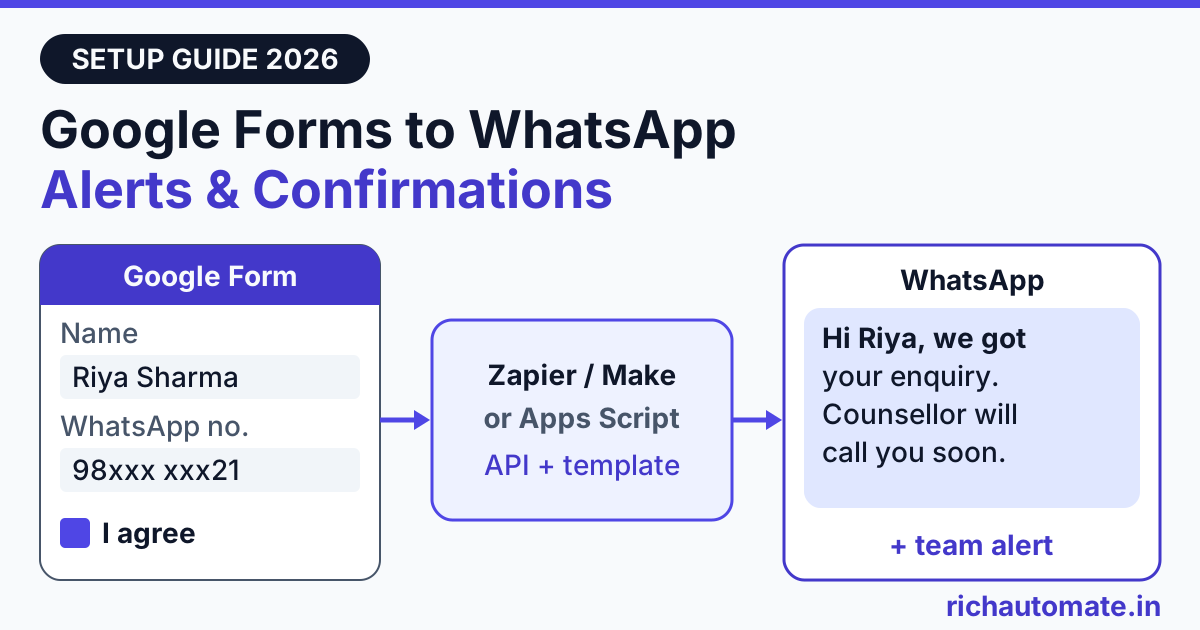
Google Forms cannot send a WhatsApp notification by itself, so you connect each new form response to a WhatsApp Business API through Zapier, Make, Pabbly Connect or a short Google Apps Script onFormSubmit trigger. That one connection can do two jobs: ping your team the moment a response lands, and send the respondent a confirmation on WhatsApp, which needs their opt-in and an approved utility template.
This guide is written for Indian businesses that already run on Google Forms: coaching institutes collecting admission enquiries, clinics taking appointment requests, event organisers handling registrations and schools answering fee queries. It covers the three practical routes, the phone-number cleanup that breaks most setups, what 500 responses a month costs, and how to stop duplicates. Google and tool mechanics are described as documented in late October 2026, so check the current docs before you go live.
Can Google Forms send WhatsApp notifications on its own?
No. Google Forms can email the form owner about new responses, and it can send respondents a copy of their answers by email, but there is no built-in WhatsApp option. You need the WhatsApp Business Platform (the API), reached through a provider such as RichAutomate, plus something that listens for new form responses and calls that API.
To be clear about what RichAutomate does and does not do here: there is no direct Google Forms integration inside RichAutomate. What you get is a public developer API that sends approved templates, and an incoming webhook that can start a chatbot flow. The glue between Forms and those endpoints is either an automation tool or a few lines of Apps Script, both covered below.
One naming trap: Google Forms is not the same product as the lead form assets inside Google Ads. If your leads come from ads with a built-in form, follow our guide to Google Ads lead form to WhatsApp integration instead, because the data arrives through a different webhook.
Two jobs: alerting your team vs confirming to the respondent
Most people asking for a "Google Forms WhatsApp notification" want one of two things, and they have different rules.
- Owner or team alert. Every new response sends a WhatsApp message to you, your counsellor or the front desk: "New admission enquiry: Riya Sharma, NEET 2027 batch, Kota, callback after 6 pm." The recipients are your own staff, but the message is still business-initiated, so it goes out as a template unless that person has messaged your WhatsApp number within the last 24 hours.
- Respondent confirmation. The person who filled the form gets "Hi Riya, we received your enquiry for the NEET 2027 batch. A counsellor will call you within one working day." This is the more valuable message, because it lands where Indian customers actually read, but it is also the one with compliance strings attached.
WhatsApp requires that a business has the user's opt-in before messaging them, and the first business-initiated message must be an approved template. For a form confirmation, that template should be in the Utility category: it confirms something the user just did and contains no offers. If you slip a discount or "join our new batch" line into it, Meta can classify it as marketing, which costs several times more.
Before you build: opt-in, phone format and a utility template
Do these three things before you touch Zapier or Apps Script. Skipping them is why most first attempts fail.
1. Add a clear WhatsApp consent checkbox
Add a checkbox question with wording along these lines: "I agree to receive updates about my enquiry from [Business name] on WhatsApp at the number above." Keep it separate from your terms, name the business and the channel, and only message respondents who ticked it. The linked Sheet stores the consent with a timestamp, which is your opt-in record.
2. Collect the phone number in a predictable format
Use a short-answer question titled "WhatsApp number (10 digits)" and add response validation (Regular expression) so people cannot type letters. Even then, Indian users will enter numbers in every format you can imagine. The WhatsApp API wants the full number with country code and no symbols, so you will clean it in your Zap or script anyway:
| What the respondent typed | Problem | Send as |
|---|---|---|
| 98xxx xxx21 | Spaces, no country code | 9198xxxxx21 |
| 098xxxxxx21 | Leading trunk zero | 9198xxxxx21 |
| +91-98xxx-xxx21 | Plus sign and hyphens | 9198xxxxx21 |
| 0091 98xxx xxx21 | International dialling prefix | 9198xxxxx21 |
| 9198xxxxx21 | Already correct | 9198xxxxx21 |
| 98xxxxx2 (8 digits) | Too short, a typo | Do not send; flag for a call |
| Landline, e.g. 0141 2xxxxxx | Not a mobile, unlikely to be on WhatsApp | Do not send; follow up by phone |
The rule in practice: strip everything that is not a digit, drop leading zeros, add 91 if exactly 10 digits remain, then accept only 12 digits starting with 91 and a mobile prefix of 6 to 9.
3. Get a utility template approved
Create the confirmation template in your RichAutomate dashboard and submit it for Meta review. A coaching institute might use: "Hi {{1}}, we have received your admission enquiry for {{2}}. Our counsellor will call you within one working day. Reply to this message if you have a question." A clinic: "Hi {{1}}, your appointment request for {{2}} on {{3}} is received. The front desk will confirm the slot shortly." Create a second template for the team alert, for example "New form response: {{1}}, {{2}}, phone {{3}}."
Route 1: Zapier, Make or Pabbly Connect to the RichAutomate API
This is the no-code route, and the right one if nobody on your team wants to maintain a script. The shape is the same in every tool: a Google Forms trigger, a step to clean and map the fields, and an HTTP request to RichAutomate.
- Trigger. Zapier's Google Forms app lists a New Form Response trigger ("Triggers when a new form response is received"). Make lists Watch Responses and Watch Responses in Google Sheets. Pabbly Connect also lists Google Forms as an app; check its current trigger options when you build.
- Clean the phone. Use a formatter or code step (Zapier Formatter, a Make text function, Pabbly's formatter) to apply the cleanup rule above. Add a filter that stops the run if the consent answer is blank.
- Send. Add a webhook or HTTP action that POSTs to RichAutomate. You have two choices of endpoint.
Option A: send a template directly. Call POST /api/v1/send-template with your API key as a Bearer token. The body carries the cleaned phone, the template name, its language and the variables (for example the student's name and course). Use one step for the respondent confirmation and a second step for the team alert. Exact field names and the base URL are in the API docs inside your RichAutomate dashboard, so copy them from there rather than from a blog post.
Option B: start a chatbot flow. In the flow builder, add an Incoming Webhook trigger to a flow. RichAutomate gives you a URL of the form POST /api/v1/public/flows/{token}/trigger that expects JSON shaped like {"phone": "...", "name": "...", "data": {...}}. Zapier, Make and Pabbly will not send that shape on their own, so add a mapper step that builds those three keys from the form fields, and put course, city or appointment date inside data. The flow can then send the template, wait for a reply and ask a follow-up question. Its Google Sheets node can append a row to a connected sheet from inside the running flow, but it does not watch your form's sheet for new rows, so the trigger still comes from Zapier, Make, Pabbly or Apps Script.
For a wider walkthrough of Zap design, filters and error handling, see our Zapier WhatsApp integration setup guide.
Route 2: Google Apps Script onFormSubmit trigger
If someone on your team is comfortable pasting code, Apps Script removes the monthly automation-tool bill and fires straight from the form. Open the form, choose the three-dot menu, then Apps Script, and paste a function like this:
Get the India 2026 WhatsApp BSP price comparison
Wati vs AiSensy vs Interakt vs RichAutomate: Meta rates, platform fees and hidden costs, side by side. We send it to your WhatsApp in a minute.
// Sketch only: check field names and the base URL in your RichAutomate API docs
const API_URL = 'https://YOUR-API-BASE/api/v1/send-template';
const API_KEY = PropertiesService.getScriptProperties().getProperty('RA_API_KEY');

function handleFormSubmit(e) {
  const answers = {};
  e.response.getItemResponses().forEach(function (r) {
    answers[r.getItem().getTitle()] = r.getResponse();
  });

  const phone = cleanIndianMobile(answers['WhatsApp number (10 digits)']);
  const consent = String(answers['WhatsApp updates'] || '');
  if (!phone || consent.indexOf('I agree') === -1) return; // no consent, no message

  const res = UrlFetchApp.fetch(API_URL, {
    method: 'post',
    contentType: 'application/json',
    headers: {
      Authorization: 'Bearer ' + API_KEY,
      'Idempotency-Key': e.response.getId()
    },
    payload: JSON.stringify({
      phone: phone,
      template: 'admission_enquiry_received',
      language: 'en',
      variables: [answers['Student name'], answers['Course']]
    }),
    muteHttpExceptions: true
  });

  if (res.getResponseCode() >= 300) {
    console.error('WhatsApp send failed', res.getResponseCode(), res.getContentText());
  }
}

function cleanIndianMobile(raw) {
  let d = String(raw || '').replace(/\D/g, '').replace(/^0+/, '');
  if (d.length === 10) d = '91' + d;
  return /^91[6-9]\d{9}$/.test(d) ? d : null;
}
A few details that matter, based on Google's Apps Script documentation:
- Install the trigger. The function does nothing until you attach an installable trigger: in the editor go to Triggers, add one, choose the function, event source From form and event type On form submit. You can also create it in code with
ScriptApp.newTrigger('handleFormSubmit').forForm(FormApp.getActiveForm()).onFormSubmit().create(). - Know which event you get. A trigger on the form gives you
e.response(a FormResponse). A trigger on the linked spreadsheet gives youe.namedValuesande.valuesinstead. Mixing them up is the most common "undefined" error. - Checkbox answers are arrays. For most questions
getResponse()returns a string, but for checkboxes it returns an array of the chosen options, which is why the script converts the consent answer withString(). - It runs as the trigger owner. Installable triggers always run under the account of the person who created them. Create it from a shared institute or clinic Google account, not from a staff member who may leave.
- Test with a real submission. Google notes that script executions and API requests do not fire triggers, so submitting a response through code will not test your trigger. Fill the live form from your phone instead.
For the team alert, add a second UrlFetchApp.fetch call with your alert template and your staff numbers, using a different idempotency key such as the response ID plus "-alert".
Route 3: use the linked Google Sheet as your record
Whichever route sends the message, link the form to a Google Sheet (Responses tab, then Link to Sheets). Treat that sheet as the system of record: one row per response, with the timestamp, the cleaned phone, the consent answer and two columns you add yourself, wa_status and wa_sent_at. Your Zap or script writes "sent" or the error text into those columns. That gives the front desk a simple view of who was confirmed and who needs a phone call.
The sheet can also be the trigger, via Make's Watch Responses in Google Sheets or a spreadsheet-bound Apps Script trigger. For spreadsheet-driven sends, our Google Sheets WhatsApp integration guide covers bulk sends and status write-back. Website forms follow the same pattern: WordPress contact form leads on WhatsApp.
Which route fits your form?
| Factor | Zapier / Make / Pabbly | Apps Script onFormSubmit | Linked Sheet only |
|---|---|---|---|
| Code needed | None (a formatter step) | About 40 lines | None, but no message is sent by itself |
| Extra tool cost | Vendor's plan, priced by tasks or operations | None beyond your Google account | None |
| When it fires | Depends on the vendor's trigger and your plan | On each submission | Only when another tool reads the sheet |
| Starting a chatbot flow | Yes, with a mapper to {phone, name, data} | Yes, POST the same JSON | No |
| Maintenance | Low; watch task usage and failed runs | Someone must own the script and trigger | Low |
| Best for | Clinics, small schools, event teams without a developer | Coaching chains and agencies with many forms | Record-keeping and manual follow-up |
A practical split we see often: an event organiser running one registration form for a Pune workshop uses Zapier, while a coaching group with 30 branch-wise admission forms uses one Apps Script template copied into each form, because per-task pricing adds up across that many forms. A school fee-query form usually needs only the accounts-team alert, with replies handled inside the 24-hour window when a parent writes back.
What it costs: 500 form responses a month
On RichAutomate's Client Pay setup, RichAutomate charges a fee of ₹0.10 per message with ₹0 setup, and Meta bills its own message charges directly to your business. Meta's approximate India rates are ₹0.1150 for a utility template and ₹0.8631 for a marketing template. Replies you send inside the 24-hour customer service window, which opens when the customer messages you, carry no Meta charge.
Take a coaching institute receiving 500 admission enquiries a month, all of whom tick the consent box. Each response triggers one team alert (utility template) and one respondent confirmation (utility template), and about 150 students reply with a question that your counsellor answers inside the window.
| Message | Count | RichAutomate fee | Meta charge | Subtotal |
|---|---|---|---|---|
| Team alert, utility template | 500 | 500 × ₹0.10 = ₹50 | 500 × ₹0.1150 = ₹57.50 | ₹107.50 |
| Respondent confirmation, utility template | 500 | ₹50 | ₹57.50 | ₹107.50 |
| Counsellor replies inside 24-hour window | 150 | ₹15 | ₹0 | ₹15 |
| Monthly total | 1,150 | ₹115 | ₹115 | ₹230 |
All figures are before GST and Meta's rates can change. The template category matters more than volume: if the confirmation were classified as marketing, Meta's share for those 500 messages would be about ₹431.55 instead of ₹57.50. Alerts also multiply with recipients: three staff members triple that line. Plans are optional: Starter is ₹499 a month and Pro ₹899 a month, with a 14-day trial. Full details are on our WhatsApp Business API pricing page.
Duplicates, quotas and failed sends
Duplicates. Zapier also offers a New or Updated Form Response trigger, which fires when a response is edited; use New Form Response for confirmations so an edit does not send a second message. Running a Zap and an Apps Script on the same form sends everything twice, so pick one. And people do submit twice, especially on slow mobile data. RichAutomate's public API accepts an Idempotency-Key header; pass the form response ID so a retried request is not sent again, and for genuine double submissions check the linked sheet for the same phone in the last few minutes before sending.
Quotas. Apps Script triggers and URL Fetch calls are subject to Google's daily quotas, which vary by account type. Check the current figures on Google's Apps Script quotas page. For spikes, such as a scholarship test with thousands of registrations in one evening, queue the sends from the sheet instead of firing one call per submission. Automation tools have their own task or operation limits per plan.
Failed sends. When an installable trigger fails, Google emails the trigger owner a "Summary of failures for Apps Script". Zapier, Make and Pabbly keep run histories. Either way, write the failure into the wa_status column so a person can call the respondent. Typical causes: an invalid number, a respondent not on WhatsApp, a blank template variable, or a mistyped template name. Do not loop retries on a number that keeps failing.
Getting started with RichAutomate
The sequence: consent checkbox and validated phone field, two approved utility templates, a Zap or Apps Script calling the RichAutomate API, and the linked Sheet as your record. Test with three real submissions (a clean number, a messy one and one without consent) before you share the form.
Ready to send your first Google Forms WhatsApp confirmation? Create your RichAutomate account, connect your WhatsApp number, generate an API key from the dashboard and submit your utility templates for approval.