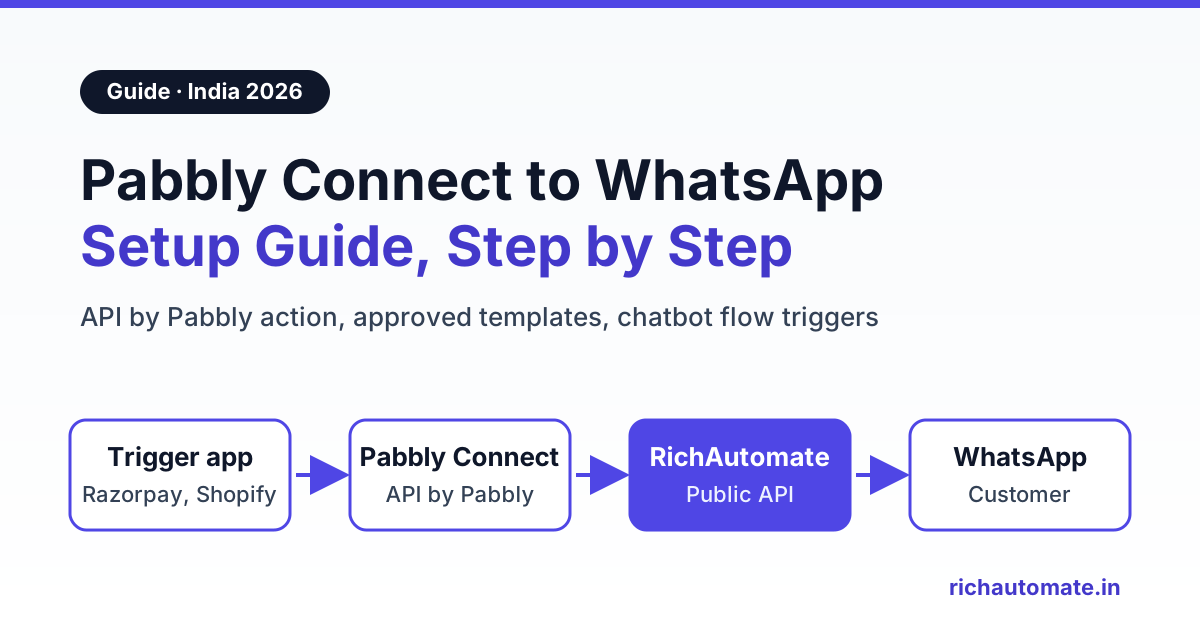
To connect Pabbly Connect to WhatsApp, use Pabbly's built-in API by Pabbly action to send a POST request to a WhatsApp Business API provider whenever your trigger app fires. With RichAutomate, that request either sends a Meta-approved template to one number or starts a multi-step chatbot flow, so a Razorpay payment, Shopify order or IndiaMART lead turns into a WhatsApp message in seconds.
Pabbly Connect is popular with Indian MSMEs for one simple reason: it has rupee pricing and one-time lifetime plans, so a small team can run thousands of automations without a dollar bill every month. What it does not have is a WhatsApp Business API of its own. You still need a provider that holds your verified number, your approved templates and your wallet. This guide shows the exact setup, two working request formats, what it costs, and the errors you will hit on day one.
One thing to be clear about up front: RichAutomate does not have its own app inside Pabbly's app list. The setup below uses Pabbly's general-purpose API action to call the RichAutomate Public Developer API. It takes about 15 minutes once your template is approved, and it is the same pattern you would use with any REST API.
How the Pabbly Connect to WhatsApp setup works
Every Pabbly workflow has a trigger and one or more actions. For WhatsApp, the chain looks like this:
- Trigger app: Razorpay, Shopify, WooCommerce, Google Forms (via Google Sheets), Facebook Lead Ads, IndiaMART, or any tool that can send a webhook to Pabbly.
- Pabbly Connect: receives the event, lets you filter or format the data (for example, clean the phone number), then runs the action.
- API by Pabbly action: sends a POST request with a JSON body to RichAutomate.
- RichAutomate: checks your API key, wallet and template, then hands the message to Meta's Cloud API.
- WhatsApp: the customer receives the message on your verified business number, and the delivery status shows up in your RichAutomate inbox.
If you have built this kind of bridge before, it is the same idea as our Zapier WhatsApp integration guide and the Make.com WhatsApp setup. Only the screens change.
What you need before you start
- A Pabbly Connect account. The free plan works for testing.
- A WhatsApp Business API number connected in RichAutomate. Your personal WhatsApp or the WhatsApp Business app cannot be driven by an API.
- At least one approved template. Meta must approve every template before you can use it to start a conversation. Create it under Templates in your dashboard, for example
order_confirmationwith two variables: customer name and order number. - An API key generated from the developer section of your RichAutomate dashboard. Treat it like a password.
- Wallet balance. Each send is checked against your balance before it goes out. New accounts get 100 free credits for testing.
Why templates? WhatsApp has a 24-hour customer service window. If the customer has not messaged you in the last 24 hours, the only thing you are allowed to send is an approved template. Since Pabbly workflows almost always fire on business events (a payment, an order, a form fill), plan on templates for every automated first message.
Option 1: Send a WhatsApp template from Pabbly (step by step)
This is the right choice for one-shot messages: order confirmations, payment receipts, appointment reminders and lead acknowledgements.
Step 1: Set up the trigger
Create a new workflow in Pabbly Connect and pick your trigger app, for example Razorpay with the payment captured event, or Shopify with new order. Run one real or test event so Pabbly captures a sample response you can map fields from.
Step 2: Clean the phone number
RichAutomate expects the number with the country code and no plus sign or spaces, like 919876543210. Shopify and Razorpay often send +91 98765 43210 or a bare 10-digit number. Add a Number Formatter or Text Formatter step in Pabbly to strip the symbols and add the 91 prefix when it is missing.
Step 3: Add the API by Pabbly action
Choose API by Pabbly as the action app and the Execute API Request event (Pabbly also offers a Custom Request event if you prefer to paste raw JSON). Then fill in:
- Method: POST
- URL:
https://richautomate.in/api/v1/send-template - Payload type: JSON
- Authentication: Bearer token, or add a header
Authorizationwith the valueBearer YOUR_API_KEY
Step 4: Map the JSON body
The request body looks like this. Replace the sample values with fields from your trigger step using Pabbly's mapping picker:
{
  "phone": "919876543210",
  "template": "order_confirmation",
  "language": "en",
  "variables": ["Rahul", "#1042"]
}
The variables array fills your template's placeholders in order, so the first value goes into the first variable, the second into the second. If your template has an image, video or document header, add "header_media_type": "image" (or video or document) and "header_media_url" pointing to a public file, such as an invoice PDF link.
Step 5: Test, then turn it on
Click Save and Send Test Request. A success response means the message is queued, and you should see it on your test phone within a few seconds. Switch the workflow on only after the test message arrives.
Tip for retries: the send-template endpoint accepts an optional Idempotency-Key header. Set it to something unique per event, such as the Razorpay payment ID or the Shopify order ID. If Pabbly re-runs a step, RichAutomate recognises the key and does not send or bill the same message twice.
Option 2: Start a chatbot flow from Pabbly
Sometimes one message is not enough. A new IndiaMART or Facebook lead should get a greeting, two qualifying questions and a booking option. For that, trigger a chatbot flow instead of a single template.
- In RichAutomate, build a flow in the visual flow builder and choose Incoming Webhook as its trigger.
- Publish the flow. It shows a trigger URL with a secret token in it, in the form
https://richautomate.in/api/v1/public/flows/{token}/trigger. - In Pabbly, add the same API by Pabbly action with method POST and payload type JSON, pointing to that URL. No API key is needed, because the token in the URL is the credential. Keep it private.
- Map the body:
{
  "phone": "919876543210",
  "name": "Rahul",
  "data": {
    "city": "Pune",
    "product": "Steel almirah",
    "source": "IndiaMART"
  }
}
Each key inside data is saved on the contact, so your flow can use it in messages and conditions, for example routing Pune leads to one salesperson. The flow's first message to a new contact still needs to be an approved template, for the same 24-hour window reason as above.
This pairs well with a scoring step: ask two or three questions inside the flow and tag hot leads before a salesperson calls.
Get the India 2026 WhatsApp BSP price comparison
Wati vs AiSensy vs Interakt vs RichAutomate: Meta rates, platform fees and hidden costs, side by side. We send it to your WhatsApp in a minute.
| Question | Send template endpoint | Flow trigger endpoint |
|---|---|---|
| URL | /api/v1/send-template | /api/v1/public/flows/{token}/trigger |
| Auth | Bearer API key in header | Secret token in the URL |
| Sends | One approved template | A multi-step chatbot conversation |
| Best for | Receipts, order updates, reminders | Lead nurture, qualification, bookings |
| Extra data | Template variables in order | Any fields in data, saved on the contact |
Six Pabbly to WhatsApp workflows Indian MSMEs actually use
- Razorpay payment received → WhatsApp receipt. Trigger on payment captured, send a utility template with the amount and payment ID. Customers stop calling to ask whether the payment went through.
- Shopify or WooCommerce new order → order confirmation. Send the order number and expected dispatch date. Add a second workflow on fulfilment to send the tracking link.
- Google Forms → instant acknowledgement. Google Forms has no webhook of its own, so most teams trigger Pabbly from the linked Google Sheet's new row. Our Google Forms WhatsApp notifications guide covers the sheet setup.
- Facebook Lead Ads → WhatsApp reply within a minute. Speed matters more than copy here. See the full playbook for Facebook Lead Ads WhatsApp auto-reply.
- IndiaMART enquiry → chatbot flow. Pabbly publishes its own tutorials on pulling IndiaMART leads. Push them into a flow that asks quantity and delivery city.
- Appointment booked → reminder sequence. Use Pabbly's Delay step to send a reminder template a day before, then again two hours before.
For more industry examples, browse the WhatsApp automation use cases by vertical.
Pabbly Connect vs Zapier vs Make for WhatsApp workflows in India
All three tools can call the same RichAutomate endpoints, so the choice comes down to pricing model and how comfortable your team is with each builder.
| Factor | Pabbly Connect | Zapier | Make |
|---|---|---|---|
| Billing currency | Rupee prices shown for India | US dollars | US dollars |
| Pricing model | Monthly or multi-year plans, plus one-time lifetime plans | Monthly or annual subscription by task volume | Monthly or annual subscription by usage |
| What counts as usage | Action tasks; triggers and internal apps like Filter and Router are not counted | Tasks (each action that runs) | Each module run in a scenario |
| Custom API calls | API by Pabbly action | Webhooks by Zapier | HTTP module |
| Best fit | Cost-sensitive MSMEs with steady volume | Teams that want the widest app catalogue | Complex branching and data transforms |
At the time of writing, Pabbly's pricing page lists a free plan with 100 tasks a month and two-step workflows, a Standard plan with 10,000 tasks a month, an Unlimited plan, and one-time lifetime plans starting at 3,000 tasks a month. Pabbly runs frequent sales and the discounted rupee prices change, so check pabbly.com for current numbers before you buy. Lifetime plans cannot be upgraded later, according to the same page, so size for your volume a year from now, not today.
A quick rule of thumb: each WhatsApp send is one action task in Pabbly. If you send 3,000 order updates a month, a 3,000-task plan leaves no room for your other workflows.
What it costs on the WhatsApp side
Pabbly only covers the automation. Each WhatsApp message also has two charges on the RichAutomate Client Pay model:
- RichAutomate platform fee: ₹0.10 per message.
- Meta's charge: Meta's per-template rates for India, which depend on the template category (marketing, utility or authentication), billed by Meta directly to your business.
There is no setup fee, you get a 14-day free trial and 100 free credits on signup, and pay-as-you-go has a ₹0 monthly floor.
- Pay-as-you-go: ₹0 monthly, pay per message. Good for low or seasonal volume and for testing Pabbly workflows.
- Starter: ₹499/month, for small shops running a few automations.
- Pro: ₹899/month, for growing teams using the inbox, campaigns and flows.
- White-label: ₹1,199/month, for agencies reselling WhatsApp automation.
- Custom: on request, for high volume or special requirements.
Full details are on the RichAutomate pricing page. A practical tip: keep receipts and order updates strictly transactional. A template that slips in a discount or upsell can be classed as marketing by Meta, which costs more per message.
Troubleshooting: common Pabbly to WhatsApp errors
Most failures show up in Pabbly's task history with the response body from RichAutomate. Here is what they usually mean:
| Symptom | Likely cause | Fix |
|---|---|---|
| 401 Unauthorized | Missing or wrong API key, or "Bearer " prefix left out | Header must read Authorization: Bearer YOUR_API_KEY; regenerate the key if unsure |
| 403 Developer API not included in your plan | Trial ended and the account is on a plan without API access | Upgrade to a paid plan, then resend |
| Message never arrives, wrong recipient | Phone sent as +91 98765 43210 or 10 digits only | Format as 919876543210: country code, no plus, no spaces |
| Template error in the response | Template name typo or language code mismatch | Copy the exact name from the dashboard; match the language it was approved in, such as en |
| Template rejected or pending | Meta has not approved it yet | Wait for approval or edit and resubmit; only approved templates can be sent |
| Insufficient balance | Wallet below the cost of the message | Top up the wallet; the response shows the required and current amounts |
| Free-form text fails | Customer has not messaged you in the last 24 hours | Use an approved template to open the conversation |
| Flow trigger returns 404 | Wrong token, or the flow's trigger is not Incoming Webhook | Copy the trigger URL again from the published flow |
| Flow trigger returns 409 | Flow saved but not published | Publish the flow, then retest |
| Duplicate messages | Pabbly re-ran the task or two workflows fire on one event | Add an Idempotency-Key header with the order or payment ID |
Delivery and read statuses from Meta appear against each message in your RichAutomate inbox, so you can confirm whether a Pabbly-triggered send reached the phone, not just whether the API accepted it.
When Pabbly is not the right tool
Pabbly is excellent glue, but some jobs belong inside the WhatsApp platform itself:
- Replying to customers. Conversations, quick replies and team assignment happen in the shared inbox, not in Pabbly.
- Bulk broadcasts. Sending one campaign to 5,000 contacts through Pabbly burns 5,000 tasks. Upload the list as a campaign in RichAutomate instead.
- Long conversations. Branching chats with buttons and conditions are easier to build and debug in a chatbot flow than as a chain of Pabbly steps.
If you are also weighing Pabbly's own WhatsApp product, our Pabbly Chatflow alternative comparison covers that decision, and the WhatsApp API provider comparison lines RichAutomate up against other platforms.
Get your first Pabbly workflow live today
The fastest path: get one utility template approved, generate an API key, and build the Razorpay or Shopify receipt workflow above with your own number as the test recipient. Once that works, every other trigger is a copy of the same action with different field mapping.
Start your 14-day free trial with 100 free credits and no setup fee, and send your first Pabbly-triggered WhatsApp message in under 15 minutes.